Sharepoint vs zipBoard Documentation Review
05 Aug
Table of Contents
ToggleWhat sets apart SharePoint and zipBoard?
SharePoint is an enterprise document repository and intranet designed for content storage, security, and document management. zipBoard is a specialized visual proofing and documentation review platform designed for collaborative markup, issue tracking, and feedback collection across digital assets (PDFs, live websites, images, and e-learning SCORM files).
For Microsoft-standardized teams, SharePoint provides the storage, permissions, and file hosting foundation. However, when teams need to conduct structured design or document reviews with external client feedback, visual pin-point annotations, and actionable task management, zipBoard works alongside SharePoint to eliminate review friction without sacrificing enterprise governance.
TL;DR
- Core Function: SharePoint stores, secures, and organizes files across Microsoft 365. zipBoard enables the visual review, visual annotation, issue tracking, and approval lifecycle.
- Review Experience: SharePoint relies on linear word comments and track changes. zipBoard offers contextual pin-point visual annotations on PDFs, web applications, media, and documents.
- External Guest Access: Granting external clients or contractors access to SharePoint requires complex Azure AD permissions or guest provisioning. zipBoard allows guest reviewers to mark up documents via a simple link without requiring a Microsoft login or software download.
- Task Conversion: SharePoint comments remain isolated in document threads unless manually transcribed into Planner/Jira. zipBoard automatically converts every markup or feedback pin into a traceable task ticket with metadata (browser, OS, screen resolution, assignee, status).
- Interoperability: You do not need to replace SharePoint. zipBoard integrates into Microsoft-standardized stacks (including Microsoft Teams, Outlook, and custom webhooks) to act as the dedicated visual review engine while SharePoint remains the document repository.
Why Compare zipBoard and SharePoint for Documentation Review?
For organizations anchored in the Microsoft 365 ecosystem, SharePoint serves as the default enterprise hub for document management, file storage, and internal intranet portals. When engineering, construction, agency, or software teams need to collaborate on technical documentation, user manuals, PDF submittals, or digital content, the instinct is often to handle the entire review cycle within SharePoint.
However, standard document repositories hit a friction wall during high-velocity or multi-stakeholder review cycles:
- Feedback is ambiguous: Text comments like “Fix paragraph 3 on page 12” lead to back-and-forth email chains and misinterpretation.
- External friction is high: Onboarding external vendors, clients, regulators, or non-technical stakeholders into internal SharePoint folders creates security, permission, and licensing bottlenecks.
- Traceability gets lost: Comments scattered across Word documents, email threads, PDF markups, and Teams chats make tracking status and accountability nearly impossible.
This is where the debate of zipBoard vs SharePoint emerges for Microsoft-standardized documentation teams. While SharePoint handles repository governance, zipBoard provides the visual, task-driven review engine required to ship accurate documentation faster.
Say Goodbye to Vague Feedback—Try Document Review with zipBoard.
Start Free TodayFeature Comparison Matrix: zipBoard vs. SharePoint
| Feature / Capability | zipBoard | Microsoft SharePoint |
|---|---|---|
| Primary Architectural Role | Visual Proofing & Review Tools | Enterprise Document Storage & Knowledge Base |
| Supported Formats for Markup | PDFs, DOCX, Images, HTML/Websites, SCORM, Video | DOCX, XLSX, PPTX, Static PDF Viewing |
| Visual Annotation Tools | Pins, rectangular/freehand draw, text callouts, arrow tools, side-by-side compare | Text highlights, threaded text comments, track changes (Office files) |
| External Reviewer Access | Unlimited guest reviewers via single secure link; no account setup needed | Requires guest user invites, tenant access rules, or Azure AD provisioning |
| Feedback to Task Automation | Converts every markup directly into a tracked task with status, priority, and tags | Requires manual creation of SharePoint List items or Planner tasks |
| Technical Metadata Capture | Automatically records browser, OS, created and updated time, resolution, and screenpath. | Manual user input required |
| Implementation Overhead | Zero IT overhead; browser-based web app | High; requires site setup, security rules, and metadata structures |
Deep-Dive Analysis: zipBoard vs. SharePoint for Documentation Workflows
1. Visual Proofing and Contextual Markup
SharePoint Approach
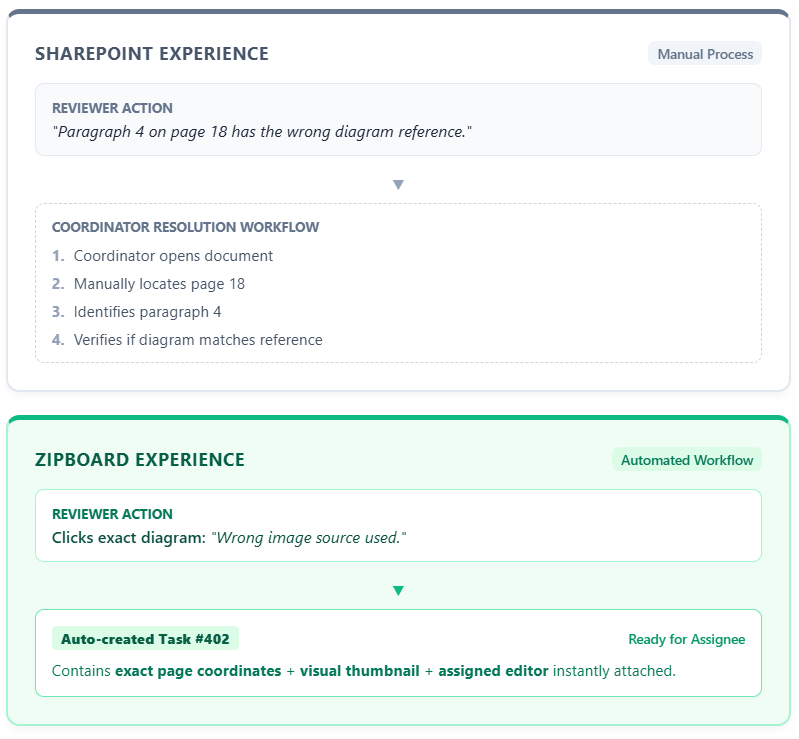
SharePoint relies on Microsoft Word co-authoring and basic PDF viewing capabilities. Reviewers leave text comments in the margins of .docx files or download PDFs to mark them up in third-party readers like Adobe Acrobat before re-uploading new file versions.
While native Word commenting works well for text editing, it falls short when reviewing visually complex documentation, such a construction drawings, technical diagrams, multi-page PDFs with embedded images, or interactive HTML documentation. Reviewers cannot pinpoint exact UI elements, vector lines, or visual assets without drafting long text descriptions.
zipBoard Approach
zipBoard treats every document as a visual workspace. Reviewers can upload PDFs, Word files, screenshots, live web pages, or e-learning content and use point-and-click annotation tools.
- Precision Pins: Click anywhere on a document page or technical drawing to leave a comment tethered to that precise coordinate.
- Shape & Draw Tools: Enclose problematic sections with rectangles, draw arrows to indicate movement, or highlight text blocks.
- Multi-Format Versatility: Review static documents alongside live web URLs, HTML5 apps, or SCORM packages within the same project workspace.
2. External Client & Stakeholder Onboarding
SharePoint Approach
Security governance is SharePoint’s hallmark, but that strength creates friction when collaborating with external partners, subcontractors, or clients.
To invite an external subject matter expert (SME) to review a document in SharePoint, IT administrators must configure guest access in Microsoft Entra ID (formerly Azure AD), ensure appropriate site-level permissions, and enforce multi-factor authentication (MFA). External stakeholders frequently encounter login barriers, missing permissions, or tenant-switching confusion, slowing down review sign-offs.
zipBoard Approach
zipBoard is built specifically to bridge the internal-external review gap.
- Frictionless Link Sharing: Document managers generate secure share links that allow clients, auditors, or external SMEs to review and mark up documents without creating an account or logging into a Microsoft portal.
- Role-Based Access Control (RBAC): Assign granular permission levels (e.g., Client, Reviewer, Collaborator, Admin) to ensure external reviewers only see the documents and comment threads relevant to their scope.
- Zero IT Dependency: Teams do not need to wait for IT ticket approvals to grant external review access, reducing project delays.
3. Turning Feedback into Actionable Tasks
SharePoint Approach
In a SharePoint-centric workflow, comments left inside documents remain isolated inside those specific files. If a 50-page technical manual receives 40 comments from three reviewers:
- A documentation lead must manually open the file.
- Read through every comment thread.
- Transcribe actionable items into Microsoft Planner, To Do, or Jira.
- Manually re-verify each item once updated.
This disconnect between feedback collection and task execution leads to missed edits, duplicated effort, and poor accountability.
zipBoard Approach
zipBoard unifies commenting and task management into a single continuous loop.
- Instant Ticket Generation: Every comment or annotation automatically creates a tracked item on a centralized project board.
- Metadata Richness: Each ticket captures essential precise location, author, screenshot thumbnail, browser/OS environment details, and timestamp.
- Kanban & List Views: Documentation managers can assign tasks to specific writers or designers, set due dates, set priorities (Low, Medium, High), and track status (Open, In Progress, Resolved, Closed) from an integrated Kanban board.
4. Technical Environment Data Capture
When reviewing web-based documentation, knowledge bases, or digital publications, issues are often environment-specific (e.g., a broken layout on Safari or a misplaced navigation bar on mobile viewports).
| Environment Data | SharePoint | zipBoard |
|---|---|---|
| Browser Version | Not captured | Automatically logged with markup |
| Operating System | Not captured | Automatically logged with markup |
| Screen Resolution / Viewport | Not captured | Automatically logged with markup |
| Direct Visual Screenshot | Manual snippet attachment | Automatically attached to task ticket |
Capturing this data automatically eliminates the standard back-and-forth email game: “What browser were you using when you saw that layout error?”
Streamline Your Documentation Review Today
Try zipBoard. Your all-in-one platform for documentation review, visual design feedback, website reviews, and collaborative approvals.
Start Free TodayBook DemoWhen to Use Which Tool?
Choose SharePoint If:
- Your primary goal is central document storage: You need a compliant, enterprise-grade cloud repository for storing company policies, templates, and static archives.
- Collaborators are all internal Microsoft 365 users: All reviewers already have active Microsoft licenses and work natively within Word, Excel, and PowerPoint co-authoring.
- Complex site governance is required: You need deep integration with Microsoft Power Platform (Power Automate, Power Apps) to enforce custom enterprise document retention or archiving policies.
Choose zipBoard If:
- You conduct high-frequency document reviews: Your team manages multi-stage review rounds involving PDFs, digital documents, designs, or web content.
- You work with external clients or non-IT stakeholders: You need a quick, secure way to collect feedback without forcing external users through complex login or permission hurdles.
- You want to eliminate manual task transcription: You need comments and markups to automatically turn into trackable work tickets with assigned owners and status updates.
- You need visual context: Your documentation contains diagrams, charts, UI elements, or multi-media that require precise visual pin-point annotations.
- You review interactive or complex digital assets: Your deliverables go beyond text files to include live websites, web apps, HTML5, CAD/architectural exports, or e-learning SCORM packages that SharePoint cannot natively review.
- You need automated environment metadata: You want to capture critical technical details (browser, OS, viewport size, exact screen resolution) automatically without relying on reviewers to type out their specs.
The Hybrid Model: Using zipBoard Alongside SharePoint
For Microsoft-standardized documentation teams, choosing zipBoard does not mean migrating away from SharePoint. The most effective strategy for enterprise teams is a hybrid architecture:
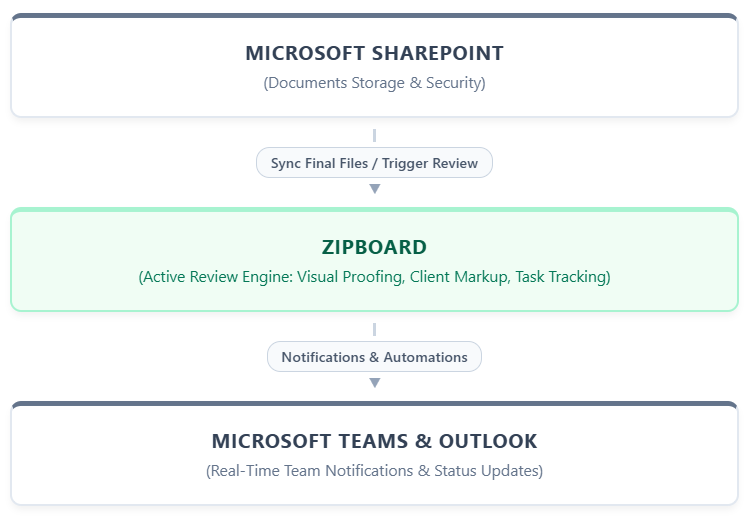
- SharePoint acts as the Repository: Files, published final PDFs, and baseline templates remain securely stored in SharePoint.
- zipBoard acts as the Review Engine: Active drafts are uploaded into zipBoard for client feedback, markup rounds, and defect tracking.
- Microsoft Teams stays the Communication Hub: Review notifications, task updates, and approval alerts stream directly into team channels via zipBoard’s Microsoft ecosystem integrations.
To see how zipBoard seamlessly connects with your existing Microsoft 365 environment, explore our SharePoint and Microsoft Integration Documentation.
See How zipBoard Transform Your Workflow
Streamline your documentation review now. Try zipBoard today.
Start Free TodayBook DemoFAQs - Technical Document Review Workflows
Is zipBoard a direct replacement for SharePoint?
No. SharePoint is an enterprise content management and document storage system, whereas zipBoard is a specialized visual review and feedback management tool. Most teams use zipBoard alongside SharePoint to handle active markup and stakeholder feedback while keeping SharePoint as their long-term document repository.
Can external clients review documents in zipBoard without login?
Yes. External clients, guest reviewers, or third-party contractors can access assigned documents via a shareable secure web link. They do not need to sign up or create an account.
How does zipBoard integrate with Microsoft Teams and Outlook?
zipBoard connects with Microsoft Teams and Outlook to push real-time notifications when new comments, task assignments, or document approvals occur. This keeps Microsoft-standardized teams updated in their daily workspace without needing constant email check-ins.
What file formats can be reviewed in zipBoard compared to SharePoint?
While SharePoint supports standard Office formats (.docx, .xlsx, .pptx) and static viewing of PDFs, zipBoard allows full interactive visual markup across PDFs, Word documents, images, live HTML websites, web applications, and SCORM/e-learning files.
Modernize Your Documentation Review Workflow
If your team is struggling with fragmented email threads, slow client approvals, or lost feedback inside SharePoint, adding a purpose-built review layer can cut document sign-off cycles in half.
Ready to streamline document reviews for your Microsoft-standardized team?
Ready to Eliminate Feedback Chaos?
Stop losing time in email chains. Collect clear, contextual feedback—on every design, from every stakeholder, in one place. Try zipBoard for free — no credit card, no client signup required. Or book a personalized demo to see it in your workflow.
Start Free TrialBook DemoRelated Post


Recent Posts
- Sharepoint vs zipBoard Documentation Review August 5, 2026
- Structured Documentation Review: Why Email and Confluence Break Down at Scale July 28, 2026
- Procore Alternative for Small and Mid-Size GCs: What You Actually Lose (and Don’t) by Switching July 23, 2026
- Protected: How TMS Brazil Transformed Digital Content Review with zipBoard | Case Study July 15, 2026
- The Ultimate Guide to Online Document Collaboration Software for Construction July 14, 2026
©️ Copyright 2025 zipBoard Tech. All rights reserved.