Collaborative document review software for technical documentation teams
Rev C of the datasheet is out with design, applications, test, product marketing and regulatory. Five groups are commenting on five copies, and nobody can say which comments are still open or who has signed off.
No credit card needed. Reviewers are always free.
The short answer: collaborative document review software lets everyone who has to check a document comment on one shared copy, see each other's comments, and record whether they approve. For technical documentation (datasheets, user manuals, application notes, safety and installation guides) that means reviewing the PDF your FrameMaker or DITA pipeline already produces, from a link, with required reviewers, due dates, a decision per reviewer per revision, and a side-by-side compare when Rev D arrives. zipBoard does that review step; your authoring tool and CCMS stay as they are.
Who reviews a datasheet or manual before release?
A technical document is rarely checked by one person. Each group looks for something different, and each one's sign-off means something different:
| Review group | What they check | What their sign-off means |
|---|---|---|
| Peer or editorial review (another writer, an editor) | Structure, terminology, style guide, cross-references, figure and table numbering | The document is ready to send to SMEs |
| Engineering SMEs (design, applications, test, firmware) | Electrical and timing specs, register maps, pinouts, procedures, example code, against the current design data | The technical content is correct for this revision |
| Safety and regulatory | Warnings and cautions, required statements, certification marks, operating limits | The document can legally ship with the product |
| Product marketing and legal | Product names, claims, ordering information, trademarks, disclaimers | Nothing in it promises what the product doesn't do |
| Release approver (doc manager or product owner) | That every required group has decided on this revision | The revision can be published |
Collaborative review works when every group comments on the same revision at the same time, and the people who must approve are separated from the people who only comment. If the regulatory reviewer and the applications engineer never see each other's comments, the writer ends up refereeing a conflict nobody else knows about.
Why does collaborative review break on technical documents?
- "Whose comments are these?" Annotated PDFs come back by email, one per reviewer, and the writer merges them by hand every round.
- "Who still hasn't signed off?" The answer lives in a spreadsheet beside the PDF, or in the writer's head.
- "What changed between versions?" SMEs reread 120 pages to check whether their four comments were fixed, or they don't, and approve anyway.
- Reviewers can't get in. Engineers don't have a FrameMaker or CCMS seat, contract reviewers can't reach SharePoint, and the Acrobat shared review server breaks after an update.
- Two SMEs fix the same line differently, and neither knows the other commented.
- The approval doesn't match the revision. A sign-off given on Rev B gets treated as approval of Rev C.
If shared review in Acrobat is the part that's failing, start with why Adobe shared review stops working and how to fix it.
Email, Acrobat, your CCMS or a review tool: what's the difference?
| How you review | Where reviewers comment | Who needs a seat or role | Do reviewers see each other's comments? | Next revision | Record of who approved |
|---|---|---|---|---|---|
| Email + PDF attachments | Their own copy of the PDF | Nobody (any PDF reader) | No, until the writer merges them | Send the whole file again | Reply emails |
| Adobe Acrobat "Share for review" | One shared PDF from a link; Adobe says recipients can comment without an Acrobat account | The person sharing from Acrobat; Compare Files needs Acrobat Pro | Yes, on the shared PDF | Compare Files (Acrobat Pro), as a separate step | Comments in the PDF; sign-off tracked by you |
| Acrobat server-based shared review (network folder, SharePoint) | Acrobat or Reader on the desktop | The initiator needs Acrobat (not available in Reader) | Yes, after comments sync | A new review | Comments in the PDF |
| Review inside your CCMS (Heretto, AEM Guides, Paligo) | DITA topics and maps in the browser, inside the CCMS | A reviewer role, licence or user in the CCMS | Yes | Inside the CCMS | Review tasks in the CCMS |
| zipBoard | The output PDF in the browser; share-link reviewers comment without signing up | Reviewers and collaborators are unlimited on every plan | Yes, live, with replies and @mentions | Upload as a new version; compare side by side with text changes highlighted; decisions reset | A decision per required reviewer per version; annotated PDF and comment export |
Sources, checked 2–3 Nov 2026: Adobe Share a PDF file for review and commenting, Compare two versions of a PDF, shared review on network servers; Heretto user roles; Adobe AEM Guides: review topics; Paligo user types. zipBoard details from our help articles on reviewing from a share link, required reviewers, comparing PDF versions and text changes.
Try it: review a sample manual with no sign-up
This is a live zipBoard review of a fictional product manual, the same view your SMEs get from a link. Click a pinned comment, reply to it, or add your own on a spec table.
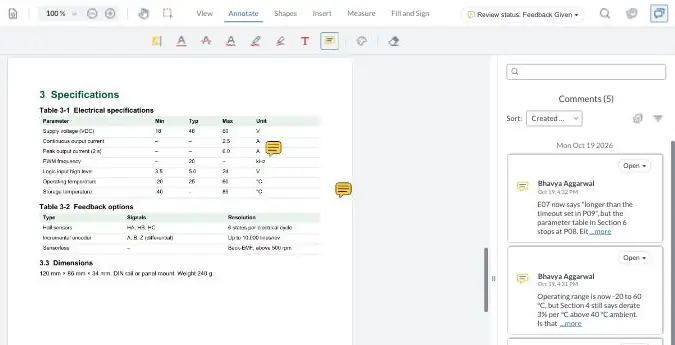
Your demo comments are private to this visit.
How does a datasheet or manual review run in zipBoard?
- Set up one project per document set, such as a product family, with a board for each round: draft review, final review, released.
- Upload the PDF from FrameMaker, your DITA pipeline, InDesign or Word, or add it by URL if it has to stay on your own server.
- Add the people who must sign off as required reviewers and set a due date. They get an email and the file appears in their review list. Everyone else comments through one share link, which can have a password and an expiry date.
- Reviewers comment on the exact line, figure or table. Everyone sees everyone's comments, replies and @mentions as they happen, so two SMEs don't fix the same line two ways.
- Every comment gets an owner. Comments become tasks with an assignee and a status; tag them by kind (technical accuracy, editorial, legal) and filter them by the PDF's own sections.
- Required reviewers record a decision: Approved, Changes Requested, Feedback Given or Review Complete. Overdue files turn red, so you can see who is late without asking.
- Upload Rev D as a new version. Reviewers see it as a new version since they last reviewed, compare it side by side with text changes highlighted, and check that their comments were addressed. Decisions start again for the new version.
- Close out: download the annotated PDF for the record and export comments as your comment resolution sheet (CSV export is on Enterprise and custom plans).

Step by step in the help centre: running technical documentation reviews with many SMEs. To check a new revision in about a minute, watch the lesson Check a revised PDF: what changed and whether your comments were fixed.
Does it work with FrameMaker, DITA and our CCMS?
Yes, because zipBoard reviews the output, not the source. Writers keep authoring in FrameMaker, Oxygen, Arbortext or InDesign, and keep content in Tridion Docs, IXIA CCMS, Heretto or AEM Guides. You publish the review PDF as you do today and send it to reviewers in zipBoard.
- Reviewers see what customers will see: the formatted datasheet or manual, with page layout, tables and figures, not topics and maps.
- No CCMS seat for SMEs: engineers, contract reviewers and partners comment from a link.
- Files can stay on your servers: your system can add PDFs by URL through the API. See reviewing documents that stay on your own servers and the security page.
- Comments can go to your tracker: Jira, Slack and Microsoft Teams integrations, with two-way Jira and Wrike status sync for Enterprise.
What it doesn't do: comments don't write back into your DITA or XML source. The writer makes the change in the source, publishes the next PDF, and reviewers compare it with the last one.
What does a slow review cycle actually cost?
The licence is the small number. The real cost of a technical review is time and release risk:
- The writer's merge time: copying comments from email and annotated copies into one list, every round.
- Extra rounds: when reviewers comment on an old revision, or two SMEs contradict each other and nobody notices until the next round.
- Chasing: working out who is outstanding and reminding them, again.
- IT upkeep: a review server or SharePoint permissions, VPN access for outside reviewers, and the tickets after every update.
- Release risk: a datasheet ships with a sign-off that was given on the previous revision.
Paid seats matter when every reviewer needs one. In zipBoard, reviewers and collaborators are unlimited on every plan. See plans · Put your own numbers in the calculator in the real cost of Adobe Acrobat for documentation teams.
What zipBoard adds, and what other tools do better
What zipBoard adds to a doc review
- Required reviewers, due dates and a decision per reviewer per version
- One list of everything waiting on each reviewer, across projects
- Comments as tasks with owners, filtered by the PDF's sections
- Side-by-side compare with text changes highlighted
- Share links with password and expiry; unlimited reviewers
- PDFs by URL, so files can stay on your servers
- Files attached to the review, such as a test report or a schematic
What other tools do that zipBoard doesn't
- Acrobat edits, creates and signs PDFs; zipBoard only reviews them.
- Your CCMS reviews the source topics, so suggested edits land where writers work.
- Bluebeam measures and takes off drawings for construction and heavy engineering.
- Filestage turns comments already in an uploaded PDF into review comments; zipBoard doesn't.
AI review for technical documents is in private beta: a first pass that checks a PDF against an editorial standard or your own guidelines before it reaches SMEs. A person accepts or rejects every finding.
Ask about early access"Was my comment fixed?" AI Compare will check whether last round's comments were addressed in the new revision.
Get a previewWhen is zipBoard not the right fit?
- Every reviewer already works in your CCMS and is happy reviewing topics there. A second tool adds a step.
- A few internal reviewers, one round, nobody chasing. Acrobat's Share for review is enough.
- You need to edit the PDF itself. Keep Acrobat for editing; move only the review if that's where the pain is.
- Your old PDF comments must come with you. Comments embedded in a PDF don't become zipBoard comments; see moving existing PDF comments.
- You need a validated system for regulated electronic signatures. Check your quality system's requirements with us before you plan on zipBoard for that step.
Reviewing something other than technical documents?
The same review runs on other content: drawings and construction documents, eLearning and SCORM courses, and marketing and content approval.
Collaborative document review: questions documentation teams ask
What is collaborative document review software?
Software that lets several people review one shared copy of a document at the same time: comment on the exact spot, see and reply to each other's comments, and record whether they approve. It replaces emailing annotated copies and merging them by hand.
Do SMEs need an account, Acrobat or a CCMS seat to review?
No. In zipBoard, share-link reviewers comment on the PDF in their browser without signing up, and reviewers and collaborators are unlimited on every plan. People who must formally sign off are added as required reviewers.
Can several reviewers comment on the same PDF at once?
Yes. Everyone works on the same copy and sees new comments, replies and @mentions as they're added, so the writer doesn't merge copies and two SMEs don't fix the same line two different ways.
How do we see who still hasn't signed off?
Add the people who must approve as required reviewers with a due date. Each records a decision on the file, the file stays in their review list until they do, and overdue files turn red.
What happens when we publish the next revision?
Upload it as a new version. Reviewers compare it side by side with the previous one, with text changes highlighted, check that their comments were addressed, and decide again on the new version.
Does zipBoard work with FrameMaker, DITA and our CCMS?
Yes. zipBoard reviews the PDF you already publish from FrameMaker, a DITA pipeline (Tridion Docs, IXIA CCMS, Heretto, AEM Guides, Oxygen) or InDesign. Comments don't write back into the source; the writer makes the change and publishes the next PDF.
Can our documents stay on our own servers?
Yes. Your system can add PDFs by URL through the API, so the file stays where it is, and there are enterprise hosting options.
Can we keep a record of the review for audits?
Yes. Download the PDF with every annotation, keep each reviewer's decision per version, and export comments as a comment resolution sheet (CSV export is on Enterprise and custom plans).
Why does our Adobe shared review keep breaking?
Usually the review server, sign-in or comment sync after a Windows, Edge or Acrobat update. See Adobe shared review not working: what breaks and how to fix it.
Get the next datasheet reviewed on one copy
Every group's comments in one place, and a clear answer to "who still hasn't signed off?"
No credit card needed. Reviewers are always free.
Related: Technical document review software for SME sign-off · Document approval software for engineering and documentation teams · Best PDF review tools for teams · Get SMEs to review technical docs on time · Compare documents side by side · Technical document review checklist (Excel)