
Technical Document Review Software for SME Sign-off
Send manuals, datasheets and specs to SMEs from one link, see who still hasn't signed off, and compare revisions. Works with FrameMaker and DITA PDFs.
Technical document review
Technical document review software for SME sign-off
Send a 600-page manual to 25 SMEs from one link. Every comment lands in one shared review, you see exactly what changed between versions, and you know who still hasn’t signed off. Works on the PDFs you already publish from Arbortext, FrameMaker, DITA or InDesign.
No credit card needed. SMEs and reviewers are unlimited on every plan: no Acrobat, no plugin, no CCMS seat.

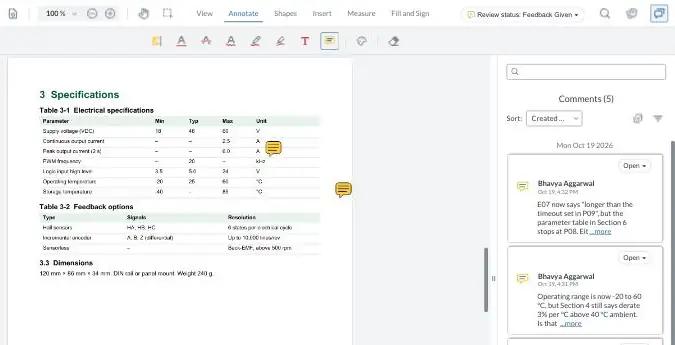
Try it: review this manual, no Acrobat needed
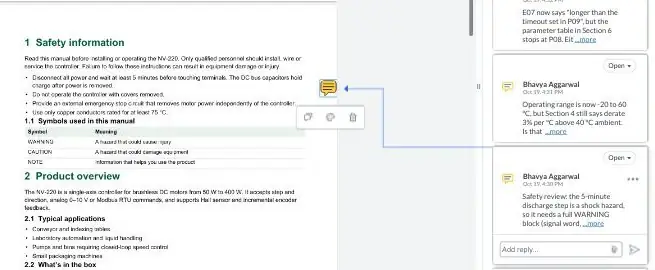
No sign-up. Highlight a line, leave a comment, reply to someone else's. This is what your SMEs see when you send them a zipBoard link.
Tip: click the speech-bubble icon at the top right of the viewer to open the comments list.
Your demo comments are private to this visit and clear when you leave the page.
No lost comments: one shared review
Compare any two versions side by side
Reviewers are free on every plan
Built for the reviews that break Acrobat shared review
Long datasheets and manuals, 25 reviewers per product, several review rounds. These are the questions documentation teams ask us first.
Did we just lose someone's comments?
Every comment saves to one shared review in the browser. No per-reviewer comment files to sync, merge or back up, and no shared-review server to maintain.
Will it cope with an 800-page datasheet?
zipBoard has been tested on 800-page PDFs with 600+ comments and 11 reviewers working at once.
Do we pay for every reviewer?
No. Reviewers are free and unlimited on every plan, so adding 25 SMEs to a product review costs nothing.
Can peer, safety and final review run as separate rounds?
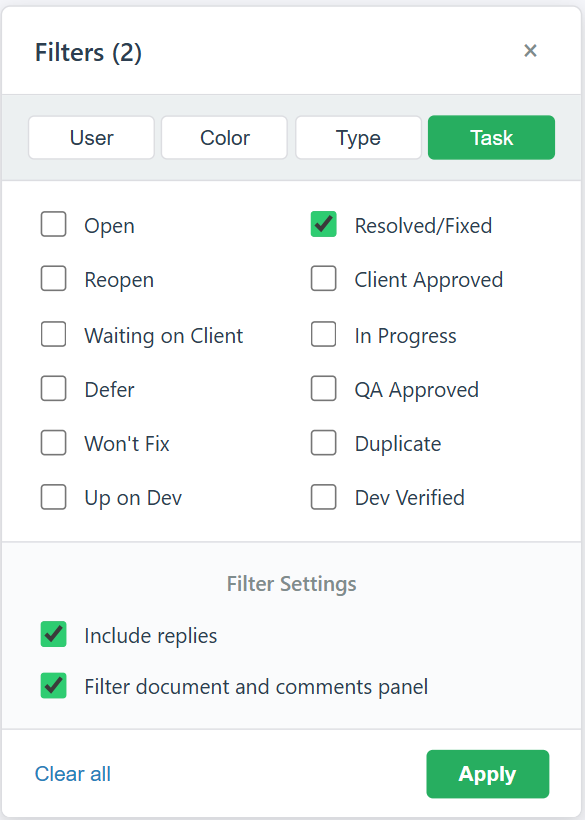
Yes. Set up a stage for each round and tag comments by type, so safety comments never get buried.
What changed, and did my comment get fixed?
Compare any two versions side by side. Each version keeps its own comments, so SMEs check their feedback before they approve.
Who still hasn't signed off?
Every SME gets one list of what's waiting for them. You see each decision and what's overdue. Upload by chapter to see coverage section by section.
Can comments go straight to Jira?
Yes. Review comments become Jira issues in the writer's project, with assignee, priority and due date kept in sync.
Do we have to change our authoring tools?
No. Keep writing in Arbortext, FrameMaker, InDesign or DITA, with source in a CCMS, Windchill, Git, Perforce or SVN. zipBoard reviews the PDF or HTML you publish, so moving from FrameMaker to DITA doesn't change how SMEs review.
Can the files stay on our servers?
Upload PDFs or review them by URL from your own server. Single sign-on on Enterprise. See our security page.
Who still hasn't signed off?
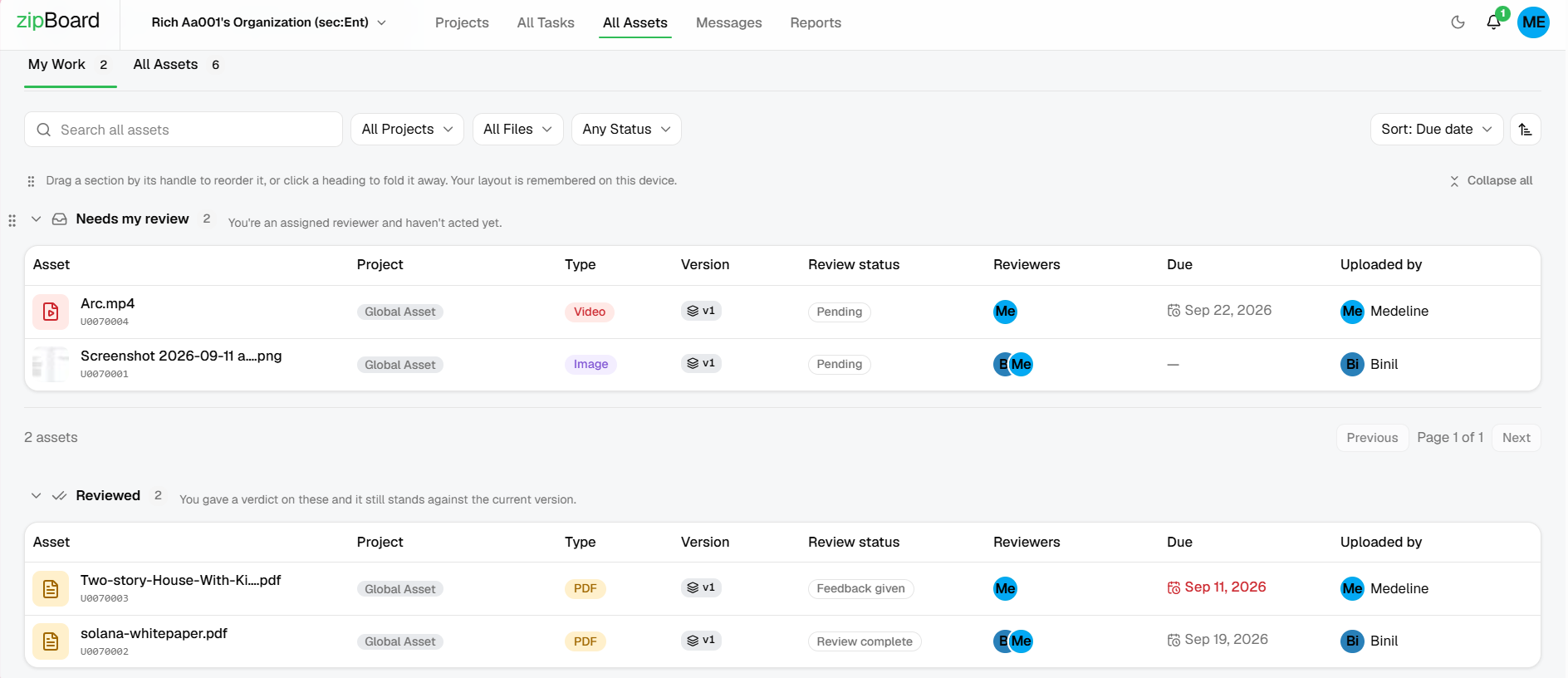
Add the SMEs whose sign-off you need. The document lands in their own Needs my review list.
See every decision at a glance: Approved, Changes Requested or still pending, with overdue reviews flagged.
Nudge the one holding it up with an @mention on the exact section.
What changed, and was my comment fixed?
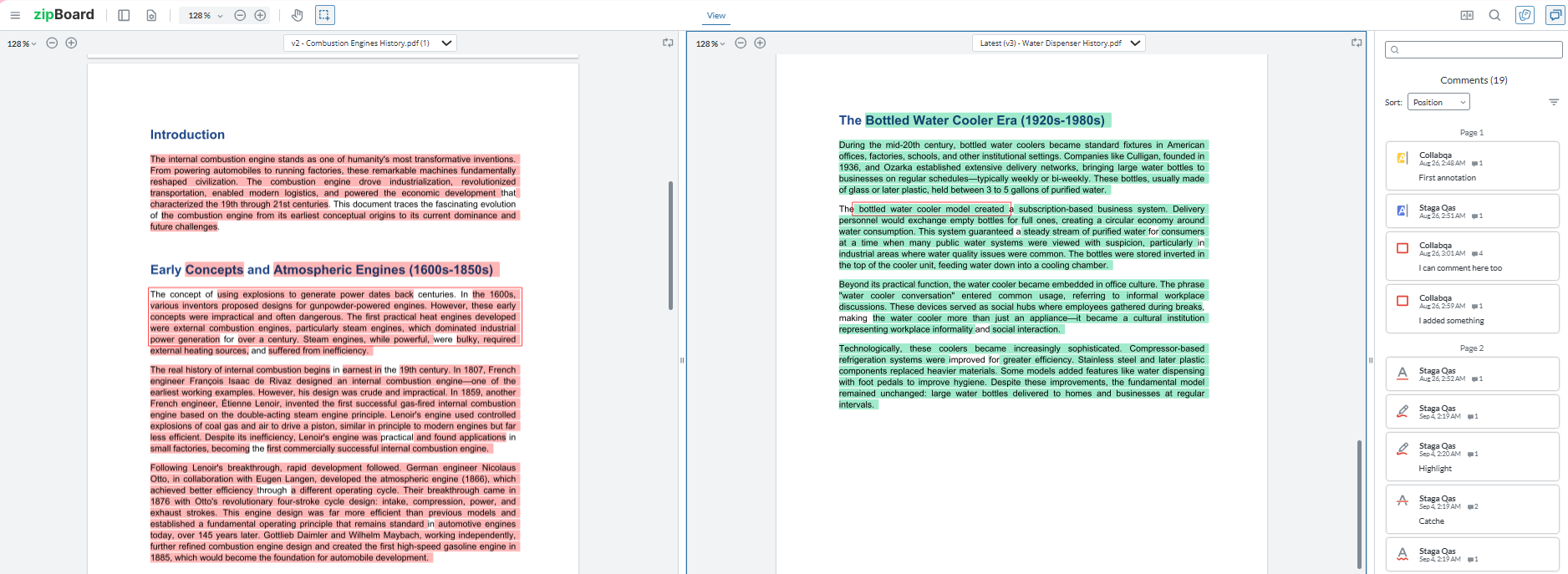
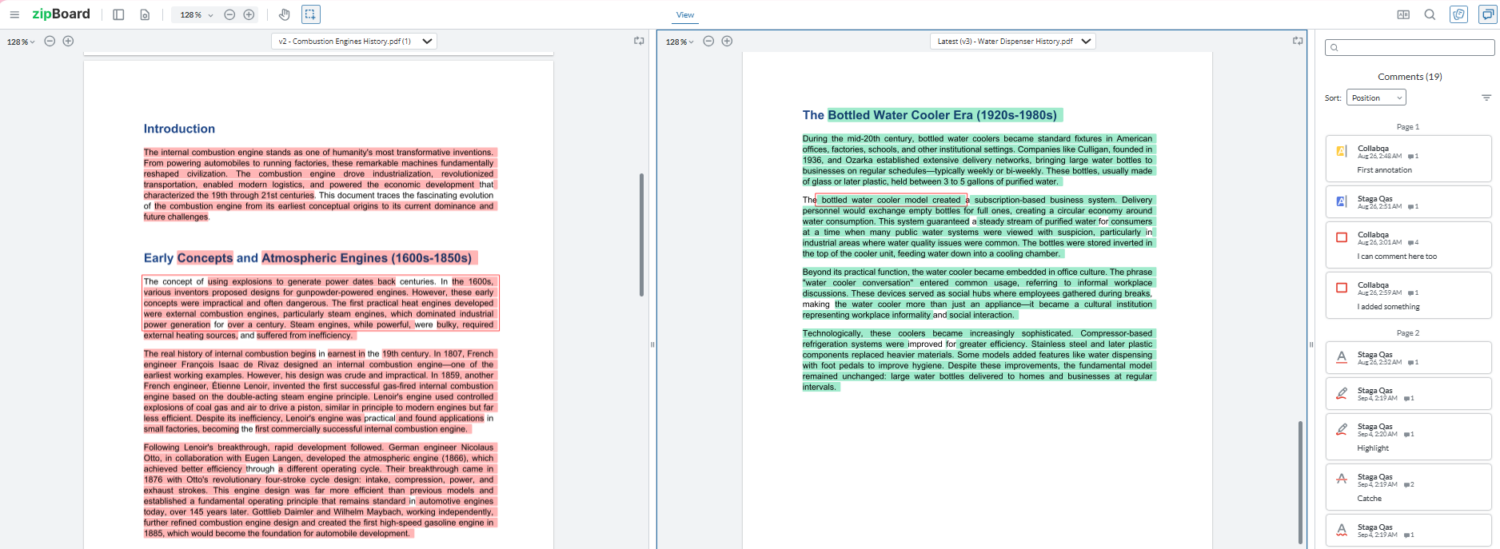
Upload the next revision as a new version. Old approvals reset, so a sign-off on Rev B never counts for Rev C.
Compare the two versions side by side and check your comments were handled before you approve.
Do SMEs need a licence or an install?
No. They open a link in the browser. Occasional reviewers can comment without creating an account.
Highlight a line, pin a comment on a figure, and tag it Technical, Editorial or Legal.
Reviewers are free and unlimited on every plan.
Can you prove who reviewed and approved what?
Every comment, reply and decision is kept with its name and time, version by version.
Export comments as a comment resolution sheet (CSV, Enterprise) or download the marked-up PDF.
How does a technical document review run in zipBoard?

Upload the PDF and add the SMEs who must sign off (others comment from a share link).

SMEs comment on the exact line or figure. Every comment can become a task.

Each SME records a decision, and you see who still hasn't signed off.

Upload the next revision, compare versions and export the record.
How does zipBoard compare with email or Acrobat shared review?
Most documentation teams run SME review one of these three ways.
| Email + Word/PDF attachments | Adobe Acrobat "Share for review" | zipBoard | |
|---|---|---|---|
| Where comments live | Separate copies per reviewer, merged by hand | In the shared PDF in Adobe's cloud | One shared PDF in the browser; comments become tasks |
| Do reviewers need an account? | No, but you merge their files | Yes for invited reviews: recipients sign in to comment. A public link can skip sign-in, but Adobe says it isn't for sensitive information | Assigned reviewers sign in; share-link reviewers can comment on PDFs without signing up |
| Deadline | In the email | Yes (Add deadline) | Due date per file, with overdue and due-soon flags |
| Who still hasn't signed off? | A spreadsheet | Status in your Shared by you list | Each reviewer's decision on the file card, plus each reviewer's Needs my review list |
| New revision | New thread, start again | Share the new file | New version of the same file; statuses reset; side-by-side Compare |
| Record for audit | Inbox search | Comments in the PDF | CSV comment resolution sheet, annotated PDF, project report |
| Cost for reviewers | None | An Adobe account; some sharing options need a subscription | Unlimited reviewers on every plan |
Watch: track every review and approval in one place
20,000+
users
15,000+
projects
Free
for every SME you invite
When is zipBoard the right fit, and when isn't it?
zipBoard is a good fit if:
- SMEs who don’t have seats in your authoring tools
- Long PDFs, 10 to 30 reviewers, several review rounds
- Arbortext, FrameMaker, DITA, InDesign or docs-as-code output
- Reviews stuck in email, merged Acrobat comments or spreadsheets
You may not need it if:
- Every SME already reviews inside your CCMS
- You need comments written back into DITA source automatically
- One reviewer, one short document
Most teams keep their authoring stack and use zipBoard only for review and sign-off.
How much does it cost?
zipBoard is priced by the number of documents you review, with unlimited collaborators and reviewers on every plan, so pricing doesn’t grow with the number of SMEs. Monthly or annual billing, with a 14-day free trial.
Team
Starts at $99/ mo
For small documentation teams with a steady flow of reviews.
- Includes:
- Up to 20 Digital Asset Pieces
- Up to 1GB Storage
- Unlimited Collaborators
- Unlimited Reviewers
- Unlimited Projects
- Standard Email Support
- Knowledge Base
Agency
Starts at $199/ mo
Ideal for an agency with multiple managers to manage projects.
- Includes everything in Team, plus:
- Up to 50 Digital Asset Uploads
- Manager seats (add-on)
- Project reports
- Integrations
Enterprise
Custom
Flexibility of content volume, priority support and dedicated account manager.
- Includes everything in Agency, plus:
- Premium Customer Success
- Single sign-on
- Archive Projects
- Custom Integrations
- Custom Workflows
- Custom Training
- Custom Reports & Insights
- Custom User Permissions & Roles
Get your next review signed off on time
Frequently asked questions
It’s where writers send a draft (a manual, datasheet or specification) to subject-matter experts, collect every comment in one place, track who has approved it, and carry the review into the next revision. It sits between your authoring tool and publishing; it doesn’t replace FrameMaker, a DITA CCMS or a docs-as-code repo.
The best fit is a tool that reviews the output you already publish (PDF or HTML), lets SMEs comment without installing anything, shows who has and hasn’t approved, and carries comments into the next revision. zipBoard does this in the browser, with unlimited reviewers on every plan.
Add the people whose sign-off is required as reviewers so the document lands in their own review list, set a due date, and point them to the exact section that needs them with an @mention. Keep it to one link and no login where you can; most delays come from friction, not unwillingness.
No. Reviewers and collaborators are free and unlimited on every plan. You pay by the documents you review, plus manager seats and features such as SSO.
Yes. Share a link and guests can comment on a PDF without signing up. You can also require sign-in. People whose formal sign-off you need are added as Reviewers, which means signing in.
Yes. zipBoard reviews the PDF or HTML your toolchain produces, so it works the same for Arbortext and Windchill, FrameMaker, DITA XML from a CCMS or the DITA Open Toolkit, InDesign or docs-as-code output kept in Git or Perforce. It doesn’t write comments back into your source; you export them as CSV or send them to Jira.
Yes. Connect a zipBoard project to a Jira project and every task created from a review comment is added to Jira, with assignee, priority, due date, description and replies kept in sync both ways. The Jira integration is on the Team plan and above.
Upload the new PDF as a new version of the same file, then use Compare to view the two versions side by side. Comments stay with the version they were made on.
Yes. Export comments and tasks to CSV and add a disposition column, or use custom statuses as dispositions. You can also download the annotated PDF and a project status report. Task CSV export is on Enterprise and custom plans.
Yes. Keep files under about 200 MB for smooth loading. For very long documents owned by different SME groups, upload each chapter as its own file.
Yes. Upload a long manual as one file per chapter or section and add the SMEs who own each one as reviewers. Each file shows every reviewer’s decision (Approved, Changes Requested or pending), and every comment, reply and decision is kept with its name and time. Export the comments to CSV for your coverage record.
Features
Compare
©️ Copyright 2026 zipBoard Tech. All rights reserved.