A Ziflow alternative your designers, clients and project managers all understand
Rounds drag when feedback arrives in five places and nobody is sure what's left to fix. zipBoard puts creative, video, HTML5 banners, web pages and the documents around them in one review, turns every comment into a clear to-do for the designer, and gives you staged approval on every plan.
No credit card needed. Reviewers are always free.
Moving off Adobe Workfront Proof and comparing tools? See where to move your review.
Built for everyone in a creative round
A round has a designer fixing, a client approving and someone keeping it moving. Each of them gets what they need.
Designers: one list of what to fix
Every comment is a task with a status. Filter to "open, assigned to me", fix it, mark it done. Each version keeps its own comments, so nothing from round 2 gets lost in round 3.
Clients and stakeholders: no login, no training
They open a link and click to comment on a layout, a video frame, an HTML5 banner or a live web page. Add a password or an expiry date if you need to.
Creative ops and producers: see who's holding it up
Staged approval with required reviewers on every plan, and My Work shows everything waiting on each person across every project.
Reviewing the video cut, the HTML5 banners, the landing page and the brief PDF together? That's the everyday case in zipBoard, not the edge case.
zipBoard or Ziflow: the short answer
Choose zipBoard if
- Your round includes more than artwork: video cuts, banners, landing pages, emails, the brief, the deck.
- Designers want one clear list of what to fix, not a thread to reread.
- You want staged approval and required reviewers on every plan, not only higher tiers.
- Clients and approvers keep losing track of what's waiting on them.
- Your team already runs work in Jira, Wrike or Microsoft Teams.
Ziflow is the better fit today if
- Designers send every proof from inside Adobe Creative Cloud and won't give up the plugin. Our InDesign plugin is coming soon.
- You check pixel-level changes on every proof. Our image compare is coming soon.
- A vendor SOC 2 report or ISO 27001 certificate is a hard requirement.
- You need e-signatures on approvals.
What Ziflow users say they still need
From Ziflow's public reviews on G2 and Capterra, and how zipBoard handles each one.
In zipBoard, reviewers and collaborators are unlimited on every plan, and My Work lists everything waiting on each reviewer with a zipBoard login, across all projects.
Each comment is a task with a status. Filter the board by status, owner or priority and see only what's still open.
Global Asset View searches every file you can access, across projects, and archived projects when you switch them on.
In zipBoard, reviewers and collaborators are unlimited on every plan. Only the people who manage projects need a seat.
Quotes from Ziflow reviews on Capterra and G2, checked 13 Nov 2026. Most reviewers like Ziflow.
One queue of everything waiting on you
My Work groups your proofs into Needs my review, New version since you reviewed, Changes requested by me, Reviewed and Due soon & overdue, across every project. Global Asset View lists every file you can access, filtered by type, review status, phase or files assigned to you.
zipBoard vs Ziflow, side by side
Ziflow's column says only what Ziflow's own pages say, opened 12 Nov 2026. Plans change, so check both pricing pages before you decide.
| What buyers decide on | zipBoard | Ziflow |
|---|---|---|
| Review and approval | ||
| Built for | Review and approval of creative, video, banners, web pages, documents and eLearning, with outside reviewers | Online proofing for marketing, in-house creative, creative ops, agencies, legal and compliance |
| Outside reviewers | Unlimited on every plan; comment from a link with no account (password, sign-in or expiry optional) | Unlimited reviewers on all plans, inside and outside the organization |
| Who needs a paid seat | Team members who manage projects; reviewers and collaborators are unlimited (see plans) | Users included: 2 (Free), 15 (Standard), 20 (Pro), 25+ (Enterprise); more in packs of 5 (Ziflow pricing) |
| Staged approval | On every plan, with required reviewers and a decision per reviewer per version | 1 workflow stage (Free), 2 (Standard), 3 (Pro), unlimited (Enterprise) |
| Status on feedback | Task statuses you define per project | Mark comments as resolved; custom comment labels and reactions (Pro) |
| Owner and due date on feedback | Yes, plus priority, tags and type; Kanban and table views | Not listed for comments on the pricing page |
| Export feedback | CSV of all, selected or filtered tasks, every plan | One-click download of comments and markups; CSV export of proof data |
| Compare versions | Side by side with each version's comments; changed text highlighted on PDFs; image compare coming soon | Pixel-level version comparison (from Free); side-by-side and overlay compare |
| What you can review | Images, PDFs and documents, video, audio, HTML5 banners, live websites and web apps, zipped SCORM/HTML courses | "1,200+ file types", live websites, HTML5 banners |
| Design-tool plugins | InDesign plugin coming soon | Adobe Creative Cloud plugins (from Free) |
| Work tools | Jira, Wrike, Slack, Microsoft Teams, Outlook, Procore, Zapier, API | Asana, monday.com, Dropbox, Google Drive, SharePoint, Slack and Microsoft Teams (Pro) |
| Admin, security and IT | ||
| Roles and admin | Super Admin, Admin, Manager, Collaborator; Client (Enterprise), Guest Collaborator, Guest Reviewer | Role names not listed on the pricing or security pages |
| Single sign-on | Enterprise: through your identity provider, such as Microsoft, Google or Okta | Enterprise: SAML 2.0, user management via SCIM |
| Where files live | AWS by default. Enterprise: documents kept on your servers and reviewed by URL through the API, customer-hosted storage, region-specific or private cloud, Azure | AWS, multiple availability zones; region choice not stated |
| Audit trail | Decision per reviewer per version; comments and tasks exportable; no packaged audit-log export yet | 90 days (Standard), 1 year (Pro), lifetime (Enterprise) |
| Certifications | No SOC 2 report or ISO 27001 of our own; security questionnaires completed on request | SOC 2 and ISO 27001 |
| Other enterprise controls | Private Cloud plan (separate instance); share links with password and expiry | IP allowlisting, electronic signatures, white-label viewer and custom domain (Enterprise); 99.9% uptime SLA |
| AI and trying it | ||
| AI | AI Review in beta on paid plans | ReviewAI (listed on Enterprise) |
| Try it | Free trial | Free plan (2 users, 1 stage) |
Sources, opened 12 Nov 2026: Ziflow pricing · Ziflow security · Ziflow. zipBoard: roles, SSO, documents on your own servers, Global Asset View, custom statuses, export, compare, security.
What does a proofing round really cost?
Both tools give reviewers free access. The difference is in who needs a seat, which features sit on higher plans, and how much of the round is chasing.
Seats
Ziflow plans include a set number of users. In zipBoard, reviewers and collaborators are unlimited on every plan.
Features on higher plans
At Ziflow, a third workflow stage needs Pro, and SAML/SCIM, unlimited stages, the lifetime audit trail and IP allowlisting are on Enterprise. In zipBoard, staged approval and CSV export are on every plan; SSO and file-location options are on Enterprise.
Chasing
"Just checking in" emails until the last approver answers. Required reviewers and a personal queue replace them.
Missed fixes
A comment marked resolved that wasn't done sends the proof round again. Tasks with an owner and status catch it.
What zipBoard adds, and what Ziflow does better
What zipBoard adds
- The whole campaign in one review: layouts and images, video, HTML5 banners, live landing pages, emails, the brief and long PDFs, and SCORM/HTML courses.
- Comments become a designer's to-do list: a task with an owner, priority, due date and your own status, on a board or a table, and in Jira or Wrike.
- Staged approval on every plan: required reviewers, a decision per reviewer per version, and approvals that reset on a new version.
- Text changes between PDF versions are highlighted when you compare two versions side by side, so copy edits don't slip through.
- Admin roles beyond reviewer and approver: Super Admin, Admin, Manager and Collaborator, plus client and guest roles.
- Files on your terms: on Enterprise, keep documents on your own servers and send them for review by URL, or use customer-hosted storage, a region-specific or private cloud, or Azure.
What Ziflow does better
- Creative-tool depth: Adobe Creative Cloud plugins from the Free plan and pixel-level compare today. zipBoard's InDesign plugin and image compare are on the way.
- Certifications: Ziflow lists SOC 2 and ISO 27001. zipBoard doesn't hold its own yet.
- Enterprise controls on the list: SCIM user management, IP allowlisting, a lifetime audit trail, e-signatures and a white-label viewer.
- A free plan for 2 users and 1 stage. zipBoard has a free trial.
When not to switch
Keep Ziflow if:
- Your designers live in the Creative Cloud plugin and sending a proof from the browser would slow them down. Our InDesign plugin is coming soon; Photoshop, Illustrator and Figma plugins aren't available.
- You need pixel-level compare on every proof today.
- A vendor SOC 2 report or ISO 27001 certificate is a hard requirement. We complete questionnaires and can run you on a private instance, but check with your security team first.
- You need e-signatures on approvals, SCIM provisioning or IP allowlisting now.
- You're mid-campaign. Finish current rounds in Ziflow and start the next campaign in zipBoard. Ziflow comments don't import, and comments already inside a PDF don't convert into zipBoard comments (why). Download your Ziflow comments and proof data for your records first.
How the move works
Start with one campaign or client. Keep your project tool.
Try it: review a sample
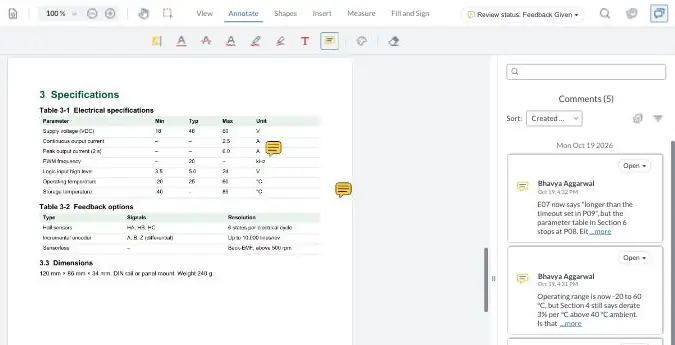
Comment the way your client would, turn a comment into a task, then compare two versions. Your demo comments are private to this visit.
Coming soon
Image compare
Compare two versions of an image or layout to spot visual changes.
InDesign plugin
Send layouts for review and see comments without leaving InDesign.
AI Review
An AI first pass on a PDF against your own rules, in beta on paid plans. A person accepts or rejects every finding.
zipBoard vs Ziflow: common questions
Is zipBoard a good Ziflow alternative for creative teams?
Yes, when your rounds include more than artwork, such as video, HTML5 banners, landing pages and the documents around them, and you want every comment tracked as a task with an owner and status. Ziflow is the better fit today if designers send every proof from the Creative Cloud plugin or you need a vendor SOC 2 report.
Can zipBoard review HTML5 banners and video?
Yes. Reviewers comment on HTML5 banners, video, images, PDFs, live websites and web apps from the same link, with no account.
Do reviewers need an account in zipBoard?
No. They review from a share link in the browser. You can add a password, require sign-in or set an expiry date. Share link options
Does zipBoard charge per reviewer?
No. Reviewers and collaborators are unlimited on every plan. Ziflow also includes unlimited reviewers, and its plans include a set number of users. See plans
Does zipBoard have multi-stage approval like Ziflow?
Yes, on every plan. Set the stages, name the required reviewers and see each reviewer's decision on each version. Ziflow's number of workflow stages depends on the plan.
How do reviewers find everything waiting on them?
My Work lists what needs their review, new versions since they last reviewed, changes they requested, what they've reviewed, and what's due soon or overdue, across all projects. Find pending reviews
Does zipBoard compare versions?
Yes. Open two versions side by side, each with its own comments; on PDFs the changed text is highlighted. Image compare is coming soon. Compare documents
Does zipBoard have Adobe or Figma plugins?
An InDesign plugin is coming soon. There's no Figma, Photoshop or Illustrator plugin today; export a PDF or image and upload it.
Does zipBoard have SOC 2 or ISO 27001?
Not at present. zipBoard completes security questionnaires, provides security documentation, offers SSO on Enterprise and can run you on a private instance. See Security at zipBoard.
Can we bring our Ziflow comments into zipBoard?
Not automatically. Finish current rounds in Ziflow and start new projects in zipBoard. Comments already inside a PDF don't convert into zipBoard comments. Why
Try zipBoard on your next round
Upload one layout, video or banner, add who must sign off, and send the link. Or plan a 30-day pilot on one campaign with us.
No credit card needed. Reviewers are always free.