
Acrobat is built for editing PDFs, and team review is where it hurts: shared reviews that break after an update, reviewers without Acrobat, and sign-off tracked by email. zipBoard puts the review in the browser, so every reviewer comments from one link and you see who still hasn’t signed off.
No credit card needed. Reviewers are always free.
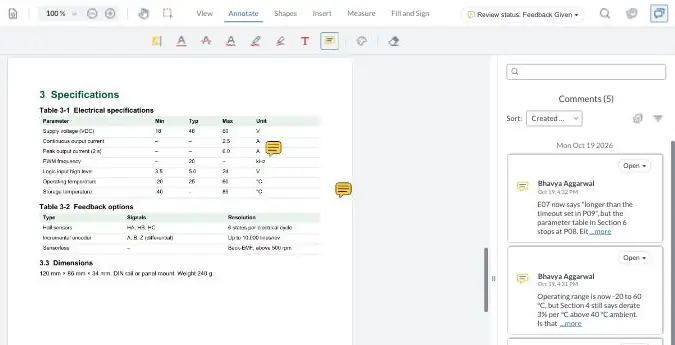
A fictional product manual, Rev B and Rev C. Highlight a line, pin a comment on a table, or compare the two revisions. No sign-up: this is what your reviewers see when you send them a zipBoard link.

Your demo comments are private to this visit and clear when you leave the page.

The people who comment on a PDF usually far outnumber the people who edit it. zipBoard gives reviewers one place to work, and everyone outside your team reviews free.
SMEs, clients and consultants open a link in any browser and comment on the exact line. Nothing to install, no account needed.
No network folder, SharePoint review library or WebDAV setup, and no sign-in fixes after every Edge or Acrobat update.
Required reviewers with a due date record a decision on the file, so you know who still hasn’t signed off before release.
Clients and trade partners review free: no licence, no account
Pay for files, not per-user licences
Find every open comment in one click
Built for
Getting PDFs and other content reviewed and signed off by your team, SMEs, clients and consultants
Creating, editing, converting, signing and sharing PDFs
Where it runs
Any modern browser. Nothing to install
Desktop apps for Windows and Mac, plus web and mobile. The server-hosted shared review needs the desktop app
Pricing
Priced by number of files, with monthly or annual billing
Per licence: Acrobat Standard, Pro or Studio (see Adobe’s plans page)
Who pays
Priced by number of files. Reviewers and collaborators are free and unlimited
Whoever starts reviews needs a paid plan. Reviewers comment free; comparing versions needs Acrobat Pro
Outside reviewers
Open a share link and comment. No account needed (optional sign-in, password, expiry)
Cloud Share link: comment in a browser. Server-hosted review: Acrobat or Reader on the desktop, plus access to your server
Commenting
Highlight text, pin comments, draw on figures, add stamps and signatures. Attach files to any comment
Comments, highlights, sticky notes, drawing tools and stamps
Editing the PDF
Not a PDF editor: fix the source file and upload a new version
Edit text and images, organize pages, convert and export files
Comparing revisions
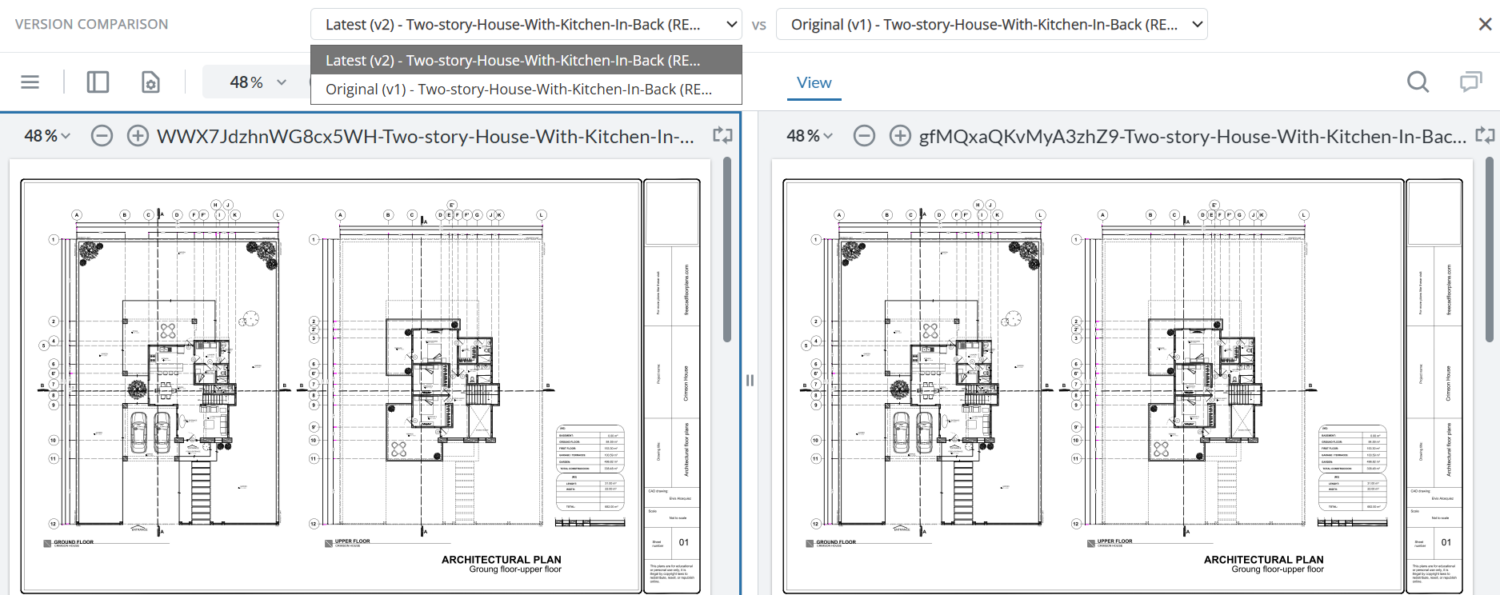
Two versions side by side in the browser, for every reviewer. Each version keeps its comments
Compare versions of a PDF in Acrobat Pro
Tracking comments
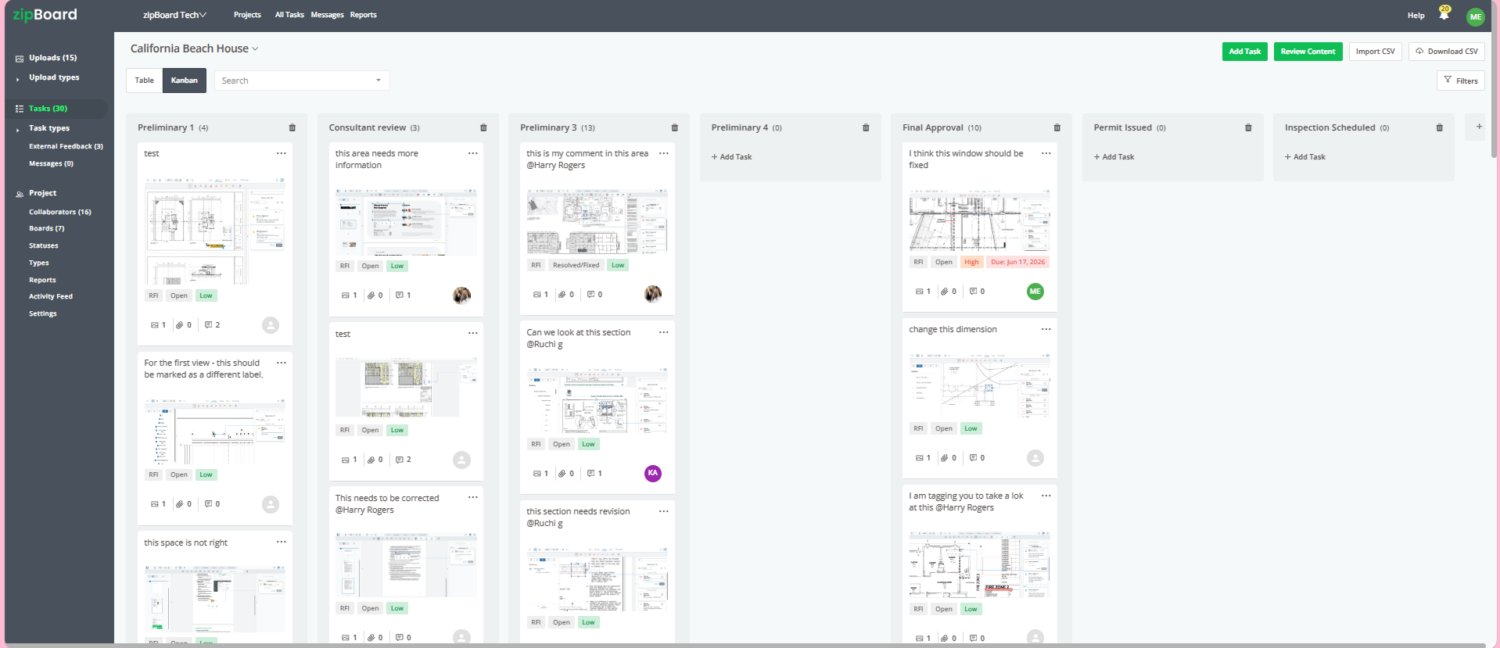
Each comment can become a task with an owner, priority and status. @mention a colleague and they get an email. Tasks can sync to Jira
Reply, react and mark comments as resolved
Sign-off
Required reviewers with due dates and a recorded decision (Approved, Changes Requested); you get an email when a reviewer’s status changes
Deadlines and activity tracking on shared links; e-signatures and signature requests
Other file types
Drawings, images, video, websites and SCORM courses in the same project
PDFs, and files converted to PDF
Files on your own servers
Add PDFs by URL so they stay on your server; SSO and hosting options
Cloud Share stores files in Adobe’s cloud; the older shared review runs on your network folder, SharePoint or WebDAV server
Integrations
Procore, Jira, Slack, Microsoft Teams, Zapier, REST API
SharePoint and other cloud storage (Add file storage)
Free trial
Yes, no credit card
Free trial of Acrobat Pro and Studio
Built for
Getting PDFs and other content reviewed and signed off by your team, SMEs, clients and consultants
Creating, editing, converting, signing and sharing PDFs
Where it runs
Any modern browser. Nothing to install
Desktop apps for Windows and Mac, plus web and mobile. The server-hosted shared review needs the desktop app
Pricing
Priced by number of files, with monthly or annual billing
Per licence: Acrobat Standard, Pro or Studio (see Adobe’s plans page)
Who pays
Priced by number of files. Reviewers and collaborators are free and unlimited
Whoever starts reviews needs a paid plan. Reviewers comment free; comparing versions needs Acrobat Pro
Outside reviewers
Open a share link and comment. No account needed (optional sign-in, password, expiry)
Cloud Share link: comment in a browser. Server-hosted review: Acrobat or Reader on the desktop, plus access to your server
Commenting
Highlight text, pin comments, draw on figures, add stamps and signatures. Attach files to any comment
Comments, highlights, sticky notes, drawing tools and stamps
Editing the PDF
Not a PDF editor: fix the source file and upload a new version
Edit text and images, organize pages, convert and export files
Comparing revisions
Two versions side by side in the browser, for every reviewer. Each version keeps its comments
Compare versions of a PDF in Acrobat Pro
Tracking comments
Each comment can become a task with an owner, priority and status. @mention a colleague and they get an email. Tasks can sync to Jira
Reply, react and mark comments as resolved
Sign-off
Required reviewers with due dates and a recorded decision (Approved, Changes Requested); you get an email when a reviewer’s status changes
Deadlines and activity tracking on shared links; e-signatures and signature requests
Other file types
Drawings, images, video, websites and SCORM courses in the same project
PDFs, and files converted to PDF
Files on your own servers
Add PDFs by URL so they stay on your server; SSO and hosting options
Cloud Share stores files in Adobe’s cloud; the older shared review runs on your network folder, SharePoint or WebDAV server
Integrations
Procore, Jira, Slack, Microsoft Teams, Zapier, REST API
SharePoint and other cloud storage (Add file storage)
Free trial
Yes, no credit card
Free trial of Acrobat Pro and Studio
Source: Adobe Acrobat plans. Comments already in a PDF stay visible in zipBoard, but they don’t convert into zipBoard comments automatically (how it works).
Many teams keep Acrobat for editing and move only the review to zipBoard.
Looking beyond Acrobat and zipBoard? Compare more PDF review tools for teams.
What we’re building next for documentation and review teams. Tell us which ones you’d use, and we’ll get you in early.
A panel inside InDesign that sends your layout to zipBoard for review and shows where its review stands.
I’d use thisA first editorial pass on a PDF, or a check against your own rules. A person accepts or rejects every finding.
Ask for early accessAI help with checking what changed between two versions of a document.
I’d use thisSend files from SharePoint for review without downloading and re-uploading them.
Tell us you need thisWe hear the same things from documentation and review teams:
Adobe still supports reviews hosted on a network folder, SharePoint or WebDAV server, but now calls it its legacy sharing experience and “not the recommended review method” (Adobe Help). If yours stopped working, see why Adobe shared review stops working in Edge or after an update.
In zipBoard, yes. Share the file as a link and reviewers comment in any browser. You choose whether the link needs sign-in, and can add a password and an expiry date (share link settings).
With Acrobat’s cloud Share link, reviewers can also comment in a browser without signing in (Adobe Help). With the older server-hosted shared review, every reviewer needs Acrobat or Acrobat Reader on the desktop, and read and write access to your server.
Getting comments in is the first half. The second half is knowing which ones are still open, and who still has to sign off.
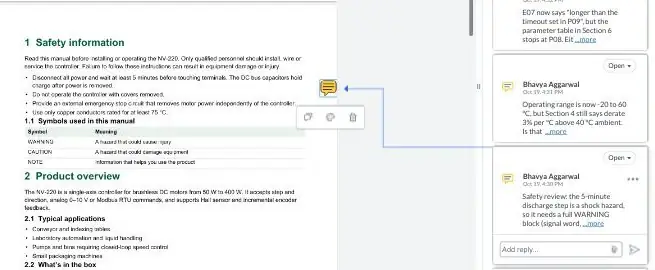
Every comment a reviewer places, whether a highlight, a pinned note or a markup on a figure, can become a task with an assignee, priority and status.
No more copying comments from a marked-up PDF into a spreadsheet: the task list builds itself as people review, and tasks can sync to Jira.
Attach screenshots, specs or reference files to any comment, so whoever fixes it has what they need.
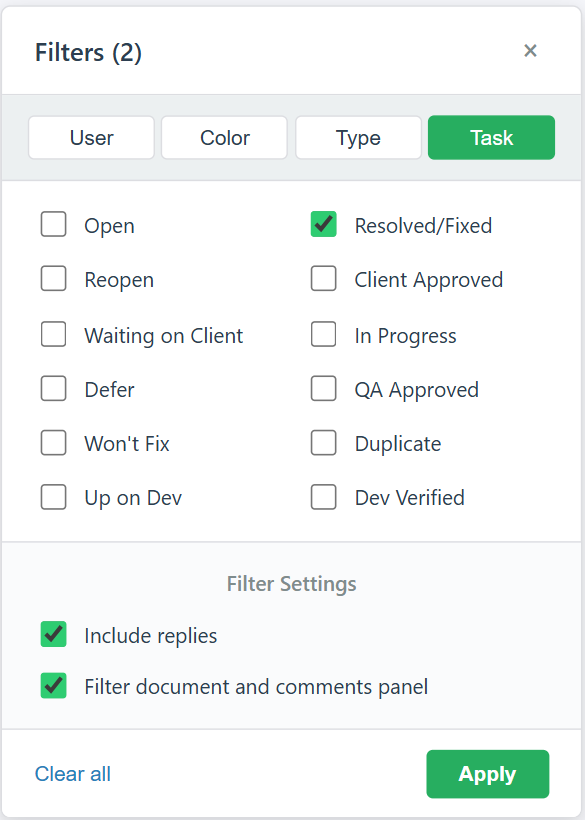
Open the filter in the review view and show only what still needs action: filter by status (Open, In Progress, Resolved/Fixed or your own statuses), by reviewer, colour or markup type, and apply it to both the document and the comments panel.
Click any comment to jump to its spot in the document, or see every task across the project in one list. Guest reviewers can use the same filters without logging in (working through a large number of comments).
Create a phase for each stage, such as Peer review, SME review and Final approval, and move each drawing across as it progresses. Rename statuses to your own action codes, like Approved as Noted or Revise and Resubmit.
Assign reviewers with due dates and save the setup as a project template, so every job starts the same way (running a submittal review cycle).
Upload the revised PDF as a new version of the same file. Earlier comments stay with the version they were made on, and reviewers’ statuses reset for the new round (version control).
Turn on Compare to see the two versions side by side with synced scroll, and check that each comment was handled (compare two PDF versions). In Acrobat, comparing versions is an Acrobat Pro feature.
Add reviewers with a due date. Each one records a decision (Approved or Changes Requested), so you can see who still hasn’t signed off, across every project.
Drop your firm’s stamp, such as “Approved as Noted”, and your signature onto the document from the review toolbar (stamping submittals and shop drawings).
When the next revision is uploaded, approvals reset for the new round. When the round closes, download the PDF with every markup and comment, for example as an as-built or approval record for your customer (download annotated PDFs).
users
projects
for every reviewer you invite
Connect zipBoard to Jira, Slack and Microsoft Teams out of the box. Need something else, such as SharePoint, your CCMS or your document management system? Custom integrations through our API are available on the Enterprise plan. Tell us what you use and we’ll scope it.
Upload the PDF, or add it by URL, and share it as a link (reviewers need no account).
Reviewers comment on the exact line or figure. Every comment can become a tracked task.
Upload the next revision and compare versions side by side.
Reviewers record their decision, and you close the round.
Many teams keep Acrobat for editing and creating PDFs, and use zipBoard for the review round with SMEs, clients and consultants.
Reviewers can comment free in Acrobat: in a browser with a cloud Share link, or in free Acrobat Reader in a server-hosted review. Whoever starts reviews needs a paid Acrobat plan, and comparing versions needs Acrobat Pro (Adobe Acrobat plans). The server-hosted review also needs a network folder, SharePoint or WebDAV server, access for every reviewer, and IT time after updates.
The bigger cost is usually people’s time: setting up the round, chasing reviewers, merging comments and checking they synced. Add it up for your team with the calculator in the real cost of Adobe Acrobat for documentation teams. In zipBoard, reviewers and collaborators are unlimited on every plan (see plans).
If the job is getting PDFs reviewed and signed off by many people, a browser-based review tool such as zipBoard is built for it: reviewers comment from a link, every comment can become a task, you compare versions side by side and see who still hasn’t signed off. Keep Acrobat for editing.
No. They open a link in any browser. You choose whether the link needs sign-in, and can add a password and an expiry date.
Yes. In Global Asset View, All Assets lists every file across your projects, and you can filter by status (Pending, In Review, Changes Requested, Approved), due date or whether you’re a reviewer. My Work groups what needs your review, new versions since you reviewed, and what’s due soon or overdue (how it works).
No. zipBoard is for reviewing and approving. Edit the source file or the PDF in your usual tool, then upload the new version and compare it with the last one.
Reviewers can comment free, in a browser with a cloud Share link or in Acrobat Reader in a server-hosted review. Whoever starts reviews needs a paid Acrobat plan, and comparing versions needs Acrobat Pro. Most of the cost is people’s time, plus server upkeep for the older shared review.
Adobe still documents reviews hosted on network folders, SharePoint and WebDAV servers, but calls it its legacy sharing experience and not the recommended review method. If yours stopped working, see our fix guide for Adobe shared review.
No. zipBoard is browser-based and cloud-hosted, so there’s no internal server, WebDAV configuration or SharePoint review folder for your team to set up or maintain.
Yes. Add PDFs by URL so the file stays on your server (how it works). See security at zipBoard for hosting and SSO options.
They stay visible in the PDF’s own comment list when you upload it, but they don’t convert into zipBoard comments automatically. Re-create the open ones, or start in zipBoard with the next revision (how it works).
See our zipBoard vs Bluebeam comparison: Bluebeam Revu is built for producing and measuring drawings; zipBoard is built for review and sign-off with clients and consultants, from a link, with no per-user licences.
©️ Copyright 2026 zipBoard Tech. All rights reserved.