Client feedback and approval software for agencies, with no client logins
Clients won't learn another tool, so their feedback lands in email threads, on the wrong version, from five people at once. With zipBoard each client opens one link and comments and approves in the browser, with no account or training, and adding clients never adds seats.
No credit card needed. Reviewers are always free.
Why agencies pick zipBoard
What changes for your clients, your producers and your designers.
Clients never need an account or training
They click the link, comment on the work and give a decision. Nothing to install, no dashboard to learn. Add a password or an expiry date if you want one.
Every asset type in one review
Designs, video, HTML5 banners, live sites (through the zipBoard Chrome extension) and PDFs sit in the same review. The client opens one link, not five attachments.
Find everything waiting on you
My Work lists what needs your review, new versions since you reviewed, changes you requested, and what's due soon or overdue, across every client. Global Asset View searches every file.
Every comment ends as done work
Each client comment can carry an owner and a status, so the designer knows what to fix and the producer sees what's closed. No rereading threads before the next round.
Adding clients never adds seats
Reviewers and collaborators are unlimited on every plan. Only the people who manage projects need a seat, so a new client or a bigger client team costs nothing extra. See plans
What agencies using other tools tell us
Short quotes from public reviews of client proofing tools, and how zipBoard handles each one.
A creative director using PageProof, on G2, Dec 2025. In zipBoard there's nothing for the client to adopt: they open a link and comment in the browser, with no account.
A marketing agency user of PageProof, on G2, Dec 2025. Global Asset View searches every file you can access across projects, and My Work lists what's waiting on you.
A freelance designer using Ziflow, on Capterra, Sep 2025. In zipBoard each comment can carry an owner and a status, so open fixes stay visible until someone closes them.
A MarkUp.io customer on Capterra, Aug 2025. zipBoard doesn't charge for clients: reviewers and collaborators are unlimited on every plan.
Reviews read 16 Nov 2026: PageProof on G2 · Ziflow on Capterra · MarkUp.io on Capterra. Most reviewers like these tools.
Keep it simple: upload, send a link, get a decision
Most client rounds need three steps. Start here and add more only when a client needs it.
Your brand in front of the client, your debate behind it
Review links on your own subdomain
On Enterprise, clients open review links on your own subdomain, such as yourbrand.zipboard.co, so the link they get looks like it came from you. Want more branding than that? Ask us.
Clients and your team in the right roles
Bring clients in with the Client role (Enterprise), or as Guest Reviewers and Guest Collaborators on their own link. Keep internal discussion in your team's review until the work is ready to show. Roles explained
Know which client approver is holding the round
Some clients need their brand lead, then legal, then the CMO. Set that up once, and every version shows who has approved and who hasn't.
- Required reviewers per file. Each gives Approved or Changes requested, with a due date.
- Stages on every plan. One board per stage, such as your team, then the client's brand lead, then the client's legal.
- Decisions reset on a new version, so an old approval never carries over to new work.
- My Work for everyone. What's due soon and what's overdue, across every client project.
zipBoard, Ziflow, Filestage and MarkUp.io for client work
Each competitor column says only what that vendor's own pages say, opened 16 Nov 2026. Plans change, so check each pricing page before you decide.
| What agencies decide on | zipBoard | Ziflow | Filestage | MarkUp.io |
|---|---|---|---|---|
| Who needs a paid seat | People who manage projects; reviewers and collaborators are unlimited on every plan | "A user license is only required to create and manage proofs"; users included: 2 (Free), 15 (Standard), 20 (Pro), 25+ (Enterprise) | 10 team seats included; more in bundles of 5; unlimited reviewers on all plans | "Every plan includes unlimited users"; plans priced on a monthly MarkUp allowance |
| Clients review without an account | Yes, from a share link; password, sign-in or expiry optional | Public proof links (Free); public URLs for outside stakeholders (Standard and up) | "Reviewers don't need to set up an account to give feedback or approve files" | "Invite collaborators with a link" |
| Approval stages | Required reviewers per file and stages (one board per stage) on every plan | Workflow stages: 1 (Free), 2 (Standard), 3 (Pro), unlimited (Enterprise) | Reviewer groups per stage: 2 (Free and Starter), 3 (Business), unlimited (Enterprise) | Not described on the pricing page |
| Your brand on the client's link | Enterprise: review links on your own subdomain, such as yourbrand.zipboard.co | Custom domain (Enterprise); branding on sign-in screen, emails and proof viewer | Your logo on the dashboard (Starter and up) | Branding and vanity domain (Business and Enterprise) |
| What clients can review | Designs and images, video, audio, HTML5 banners (zip), PDFs and documents, live sites and web apps (Chrome extension) | "1,200+ file types", live websites, HTML5 banners | Artwork and packaging, video, documents and PDFs, designs and images, live websites and interactive HTML | "Websites & all file types", including images, PDFs and video |
| Work tools | Jira, Wrike, Slack, Microsoft Teams, Outlook, Procore, Zapier and API, on every plan | Asana, monday.com, Jira, Trello, Wrike, Slack, Microsoft Teams and more; public API | Slack, Microsoft Teams, Google Drive (all plans); Jira, Monday, Zapier, API (Business and up) | Integrations on all plans; not named on the pricing page |
| Try it | 14-day free trial | Free plan (2 users, 1 stage) | Free plan (1 active project); 14-day Business trial | 14-day free trial (Pro and Business) |
Sources, opened 16 Nov 2026: Ziflow pricing · Ziflow · Filestage pricing · Filestage · MarkUp.io pricing. zipBoard: plans, share links, roles. Full comparison: zipBoard vs Ziflow.
When not to switch
We'd rather you pick the right tool. Stay where you are today if:
- Your designers send every proof from inside Adobe apps or Figma. Our InDesign plugin is coming soon; there's no Photoshop, Illustrator or Figma plugin. Export a PDF or image and upload it instead.
- You check pixel-level changes on images every round. PDF compare works today; image compare is coming soon.
- Clients must see only your brand everywhere, including emails from your own domain. zipBoard offers review links on your own subdomain on Enterprise, not a full white-label viewer.
- Your clients approve inside Monday.com today. That integration is coming soon, not live.
- A vendor SOC 2 report or ISO 27001 certificate is a hard requirement for a client. Check with them first. Security at zipBoard
- You're mid-campaign. Finish current rounds where they are and start the next client project in zipBoard. Comments already inside a PDF don't convert into zipBoard comments (why).
Try it the way your client would
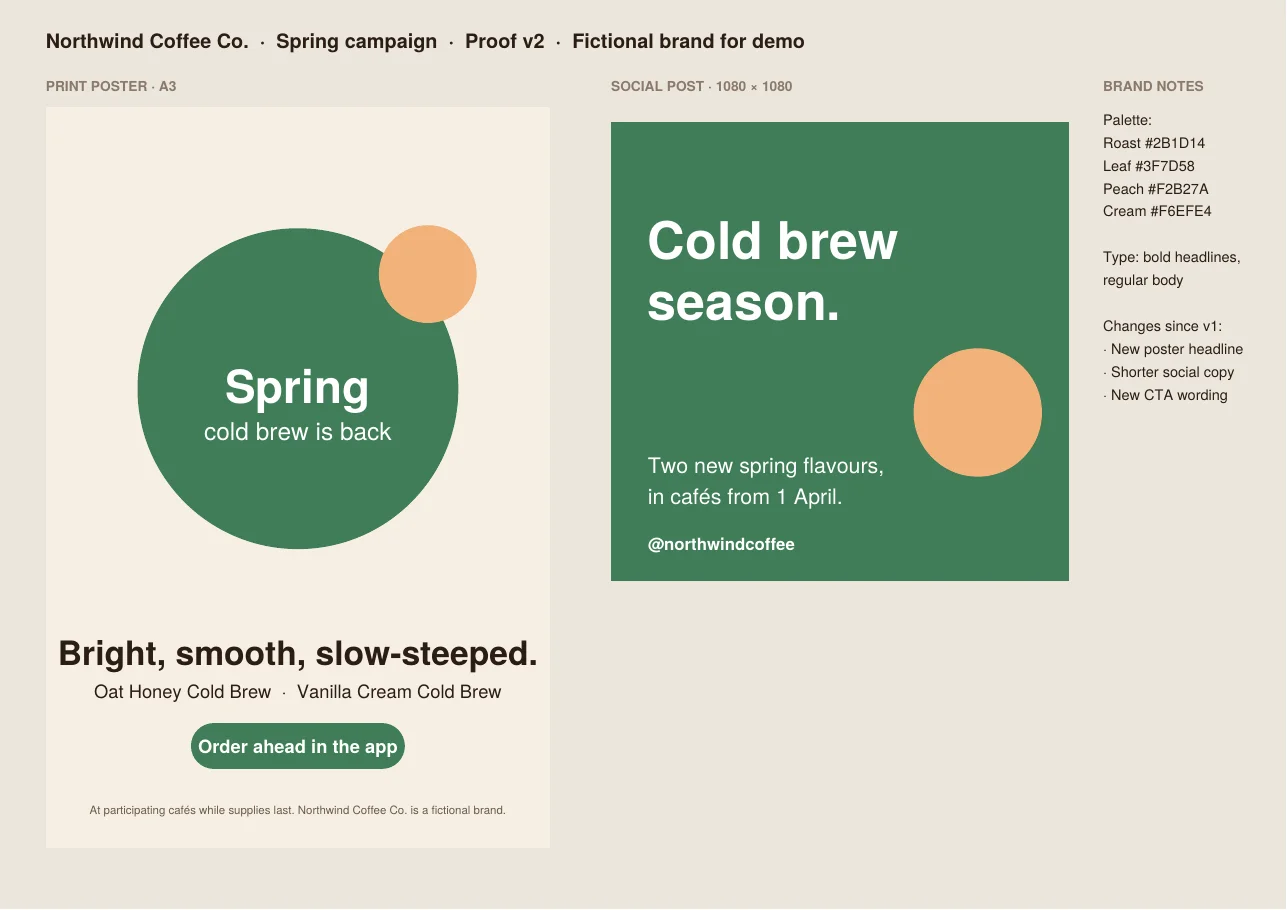
Open a sample spring campaign proof for a fictional brand and leave feedback like a client. No account needed. Your demo comments are private to this visit.
Coming soon
Image compare
Compare two versions of an image or layout to spot visual changes between rounds.
InDesign plugin
Send layouts for client review and see feedback without leaving InDesign.
Monday.com
Start reviews and see client approval status from the board where your team plans the work.
AI first pass on PDFs
AI first pass on PDFs against your own rules, in beta on paid plans. A person accepts or rejects every finding.
Client collaboration for agencies: common questions
What is client collaboration software for agencies?
It's one place where clients review your work and approve it. You upload designs, video, banners, PDFs or a staging site, send the client a link, and their feedback and decisions stay on the work instead of in email threads.
Do clients need an account or training to give feedback?
No. Clients comment from a share link in the browser, with nothing to install or learn. You can add a password, require sign-in or set an expiry date. Share link options
Does adding clients add seats or cost?
No. Reviewers and collaborators are unlimited on every plan. Only the people who manage projects need a seat, so a new client or a bigger client team costs nothing extra. See plans
Can clients review designs, video, banners, websites and PDFs from one link?
Yes. Images and designs, video, audio, HTML5 banners uploaded as a zip, PDFs and documents sit in the same review. Live sites and staging links are reviewed with the zipBoard Chrome extension.
Can review links carry our agency's brand?
On Enterprise, review links can run on your own subdomain, such as yourbrand.zipboard.co. If you need more branding than that, ask us before you buy.
Can we keep internal discussion away from the client?
Bring clients in with the Client role (Enterprise), or as guests on their own link, and keep internal discussion in your team's review until the work is ready to show. Tell us how your client sign-off works and we'll help you set it up.
How do we stop client feedback getting lost between rounds?
Each version keeps its own feedback, and each comment can carry an owner and a status. Required reviewers give Approved or Changes requested on each version, and My Work shows what's due soon or overdue across every client. Find pending reviews
Does zipBoard have SOC 2 or ISO 27001?
No, we don't hold either at present. zipBoard completes security questionnaires, offers SSO on Enterprise, share links with password and expiry, and a private instance on the Private Cloud plan. See Security at zipBoard.
Run your next client round in zipBoard
Upload one round, send the client a link, and get a clear decision from each approver. Your clients don't sign up for anything.
No credit card needed. Reviewers are always free.