
Bluebeam vs zipBoard

A Bluebeam alternative for drawing review: send a link, get every comment closed

If you need a Bluebeam alternative for reviewing drawings with clients, consultants and owners, zipBoard lets anyone open a PDF from a link and mark it up in the browser, with no Bluebeam ID, no Revu seat and nothing to install. Every markup becomes a tracked task with an owner and status, so you can see what’s still open and who has signed off. If your team mainly needs takeoffs, batch tools or 3D PDFs, keep Revu for that and use zipBoard for the review round.

No credit card needed. No licences for your clients and trade partners: reviewers are always free.

Try it: mark up this drawing, no Bluebeam needed

No sign-up. Click Annotate to leave a comment or Measure to check a dimension. This is exactly what your reviewers see when you send them a zipBoard link.
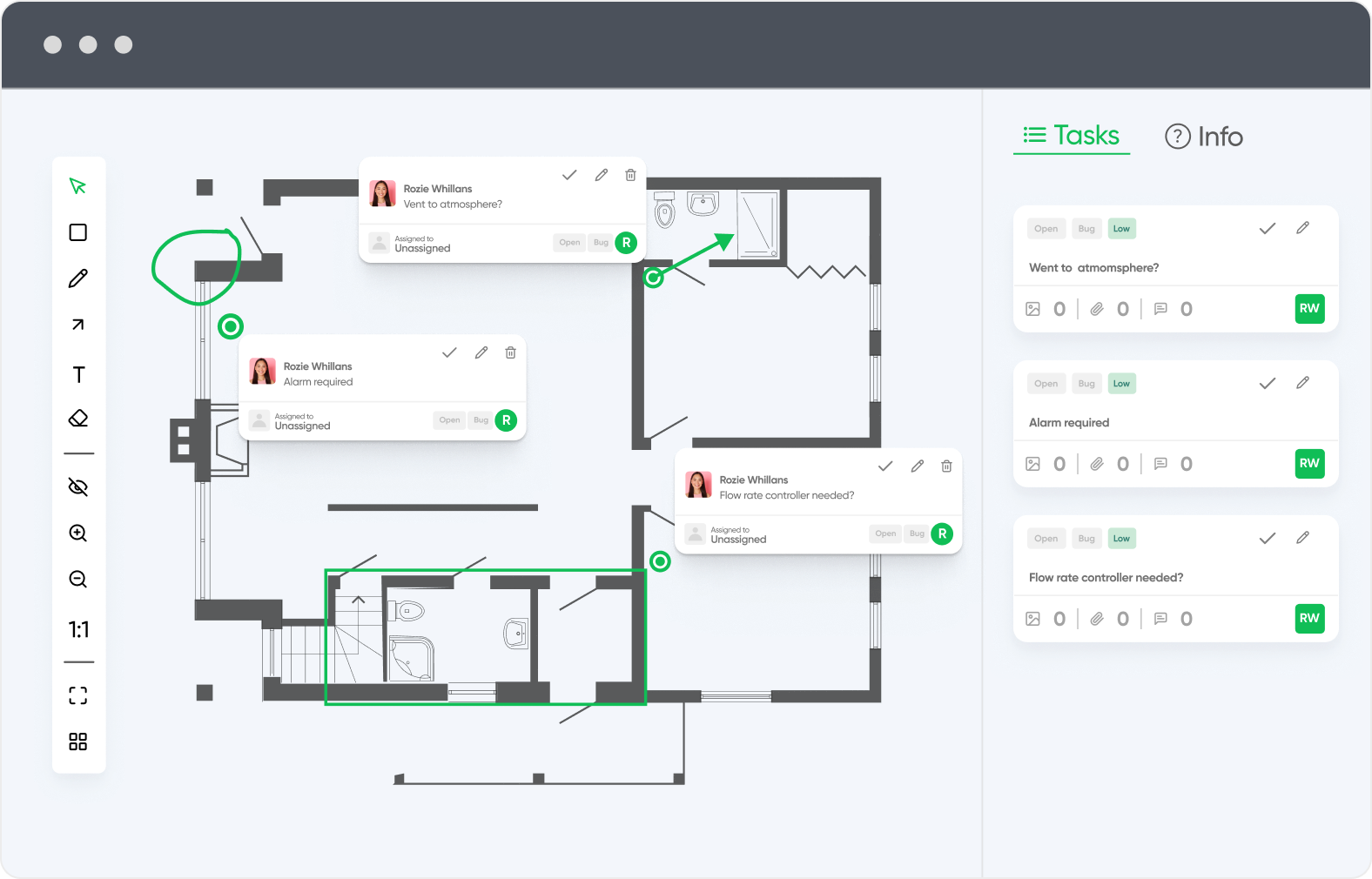
This is a shared demo file, so you may see markups from other visitors.


Stop buying licences for every client and trade partner

On a typical project, the people who need to comment on drawings far outnumber the people who produce them. With zipBoard, everyone outside your team reviews for free.

Clients and trade partners review free

Owners, consultants, subcontractors and trade partners open a link and mark up the drawing. No licence, no Bluebeam ID, no install, no per-session invite.

No per-user pricing for your team

zipBoard plans are priced by the number of files you review, with unlimited collaborators and reviewers. Adding a new sub or consultant to a project costs nothing.

What it takes in Bluebeam

Outside reviewers can join a Studio Session with a free Bluebeam ID and a limited toolset, but anyone who hosts sessions or compares versions needs Core or above, at $330 per user per year.

Clients and trade partners review free: no licence, no account

Pay for files, not per-user licences

Find every open comment in one click

zipBoard vs Bluebeam: how do they compare?

Feature

Built for

Getting drawings and documents reviewed and approved by your team, clients and consultants

Producing, marking up and quantifying drawings in Revu

Where it runs

Any modern browser. Nothing to install

Revu: Windows desktop only. Bluebeam on web and iOS with a smaller toolset

Price

From $99/month (Team). Monthly or annual billing

$260–$590 per user per year (Basics, Core, Complete, Max). Billed annually

Who pays

Priced by number of files. Clients, trade partners and reviewers are free and unlimited

Every user who needs more than free read-only access needs a paid seat

Outside reviewers

Open a share link and mark up. No account needed (optional sign-in, password, expiry)

Free with a Bluebeam ID, invited by email to a Studio Session hosted by a Core+ user. View-only in Studio Projects

Markup tools

Clouds, arrows, lines, polylines, shapes, highlights, free hand, text, callouts, notes

Full Revu markup set, Tool Chest of saved tools, legends and hatch patterns

Measurement

Distance, area, perimeter, arcs and count, with calibrated and multiple scales per sheet

Full measurement and takeoff on Core+ (count, angle, volume), formula columns, Quantity Link to Excel on Complete+

Comparing revisions

Two PDF versions side by side, with synced scroll and zoom

Overlay Pages, Compare Documents and Batch Compare on Core+

Tracking comments

Each markup becomes a task with an owner, priority and status (Open / Resolved)

Markups List with statuses and custom columns, exportable as a summary

Sign-off

Reviewers with due dates, Approved / Changes Requested decisions, custom stamps and signatures. Approvals reset on each new version

Stamps and digital signatures. Batch Sign & Seal on Complete+

Other file types

Images and renderings, video, websites and SCORM courses in the same project

PDF-centred (Core+ converts CAD, Revit and SolidWorks files to PDF)

3D / BIM

No

View 3D PDFs on all plans; mark up and create them on Core+

Integrations

Procore, Jira, Slack, Microsoft Teams, Zapier, REST API

SharePoint, ProjectWise, CAD plug-ins (Core+), Claude via MCP (Max)

Free trial

Yes, no credit card

14 days of Max, no credit card

zipBoard vs Bluebeam: how do they compare?

Feature

Built for

Getting drawings and documents reviewed and approved by your team, clients and consultants

Producing, marking up and quantifying drawings in Revu

Where it runs

Any modern browser. Nothing to install

Revu: Windows desktop only. Bluebeam on web and iOS with a smaller toolset

Price

From $99/month (Team). Monthly or annual billing

$260–$590 per user per year (Basics, Core, Complete, Max). Billed annually

Who pays

Priced by number of files. Clients, trade partners and reviewers are free and unlimited

Every user who needs more than free read-only access needs a paid seat

Outside reviewers

Open a share link and mark up. No account needed (optional sign-in, password, expiry)

Free with a Bluebeam ID, invited by email to a Studio Session hosted by a Core+ user. View-only in Studio Projects

Markup tools

Clouds, arrows, lines, polylines, shapes, highlights, free hand, text, callouts, notes

Full Revu markup set, Tool Chest of saved tools, legends and hatch patterns

Measurement

Distance, area, perimeter, arcs and count, with calibrated and multiple scales per sheet

Full measurement and takeoff on Core+ (count, angle, volume), formula columns, Quantity Link to Excel on Complete+

Comparing revisions

Two PDF versions side by side, with synced scroll and zoom

Overlay Pages, Compare Documents and Batch Compare on Core+

Tracking comments

Each markup becomes a task with an owner, priority and status (Open / Resolved)

Markups List with statuses and custom columns, exportable as a summary

Sign-off

Reviewers with due dates, Approved / Changes Requested decisions, custom stamps and signatures. Approvals reset on each new version

Stamps and digital signatures. Batch Sign & Seal on Complete+

Other file types

Images and renderings, video, websites and SCORM courses in the same project

PDF-centred (Core+ converts CAD, Revit and SolidWorks files to PDF)

3D / BIM

No

View 3D PDFs on all plans; mark up and create them on Core+

Integrations

Procore, Jira, Slack, Microsoft Teams, Zapier, REST API

SharePoint, ProjectWise, CAD plug-ins (Core+), Claude via MCP (Max)

Free trial

Yes, no credit card

14 days of Max, no credit card

More review features for small teams, without per-user licences

In one zipBoard subscription (from $99/month)

  • Unlimited collaborators and reviewers: you pay for files, not people
  • Share links with optional sign-in, password and expiry
  • Every markup becomes a task with an owner, priority and due date
  • Filters to find every open comment on a drawing
  • Phases and custom statuses for your review stages
  • Reviewers with due dates and an Approved / Changes Requested decision
  • Measurement with calibrated scales, and side-by-side version compare
  • Custom stamps and signatures
  • Drawings, renderings, images, video and web pages in one project

The same review round in Bluebeam (per user, per year)

  • Basics, $260: can join Studio Sessions but not host them; measures length and area only; no Overlay or Compare
  • Core, $330: needed to host Sessions and compare documents
  • Complete, $440: adds Quantity Link to Excel and Batch Sign & Seal
  • Max, $590: adds AI features
  • Outside reviewers are free, but each needs a Bluebeam ID and an invite to every Session

A five-person team on Bluebeam Core pays $1,650 a year before any client or consultant joins. zipBoard starts at $99 a month for the whole team, whether three people comment or thirty (the Team plan covers up to 20 files; larger plans add more files, managers and integrations).

Why do teams look for a Bluebeam alternative?

Most teams don’t leave Bluebeam because Revu is bad at markup. They look for something else when the review round gets painful:

  • “Our client doesn’t have Bluebeam and won’t install anything.”
  • “Who still hasn’t signed off on this set?”
  • “Did the engineer’s comment from rev B actually get fixed in rev C?”
  • “We’re paying $330+ a year for seats people only use to leave comments.”
  • “Half the team is on Macs.”

Revu is a Windows desktop application. Bluebeam’s own Mac page points Mac users to its web app, its iOS app or Parallels; Revu for Mac reached end of life in June 2023 and Revu for iPad was withdrawn at the end of 2025 (Bluebeam on Mac).

Can clients mark up drawings without a Bluebeam license?

In zipBoard, yes. Click Share on the file, choose what the link allows, and send it. Reviewers open it in any modern browser, type their name if asked, and mark up the PDF. You can still require sign-in, add a password or set an expiry date for confidential sets (share link settings).

In Bluebeam, also yes, with conditions. Someone on a Core, Complete or Max plan hosts a Studio Session and invites attendees by email. Attendees without a subscription need a free Bluebeam ID and get a smaller toolset; in Studio Projects they can only view files (Bluebeam support).

So access isn’t the real difference any more. The difference is what happens after the comments come in.

document versioning

How do comments turn into assigned work?

Every markup a reviewer places (a cloud, arrow, highlight or note) opens a task panel, so the comment gets an owner, a priority and a due date straight away.

No more retyping comments from a marked-up PDF into a spreadsheet: the task list builds itself as people review (creating tasks from PDF annotations).

Renderings, images, walkthrough videos and web pages can sit in the same project, so the whole client review lives in one place.

adobe pdf alternative

How do you find every comment again?

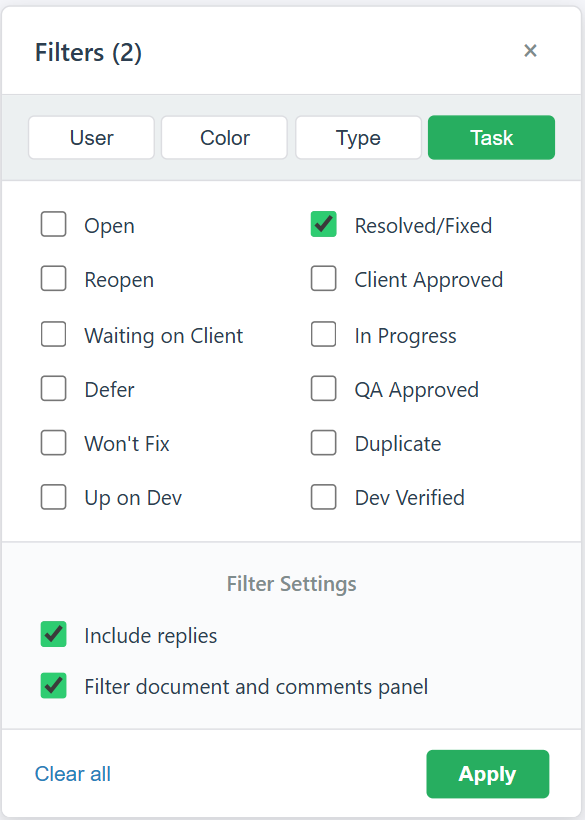
Open the filter in the review view and show only what still needs action: filter by status (Open, In Progress, Resolved/Fixed or your own statuses), by reviewer, colour or markup type, and apply it to both the drawing and the comments panel.

Click any comment to jump to its spot on the drawing, or see every task across the project in one list. Guest reviewers can use the same filters without logging in (working through a large number of comments).

zipBoard Task Status Filter in Review View

Can you set up your own review workflow?

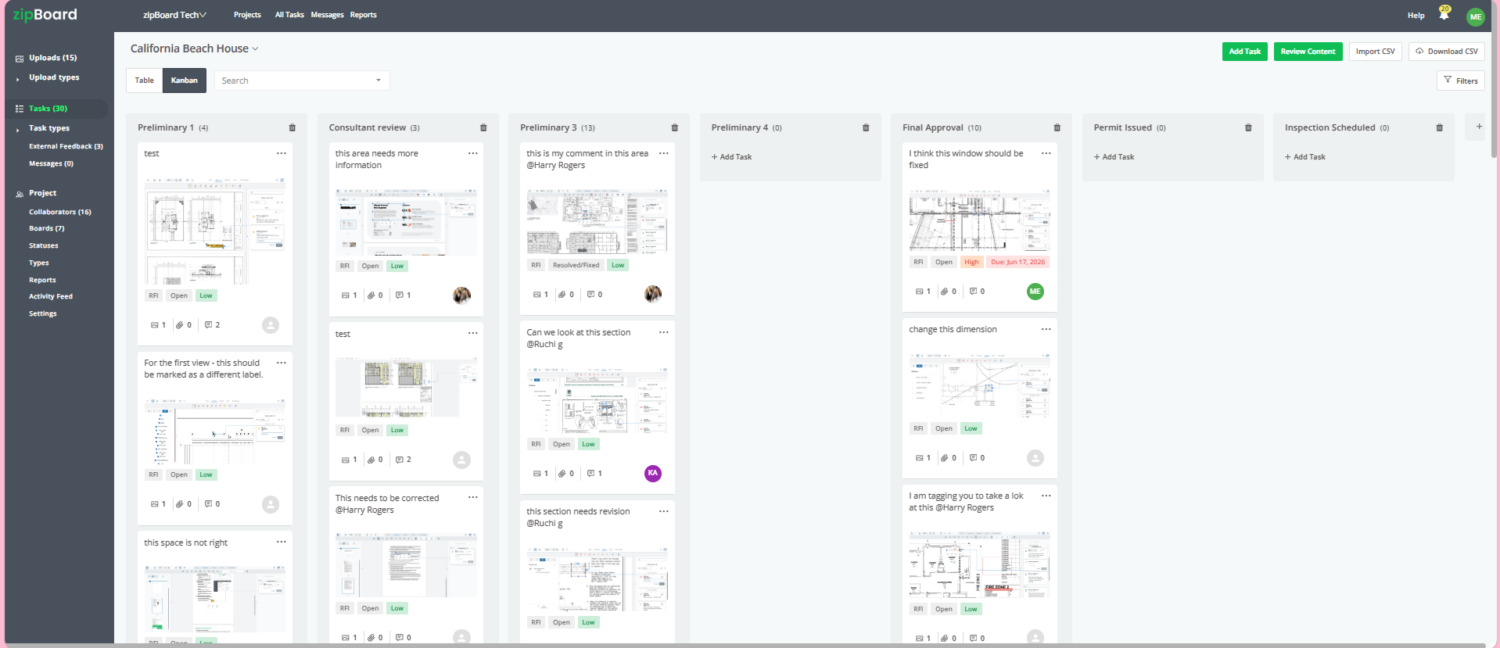
Create a phase for each stage, such as Consultant review, Client approval and Final approval, and move each drawing across as it progresses. Rename statuses to your own action codes, like Approved as Noted or Revise and Resubmit.

Assign reviewers with due dates and save the setup as a project template, so every job starts the same way (running a submittal review cycle).

A screenshot of a project management dashboard named zipBoard displaying a Kanban board for a project titled "California Beach House." The board is organized into columns such as Preliminary 1, Consultant review, Preliminary 3, Preliminary 4, Final Approval, Permit Issued, and Inspection Scheduled. Individual task cards contain text, image attachments of architectural blueprints, priority labels, and user profile icons. A left-hand navigation sidebar and top action buttons like "Add Task" and "Review Content" are also visible.

Already on Procore?

Connect your Procore account and choose which projects to sync. New RFIs, submittals and change orders added in Procore then appear in zipBoard automatically, ready to mark up, so nobody downloads and re-uploads files.

Consultants and clients review those documents in zipBoard without a Procore licence, and their markups become tracked tasks. Included on the Agency and Enterprise plans (Procore integration).

Can you measure and compare revisions in the browser?

Open the Measure tab, calibrate the scale against a known dimension, then measure distance, area, perimeter, arcs or count. It’s built for checking dimensions during review, not for full takeoffs (how to measure).

When rev C arrives, upload it as a new version and compare it with rev B side by side, with synced scrolling and zoom, to check every comment was addressed (compare two PDF versions).

zipBoard Measurement Tool for Architect with Easy Calibration Feature

How do you record sign-off?

Add reviewers with a due date. Each one records a decision (Approved or Changes Requested), so you can see who still hasn’t signed off, across every project.

Drop your firm’s stamp, such as “Approved as Noted”, and your signature onto the drawing from the review toolbar (stamping submittals and shop drawings).

When the next revision is uploaded, approvals reset for the new round.

20,000+​

users

15,000+

projects

Free

for every reviewer you invite

Works with the tools AEC teams already use

Connect zipBoard to Procore and Microsoft Teams out of the box. Need something else, such as SharePoint, your document management system or your ERP? Custom integrations through our API are available on the Enterprise plan. Tell us what you use and we’ll scope it.

procore integration - zipboard

How do you review a drawing set in zipBoard?

Upload the drawing set and share it as a link (reviewers need no account).

Reviewers mark up the drawings. Every markup becomes a tracked task.

Measure dimensions and compare revisions side by side.

Stamp, sign off and close the round.

Watch: track every review and approval in one place

Who should use zipBoard instead of Bluebeam, and who shouldn't?

zipBoard is a good fit if:

  • most of the people commenting on your drawings are clients, owners or consultants who will never buy Revu;
  • you need to know which comments are still open and who has signed off, across several review rounds;
  • you review renderings, images or walkthrough videos alongside the drawings;
  • your team works on Macs or in the browser;
  • you’re on Procore and want drawing markups to flow into the review (Procore integration).

Stay with Bluebeam (or keep both) if:

  • your estimators rely on takeoffs with formula columns, Quantity Link to Excel or volume measurement (takeoff tool vs measurement tool);
  • you depend on overlay comparison, batch slip-sheeting, batch sign & seal or CAD plug-ins;
  • you work with 3D PDFs;
  • your whole project team, including outside parties, is already on Bluebeam and Studio Sessions work well for you.

Many AEC teams keep Revu for production and use zipBoard for the external review and approval round. That avoids a switching project and still takes the review chase out of email.

How much does Bluebeam cost compared with zipBoard?

Bluebeam is priced per user per year, billed annually: Basics $260, Core $330, Complete $440 and Max $590 (Max is an introductory price). You need Core or above to host Studio Sessions or use Overlay and Compare.

zipBoard is priced by the number of files you review, starting at $99 a month, with unlimited collaborators and reviewers and monthly or annual billing. A 10-person team on Bluebeam Core pays $3,300 a year before any client or consultant joins; on zipBoard, what you pay depends on how many files you review, not on how many people comment.

Team

Starts at $99/ mo

For small teams that review a steady stream of drawings and documents.

Agency

Starts at $199/ mo

Ideal for an agency with multiple managers to manage projects.

Enterprise

Custom

Flexibility of content volume, priority support and dedicated account manager.

Frequently asked questions

For viewing and light markup, Bluebeam itself lets people with a free Bluebeam ID join Studio Sessions they’re invited to. For a full review workflow, zipBoard offers a free trial with no credit card, and reviewers you invite by link never pay.

Not in zipBoard. Clients, owners, consultants, subcontractors and trade partners review from a share link with no licence, account or install, and you can add as many as a project needs. In Bluebeam, outside reviewers can join a Studio Session with a free Bluebeam ID, but someone on a Core plan or above has to host and invite them to each session.

Yes. In zipBoard, a reviewer opens the share link in a browser and marks up the drawing. No account or download is needed unless you turn on Require Signup/Login.

Not natively. Revu is a Windows desktop application; Bluebeam points Mac users to its web app, its iOS app or Windows through Parallels. Revu for Mac reached end of life in June 2023. zipBoard runs in any modern browser on Mac or Windows.

Yes. The Measure tab covers distance, area, perimeter, arcs and count, with calibrated scales and multiple scales on one sheet. It’s built for checking dimensions during review, not for full quantity takeoffs.

Yes. Upload the new revision as a new version of the same file, then compare the two PDFs side by side with synchronized scrolling and zoom.

Add reviewers with a due date. Each reviewer records a decision (Approved or Changes Requested), and you can see who is still pending. When you upload a new version, approvals reset for the new round.

Yes. Export the set from Revu as a PDF and upload it to zipBoard for the client or consultant round. Markups already embedded in the PDF stay visible but don’t become zipBoard tasks automatically, so re-create the ones that need tracking.

No per-user licences for reviewers or collaborators: plans are priced by the number of files you review, with unlimited collaborators and reviewers. See the pricing page for manager seats on each plan.

Procore and Microsoft Teams integrations are available today; with Procore, new RFIs, submittals and change orders sync into zipBoard for review. SharePoint isn’t a built-in integration yet. On the Enterprise plan we scope custom integrations through our API, so talk to us about your setup.

For review and approval with people outside your team, often yes. For takeoffs, batch tools, overlays and 3D PDFs, no: keep Revu for that work.