Online proofing that doesn't end in an inbox hunt
Feedback in five places, a client who can't find the link, and nobody sure which version got the yes. zipBoard keeps every proof, comment and approval in one place, and shows each person what's waiting on them across every project.
No credit card needed. Reviewers are always free.
What is online proofing software?
Online proofing software is one shared place where designs, documents, videos and web pages get reviewed and approved. Instead of PDFs and screenshots by email, reviewers comment on the file itself, each version is kept, and everyone can see who has signed off. Good tools also let clients review from a link and turn feedback into work someone owns.
The questions that slow every proofing round
What creative and marketing teams ask us, and what proofing-tool users say is still hard elsewhere.
My Work lists every proof that needs your review, across all your projects, with what's due soon or overdue.
Comments become tasks with an owner, priority, due date and status, so open feedback can't hide in a thread.
Open two versions side by side with each version's comments. On PDFs, changed text is highlighted.
Set your own task statuses per project, like "Copy check" or "Waiting on legal", and filter by them.
No. Send a share link, and add a password, a sign-in or an expiry date if you need one.
Export all, selected or filtered tasks to CSV on any plan, or send them to Jira or Wrike.
Stop hunting through projects for what needs your review
"I can never find the proof I'm looking for" is the most common complaint about proofing tools. zipBoard's Global Asset View puts every file you can access, across every project, in one searchable list. Filter by file type, review status, phase, or proofs assigned to you, and switch on archived projects when you need an old version.
My Work is your personal queue, in five sections: Needs my review, New version since you reviewed, Changes requested by me, Reviewed, and Due soon & overdue. Drag the sections into the order you work, and jump from any proof straight back to its project.
Track every pending review in one place · How it works
Coming soon Search by reviewer and by project in Global Asset View.
Every comment has an owner and a status
Most proofing tools stop at "resolved". In zipBoard each comment is a task your team can run.
- Owner, priority, due date and status on every piece of feedback.
- Your own statuses, set per project, so the board matches how your team works.
- Kanban board or table, filtered by status, owner, priority, type or file.
- Tags, including AI auto-tagging, so you can group feedback by type.
- CSV export of everything, a selection, or what your filter shows.
- Jira and Wrike: send tasks to your team's tracker; two-way status sync on Enterprise.
Know who still has to say yes
- Name the reviewers who must approve; everyone else can still comment.
- Each reviewer marks the proof Approved, Changes Requested or Feedback Given, and you get an email when one changes.
- Upload a new version and earlier approvals reset, so a yes on v3 never counts for v4.
Proof everything your team ships, in one tool
The same reviewers, comments and sign-off for every format, so you don't run one tool for video and another for print.
Who uses zipBoard for proofing
In-house creative and marketing teams
Campaign assets, web pages and sales collateral reviewed by brand, legal and product, with one queue per person instead of a dozen threads.
Agencies
Clients review from a link with no account. Feedback lands as tasks for your designers, and every client's projects stay separate. For agencies
Packaging and print
Brand, QA, regulatory and the printer review the same proof. Compare rounds so a copy change can't slip through before print.
Compare versions, with AI on the way
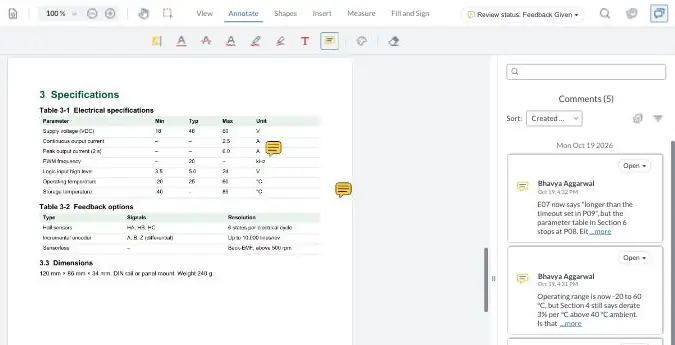
Most of a second round is checking. zipBoard puts the two versions side by side, each with its own comments, so reviewers check only what moved.
Side by side, with each version's comments
Synced scrolling, and on PDFs the text that changed is highlighted.
AI that does the admin
Auto-tagging for files and tasks, AI-suggested task types and AI-suggested statuses.
AI Review
An AI first pass on a PDF, against your own rules. A person accepts or rejects every finding.
How does zipBoard compare with Ziflow, Filestage and PageProof?
All four handle feedback and sign-off well. The differences show up after the comment: finding what's waiting on you, tracking whether feedback was done, and getting the list out.
| What buyers decide on | zipBoard | Ziflow | Filestage | PageProof |
|---|---|---|---|---|
| What's waiting on me, across projects | My Work: needs my review, new version since I reviewed, due soon & overdue | "My pending proofs" and custom view tabs | Project dashboard and notifications | Dashboard inbox of proofs needing my decision |
| Status on each comment | Task statuses you define per project | Resolved / unresolved | Open / done to-do (team only) | Unmarked / to-do / done |
| Comment owner and due date | Yes: owner, priority, due date | Not on comments; Jira or Asana via automation (Pro and up) | No assignee or due date on to-dos | The to-do list goes to one editor |
| Board or table of feedback | Kanban and table, with filters | Comment panel filters | Sort and search per file | Comment filters per proof |
| Export comments | CSV of all, selected or filtered tasks | PDF report; comment CSV for Enterprise admins | PDF review report | PDF print sheet |
| Approval decisions | Required reviewers; Approved / Changes Requested / Feedback Given | 4 decision labels (can be renamed) | In review / Needs changes / Approved | Fixed decisions, incl. approved with changes |
| Multi-stage routing | Stages and boards on Enterprise and custom plans | 1 stage (Free), 2 (Standard), 3 (Pro), unlimited (Enterprise) | 2 reviewer groups on Free and Starter, 3 on Business | Unlimited workflow templates on all plans |
| Compare versions | Side by side with each version's comments; changed text highlighted on PDFs | Side by side, overlay, pixel Auto Compare | Side by side; overlay and text compare | Side by side and smart compare |
| Design-tool plugins | InDesign coming soon | Adobe Creative Cloud; Figma (preview) | Premiere Pro, InDesign, After Effects, Figma | Adobe Creative Cloud, Figma, Canva |
| What else you can review | Live web apps, zipped SCORM/HTML courses, audio | "1,200+ file types", live sites, HTML5 | Office files, sites, HTML, audio | HTML email, sites, Figma, audio |
| Outside reviewers | Unlimited, no account needed | Unlimited | Unlimited, no account needed | Unlimited |
Sources, opened 29 Oct 2026: Ziflow pricing, comment filters, comment export, pending proofs, compare · Filestage pricing, to-do list, integrations · PageProof pricing, comment filters, dashboard. zipBoard: Global Asset View, custom statuses, export. Plans change; check each vendor's page before you decide.
What they do that zipBoard doesn't (yet)
- Ziflow, Filestage and PageProof plug into Adobe Creative Cloud and Figma, so designers send proofs from where they work. zipBoard's InDesign plugin is coming; Figma isn't on it yet.
- Ziflow has pixel-level compare on every plan. zipBoard's image compare is coming soon.
- Ziflow and Filestage include staged routing on lower plans; zipBoard's stages are on Enterprise and custom plans.
- Ziflow and PageProof have review checklists; Filestage and Ziflow offer 21 CFR Part 11 sign-off on Enterprise. zipBoard has neither today.
See the full zipBoard vs Ziflow comparison.
Try it: review a sample proof
Comment on a sample document the way your reviewers would, then compare two versions. Your demo comments are private to this visit.
Coming soon to zipBoard proofing
Image compare
Compare two versions of an image or layout to spot visual changes.
Was it fixed?
AI checks which comments on the last version were addressed in the new one.
InDesign plugin
Send layouts for review and see comments without leaving InDesign.
Online proofing: common questions
What is online proofing software?
One shared place where designs, documents, videos and web pages get reviewed and approved. Reviewers comment on the file itself, every version is kept, and everyone can see who has signed off.
Do clients and reviewers need a zipBoard account?
No. They open a share link and comment in the browser. You can add a password, require sign-in or set an expiry date. Share link options
Do we pay for every reviewer?
No. Reviewers and collaborators are unlimited on every zipBoard plan. See plans
How do I see every proof waiting on me across projects?
Open My Work. It lists what needs your review, new versions since you last reviewed, changes you requested, what you've reviewed, and what is due soon or overdue, across all your projects. Global Asset View lists every file you can access, filtered by type, status, phase or assignment. Find your pending reviews
Can we use our own statuses instead of Approved and Rejected?
Yes, for feedback. Each comment becomes a task, and you set the task statuses per project. Reviewers' sign-off on the file is Approved, Changes Requested or Feedback Given. Custom statuses
Can we export the feedback?
Yes. Export all tasks, a selection, or whatever your filter shows to CSV, or send tasks to Jira or Wrike. Exporting from zipBoard
How do we see what changed between versions?
Upload the new version on the same file and open both side by side, each with its own comments. On PDFs, the text that changed is highlighted. Approvals reset on a new version. Compare documents
Does zipBoard work with Adobe InDesign or Figma?
An InDesign plugin is coming soon. Today, export a PDF or image from your design tool and upload it. There is no Figma plugin yet.
Does zipBoard use AI?
Auto-tagging, AI-suggested task types and AI-suggested statuses are available now. AI Review, an AI first pass on PDFs against your own rules, is in early access; a person accepts or rejects every finding.
How is zipBoard different from Ziflow or Filestage?
All of them handle feedback and sign-off. zipBoard turns each comment into a task with an owner, status and due date, shows each person what's waiting on them across projects, and reviews web apps and courses as well as creative files. Ziflow and Filestage are stronger on design-tool plugins and staged routing on lower plans. zipBoard vs Ziflow
Run your next proofing round in one place
Upload a proof, add the people who must sign off, and send the link.
No credit card needed. Reviewers are always free.