Content approval software that shows who still has to sign off
Approvals stall in email: five threads, three versions, and nobody sure who has said yes. zipBoard keeps the file, every comment and each reviewer's decision in one place, so "is it approved yet?" takes one look.
No credit card needed. Reviewers are always free.
What is content approval software?
Content approval software is one shared place where a draft gets reviewed, changed and signed off before it goes out. It replaces the email chain with three answers anyone can check. Good tools also let people outside your company review from a link, keep every version, and show what changed between rounds.
What slows your approvals down?
The questions teams ask in every round, and how zipBoard answers them.
Required reviewers' statuses sit on the file, and you get an email when one changes.
New versions stack on the same file. Approvals reset, so a yes on v1 never counts for v2.
Open two versions side by side and check only what moved.
Comments become tasks with an owner and a due date, and stay open until they are done.
No. Send a share link and choose whether it needs a password, a sign-in or an expiry date.
Global Asset View shows every file across projects by status. My Work shows what is waiting on you.
Approve every kind of content in one place
The same reviewers, decisions and sign-off for every format your team ships, so you don't run a different tool for each one.
Review a live website the same way as a PDF
Reviewers comment on the live page or a staging link. Each comment captures the screen and browser details, and it lands in the same approval and task flow as your documents.
How does a content approval workflow work in zipBoard?
Seven steps from first draft to a recorded yes.
Upload the draft, name who must sign off, set a due date
- Upload a PDF, image, video, audio file or zipped course, or add a web page URL.
- Add the reviewers who must approve. They are told it's on them.
- Give the file a due date so the round has an end.
Share with outside reviewers and turn comments into work
- Clients, agencies and SMEs review from a link, with no zipBoard account. Add a password, sign-in or expiry date if you need one.
- Each reviewer marks the file Approved, Changes Requested or Feedback Given.
- Comments become tasks with an owner, priority and due date, on a Kanban board or in a table.
Upload the fix and compare it with the last version
- The revision goes on the same file as a new version.
- Reviewers open both versions side by side, with synced scrolling, and check only what changed.
- Earlier approvals reset, so every version gets its own yes.
See what's approved and what's still pending, across every project
Global Asset View lists every file you can access across all your projects. Filter by review status, project, file type or due date to see where every approval stands.
My Work shows what is waiting on you: Needs my review, Changes requested by me, Reviewed, and Due soon & overdue.
Try it: review and approve a sample document
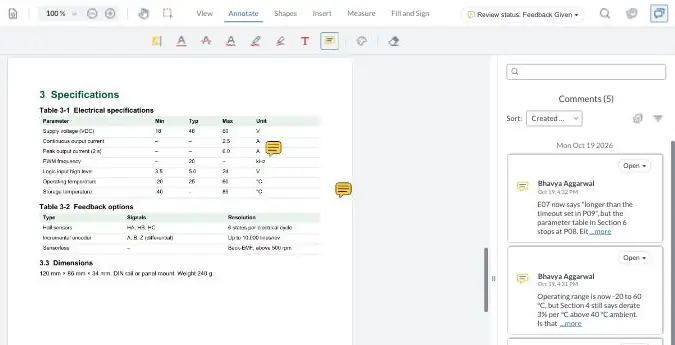
Comment on a sample manual the way your reviewers would, then compare Rev B with Rev C. Your demo comments are private to this visit.
How does zipBoard compare with Filestage and Ziflow?
All three are good at getting feedback and sign-off on files. The differences are in what you review, who pays, and how much routing you need.
| What buyers decide on | zipBoard | Filestage | Ziflow |
|---|---|---|---|
| Built for | Teams that review documents, drawings, courses and web pages, with outside reviewers | Marketing, creative and regulated content teams | Marketing, creative operations, agencies, legal/compliance |
| What you can review | PDFs, images, video, audio, live web pages and apps, zipped SCORM/HTML courses | Word, PowerPoint, Excel, PDF, images, video, audio, websites | "1,200+ file types", including live websites |
| Outside reviewers | Unlimited, from a share link; no account needed (password, sign-in or expiry optional) | Unlimited; "no account needed" | Unlimited reviewers on every plan |
| Who needs a paid seat | Team members who manage projects; reviewers and collaborators are unlimited on every plan (see plans) | Team seats (10 included, more in bundles of 5) | Users (2 on Free, 15 on Standard, 20 on Pro, 25+ Enterprise) |
| Required approvers and decisions | Required reviewers; Approved / Changes Requested / Feedback Given | Review steps, due dates, automated reminders | Approval decisions per stage |
| Approved vs pending, across projects | Global Asset View and My Work, filtered by status | Dashboard of delayed files and missed due dates | Not listed on the pages we checked |
| Multi-stage routing | Stages and boards on Enterprise and custom plans | Workflows and project templates for review steps | Automated stages: 1 (Free), 2 (Standard), 3 (Pro), unlimited (Enterprise) |
| Compare versions | Side by side, synced scrolling | Side by side; overlay and text compare on Business | Side by side and overlay, pixel-level on every plan |
| Comments become tracked tasks | Yes: owner, priority, due date; Kanban and table views | Comments and to-dos per file | Comments and checklists per proof |
| Integrations | Jira, Slack, Microsoft Teams, Outlook, Wrike, Procore, Zapier, API | Slack, Teams, Google Drive; API and webhooks on Business | Adobe Creative Cloud plugin; Asana, monday.com, Slack, Teams, SharePoint on Pro |
| Files on your own servers | PDFs reviewed by URL from your server (how it works) | Germany data residency option (Enterprise) | Not listed |
| SSO | Enterprise (security) | Add-on on Business, included on Enterprise | Enterprise (SAML 2.0, SCIM) |
| Free trial / plan | Free trial | Free plan (1 active project) | Free plan (2 users, 1 stage) |
Sources, opened 27 Oct 2026: Filestage pricing · Filestage features · Ziflow pricing · Ziflow. zipBoard: pricing, compare versions, share links, security. Plans change; check each vendor's page before you decide. See also zipBoard vs Ziflow.
What does a content approval process really cost?
The licence is the small part. The cost is in the round itself.
Working it out for a documentation team? Use the calculator in the real cost of Adobe Acrobat.
Chasing
"Just checking in" emails until the last approver answers. Required reviewers and status emails replace them.
Merging
Feedback from email, PDFs and chat gets pieced together, and some gets lost in translation. One file, one comment list.
Extra rounds
A missed fix sends the file round again. Side-by-side versions and comment tasks catch it in the same round.
Paying for reviewers
Per-user pricing turns every occasional approver into a seat question. In zipBoard, reviewers are unlimited on every plan.
What does zipBoard add to an approval?
One review for every format
Documents, drawings, video, web pages and eLearning courses in the same workflow.
Required reviewers and decisions
See who has approved, who asked for changes, and who hasn't looked.
Comments become tasks
Owner, priority and due date, in Kanban or table view.
@mentions and email alerts
People are notified when they are tagged or a review status changes.
AI that does the admin
Auto-tagging for files and tasks, AI task types and AI-suggested statuses.
Files on your own servers
PDFs reviewed by URL, SSO on Enterprise, questionnaires on request (security).
Works with the tools your team already uses
What Filestage and Ziflow do that zipBoard doesn't
- Ziflow plugs into Adobe Creative Cloud today. zipBoard's InDesign plugin is on the way (see below).
- Ziflow routes a proof through automated stages on every paid plan, and Filestage automates reminders and review steps. zipBoard's stages and boards are on Enterprise and custom plans.
- Filestage reviews Word, PowerPoint and Excel files directly.
- Both offer overlay compare for images and layouts.
What teams say
We now have everything in one place, we track client feedback, we are able to transition client feedback into internal bugs or tasks.
ELM's designers, QA, animators and scriptwriters review every module in zipBoard, and clients review from a link when it's their turn. Read the ELM Learning case study or watch the full session with ELM's Greg Kozera and Beth Epperson.
Rather than write up a small book I can quickly use the provided tools to visually capture the problem and point, encircle, and write a note connected to the needed changes. It has saved us so much time and increased productivity.
How ELM Learning runs course QA and client review in zipBoard (3 min).
Coming soon to zipBoard approvals
AI Review
An AI first pass on a PDF against your own style rules. A person accepts or rejects every finding.
InDesign plugin
Send layouts for review and see comments without leaving InDesign.
AI Compare
A summary of what changed between two versions, and which comments it answers.
Content approval software: common questions
What is a content approval workflow?
The steps a draft goes through before it's published: create, review, revise, approve. A good workflow names who must approve, sets a due date and records each decision, so nobody has to ask where it stands.
Do reviewers need a zipBoard account?
No. Outside reviewers open a share link and comment in the browser. You can add a password, require sign-in or set an expiry date. Share link options
Do we pay for every reviewer?
No. Reviewers and collaborators are unlimited on every zipBoard plan. See plans
How do I see what's approved and what's still pending?
Required reviewers' statuses show on each file (Approved, Changes Requested, Feedback Given), and you get an email when one changes. Global Asset View lists every file across your projects by status, and My Work shows what is waiting on you. Track pending reviews
What happens to approvals when I upload a new version?
They reset, so an approval on version 1 never counts for version 2. Reviewers can compare the two versions side by side before approving again.
What content can we approve in zipBoard?
PDFs and documents, drawings, images and designs, video, audio, live web pages and apps, and zipped SCORM/HTML eLearning courses. Supported content types
Which tools does zipBoard integrate with?
Jira, Slack, Microsoft Teams, Outlook, Wrike, Procore and Zapier, plus an API for custom integrations. All integrations
Does zipBoard use AI?
Auto-tagging for files and tasks, AI-powered task types and AI-suggested project statuses are available now. AI Review, an AI first pass on PDFs against your own style rules, is in early access; a person accepts or rejects every finding.
Can our files stay on our own servers?
PDFs can be reviewed by URL from your own server. Hosting, SSO and data details are on zipBoard's security page. Security at zipBoard
How is zipBoard different from Filestage or Ziflow?
All three handle feedback and sign-off. zipBoard covers documents, drawings, web pages and eLearning as well as marketing files, turns comments into tracked tasks, and doesn't charge for reviewers. Ziflow is built mainly for creative proofing teams working in Adobe apps, Filestage mainly for marketing teams.
Get your next approval out of the inbox
Upload one file, add the people who must sign off, and send the link.
No credit card needed. Reviewers are always free.