Beyond the Spreadsheet: The Complete E-Learning Review and Approval Process
17 Jun

Table of Contents
ToggleWhat is an E-Learning Review Tool?
An e-learning review tool is a specialized software application designed to streamline the online training review process by centralizing communication between instructional designers, developers, and Subject Matter Experts (SMEs).
Unlike standard project management software, dedicated e-learning collaboration tools support interactive SCORM review, slide-specific bug tracking, and multimedia proofing. Implementing a structured document review and approval framework ensures that preliminary narrative drafts transition smoothly into final technical QA and LMS deployment.
Building high-impact digital learning isn’t just an asset creation challenge—it’s a logistics challenge. When a single course requires input from IDs, graphic artists, voice talent, compliance officers, and busy external stakeholders, communication gaps are inevitable.
While most teams focus heavily on the final build, project velocity is often bottlenecked much earlier by an unmanaged documentation approval workflow during the narrative, script, and storyboarding phases.
To achieve rapid, repeatable output, modern teams must look beyond generic task managers. They need an integrated ecosystem that functions as both a rigorous elearning project management tool and a precise e-learning review tool.
This guide provides a step-by-step structural framework to engineer your internal processes, eliminate review loops, and empower every elearning expert on your team to execute flawless compliance checks.
TL;DR
Selecting the right e-learning approval software requires balancing detailed technical bug tracking (for developers) with an intuitive, frictionless interface (for non-technical Subject Matter Experts).
Evaluate platforms across four core criteria:
Technical Versatility: Ability to natively play back compressed SCORM/HTML5 packages and map visual canvas coordinates.
User Experience: Zero-barrier guest access via secure links and simple visual annotation tools.
Workflow Automation: Conditional task routing and granular issue triaging (tracking statuses like “Open” to “Resolved”).
Compliance & Auditing: Linear version stacking to preserve historical context and timestamped audit trails for regulatory checks.
The Ideal Standard: zipBoard satisfies both sides of this equation by combining precise, slide-specific QA tracking for development teams with seamless, account-free review environments for external stakeholders—eliminating scattered spreadsheets and email loops.
The Core Pillars of Modern E-Learning Collaboration
Successful elearning development relies on keeping three distinct pillars aligned:
- Instructional Designers Collaboration: This bridges the gap between the initial pedagogical architecture and raw development. IDs must pass off vision documents, storyboards, and wireframes to development teams without losing crucial context.
- SME Content Approval & Alignment: Managing the friction of expert reviews without overwhelming busy stakeholders is critical. Teams must define the exact operational boundaries in the product lifecycle where initial text-based document review and approval ends (locking scripts, storyboards, and asset blueprints) and active interactive course assembly begins.
- Course Development Collaboration: This keeps cross-functional asset creators (animation teams, audio engineers, UI designers) perfectly synchronized with software developers using a robust multimedia review tool.
Common E-Learning Review Challenges
Without a dedicated instructional design review tool, teams default to manual methods that cause major operational friction:
- Feedback buried in email chains: Critical feedback gets lost in cluttered inboxes.
- SME feedback overload: Subject matter experts providing conflicting or unvetted changes late in the cycle.
- Multiple file versions: Disorganized naming conventions (e.g., Course_v2_FINAL_revised.zip) leading to confusion.
- Conflicting comments: Developers receiving clashing directions from different stakeholders on the exact same slide.
- Tracking approvals manually: No clear paper trail showing who signed off on what version.
- Reviewing SCORM packages blind: Trying to capture feedback on dynamic, interactive elements using static screenshots.
Stages of an Approval Workflow in E-Learning Review

A high-velocity online course review tool should guide your project through four distinct, linear gates:
Phase 1: Storyboard & Script Validation
Securing absolute sign-off on text, narrative flow, and legal compliance before a single line of code is written or an asset is rendered. This is where instructional design collaboration and initial content approval workflow steps take place.
Phase 2: Alpha Build Evaluation
Deploying the first functional structural prototypes into an e-learning collaboration tool to test UX mechanics, branching logic, and primary visual layouts.
Phase 3: Deep Technical Bug Tracking
Transitioning the course into a strict functionality sandbox. This phase utilizes instructional design review frameworks to stress-test variables, interactive triggers, and tracking parameters across various devices.
Phase 4: Final Sign-off & LMS Verification
The final compliance gateway. This step ensures the production-ready package functions perfectly within the targeted host learning management system (LMS) environment.
Why SCORM Courses Need Specialized Review Software
Standard web proofing tools cannot read a compressed SCORM package. A dedicated SCORM review tool or SCORM feedback tool unpacks the zip file, maps the internal manifest architecture, and allows reviewers to leave comments directly on interactive elements. Without this, tracking variables, scored quizzes, and slide-state bugs becomes nearly impossible.
Why Teams Outgrow Articulate Review
For teams embedded in the Articulate ecosystem, Articulate Review is a common starting point.
Articulate Review is excellent for:
- Storyline courses.
- Rise 360 micro-learning components.
- Handling basic, internal team-only review loops.
However, as elearning development scales to include diverse multimedia and complex stakeholder review process steps, teams frequently outgrow its limitations. The following matrix contrasts Articulate Review with a dedicated, end-to-end platform like zipBoard:
| Feature / Capability | Articulate Review | zipBoard (Dedicated Platform) |
|---|---|---|
| Supported File Formats | Limited to Articulate ecosystem files | Broad: SCORM, HTML5, PDF, Video, Images, live URLs |
| Reviewer Account Rules | Often requires reviewer accounts/logins | Seamless: Guest reviewer access via easy share links & customizable no-login links |
| Review Scope Focus | Course-focused (individual file review) | Entire project review lifecycle management |
| Workflow Management | Basic comment feed | Advanced: Customizable course approval workflows |
| Asset Management | Single file tracking | Multi-asset storage and tracking |
| Primary System Use Cases | Primarily basic review markup | Comprehensive: Review + issue tracking + project management |
The Technical Side: E-Learning QA & Bug Tracking
Why Traditional IT Bug Trackers Fail
Engineering software bug trackers (like Jira or GitHub Issues) are built for linear code deployments. They fail to interpret slide-specific feedback, layered canvas annotations, or the zipped package structures unique to digital learning. An eLearning review software maps comments to specific coordinates on a specific slide state, giving developers exact visual context.
SCORM QA Tool Essentials
A comprehensive SCORM QA and SCORM testing regimen requires a SCORM review process that verifies tracking data. Your tool must track:
- Completion Statuses: Ensuring the course triggers a “Complete” or “Passed” status in the LMS.
- Scoring Variables: Verifying that quiz results map accurately to the data payload.
- Bookmarking Mechanics: Ensuring a learner can exit the course and resume at the exact same location across diverse browser profiles.
E-Learning Version Control
Without a clear e-learning version control framework, teams run the constant risk of overwriting files, re-introducing fixed bugs, or chasing dead feedback threads. A modern course review software automatically stacks revisions linearly, locking down past versions while porting unresolved issues over to the new build.
Key Features to Look For in an E-Learning Review Tool
Who Uses an E-Learning Review Tool?
- Instructional Designers: To conduct instruction design feedback checks against the initial script.
- eLearning Developers: To receive, log, and resolve visual and technical bugs.
- SMEs (Subject Matter Experts): To review text accuracy, compliance guidelines, and domain facts.
- Compliance Teams: To verify regulatory boxes are checked and archive audit trails.
- Learning Managers: To track overall project velocity and launch deadlines.
Manual Bottlenecks vs. Automated Progressions
Manual workflows relying on scattered spreadsheets and long email strings degrade data integrity. Centralized tracking automation ensures every bug is captured, assigned, and cleared systematically.
| Feature Context: Approval Workflow Software | Strategic Value for E-Learning Teams |
|---|---|
| In-Context Commenting | Eliminates ambiguity by allowing reviewers to drop clear markers exactly where structural or textual errors occur on live interactive slides. |
| SCORM/HTML5 Native Environments | Functions as a dedicated SCORM review workspace, enabling testing of interactive variables directly inside the review environment. |
| Frame-Accurate Video Proofing | Enables multimedia specialists to leave timestamped, precise feedback on video assets, transitions, and audio cues. |
| Zero-Barrier Guest Access | Allows external stakeholders and busy executives to approve assets instantly without forcing them through complex platform onboarding. |
How to Build a Document Approval Process for E-Learning Assets

Step 1: Standardize Input and Intake Formats
Build unified, immutable storyboard frameworks. This ensures IDs and writing teams deliver structured data to reviewers, protecting the foundational e-learning design before development starts.
Step 2: Automate Status Transitions
Leverage specialized approval workflow software to instantly route documents to the next structural gatekeeper (e.g., moving from ID review to SME review) the moment a previous milestone is marked complete.
Step 3: Centralize and Stack Version Histories
Maintain an unalterable audit trail. Ensure historical compliance comments, design iterations, and past document drafts are permanently stored, archived, and searchable.
Step 4: Establish Formal Authorization Gates
Clearly define who owns ultimate sign-off authority to transition an asset from a raw draft to an “approved for production” status. This prevents scope creep and late-stage re-writes.
Selecting the Right E-learning Review Tool for Your Team
The Evaluation Criteria
When selecting an approval workflow software, the primary challenge lies in bridging a technical divide. You must balance the highly detailed e-learning bug tracking capabilities needed by developers with an intuitive, clean interface required by non-technical business units for SME review e-learning loops.
To choose a platform that satisfies both cohorts without causing operational friction, evaluate your options against these four core structural dimensions:
Versatility
& Accessibility
Automation
& Version Controls
The Evaluation Criteria
When selecting an approval workflow software, the primary challenge lies in bridging a technical divide. You must balance the highly detailed e-learning bug tracking capabilities needed by developers with an intuitive, clean interface required by non-technical business units for SME review e-learning loops.
To choose a platform that satisfies both cohorts without causing operational friction, evaluate your options against these four core structural dimensions:
1. Technical Versatility & Asset Parsing
A baseline project management tool treats every upload as a static file. True eLearning review software must be context-aware.
- Dynamic Package Playback: The tool must natively render and play back compressed zip files without requiring manual decompression. It should serve as a live SCORM testing sandbox that mimics how the course will behave on a production LMS.
- Canvas Coordinate Mapping: Instead of generic text logs, the platform must capture the exact slide state, layer configurations, and pixel coordinates when a user submits a bug.
2. User Experience & Accessibility for Non-Technical Reviewers
If a tool requires extensive onboarding, your stakeholder review process will break down. Subject Matter Experts and compliance executives are busy; they will default back to email or screenshots if the software presents a steep learning curve.
- Zero-Barrier Guest Access: Look for platforms that allow stakeholders to review courses via secure sharelinks or single-click invitations. Reviewers should be able to log in, view the media, and drop comments instantly without creating a password or navigating a complex dashboard.
- Visual Annotation Toolkit: The interface should offer familiar, point-and-click drawing tools—such as rectangles, arrows, and freehand brushes—allowing non-technical users to explicitly show what needs to change without needing to learn technical QA terminology.
3. Workflow Automation & Status Progression
An efficient content approval workflow does not rely on human memory to pass the baton between production phases. The software should act as an automated traffic controller for your assets.
- Conditional Routing: When an instructional designer approves a storyboard, the platform should automatically update the project status, lock down that version, and ping the multimedia team that the asset is ready for development.
- Granular Issue Triaging: The system must allow developers to filter feedback by severity (e.g., critical functional blocker vs. minor cosmetic typo), assign tasks to specific creators, and track clear “Open,” “In-Progress,” and “Resolved” statuses.
4. Compliance Auditing & Version Controls
For teams building highly regulated training, accountability is just as important as speed. Your platform must maintain an unalterable historical ledger of the entire eLearning review process.
- Linear Version Stacking: When an updated course build is uploaded, the platform should stack it directly on top of the previous iteration. This preserves all historical comments, attachments, and resolution signatures underneath, preventing the loss of historical context.
- Timestamped Audit Trails: Every sign-off, comment, and status change must generate a permanent, timestamped record detailing exactly who authorized a change and when. This is critical for defending design decisions during internal or external regulatory compliance audits.
Why zipBoard Excels as the Ideal E-Learning Review Solution
When measured against these rigorous operational criteria, zipBoard emerges as the ideal solution that bridges the gap between production and review teams. Unlike generic task managers or restricted ecosystem plugins, zipBoard is purpose-built to handle complex digital learning assets. It provides developers with the deep, pixel-accurate e-learning bug tracking data they need to fix interactive layout errors, while maintaining a frictionless, zero-onboarding guest environment for SMEs. By centralizing SCORM testing, video proofing, and document tracking within a single interface, zipBoard eliminates the fragmented spreadsheets and email chains that bottleneck traditional courses—acting as the complete, unified engine for modern instructional design collaboration.
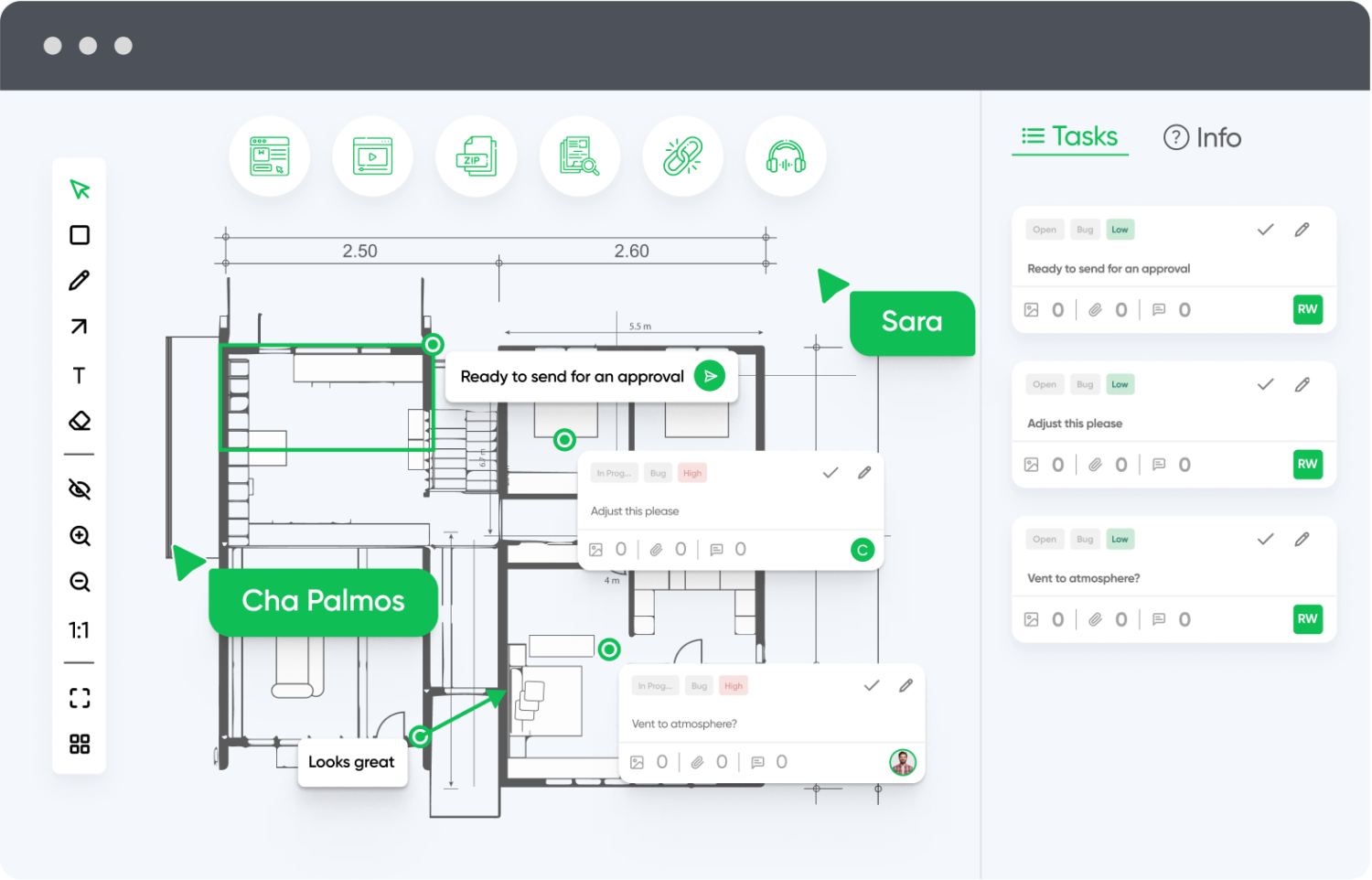
Customizable Workflows
Adapt zipBoard to your team’s review process, not the other way around. From simple two-step approvals to multi-phase stakeholder workflows, zipBoard flexibly supports your content lifecycle.
Enterprise-Grade Security and Permissions
With granular access controls, audit trails, and compliance features, zipBoard is built to protect sensitive content while ensuring only the right people can view, comment, or approve.
Visual Context Reduces Miscommunication
Markup tools allow teams to leave feedback directly on the content—not in separate threads—making feedback clearer, faster, and far less prone to misinterpretation.
Cross-Browser & Device Testing
Review web content and applications in multiple browsers and devices from one platform. Ideal for teams working on responsive or cross-platform experiences.
Built-In Task Management
Convert comments into actionable tasks, assign them to team members, and track progress without switching platforms. Priorities and deadlines help keep reviews on schedule.
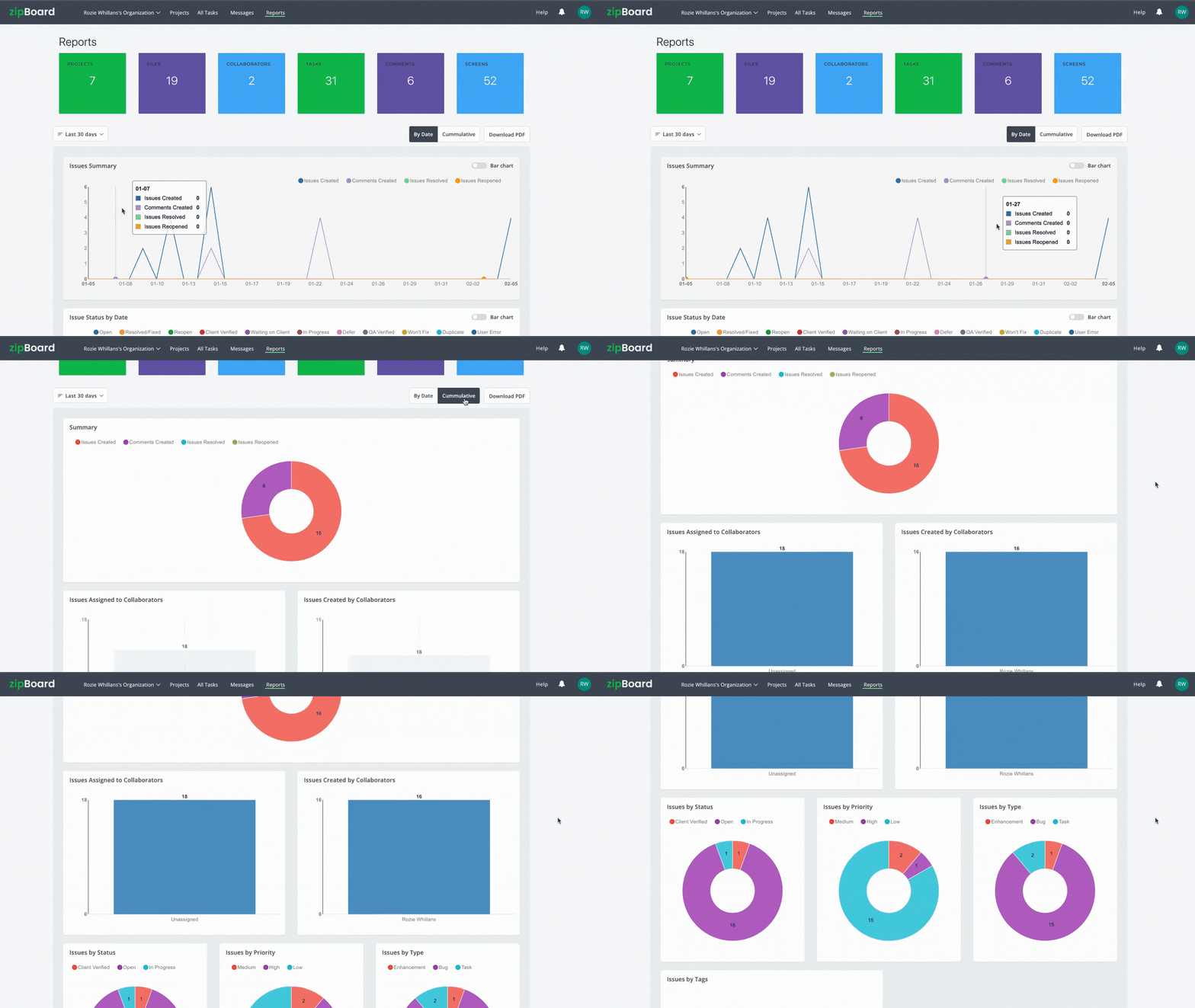
Reporting & Analytics
Use built-in dashboards to analyze feedback trends, identify bottlenecks, and improve processes over time with data-driven insights.
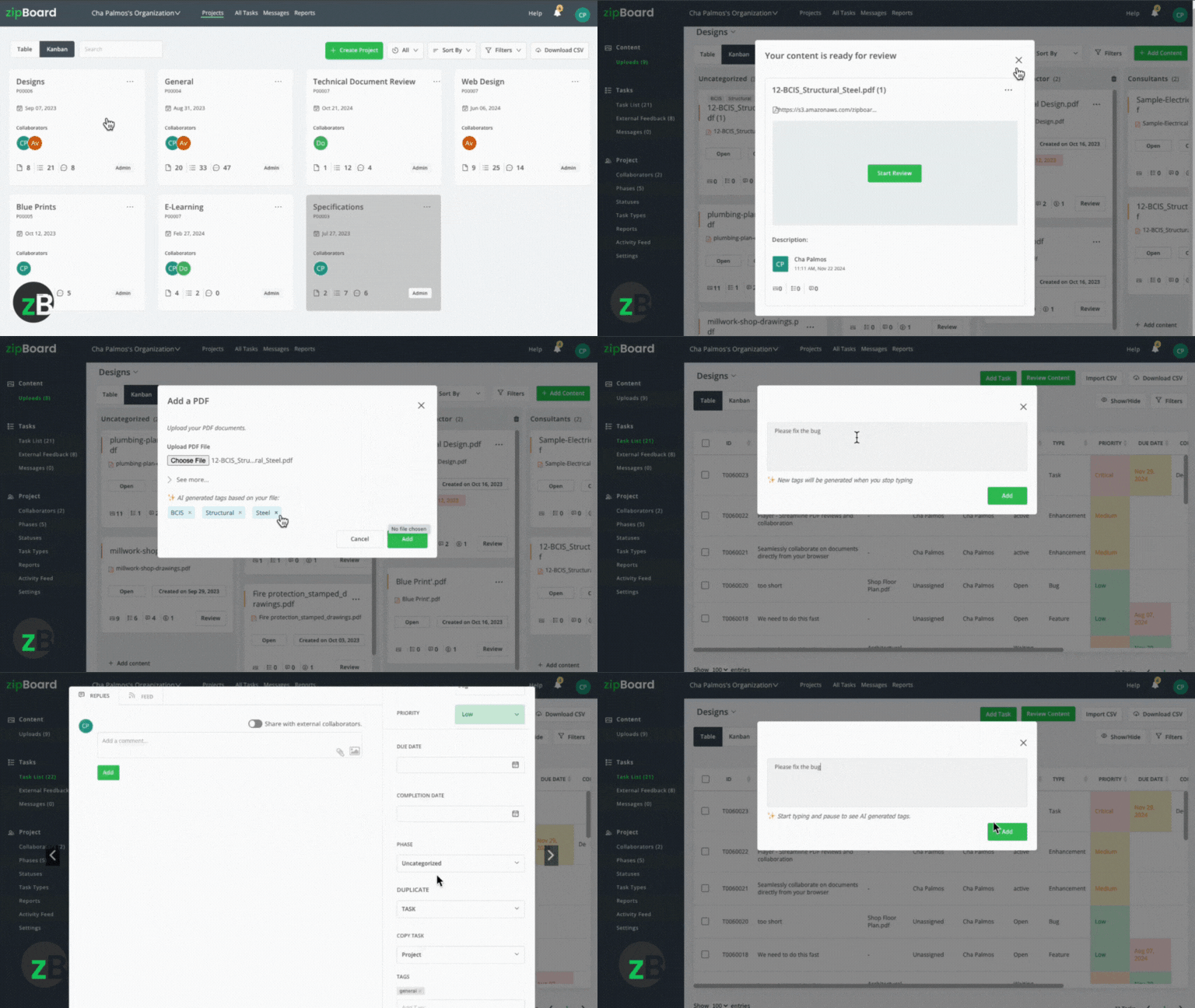
AI-Enhanced Feedback
Leverage AI features to automatically categorize feedback, highlight potential issues, and streamline review cycles through smart suggestions.
API & SSO Support
Need custom integrations? zipBoard’s API and single sign-on (SSO) features make it easy to connect securely with your existing systems.
Frequently Asked Questions
A reliable elearning approval process must mandate immutable, timestamped change records and multi-factor sign-off authorization. This ensures your project can survive rigorous internal and external compliance audits.
Build a clear escalation path into your course approval workflow. Designate a single lead performing instructional design management to act as the clearinghouse—consolidating, sorting, and resolving clashing feedback before it ever reaches the development team.
Generic project management tools track tasks and deadlines (e.g., “Complete Module 1”). An e-learning feedback tool tracks contextual, slide-specific asset changes, allowing users to leave annotations directly on interactive SCORM files, video timelines, and live learning environments.
Version control is managed by using an ecosystem that treats revisions as linear layers. Instead of creating new files, new iterations are uploaded on top of the original asset, preserving the complete history of comments and resolutions underneath.
Use an online course review tool that supports zero-barrier guest access. This allows your busy SMEs to click a secure link, view the course in their browser, and point-and-click directly on the slide to leave feedback without creating an account.
Use a platform with a native SCORM review workflow. This allows reviewers to play through the course in real time, record accurate slide coordinates, log canvas annotations, and test system variables simultaneously within a unified environment.
Conclusion
Achieving high-velocity elearning development isn’t about rushing the creative process—it’s about removing structural friction from your online training review process. When teams rely on fragmented spreadsheets, generic task managers, or isolated email chains, critical contextual feedback is inevitably lost, leading to endless revision loops and delayed launch timelines.
To protect both your timeline and your learning architecture, your team needs an environment that bridges the gap between technical production and stakeholder sign-off. The most effective way to secure this alignment is to use a platform with a native SCORM review workflow. This allows reviewers to play through the course in real time, record accurate slide coordinates, log canvas annotations, and test system variables simultaneously within a unified environment.
By choosing a dedicated, purpose-built platform like zipBoard, you eliminate the technical barriers for your Subject Matter Experts while giving your developers the precise, actionable bug tracking data they need. Stop wrestling with manual feedback tracking—centralize your QA pipeline, streamline your approvals, and ship flawless learning experiences on time.



Recent Posts
- 7 Best Fieldwire Alternatives for Construction Teams September 29, 2026
- How to Track Content Approvals Across Multiple Projects (Without Missing One) September 25, 2026
- How to Compare Two PDF Versions Without Losing Track of Changes September 1, 2026
- Why IT Teams Are Getting Out of the PDF Review Server Business August 20, 2026
- The Real Cost of Adobe Acrobat for Documentation Teams August 19, 2026
©️ Copyright 2026 zipBoard Tech. All rights reserved.