11 Nov
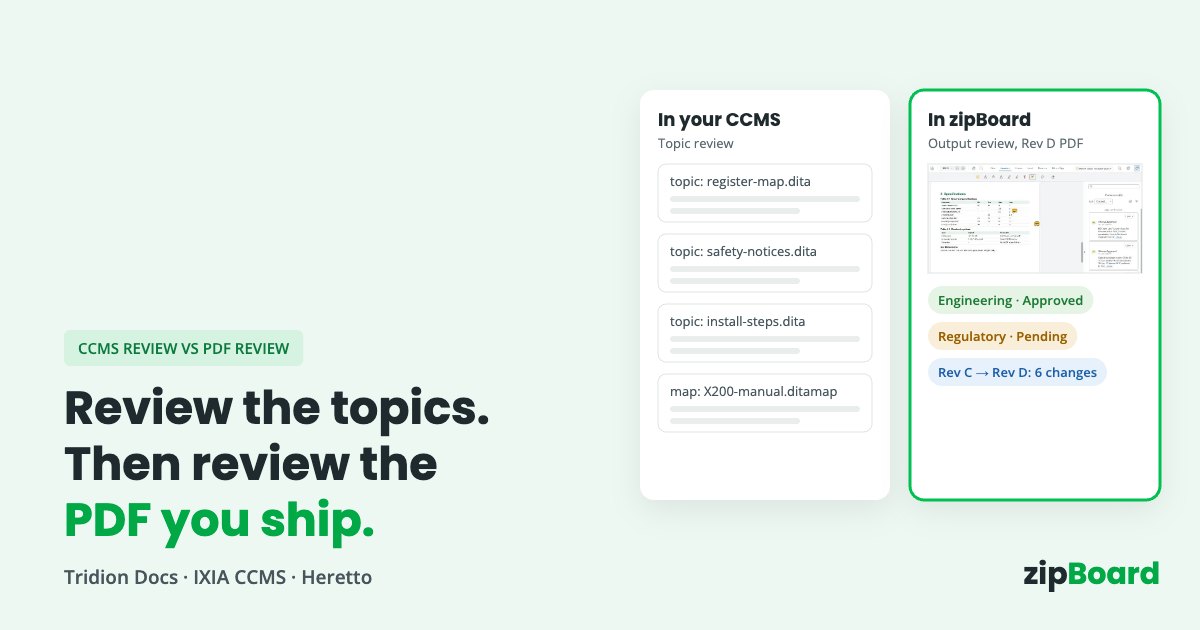
Your CCMS has a review tool, yet the engineers still send comments on the PDF, by email, a week late. Topic review in the CCMS and review of the published PDF answer different questions, and most hardware doc teams need both.
No credit card needed. Reviewers are always free.
The short answer: keep content review in your CCMS. Tridion Docs, MadCap IXIA CCMS and Heretto all let reviewers comment on DITA topics, and all three compare revisions of the source. Add a review of the published output (the PDF, or the HTML page in your help portal) when you need to check the deliverable itself (layout, tables, conditional content as it was resolved, page-level details), when reviewers will never work inside the CCMS, or when the document you release isn’t only DITA. That step should be short: only the reviewers who sign off on the output, only on the release candidate, with a decision per reviewer per revision.
What does your CCMS review already do well?
More than many teams use. Before adding a tool, check what you have:
- Comments on the source, where writers work. Reviewers comment or suggest changes on topics, and writers accept or reject them without retyping anything from a PDF.
- Review of a whole map. All three send a map, or a publication, to review rather than topic by topic.
- Source compare. All three show what changed between revisions of a topic.
- Workflow states and approval. IXIA has an Approvals step after review; Heretto supports workflow steps including an e-signature step on Enterprise; Tridion Docs moves content through configurable statuses such as Draft and To be reviewed.
If your reviewers are writers, information architects and engineers who already sign in to the CCMS, and the output is generated straight from the map, you may not need anything else.
When does a PDF review step still matter?
Four situations come up again and again with hardware, semiconductor and medical-device doc teams:
The question is about the rendered output, the way readers will see it. Did the register table break across pages? Are the figure callouts on the right page? Did the right conditional content resolve for this product variant? Are the revision history, the headers and the legal page right? You can only answer these on the output: the PDF as published, or the HTML page as it appears in your help portal.
Reviewers won’t work in the CCMS. Product managers, field application engineers, regulatory, legal, partners and customers review a few documents a year. Getting each one a login, a role and training costs more than their review. They will review a PDF, though, usually by email.
The release isn’t only DITA. A datasheet or a manual often ships with a cover, marketing pages, a compliance insert or an appendix from another team. The CCMS review sees only its part.
Sign-off belongs to the exact file you ship. Release approvers and auditors ask “who approved Rev D of the PDF?”, not “who approved topic 4.2 on Tuesday?”. The record has to point at the deliverable.
None of these is a failure of the CCMS. Topic review and output review answer different questions.
How do Tridion Docs, IXIA CCMS and Heretto handle review?
Based on each vendor’s own documentation. Where their pages don’t say, the table says “not stated”.
| What you’re deciding on | RWS Tridion Docs | MadCap IXIA CCMS | Heretto CCMS | zipBoard (PDF review layer) |
|---|---|---|---|---|
| Where reviewers comment | Review Space: annotations on DITA content in the context of a publication | Collaborative Review: annotations on all topics in a map | Comments and suggestions on topics in the Content Editor, grouped in a Review tab | On the rendered PDF (or Word, image, web page), pinned to the spot |
| Comment on the PDF output | Not stated in the Review Space docs | A PDF can be generated for reviewers to download; comments are made on the DITA content | Not stated; PDF publishing can show suggestions highlighted | Yes |
| Reviewers outside the CCMS | A Reviewer user role exists; licensing for it not stated | A Reviewers licence type exists alongside Advanced Users and Contributors; price not published | A Reviewer role exists (view, suggest, comment); licensing for it not stated | Comment from a share link in the browser; reviewers and collaborators unlimited on every plan |
| Compare revisions | Compare the current revision with past revisions in Draft Space (“Show changes”) | Compare any two revisions of a map or topic; redline in a review | Compare file revisions; added and removed text highlighted | Compare two PDF versions side by side, changed text highlighted, each version’s comments in its own pane |
| Approval / sign-off | Configurable statuses (Draft and Released types); annotation statuses | Approvals after review; Approved only if all assigned users approve; a reason is required to reject | Workflow steps; custom workflows and e-signature step on Enterprise | Required reviewers with due dates; a decision per reviewer per version |
| Where comments end up | In the CCMS, on the content | In the CCMS, on the content | In the CCMS, on the content | In zipBoard, on the PDF; the writer applies them in the source |
| Published pricing / trial | Contact RWS; no trial listed | Contact sales; demo offered | Request a demo; no prices listed | Free trial; see plans |
Sources: Tridion Docs Review Space, comparing revisions, workflow settings, product page. IXIA CCMS Collaborative Review, creating a review, comparing revisions, Approvals, pricing. Heretto comments and suggestions, user roles, file history, assignment workflows, pricing. Features and plans change; check the vendor’s current documentation.
What does a review cycle cost when the PDF step is informal?
Rarely the licence. The cost is in the work around it:
- Collecting. Someone gathers comments from five Acrobat copies and three email threads, and asks the two reviewers who didn’t reply.
- Reconciling. Two engineers disagree on the same table in different files, and nobody sees it until the writer merges them.
- Re-reading. When Rev D comes out, reviewers read the whole PDF again because nobody told them what changed.
- Proving it. Before release, the doc manager rebuilds who approved what from the inbox.
Count those hours for one release. For most teams they are larger than any seat cost, on either side.
How do you add a PDF step without a second review?
- Keep content review in the CCMS. Writers, IAs and engineers who already work there stay there.
- Review the output once, on the release candidate. Publish the PDF from the CCMS, and send it only to the people who sign off on the deliverable: the release approver, safety or regulatory, outside reviewers, and anyone checking layout.
- Give each output reviewer a job. Layout and pagination, compliance pages, or the parts their team owns. Not a full re-read.
- Show what changed. On the next revision, reviewers compare the two PDFs instead of re-reading.
- Write comments back once. The writer applies output comments in the source, so the CCMS stays the single source.
Where zipBoard fits alongside your CCMS
zipBoard is a review layer on the PDF or HTML you already publish from Tridion Docs, IXIA CCMS, Heretto, AEM Guides or an Oxygen and DITA-OT pipeline. It doesn’t replace your CCMS or its review.
- Reviewers comment from a link. No CCMS seat or Acrobat licence needed; reviewers and collaborators are unlimited on every plan.
- Comments become tasks. Tag and assign comments, and send them to Jira if that’s where engineering tracks changes.
- A record per revision. Download the marked-up PDF, keep each reviewer’s decision per version, and export comments as a comment resolution sheet (CSV export is on Enterprise and custom plans).
- Files that must stay inside. Your system can add PDFs by URL, so documents stay on your own servers: how it works.
One place to see what’s pending and what’s due
Once a revision is out, the review owner’s job is mostly chasing. zipBoard puts that on one screen instead of an inbox.
- Every review, across projects. All Assets lists every document with its review status, reviewers and due date. Filter by project or status and sort by due date.
- Your own queue. My Work shows what needs your review, including new versions of files you’ve already reviewed.
- Due dates that stand out. Due dates change colour as they get close and once they’re overdue.
- Required reviewers. A file stays in each required reviewer’s list until they decide: Approved, Changes Requested, Feedback Given or Review Complete.
- Who has opened it. Each reviewer shows when the file was sent to them and when they saw it, so you know who to nudge. The owner gets an email when a reviewer changes their status.
Compare, Check and Verify with Orbit
Three checks for every round after the first, built into zipBoard’s PDF viewer.
What changed between versions? Rev C and Rev D side by side: changed text highlighted, every text change in the Change List, each version’s comments in its own pane, and approvals reset so reviewers decide again.
Orbit Check takes an AI first pass on a PDF against a standard editorial check or your own rules, such as your terminology. A person accepts each finding as a task or dismisses it. In beta on paid plans.
Ask about early accessWas everything fixed? Flags which of last round’s comments look resolved in the new revision and which don’t. A person still confirms each one.
Get a previewWhat about HTML output and knowledge bases?
Many documentation and knowledge management teams publish to an HTML help portal or knowledge base as well as, or instead of, PDF. The rule is the same: review the page the way readers will see it.
- Review the live page. Add the published or staging URL. Reviewers comment and annotate on the page itself, and can attach screenshots or a screen recording.
- Same follow-through. Comments become tasks with owners, priorities and statuses, tracked alongside your PDF reviews.
- Know the limits. Web pages can be compared side by side, but highlighted text changes, per-version comments and Orbit Check work on PDFs today.
Try it on a sample manual
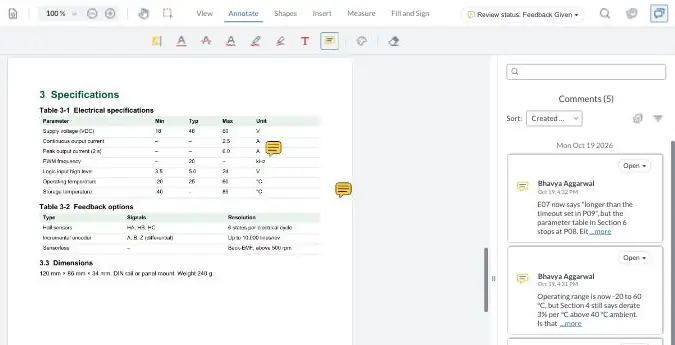
A live review of a fictional product manual, the same view your reviewers get from a link. Click a pinned comment or add one to the specifications table.
Your demo comments are private to this visit.
What does your CCMS do that zipBoard doesn’t?
- Comments on the source. CCMS review comments and suggestions land on the topic, and writers accept them in place. zipBoard comments stay on the PDF; a writer applies them in the source.
- Topic-level reuse. A CCMS review of a shared topic covers every deliverable that uses it. A PDF review covers one deliverable.
- Authoring, translation and publishing. zipBoard does none of these.
- Validated e-signatures. IXIA describes controls for 21 CFR Part 11 compliant systems, and Heretto offers an e-signature workflow step on Enterprise. zipBoard records reviewer decisions but isn’t a validated e-signature system.
When shouldn’t you add a PDF review step?
- Every reviewer already works in the CCMS and nobody signs off on the deliverable as a file.
- Your output is HTML only and reviewers already comment in your portal’s own feedback tool.
- Your regulated approval must sit in the CCMS or eQMS with a validated signature. Use the PDF step, if at all, only for the review before it.
- Existing comments in Acrobat files need to move across. Comments already in a PDF don’t convert into zipBoard comments, so start with the next revision.
CCMS review and PDF review: common questions
Does Heretto, IXIA CCMS or Tridion Docs have built-in review?
Yes. Tridion Docs has Review Space, IXIA CCMS has Collaborative Review and Approvals, and Heretto has assignments with comments and suggestions in the Content Editor. All three review DITA content, not the PDF output.
Why review the PDF if we already review topics?
Because some questions only exist on the deliverable: page breaks in tables, resolved conditional content, figure placement, legal and revision pages, and content that didn’t come from the CCMS. The release sign-off also belongs to the file you ship.
Do reviewers need a CCMS licence?
Each vendor has a reviewer role or licence type; whether it is paid isn’t stated on the pages we opened, so ask your vendor. In zipBoard, share-link reviewers comment without signing up, and reviewers and collaborators are unlimited on every plan.
Will PDF comments write back into our DITA source?
No. zipBoard comments stay on the PDF, organized by page and status. The writer applies each change in the source and publishes the next revision.
How do reviewers see what changed between revisions of the PDF?
Upload the new PDF as a new version. Reviewers compare it side by side with the previous version, with changed text highlighted and every text change in the Change List, and record a new decision.
Can we check that every comment was fixed in the new revision?
Yes. In the compare view each version keeps its own comments, so reviewers check last round’s comments against the new text and resolve them. Orbit Verify, an AI check that flags which comments look fixed, is coming soon.
Can we see what’s pending, and who has opened the document?
Yes. All Assets and My Work show every document in review across projects with its status and due date. On each document, every reviewer shows when it was sent to them and when they saw it, and the owner gets an email when a reviewer changes their status.
Can reviewers comment on our HTML help output, not just the PDF?
Yes. Add the published or staging page by URL and reviewers comment on it as a live web page. See how website review works.
Can our documents stay on our own servers?
Yes. Your system can add PDFs by URL, so the file stays where it is, and there are enterprise hosting options.
Won’t a second review step slow the release down?
Only if it repeats the first one. Keep it to the release candidate and the people who sign off on the deliverable, give each a job, and use compare for later revisions.
Why does our Adobe shared review keep breaking?
Usually the review server, sign-in or comment sync after a Windows, Edge or Acrobat update. See Adobe shared review not working.
Review the PDF you ship, not just the topics
One link per reviewer, a decision per revision, and a clear answer to “what changed since the last PDF?”, alongside the CCMS you already have.
No credit card needed. Reviewers are always free.
Related: Adobe shared review not working · Technical document review software for SME sign-off · Compare documents side by side · Adobe PDF alternative for PDF collaboration · Get SMEs to review technical docs on time · Running technical documentation reviews with many SMEs