User-Friendly E-Learning Review Tools: Trends for Teams in 2026
20 Feb
Table of Contents
ToggleFor remote L&D teams, reviewing e-learning content has become one of the most frustrating bottlenecks in the development process. A 2025 study found that 67% of instructional designers cite the review and approval phase as their biggest source of project delays (Training Industry, 2025). The problem isn’t the content itself, it’s the chaos of coordinating feedback across time zones, tools, and stakeholders who may never meet face-to-face.
That is why the right e-learning review tools can completely transform how remote teams collaborate. Purpose-built platforms eliminate the scattered feedback and version confusion that plague traditional review processes. They bring clarity, speed, and accountability to a phase that often feels unmanageable.
In this blog, we’ll explore the trends reshaping e-learning development in 2026, the unique challenges remote teams face, and the features you should look for in a review tool. We’ll also show you how zipBoard, a leading digital asset review platform, helps distributed teams streamline their e-learning review workflows without the friction.
TL;DR
In 2026, the volume and complexity of e-learning—driven by AI-generated content and immersive VR/AR—have made traditional review methods like email obsolete. For remote teams, the bottleneck is often the “chaos of coordination.”
The solution? Purpose-built tools like zipBoard that allow for:
Frictionless Feedback: No-signup reviewer access so SMEs can comment via a simple link.
Visual Clarity: Direct annotation on SCORM, HTML5, and Video content.
Centralized Truth: A single platform for version control and task tracking.
E-Learning Industry Trends Shaping 2026

The e-learning landscape has evolved dramatically, and with it, the demands on review processes have intensified. Understanding these trends is essential for choosing tools that will serve your team today and scale with you tomorrow.
AI-Powered Content Creation at Scale
Generative AI has fundamentally changed how quickly e-learning content can be produced. According to the LinkedIn 2025 Workplace Learning Report, over 70% of L&D teams are now integrating AI into their workflows.
While AI enables faster production, it requires stricter human oversight to ensure accuracy. To manage this volume, teams are turning to platforms that streamline project workflows with enhanced AI-powered task management.
Rise of Immersive and Interactive Learning
The demand for VR, AR, and simulation-based training is projected to reach $28.5 billion by 2026. Interactive content can’t be effectively reviewed in a static PDF; reviewers need to experience branching paths and test decision points. This shift requires specialized collaborative review in UI/UX development that renders complex content natively.
The Complexity of Remote Collaboration
As teams become more distributed, the “asynchronous” nature of work becomes the biggest hurdle. Without a central hub, feedback gets lost in translation. Successful teams are adopting specific strategies for e-learning development collaboration that move conversations out of email and into a shared, visual environment.
Video-First Learning Experiences
Video is now a primary training format, but reviewing it via email is a “guessing game.” To avoid delays, modern L&D teams provide timestamped feedback on videos, ensuring every animation and audio cue is pinned to a specific frame for the editor.
Emphasis on Accessibility and Compliance
Stricter WCAG 2.2 enforcement has made accessibility a non-negotiable requirement. To avoid costly rework, accessibility audits must be integrated directly into the review cycle. Using a dedicated e-learning development process guide allows teams to track compliance and QA checks from the initial storyboard to final sign-off.
Data-Driven and Adaptive Learning
With the rise of xAPI, QA now extends beyond visual review to technical functionality. Teams must verify that tracking triggers fire correctly and data flows accurately to the LMS. This level of technical complexity requires best practices for managing content reviews and tracking issues to ensure every interactive path functions as intended.
The Growth of Remote and Hybrid L&D Teams

The structure of Learning & Development teams has transformed permanently. According to Gartner’s 2026 Future of Work survey, 58% of L&D professionals now work in fully remote or hybrid arrangements, compared to just 31% in 2019. This shift reflects broader workforce trends but also responds to the practical realities of modern instructional design.
Organizations increasingly tap global talent pools for specialized e-learning skills. A company headquartered in Chicago might work with an instructional designer in Portugal, a video editor in the Philippines, and a voice-over artist in Canada, all on a single project. This distributed model offers access to diverse expertise and often significant cost advantages, but it fundamentally changes how collaboration must happen.
Freelance and contract instructional designers have become standard fixtures in L&D workflows. LinkedIn data shows that freelance instructional design postings grew by 47% between 2023 and 2025 (LinkedIn Reports, 2025). These external collaborators bring fresh perspectives and specialized skills, but they also require seamless onboarding into review processes. Tools with steep learning curves or mandatory account creation create friction that slows projects and frustrates contributors.
Subject matter experts, essential for content accuracy, are rarely co-located with development teams. A compliance training module might require input from legal counsel, HR leadership, and frontline managers, each bringing different availability, technical comfort levels, and feedback styles. Coordinating this diverse group across time zones demands tools designed for asynchronous, frictionless collaboration.
Unique Challenges Facing Remote E-Learning Teams
Remote collaboration on e-learning projects presents specific obstacles that traditional tools weren’t designed to address.
Time zone differences
Time zone coordination makes synchronous reviews impractical for many teams. When your instructional designer is ending their day as your SME is starting theirs, scheduling live review sessions becomes nearly impossible. Asynchronous workflows aren’t just convenient—they’re essential. But asynchronous collaboration only works when feedback is clear, contextual, and self-explanatory. Reviewers can’t ask clarifying questions in real-time, so comments must stand on their own.
Indirect communication gaps
Communication gaps emerge when context is stripped away. Feedback like “this doesn’t feel right” or “fix the thing we discussed” makes sense in a live conversation but becomes meaningless in an asynchronous environment. Without visual context—the ability to point directly at what needs changing—remote reviewers waste time describing locations and hoping creators interpret correctly. Studies show that unclear feedback increases revision cycles by an average of 40%.
Scattered tools and software
Format complexity compounds the challenge. Modern e-learning portfolios include SCORM packages, xAPI-enabled modules, HTML5 interactions, MP4 videos, PDFs, and more. Each format has unique playback requirements. Asking reviewers to download specialized software, configure LMS test environments, or navigate unfamiliar interfaces creates barriers that delay feedback and frustrate stakeholders.
Stakeholder diversity means accommodating radically different technical comfort levels. The same review workflow must work for a tech-savvy instructional designer and a compliance officer who struggles with basic file sharing. Tools that require training or assume technical proficiency exclude important voices from the review process.
Version confusion
Version confusion plagues teams without systematic tracking. When modules go through multiple revision rounds, and e-learning content typically requires 3-5 iterations before final approval, keeping track of which version contains which changes becomes genuinely difficult. Teams waste hours reviewing outdated versions or re-implementing feedback that was already addressed.
Ready to Elevate Your Content Feedback Process?
Try zipBoard today and experience streamlined reviews, clear collaboration, and faster approvals—all in one platform.
Start Free TrialBook DemoWhy Generic Tools Fall Short
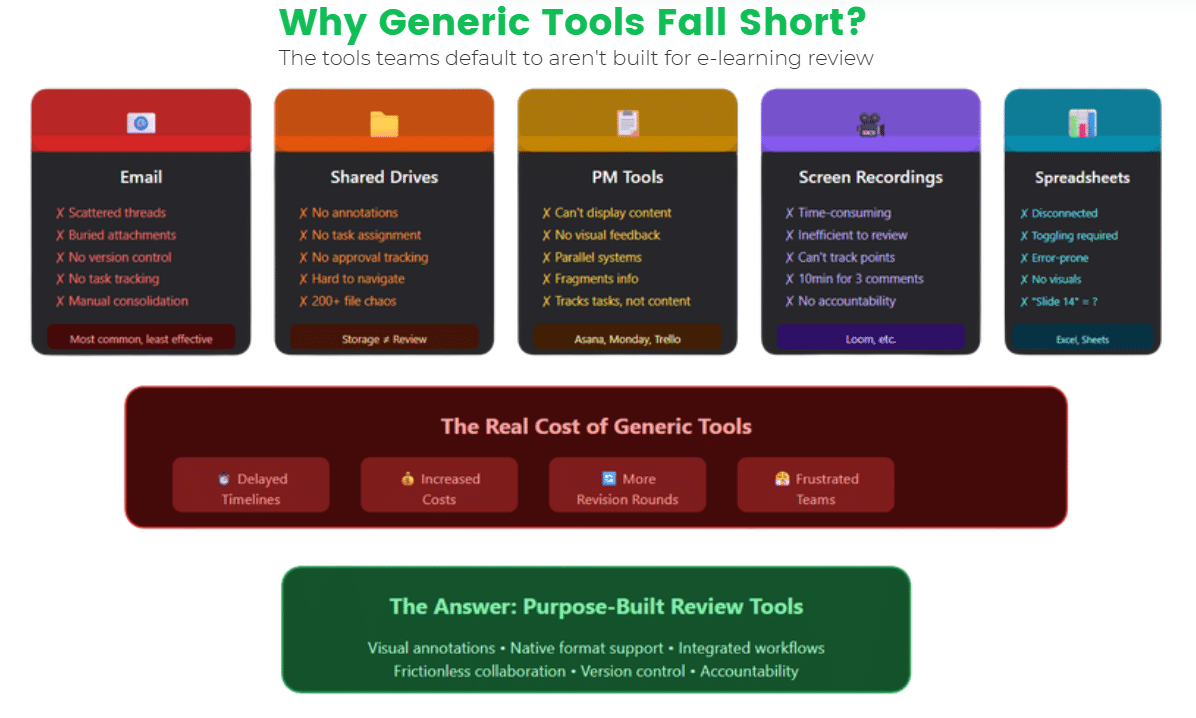
Before exploring purpose-built solutions, it’s worth understanding why the tools most teams default to fail the e-learning review use case.
Why Emails fail your team’s review process
Email remains the most common review method despite being poorly suited for the task. Feedback gets scattered across multiple threads, buried in attachments, and disconnected from the content itself. When three stakeholders send separate emails with comments on the same module, the development team must manually consolidate, reconcile conflicts, and often request clarification. There’s no version control, no task tracking, and no way to verify that all feedback has been addressed.
Why Shared Drives fail your team’s review process
Shared drives like Google Drive or OneDrive provide centralized storage but minimal review functionality. They lack annotation capabilities for most e-learning formats, offer no way to assign tasks or track approvals, and make navigation increasingly difficult as project folders grow. Finding the correct version of a specific module in a folder containing 200+ files is time-consuming and error-prone.
Why Project Management tools fail your team’s review process
Project management tools like Asana, Monday, or Trello excel at tracking tasks but weren’t designed for multimedia content review. They can track that “Module 3 needs SME review,” but they can’t display the module, capture visual feedback, or support the nuanced collaboration that content review requires. Teams end up maintaining parallel systems, a PM tool for tracking and email for actual feedback, which fragments information further.
Why Screen Recording tools fail your team’s review process
Screen recordings via Loom or similar tools offer a workaround for visual feedback but create their own problems. Recording a video to explain changes is time-consuming for reviewers. For creators, scrubbing through a 10-minute recording to find the three relevant pieces of feedback is inefficient. There’s no way to systematically track whether each point has been addressed.
Why Spreadsheets fail your team’s review process
Spreadsheets provide structure for feedback tracking but disconnect comments from content entirely. When reviewers log “Slide 14: change third bullet point wording,” creators must toggle between the spreadsheet and the actual content, hunting for the referenced location. This approach is tedious, error-prone, and particularly problematic for interactive content where “slide 14” doesn’t map to a fixed location.
The limitations of these generic tools aren’t minor inconveniences, they translate directly into delayed timelines, increased costs, and frustrated teams. This is precisely why purpose-built e-learning review tools have become essential for remote teams aiming to deliver quality content on time.
Key Features of User-Friendly Review Tools for E-Learning

When evaluating e-learning review tools, certain capabilities distinguish genuinely useful platforms from those that simply add another layer of complexity.
Visual Annotation and Contextual Feedback
The most critical feature of any effective review tool is the ability to provide feedback directly on the content itself. Visual annotation allows reviewers to click on exactly the element that needs attention, a specific image, text block, button, or animation, and attach their comment to that precise location.
This contextual feedback eliminates ambiguity. Instead of describing where a problem exists, reviewers simply mark it. Development teams receive crystal-clear direction that requires no interpretation.
For e-learning specifically, annotation should work across format types. Reviewers should be able to mark up static screens, comment on specific frames within video content, and flag issues at particular decision points in branching scenarios. Tools that only support basic image markup miss the complexity of modern e-learning formats.
No Signups Review Tool Capabilities
Friction kills collaboration. Every obstacle between a stakeholder and providing feedback, creating an account, confirming an email, setting up a password, learning a new interface, reduces participation and delays review cycles.
The best user-friendly review tools offer no signup options for reviewers. Project owners share a simple link, and external collaborators can immediately view content and provide feedback without creating accounts. This capability is particularly valuable for SME reviews, executive approvals, and any scenario involving people outside your immediate team.
Guest access via shareable links democratizes the review process. A busy executive can spend five minutes providing feedback without IT setup. A subject matter expert can mark up content accuracy issues without ever creating an account they’ll use once and forget. The no signups review tool approach recognizes that not everyone involved in content approval needs, or wants, to become a regular platform user.
Support for E-Learning Formats (SCORM, HTML5, Video)
E-learning content exists in specialized formats that generic tools can’t handle. SCORM and xAPI packages don’t open in a browser like simple web pages. Interactive HTML5 content requires proper rendering environments. Video content needs more than just playback, it needs timestamped commenting.
Effective e-learning review tools provide native preview without downloads or specialized software. Reviewers should be able to experience SCORM modules directly in the platform, interact with HTML5 content as learners would, and navigate video with frame-level precision. This native rendering ensures reviewers evaluate content as learners will experience it, not as a simplified approximation.
Interactive content review requires particular sophistication. Reviewers need to test different paths through branching scenarios, verify that quiz questions score correctly, and confirm that navigation functions as intended.
Version Control and Change Tracking
E-learning projects generate multiple versions, initial drafts, post-SME revisions, accessibility updates, final client tweaks. Without systematic version control, teams lose track of current states and waste time on outdated files.
Robust review tools maintain complete version histories with clear labeling. Reviewers can see exactly which version they’re evaluating and access previous iterations when needed. This visibility prevents duplicate work and ensures feedback applies to current content.
Change tracking should extend to feedback itself. When a reviewer marks an issue, the system should track whether that issue has been addressed, verified, and closed. This audit trail provides accountability and ensures no feedback falls through the cracks, particularly important for compliance-related reviews where documentation and transparency matter.
Task Management and Approval Workflows
Review processes involve multiple stakeholders with different responsibilities. A single module might need instructional design review, SME accuracy verification, accessibility audit, brand compliance check, and final executive approval. Managing these parallel workflows manually creates overhead and invites oversight.
Integrated task management allows project owners to assign specific review responsibilities to team members and track completion status. Deadlines keep projects moving; automated reminders prevent reviews from stalling in someone’s inbox. Clear approval stages define who needs to sign off before content advances—ensuring proper governance without requiring manual coordination.
For remote teams specifically, workflow visibility matters enormously. When stakeholders across time zones can see review status, upcoming deadlines, and pending dependencies, they can plan their contributions effectively. This transparency reduces the coordination burden on project managers and keeps content moving through the pipeline
Ready to Elevate Your Content Feedback Process?
Try zipBoard today and experience streamlined reviews, clear collaboration, and faster approvals—all in one platform.
Start Free TrialBook DemoBenefits of User-Friendly Review Tools for Remote Teams
Implementing dedicated e-learning review tools delivers measurable improvements across key workflow metrics.
Faster review cycles represent the most immediate benefit. When feedback is clear, contextual, and consolidated, development teams can act on it immediately. Organizations using purpose-built review platforms report 40-60% reductions in time from first review to final approval. For teams releasing content regularly, this acceleration compounds into significant productivity gains over time.
Reduced miscommunication translates directly into fewer revision rounds. Each round of unnecessary back-and-forth consumes time on both sides—reviewers clarifying intent and developers reworking content that was actually fine. Visual annotation and centralized discussion threads eliminate most misunderstandings before they spawn additional work. Teams typically see revision rounds drop from 5-7 to 2-3 per project.
Better stakeholder engagement emerges when you remove participation barriers. Busy executives who would never install specialized software will gladly spend ten minutes providing feedback through a simple link. SMEs who lack technical confidence contribute more readily when the interface is intuitive. User-friendly review tools expand the pool of voices that meaningfully contribute to content quality.
Centralized feedback creates a single source of truth that everyone can reference. There’s no more hunting through email threads or wondering which spreadsheet contains the latest comments. All feedback lives alongside the content it references, organized by version and reviewable by anyone with access. This centralization is particularly valuable for distributed teams who can’t walk over to a colleague’s desk to ask about review status.
These benefits compound over time. As teams establish rhythm with their review tools, processes become increasingly efficient. Reviewers know exactly where to provide feedback; developers know exactly where to find it. The cognitive overhead of coordination decreases, leaving more mental energy for the actual work of creating great learning experiences.
How to Choose the Right E-Learning Review Tool
Selecting a review platform requires evaluating options against your team’s specific needs. Consider these factors as you compare solutions.
Ease of use and learning curve should be your first filter. A tool that requires extensive training defeats its purpose for occasional reviewers.
- Look for platforms with intuitive interfaces that new users can navigate without instruction. Test this yourself—if you can’t figure out basic functions within five minutes, neither will your SMEs.
- Integration with authoring tools matters for workflow efficiency. If your team uses Articulate Storyline, Adobe Captivate, or other development platforms, verify that your review tool handles their output formats smoothly. Some platforms offer direct integrations that streamline publishing from authoring tool to review environment. Others require manual export and upload steps that add friction.
- Collaboration features for async teams deserve particular attention for remote organizations. Look for robust notification systems that alert stakeholders when reviews need attention. Evaluate discussion threading capabilities that allow back-and-forth without spawning separate conversations.
- Pricing and scalability fit. Pricing and scalability require honest assessment of current needs and growth trajectory. Some platforms charge per user, which becomes expensive as you add reviewers. Others offer unlimited collaborators with restrictions on storage or projects. Model your actual usage patterns, including external stakeholders who review occasionally, to understand true costs. Ensure the platform can grow with your team without forcing a painful migration later.
How zipBoard Simplifies E-Learning Review for Remote Teams
zipBoard was built specifically to solve the collaboration challenges that e-learning teams face daily. As a purpose-built review and approval platform, it addresses each pain point we’ve discussed, and it’s designed from the ground up for distributed team workflows.
From SCORM files to video review, we can help you streamline all of that. Upload SCORM packages directly to zipBoard and reviewers can interact with modules in their browser, no LMS setup, no downloads, no technical configuration. Video content gets timestamped commenting that pins feedback to exact frames. Interactive HTML5 content renders fully, allowing reviewers to test branching paths and verify functionality.
No signup required for reviewers removes every barrier to participation. Project owners simply share a link, and collaborators, whether internal stakeholders, external SMEs, or executive sponsors, can immediately view content and add feedback. This frictionless access is particularly valuable for one-time reviewers who shouldn’t need to create yet another account.
Visual markup and annotations provide the contextual feedback that makes reviews efficient. Reviewers click directly on elements that need attention, attach comments, and even draw arrows or shapes to clarify their intent. Development teams receive feedback that requires no interpretation, just clear direction on what needs to change and exactly where.
Built for distributed collaboration, zipBoard includes robust task assignment, deadline tracking, and workflow management. Project managers can see review status at a glance, identify bottlenecks before they delay timelines, and ensure accountability across stakeholders. Automated notifications keep reviews moving without requiring constant manual follow-up.
Version control maintains complete history and enables side-by-side comparison between iterations. Teams always know which version is current, can reference previous iterations when questions arise, and maintain clean audit trails for compliance documentation.
Best Practices for Streamlining E-Learning Reviews with Remote Teams
Even the best e-learning review tools require thoughtful processes to maximize their value. These practices help remote teams get the most from their review workflows.
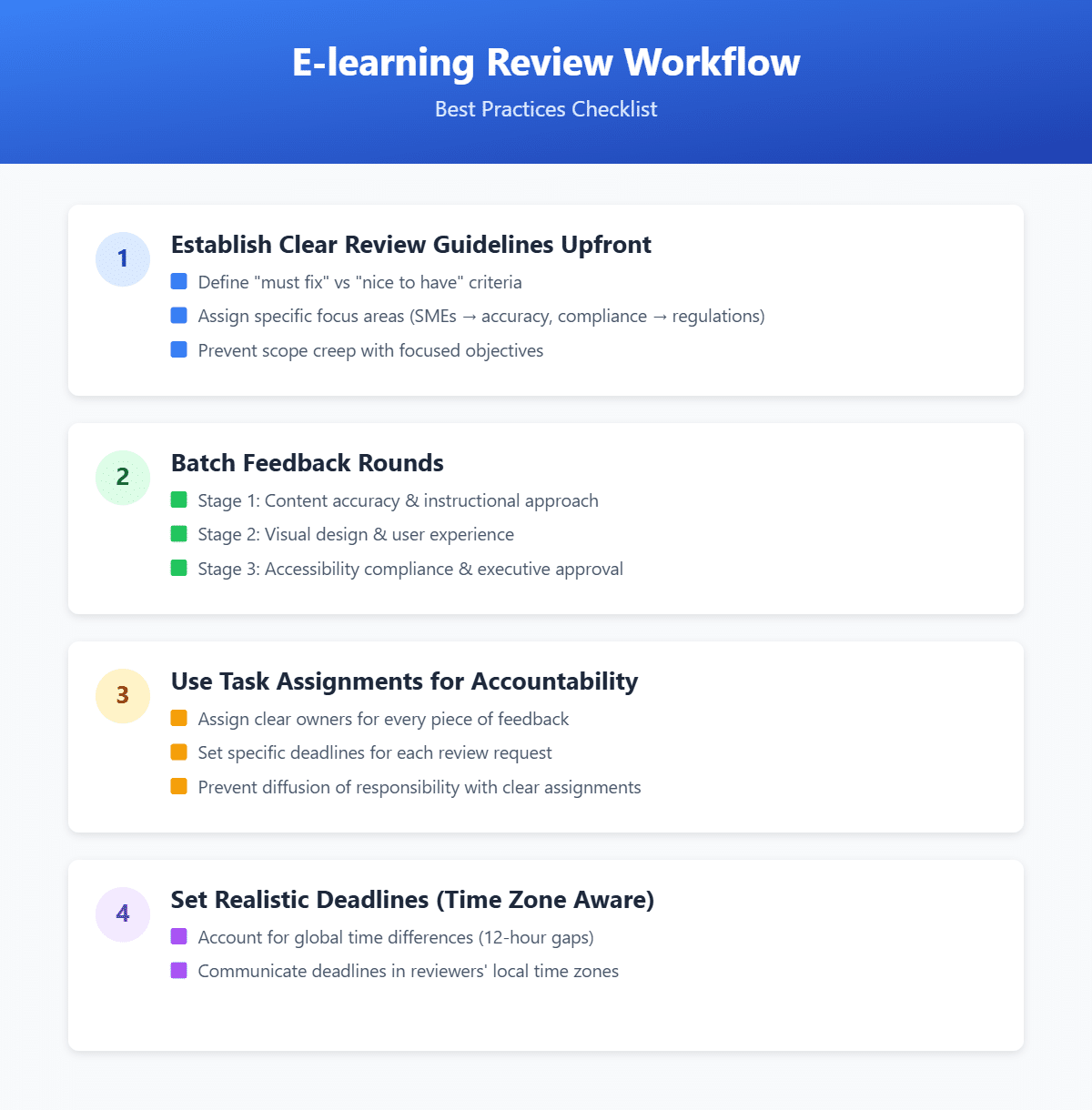
1. Establish clear review guidelines upfront
Before sending content for review, communicate exactly what you need from each stakeholder. Define the difference between “must fix” and “nice to have” feedback. Clarify which aspects each reviewer should focus on—SMEs evaluate accuracy, compliance officers check regulations, executives confirm strategic alignment. This focus prevents scope creep and helps reviewers use their time efficiently.
2. Batch feedback rounds rather than seeking continuous input
Establish defined review stages with specific participants for each. A first round might focus on content accuracy and instructional approach. A second round addresses visual design and user experience. A final round confirms accessibility compliance and executive approval. This batching prevents premature feedback and ensures reviewers evaluate content at appropriate stages.
3. Use task assignments to maintain accountability
Every piece of feedback should have a clear owner responsible for addressing or responding to it. Every review request should have a specific deadline and assigned reviewer. This clarity prevents the diffusion of responsibility that causes reviews to stall. When everyone knows exactly what they’re responsible for—and when—projects stay on track.
4. Set realistic deadlines that account for time zones
A “24-hour turnaround” means something different when your reviewer is 12 hours ahead of your development team. Build buffer time into schedules and communicate deadlines in reviewers’ local time zones. For truly global teams, consider rotating which time zone “owns” the critical path to distribute the burden of off-hours work fairly.
5. Create feedback templates for common review types.
Accessibility reviews should check specific criteria. Compliance reviews should verify particular requirements. Providing structured templates helps reviewers cover all necessary points without reinventing their approach each time. This consistency also makes it easier for development teams to process and address feedback systematically.
Why zipBoard Excels as E-Learning Review Solution
zipBoard stands out by offering a complete, visual-first solution for managing E-learning reviews across diverse formats and workflows. Here’s how it supports teams end-to-end:
Customizable Workflows
Adapt zipBoard to your team’s review process, not the other way around. From simple two-step approvals to multi-phase stakeholder workflows, zipBoard flexibly supports your content lifecycle.
Don’t want to start from scratch?
Try zipBoard’s ready-to-use templates with pre-built phases, project statuses, and task types—designed to help you launch faster and stay organized from day one.
Explore templates now and streamline your setupEnterprise-Grade Security and Permissions
With granular access controls, audit trails, and compliance features, zipBoard is built to protect sensitive content while ensuring only the right people can view, comment, or approve.
Visual Context Reduces Miscommunication
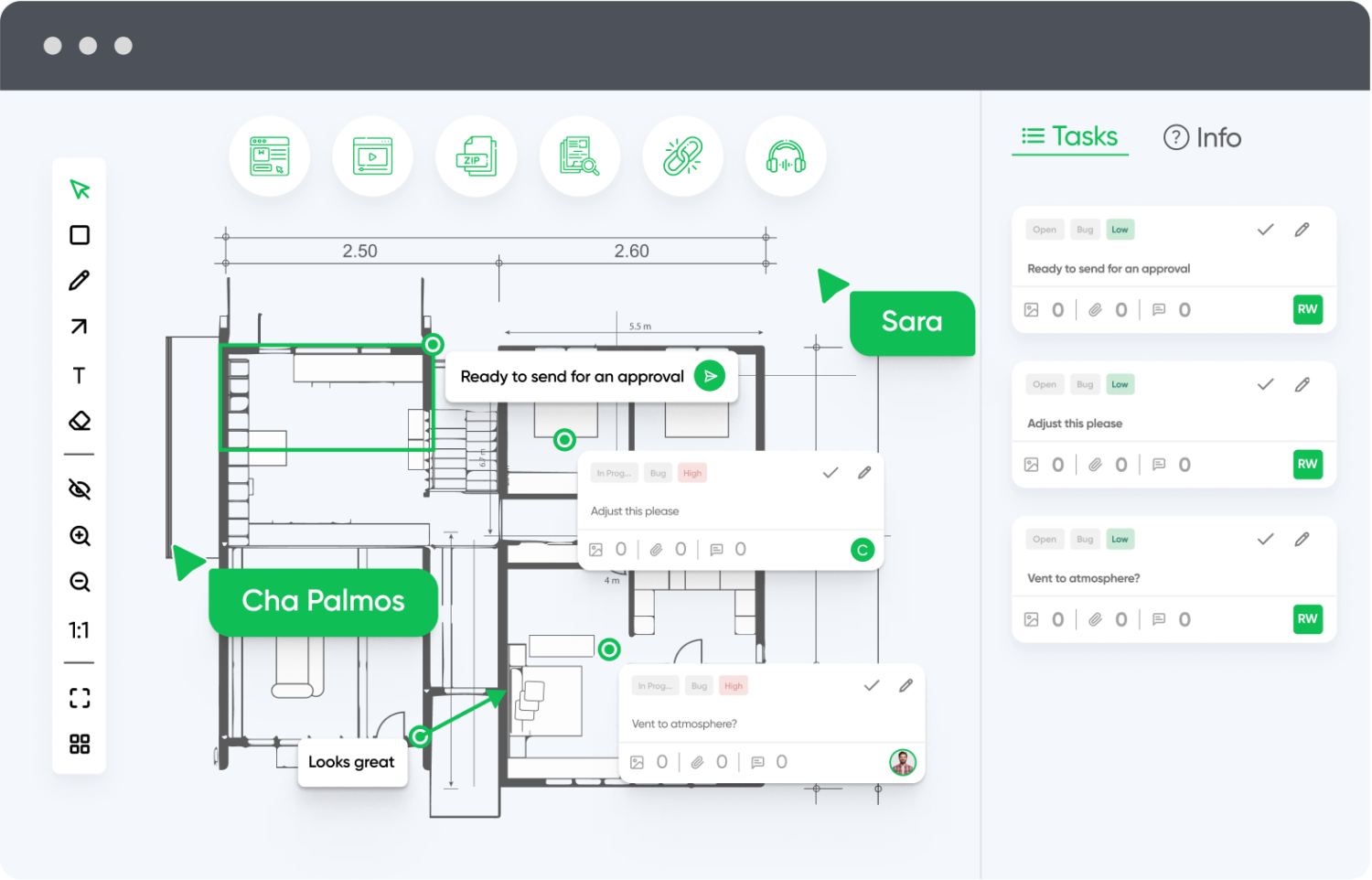
Markup tools allow teams to leave feedback directly on the content—not in separate threads—making feedback clearer, faster, and far less prone to misinterpretation.
Cross-Browser & Device Testing
Review web content and applications in multiple browsers and devices from one platform. Ideal for teams working on responsive or cross-platform experiences.
Built-In Task Management
Convert comments into actionable tasks, assign them to team members, and track progress without switching platforms. Priorities and deadlines help keep reviews on schedule.
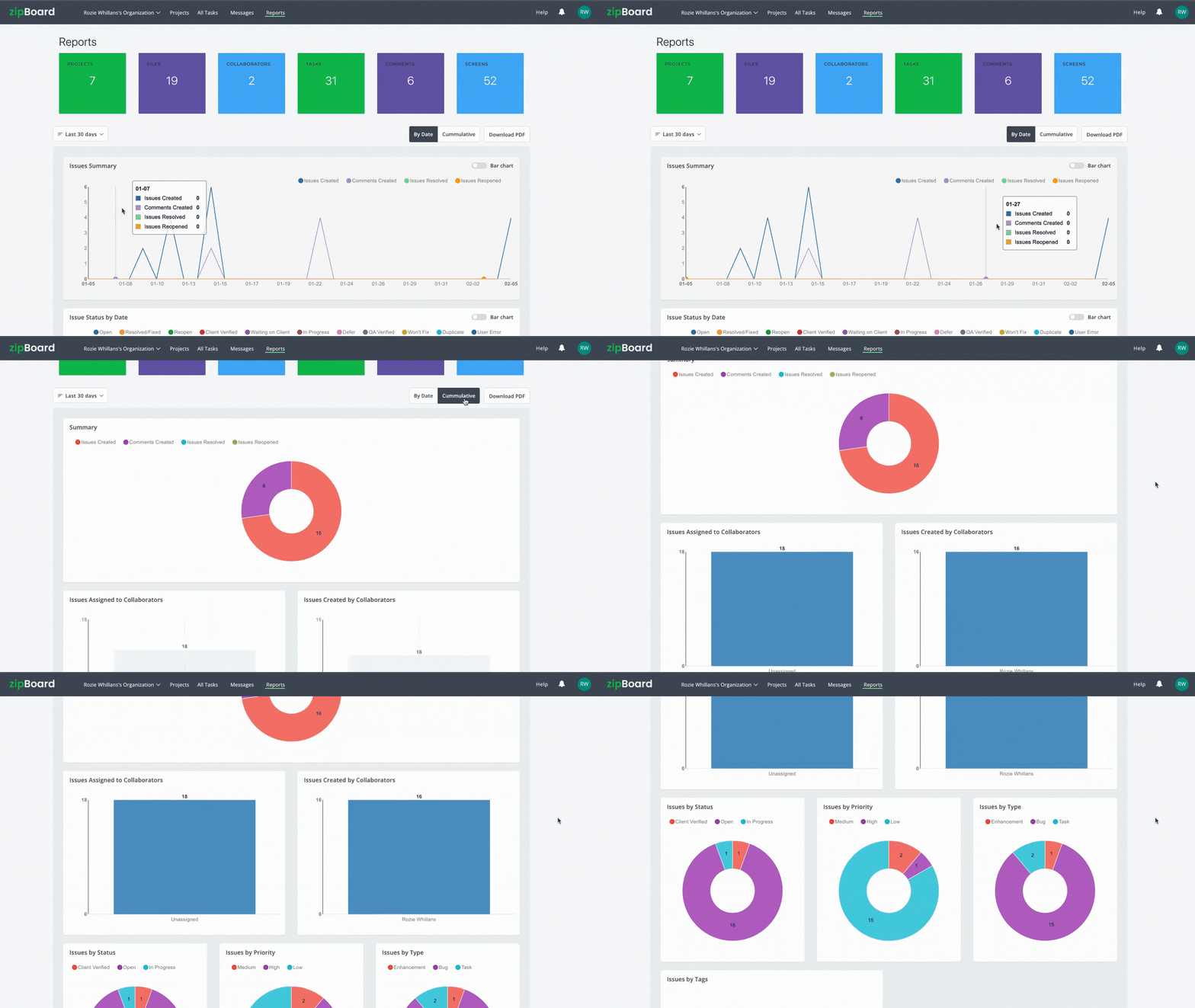
Reporting & Analytics
Use built-in dashboards to analyze feedback trends, identify bottlenecks, and improve processes over time with data-driven insights.
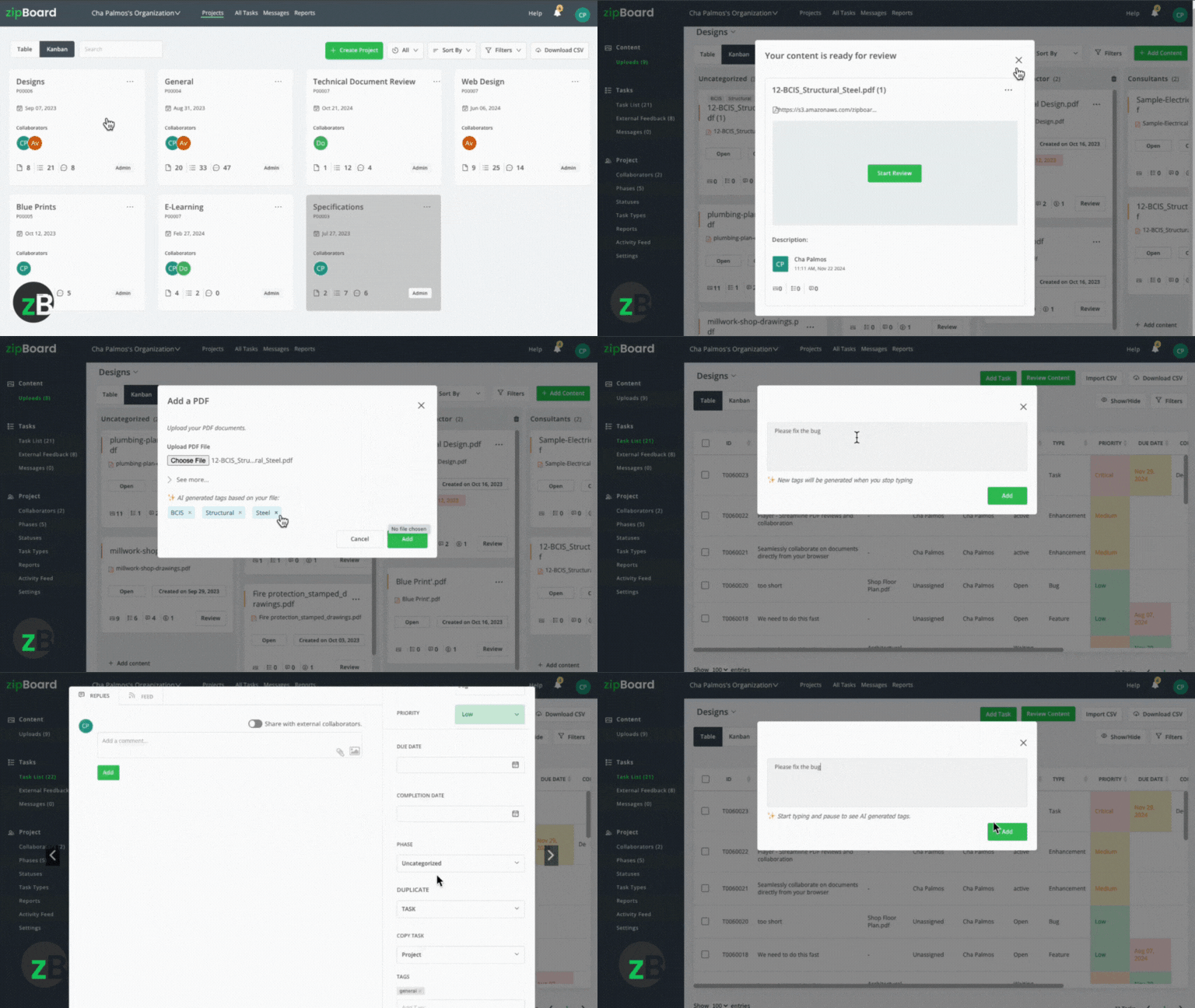
AI-Enhanced Feedback
Leverage AI features to automatically categorize feedback, highlight potential issues, and streamline review cycles through smart suggestions.
Want to see how zipBoard fits into your stack?
Check out all available integrations to keep your team in sync and your reviews efficient.
Explore all integrations now.API & SSO Support
Need custom integrations? zipBoard’s API and single sign-on (SSO) features make it easy to connect securely with your existing systems.
Ready to Streamline Your Content Feedback Process?
Start your free trial with zipBoard and experience organized, actionable feedback across all your digital content—no setup hassles, just better collaboration.
Start Free TrialBook DemoFAQs About Digital Asset Review
An e-learning review workflow is a structured process for testing and approving interactive course content (like SCORM, xAPI, or HTML5) before it goes live on an LMS. Unlike static documents, e-learning requires a workflow that handles interactivity, ensuring that branching paths, quiz logic, and multimedia elements function correctly across all devices.
Standard tools (like Google Docs or Microsoft 365) are “flat”—they can’t “play” e-learning files. A specialized e-learning review tool provides:
Native Rendering: It plays your SCORM package or HTML5 content in a browser environment, allowing reviewers to experience the course, not just look at screenshots.
Interaction Tracking: It allows you to log feedback on specific decision points or quiz slides that only appear after a certain user action.
Technical Validation: It can verify if tracking triggers (like “Course Complete”) are actually firing, which is impossible in a standard document.
In e-learning, “where” a problem occurs is often as important as “what” the problem is.
Contextual Pinning: Reviewers can click directly on a broken “Submit” button or a typo in a specific layer of an interaction. This eliminates vague emails like “Something is wrong on the slide about safety.”
Frame-Specific Video Review: For video-heavy courses, stakeholders can pin comments to the exact second/frame, ensuring the instructional designer knows exactly which part of the animation needs a tweak.
Accessibility Overlays: Visual tools allow teams to check WCAG 2.2 compliance (like color contrast and alt-text) directly on the screen where the content lives.
Moving away from spreadsheets and email threads provides measurable gains:
50% Faster Approvals: Organizations using purpose-built review tools typically reduce the time from “first draft” to “LMS-ready” by half.
Fewer Revision Rounds: By providing visual clarity, teams often drop from 5–7 revision rounds to just 2 or 3.
Zero “Version Chaos”: Centralized version control prevents SMEs from reviewing outdated files, saving hours of wasted work.
Reduced Development Costs: Since 67% of instructional designers cite review as their biggest bottleneck, streamlining this phase allows your team to produce more courses per year without increasing headcount.
Conclusion
The trends shaping 2026, AI-accelerated content production, immersive learning formats, accessibility requirements, and distributed workforce structures, aren’t reversing. Teams that establish effective review workflows now position themselves for sustainable success as demands continue to grow. Those clinging to email threads and shared folders will find themselves increasingly overwhelmed.
Purpose-built platforms like zipBoard exist specifically to solve these problems. By providing native format support, frictionless reviewer access, visual annotation, and robust workflow management, these tools address each pain point that makes remote e-learning review difficult. The investment in proper tooling pays dividends in faster timelines, higher quality content, and less frustrated teams.
Your L&D work matters. The training you create shapes how people develop skills, advance careers, and perform their jobs safely and effectively. That important work deserves tools that support it properly, not force you to fight against inadequate systems while trying to deliver excellent learning experiences.
Don’t let version control issues or fragmented feedback slow your team down.
Transform Your E-learning Feedback Process Today
Try zipBoard free for 14 days or book a personalized demo to see how structured feedback can revolutionize your E-learning review workflow.
Book DemoStart Free Trial

Recent Posts
- How Construction Teams Manage Drawing Reviews (Without the Chaos) March 24, 2026
- Technical Writers Best Toolkit: Review & Documentation Calculator March 16, 2026
- User-Friendly E-Learning Review Tools: Trends for Teams in 2026 February 20, 2026
- Your Digital Asset Review Workflow Is Broken (And How to Fix It) February 3, 2026
- Best Practices for Efficient Document Reviews and Collaboration December 18, 2025
©️ Copyright 2025 zipBoard Tech. All rights reserved.