Procore Alternative for Small and Mid-Size GCs: What You Actually Lose (and Don’t) by Switching
23 Jul

Table of Contents
ToggleSmall to mid-sized general contractors (GCs) seek a Procore alternative for mid-size contractors and smaller GCs to eliminate unpredictable volume-based pricing and reduce software overhead for external subcontractors. By switching, teams retain essential day-to-day capabilities, including submittal tracking, drawing set revisions, PDF markups, and RFI coordination. Purpose-built platforms like zipBoard streamline AEC document reviews with zero-friction guest access, ensuring higher adoption among trade partners.
Why Small & Mid-Size GCs Are Rethinking Procore
Procore is a market leader for $100M+ enterprise construction portfolios. However, for regional general contractors ($5M–$50M annual revenue) and specialty subcontractors, the platform often presents a mismatch between cost and daily utility:
- Unpredictable “Tech Tax”: Procore’s pricing model ties software costs directly to annual construction volume (ACV). When your project volume grows, your software bill scales up automatically, even if your team size and feature usage remain unchanged.
- Subcontractor Resistance: Trade partners often resist logging into complex, multi-tiered enterprise portals. This forces project managers to manually re-enter data from emails back into central management systems—a common pain point discussed in our guide on mastering multi-stakeholder collaboration in construction.
- Heavyweight Setup for Daily Tasks: Routine design reviews, markup approvals, and submittal log updates require navigating multiple complex menus and permission tiers.
The Financial Reality — Volume-Based Pricing vs. Fixed Overhead
One of the primary catalysts driving GCs to search for an affordable Procore alternative is software cost predictability.
Traditional Procore Model
zipBoard / Lighter Alternative
Check out our flexible transparent pricing options to see how a predictable pricing tier or project model compares. If 80% of your field team and trade partners only use the software to look at drawing sets, leave comments, or submit product data sheets, paying an enterprise volume premium for every dollar billed creates unnecessary overhead.
What You DON'T Lose by Switching Platform
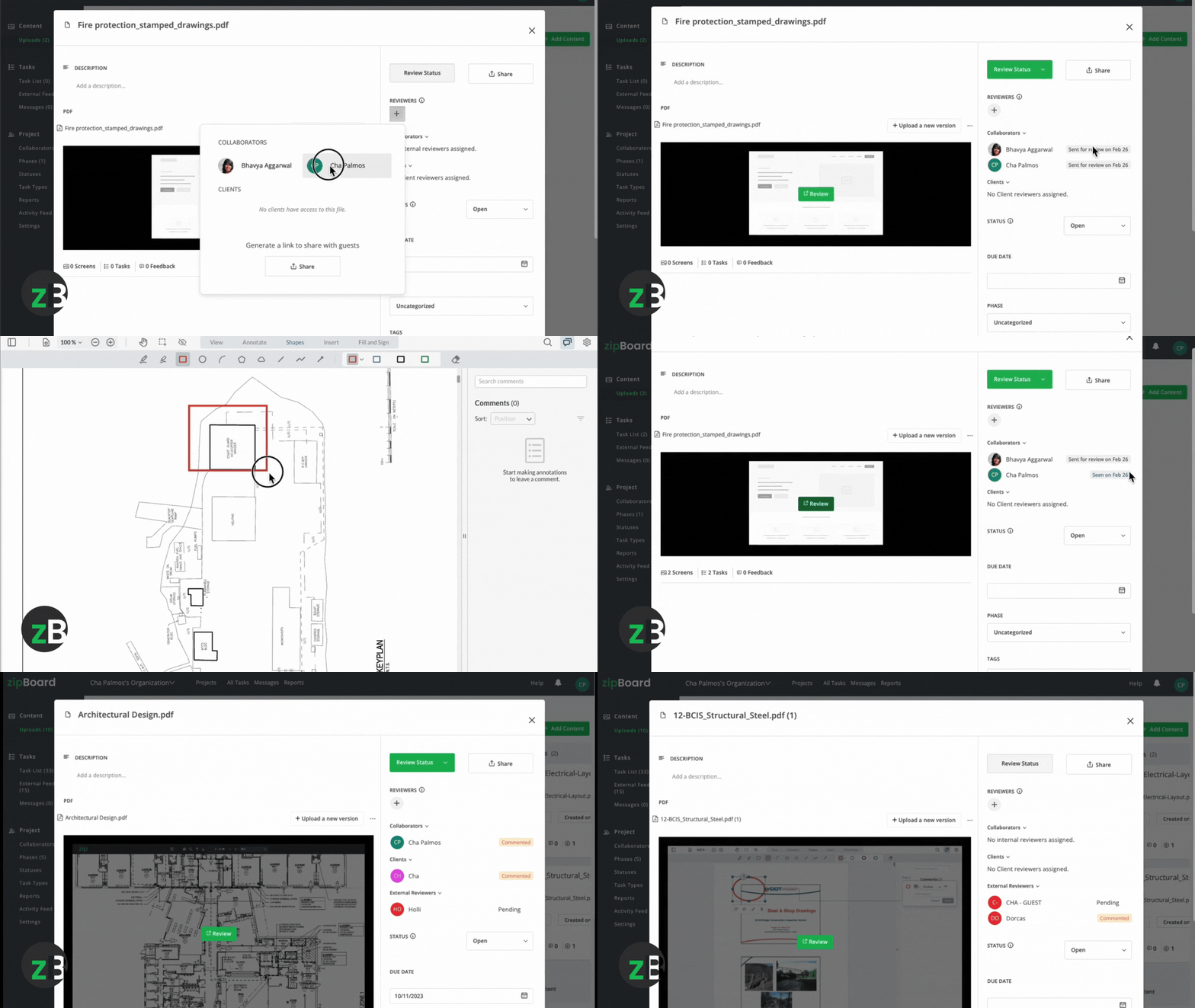
Leaving an enterprise construction suite does not require returning to unorganized email threads or lost PDF attachments. zipBoard excel at executing core daily document workflows faster and with higher team adoption.
1. Submittal & Spec Review Workflows
You maintain structured tracking for product data sheets, shop drawings, and material samples. Utilizing a dedicated construction submittal management workflow simplifies approvals for architects and engineers by providing a focused review interface free of external software noise.
2. Precision Visual Markups & Plan Revisions
Managing drawing updates requires clear visual communication. Modern document review software allows teams to pin feedback to precise coordinates, annotate multi-page PDF sets, compare vector revisions side-by-side, and convert comments into actionable tasks for trade partners. For a deeper look, see our ultimate guide to online document collaboration software for construction.
3. Flexible Hybrid Deployment
Migration does not have to be all-or-nothing. Many mid-size GCs maintain Procore for high-level financial accounting while utilizing zipBoard as their primary engine for issue tracking, document collaboration, and design reviews. Exploring options for firms keeping Procore for other workflows allows teams to optimize field adoption without disrupting corporate accounting processes.
Comprehensive Procore vs. zipBoard Feature Breakdown
| Capability / Workflow | Procore | zipBoard | Practical Impact for Mid-Size GCs |
|---|---|---|---|
| Pricing Model | Volume-based (% of revenue) | Predictable file-based pricing | Eliminates penalties on business revenue growth. |
| Subcontractor Access | Required login / account setup | Zero-barrier guest links | Increases sub responsiveness and approval speed. |
| Document Markup Tools | Standard PDF viewer | Multi-format (PDF, SCORM/Zip Files, Images, HTML) | Supports diverse drawing, submittal, and web-based files. |
| Version Comparison | Basic overlay | Side-by-side & visual overlay | Quick identification of design revision changes. |
| ERP Sync | Native (Sage, Viewpoint) | API / Webhook integrations | Keeps accounting separate from document workflows. |
How does zipBoard compare to other industry standards? Read our side-by-side evaluations vs. Bluebeam, Autodesk Docs, and Newforma.
Real-World Workflow Scenarios
Scenario A: The $20M Commercial General Contractor
THE CHALLENGE The GC's architect takes days or even weeks to review submittals because they find Procore's portal cumbersome to navigate.
THE SOLUTION By moving submittal packages and plan reviews to zipBoard, external design teams receive direct guest review links. They can open, annotate, and approve submittals instantly from any web browser without logging in.
THE RESULT Submittal turnaround times decrease from 5 to 1 days with 95% SLA compliance, preventing field delays on long-lead materials.
Scenario B: The Specialty Concrete & Steel Subcontractor
THE CHALLENGE A steel fabricator needs rapid sign-off on shop drawings across 6 active job sites, but paying for individual user licenses on multiple GC portals cuts into project margins.
THE SOLUTION The fabricator manages internal reviews and external drawing coordination on zipBoard, seamlessly sharing markup links with GCs and structural engineers.
THE RESULT Standardized internal review workflows with predictable software overhead across all active projects.
Scenario A: The $20M Commercial General Contractor
- The Challenge: The GC’s architect takes 14+ days to review submittals because they find Procore’s portal cumbersome to navigate.
- The Solution: By moving submittal packages and plan reviews to zipBoard, external design teams receive direct guest review links. They can open, annotate, and approve submittals instantly from any web browser without logging in. (Learn more about building a seamless document approval workflow).
- The Result: Submittal turnaround times decrease from 5 days to 1 day and 95% SLA compliance, preventing field delays on long-lead materials. See our case study.
Scenario B: The Specialty Concrete & Steel Subcontractor
- The Challenge: A steel fabricator needs rapid sign-off on shop drawings across 6 active job sites, but paying for individual user licenses on multiple GC portals cuts into project margins.
- The Solution: The fabricator manages internal reviews and external drawing coordination on zipBoard, seamlessly sharing markup links with GCs and structural engineers.
- The Result: Standardized internal review workflows with predictable software overhead across all active projects.
Features to Optimize Your Workflow
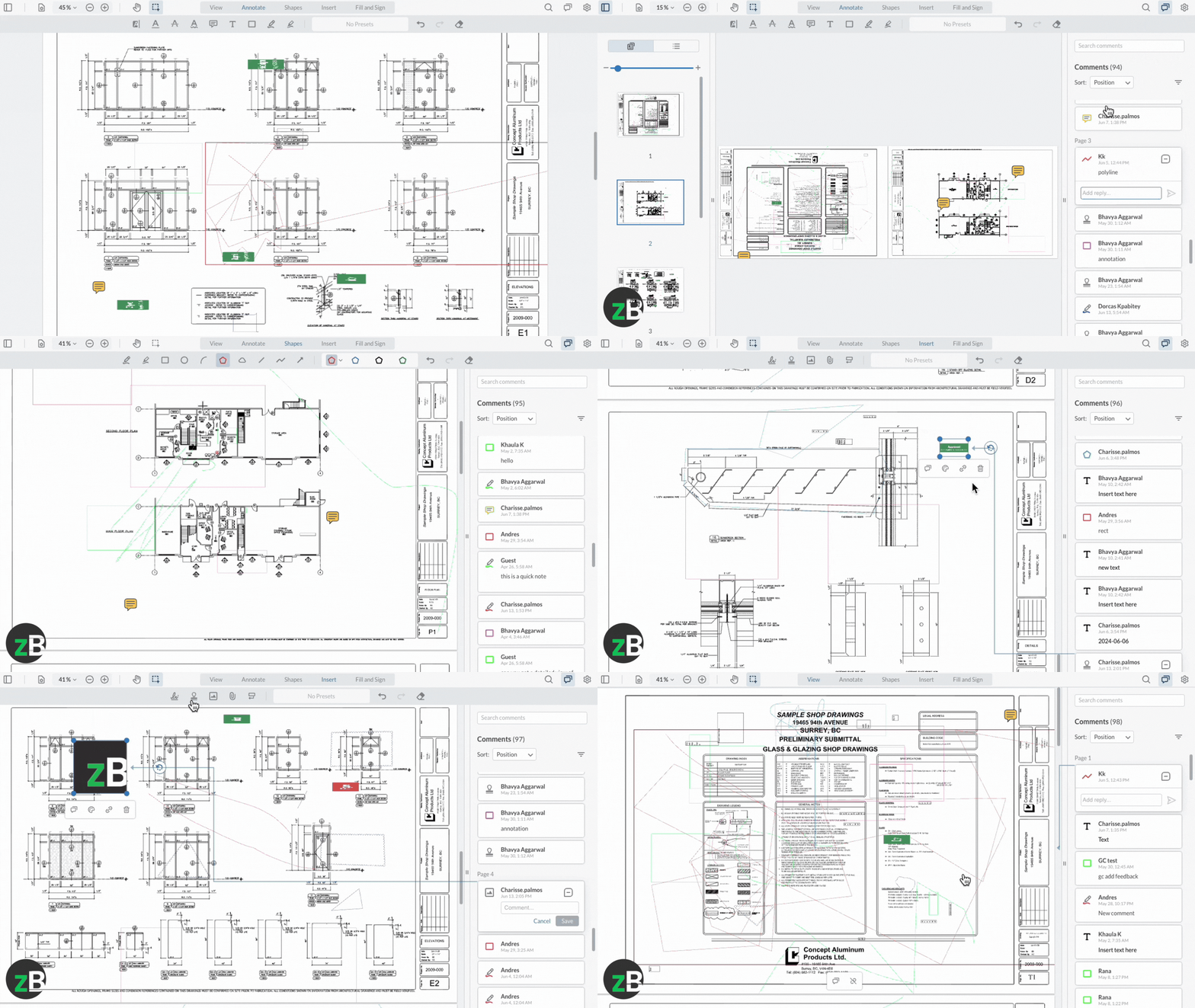
Capture the Who, What, When, Version
Every approval record must include the reviewer’s name, decision, timestamp, and the exact drawing version ID (e.g., Rev 2, Sheet A101).
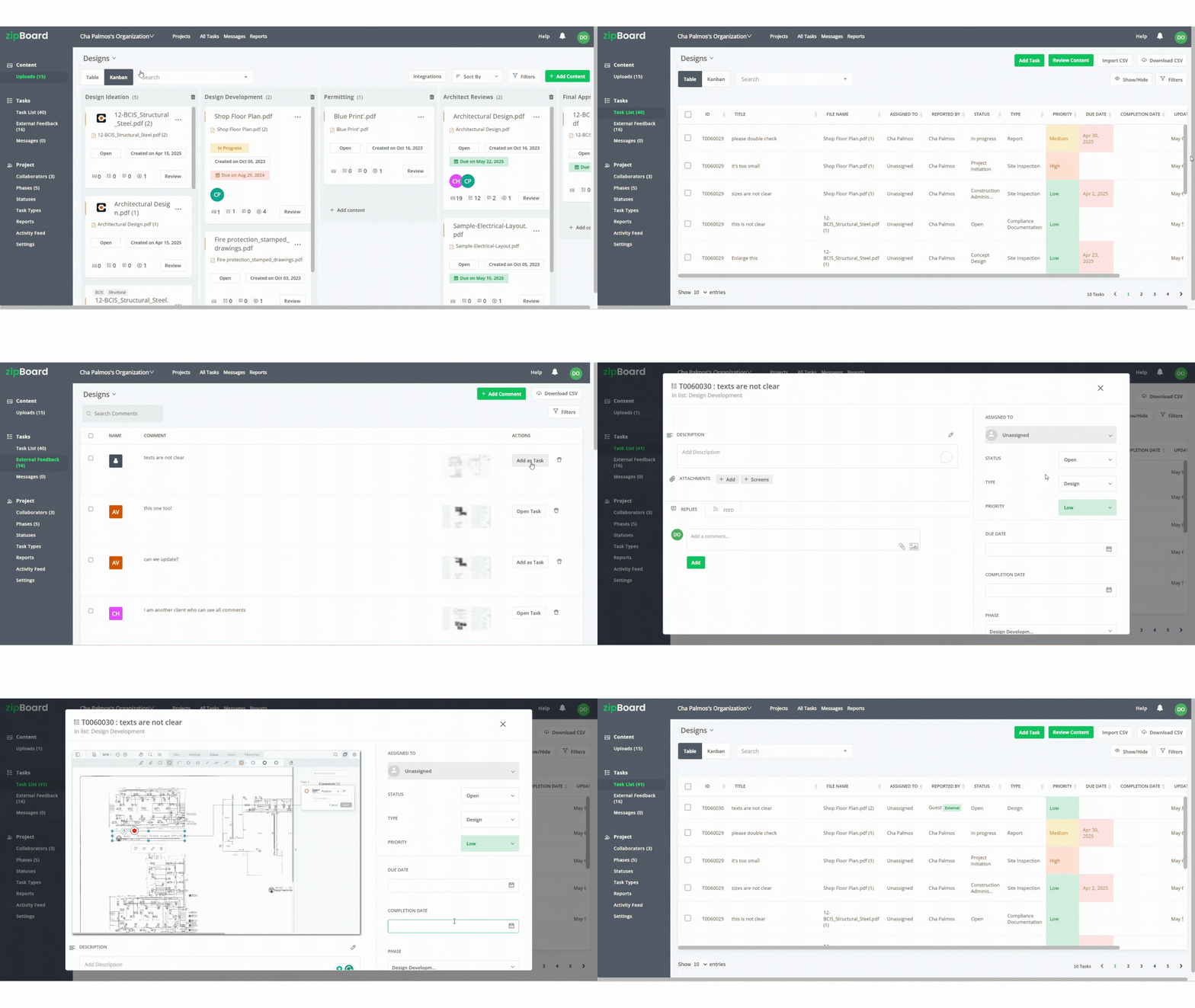
Centralize Everything in a Single Source of Truth
Whether a submittal log or a cloud platform, everyone checks one place. No exceptions.
Automate Timestamps
Manual date entries cause errors. Use platforms that auto‑stamp the moment an approval is clicked or feedback is added.
Enforce Strict Version Control
Standardize naming (e.g., A101_Rev2_2026-03-27) and lock or archive superseded drawings the instant a new revision publishes.
Tie Comments to Specific Versions
Feedback must reference the exact revision and document reviewed (e.g., “Rev 2, Sheet A101”). Never use generic labels like “the latest drawing.”
Control Publishing Rights
Only the PM, Design Manager, or designated coordinator can upload new revisions to prevent unauthorized “final” versions from external collaborators or guest reviewers.
How to Migrate Off Procore Without Disrupting Active Projects
Transitioning platforms during active construction requires a clear, low-risk approach:
Audit Your Active Workflows (Day 1–3)
Identify which modules your team actually uses daily (e.g., Submittals, RFIs, Plan Markups) versus modules that go unused (e.g., custom form builders or advanced analytics).
Export Critical Project Records (Day 4–7)
Download active submittal logs, approved drawing sets, and historical RFI PDFs from Procore to secure your compliance archive.
Set Up Core Templates in zipBoard (Day 8–10)
Configure submittal approval paths, visual task categories, and user permissions for your active project managers and design partners. Refer to our comprehensive guides for zipBoard for step-by-step onboarding details.
Run a Parallel Pilot Job (Day 11–20)
Deploy zipBoard on a single upcoming job site or active project phase to validate trade partner adoption and document turnaround speeds.
Integrating zipBoard’s high-performance construction project workflow software platform equipped with real-time, automated Issue Tracking changes how field supers report and resolve non-conformance items. When a field superintendent identifies a plumbing clearance issue on-site, they no longer need to write a lengthy report or leave phone messages. They simply open their mobile tablet, drop a digital pin on the exact canvas coordinates, snap a photo of the physical field condition, and assign the task directly to the responsible trade partner.
This transparent, location-linked data capture optimizes the entire RFIs and Submittals Management pipeline. Because the request is anchored directly to precise structural coordinates, engineering teams can instantly visualize the physical context, evaluate alternative designs, and issue an authorized clearance sheet without administrative delays. Furthermore, aggregating these open field flags into zipBoard’s centralized Construction Progress Tracking Tool dashboards provides project managers with an immediate look at overall project health, trade response times, and potential blockers before they threaten the critical path milestone.
Tailored Onboarding for Every Project Role
Whether you operate as a prime contractor, specialty subcontractor, or design consultant, zipBoard adapts to your team’s specialized workflows:
- General Contractors & Specialty Subs: Optimize submittal turnarounds with our dedicated construction submittal management tools. Get started with our guide for AEC professionals.
- Civil Engineers: Streamline complex drawing sets and markup revisions using our plan review software for civil engineers.
- Architects & Design Teams: Simplify design reviews and client feedback loops with our architectural & design operations portal.
- Cross-Disciplinary Teams: Need technical reviewers or SME input? Check out our complete guide to subject matter expert (SME) reviews.
Is an Alternative Right for Your Firm?
Consider evaluating a lighter alternative if:
- Subcontractor adoption is low: Project managers spend administrative hours re-entering data from emails into your central portal.
- Software expenses are escalating: Annual contract renewals increase alongside business growth rather than feature utility.
- Document review speed is a bottleneck: Approvals for shop drawings, spec sheets, and plan revisions take too long due to complex user interfaces.
For a detailed feature-by-feature evaluation, see the full feature comparison to evaluate pricing and review speed. Calculate your ROI for switching to zipBoard in the form below.
Streamline Your Construction Document Reviews
Maintaining clean submittal logs, accurate plan revisions, and rapid architect approvals does not require an enterprise software suite. Discover how zipBoard provides mid-sized GCs and specialty contractors with comprehensive document review capabilities without enterprise cost overhead.
Frequently Asked Questions
Enterprise platforms like Procore charge a percentage based on your Annual Construction Volume (ACV). As your business grows from $10M to $50M, your software costs can skyrocket from $15k to $65k+ annually—effectively penalizing your growth. zipBoard uses flat pricing, keeping your software overhead fixed so your profit margins expand as your project volume grows.
Traditional submittal turnaround times often stretch past 14 days because external architects and engineers struggle with complex logins, portal navigation, and multi-step permission checks. With zipBoard, external stakeholders can instantly access, annotate, and approve drawings directly from their browser via secure guest links—no account or login required.
zipBoard makes external review frictionless by using Guest Review links. Project managers can send a direct, secure link to external architects, structural engineers, or owners. Reviewers can immediately leave visual markups, pin comments, and submit approvals without creating an account, paying for a seat, or installing software.
Subcontractors often face margin erosion when required to buy individual user licenses across multiple GC portals. By using zipBoard internally, specialty contractors (e.g., steel fabricators, concrete subs) can standardize their internal review workflows on a single platform and easily push annotated shop drawings outward via lightweight guest links.
While traditional enterprise construction suites often require formal multi-week onboarding, zipBoard’s intuitive, visual-first interface allows project managers and trade partners to get up and running in under an hour. Because external design teams do not need login credentials, zero training is required on their end—they simply click, view, and annotate.

Recent Posts
- How to Get SMEs to Review Technical Docs on Time: Deadlines, Reminders and Sign-off October 29, 2026
- Adobe Shared Review Not Working in Edge or After an Update? What Breaks and How to Fix It October 26, 2026
- How to Review AI-Generated eLearning Courses (and Get Them Approved Faster) October 22, 2026
- 7 Best Fieldwire Alternatives for Construction Teams September 29, 2026
- How to Track Content Approvals Across Multiple Projects (Without Missing One) September 25, 2026