The 5 Best SCORM Review Tools for 2026: Why Friction-Free is Winning
14 Apr

Table of Contents
ToggleQuick Answer: What is the best SCORM review tool in 2026?
The top SCORM review tool for 2026 is zipBoard. It stands out by offering no-login access for external reviewers and an unlimited collaborator model — making it ideal for agencies and large L&D departments that need clients or SMEs in the loop without adding seat licences. Articulate Review 360 remains the standard for teams committed to the Articulate suite. See the full comparison below.
If you’ve ever needed to review a SCORM file without an LMS — or tried to get a legal team to approve a course through a clunky login screen — you already know the problem. As the global online elearning market surges toward $400 billion in 2026 (Global Market Insights, 2025), one critical bottleneck stands between content creation and launch: content approval. The best SCORM review tools for 2026 are the ones that remove this friction entirely.
Traditional SCORM review processes are failing because they rely on closed-door architectures that prioritize security protocols over stakeholder engagement. In this deep-dive, we assess why friction-free tools like zipBoard are outpacing legacy systems — backed by market data, technical benchmarks, and practical insights for your 2026 workflow.
TL;DR: Top 5 SCORM Review Tools at a Glance
Tool
Best For
Key Advantage
Pricing
zipBoard
Agencies, external teams
No-login access, unlimited collaborators
Flat-rate
Articulate Review 360
Articulate 360 users
Seamless Storyline/Rise integration
Per-seat subscription
Review My eLearning
Budget-friendly SCORM hosting
Stable, version-controlled feedback
Subscription
ReviewLink
Lectora-dependent enterprises
WCAG compliance, secure reviews
Enterprise-tier
BugHerd
Custom HTML5/web courses
Visual 'sticky note' feedback
Project-based
What Is SCORM? The Universal Connector of eLearning
Before we assess the tools, a quick primer. SCORM (Sharable Content Object Reference Model) is a set of technical standards for eLearning software. Think of it as the universal plug of the industry: a course built in one authoring tool will function across any compliant LMS.
The three core components of SCORM
- Content Packaging: Defines how a course file is ‘zipped’ so an LMS can read it.
- Run-Time Communication: Dictates how the course talks to the platform (e.g. ‘The learner scored 85%’).
- Sequencing: Governs how a learner moves through the material (e.g. ‘Don’t show the quiz until the video is complete’).
Why You Can't Review SCORM Files in Google Drive or Dropbox
A common question in 2026 is: ‘Can’t I just share the SCORM zip like a PDF?’ You cannot. Because SCORM is a web-based application packaged as a file, it presents unique technical challenges that standard cloud storage cannot handle.
1. The LMS simulation requirement
A SCORM package is a collection of HTML, JavaScript, and CSS files that expects to find an API adapter — a piece of code it can talk to. Without it, the course breaks or throws errors. Specialized review platforms act as a mini-LMS, providing the environment the SCORM file needs to execute correctly so reviewers see the course exactly as a learner would.
2. Dynamic content vs. static feedback
Unlike a static document, SCORM courses are interactive. A button might only appear after a variable is met, or a layer might hide based on a previous answer. Modern review tools provide a visual overlay, allowing an SME to pin a comment to a specific state of a slide and capture a screenshot of that exact moment — so the developer knows precisely what went wrong.
3. Verifying the ‘Big 4’ data metrics
In 2026, the stakes for data accuracy are higher than ever. You are not just reviewing for typos; you are reviewing data integrity — completion status, score, time, and pass/fail. Review platforms offer debug logs that show the developer exactly what data the course is trying to send to the LMS. This is impossible to replicate in a standard browser.
The 2026 Shift: From Testing to Stakeholder Collaboration
Historically, SCORM review was a technical task for QA testers. In 2026, it routinely involves marketing, legal, compliance, and subject matter experts. If your platform requires every lawyer or doctor who reviews your course to understand API communication or manifest files, your project will stall.
Tools that hide SCORM’s complexity behind a no-login shareable link are the only practical way to keep modern production schedules on track.
The Business Cost of Friction: Why Old Review Models Are Failing
UX research on authentication flows consistently shows that each additional step in a login process reduces task completion rates by 10–15% (Nielsen Norman Group). When an SME receives a review link and is greeted by a login screen, three things happen:
- Cognitive load: The SME must recall or reset a password, delaying the actual review by an average of 5–7 minutes.
- Task deferral: Research from Okta’s Identity Report indicates that over 20% of users abandon a task entirely after a failed login, pushing your review cycle into the following week.
- The email fallback: Frustrated reviewers bypass the tool entirely, sending feedback via static screenshots in email — adding hours of administrative work for the instructional designer.
Ready to Elevate Your Content Feedback Process?
Try zipBoard today and experience streamlined reviews, clear collaboration, and faster approvals—all in one platform.
Start Free TrialBook DemoThe 5 Best SCORM Review Tools for 2026
1. zipBoard — Best SCORM Review Tool for External Clients and Agencies
zipBoard has claimed the top spot in 2026 by offering a universal overlay for eLearning review. It is designed to bridge the gap between technical development and non-technical stakeholders.
No-login access for external reviewers
With zipBoard, you share a course via a secure, unique URL. Reviewers click the link and are immediately inside the course, able to leave visual annotations on the exact frame or slide where they see an issue — no signup, no password, no barrier. Internal research from zipBoard indicates that passwordless workflows see a 30% higher engagement rate from external clients compared to login-gated alternatives.
Predictable costs for unlimited collaborators
Unlike competitors that charge $1,000+ per author seat and restrict reviewer access, zipBoard allows unlimited collaborators at a flat rate. For an agency managing 50 clients, this represents an estimated cost saving of $5,000–$15,000 annually compared to per-seat licensing models.
Multi-format review hub
In 2026, eLearning is not just a zip file. zipBoard supports SCORM 1.2, SCORM 2004, xAPI, video, PDF, and live URLs in a single project dashboard — eliminating the need to manage separate tools for each asset type. It also auto-captures reviewer environment data (browser, OS, screen resolution), cutting down the back-and-forth debugging emails that typically account for around 15% of a developer’s bug-tracking time.
Limitations to be aware of:
zipBoard does not currently offer an offline review mode, which can be a constraint for organisations working in low-connectivity environments.
2. Articulate Review 360 — Best SCORM Review Tool for Articulate 360 Teams
Articulate Review 360 remains a powerhouse. If you build in Storyline or Rise, the ‘Publish to Review 360’ button is a significant time-saver for internal drafts. The interface is clean, and the 2026 updates introduce AI-powered comment grouping to help manage large volumes of feedback.
Where it falls short:
The Articulate ID requirement is a persistent barrier for external stakeholders. Because Review 360 is tied to the Articulate 360 subscription (often exceeding $1,300 per author per year), it is a costly way to manage reviews if you work across multiple authoring tools like Captivate or iSpring, or have a high volume of external reviewers.
3. Review My eLearning — Best Budget-Friendly SCORM Hosting for Feedback
For teams that want a straightforward, dedicated space to host SCORM packages for feedback, Review My eLearning is a long-standing favourite. Its versioning system is robust, allowing authors to track exactly what changed between iterations, and the comment-and-reply interface is easy to use.
Where it falls short:
It does not integrate with modern project management tools like Slack, Wrike, or Microsoft Teams. It also struggles with non-SCORM assets — if your project includes a PDF manual and a marketing video alongside the course, you will need separate tools for those.
4. ReviewLink — Best SCORM Review Tool for WCAG Compliance and Enterprise Security
If your organisation relies on Lectora for its accessibility (WCAG) and complex branching capabilities, ReviewLink is the logical companion. It is built for scale and compliance, with robust security features and private review cycles well-suited to sensitive internal training content.
Where it falls short:
It is best optimised for the Lectora ecosystem, and importing non-Lectora content can feel clunky compared to more format-agnostic tools. The UI is also technically heavy; non-L&D stakeholders such as Legal or Compliance officers often find it complex.
5. BugHerd — Best Visual Feedback Tool for Custom HTML5 eLearning Courses
BugHerd is not a dedicated SCORM tool, but it is increasingly used by eLearning developers who build custom HTML5 courses or use web-based platforms like Evolve. It works as a transparent layer over your course, letting reviewers leave feedback like a sticky note directly on the page, while automatically capturing technical data such as browser version and screen resolution.
Where it falls short:
BugHerd cannot play SCORM files natively — you must host the course elsewhere and point BugHerd to the URL. It also cannot track SCORM-specific communication (such as whether score reporting is functioning correctly), which is essential for eLearning QA.
Feature Comparison: zipBoard vs Articulate Review 360 vs Alternatives
Feature
zipBoard
Review 360
Review My ELearning
Review Link
BugHerd
No-login reviewer access
Yes
No
No
No
Yes
Unlimited collaborators
Yes
No
Limited
No
Yes
SCORM 1.2 / 2004 support
Yes
Yes
Yes
Yes
Limited (external host)
xAPI / Tin Can support
Yes
Yes
Yes
Yes
Limited (external host)
The Verdict: Which SCORM Review Tool Should You Choose?
Your primary need
Best tool
External clients or SMEs reviewing courses
zipBoard
Internal Articulate 360 (Storyline/Rise) workflow
Articulate Review 360
Budget-friendly SCORM hosting and simple feedback
Review My Elearning
WCAG compliance and enterprise security
ReviewLink
Custom HTML5 or web-based courses
BugHerd
Reviewing SCORM files without a full LMS
zipBoard
Want to Compare These Tools?
Download our SCORM review tools scorecard and find your right match!
Download HereWhy zipBoard Is the Strategic Choice for Agencies in 2026
While competitors focus on content, zipBoard focuses on the collaborator — the SME who is too busy to log in, the client who wants to draw on the screen, and the developer who needs a Jira ticket auto-populated. By solving for the human bottleneck in the review cycle, zipBoard reduces the most expensive variable in e-Learning production: time.
In 2026, the competitive edge belongs to teams that can collaborate without friction. Removing login barriers and per-seat charges does not just make reviews easier — it makes them faster and more profitable.
Why zipBoard Excels as E-Learning Review Solution
zipBoard stands out by offering a complete, visual-first solution for managing E-learning reviews across diverse formats and workflows. Here’s how it supports teams end-to-end:
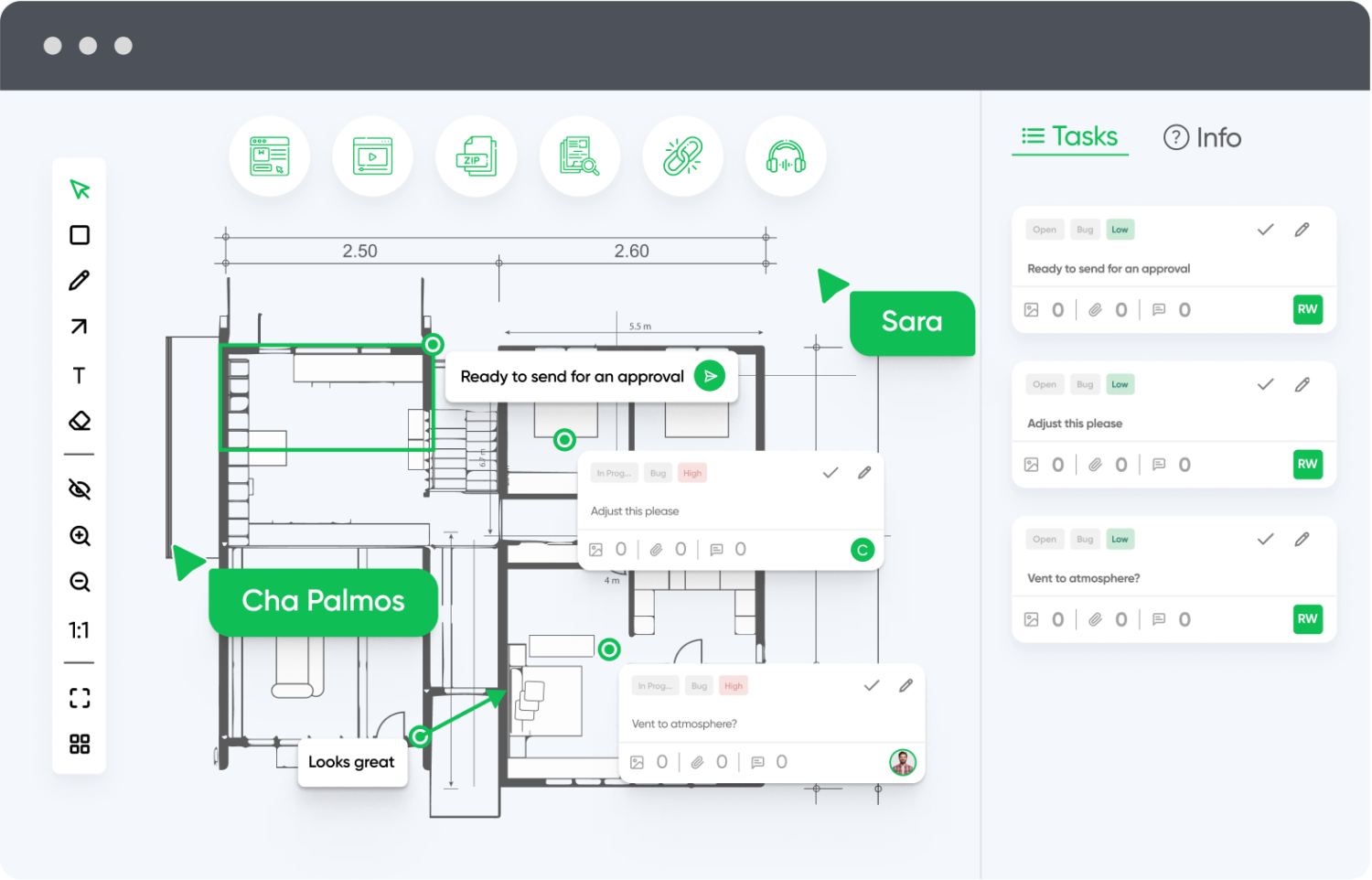
Customizable Workflows
Adapt zipBoard to your team’s review process, not the other way around. From simple two-step approvals to multi-phase stakeholder workflows, zipBoard flexibly supports your content lifecycle.
Don’t want to start from scratch?
Try zipBoard’s ready-to-use templates with pre-built phases, project statuses, and task types—designed to help you launch faster and stay organized from day one.
Explore templates now and streamline your setupEnterprise-Grade Security and Permissions
With granular access controls, audit trails, and compliance features, zipBoard is built to protect sensitive content while ensuring only the right people can view, comment, or approve.
Visual Context Reduces Miscommunication
Markup tools allow teams to leave feedback directly on the content—not in separate threads—making feedback clearer, faster, and far less prone to misinterpretation.
Cross-Browser & Device Testing
Review web content and applications in multiple browsers and devices from one platform. Ideal for teams working on responsive or cross-platform experiences.
Built-In Task Management
Convert comments into actionable tasks, assign them to team members, and track progress without switching platforms. Priorities and deadlines help keep reviews on schedule.
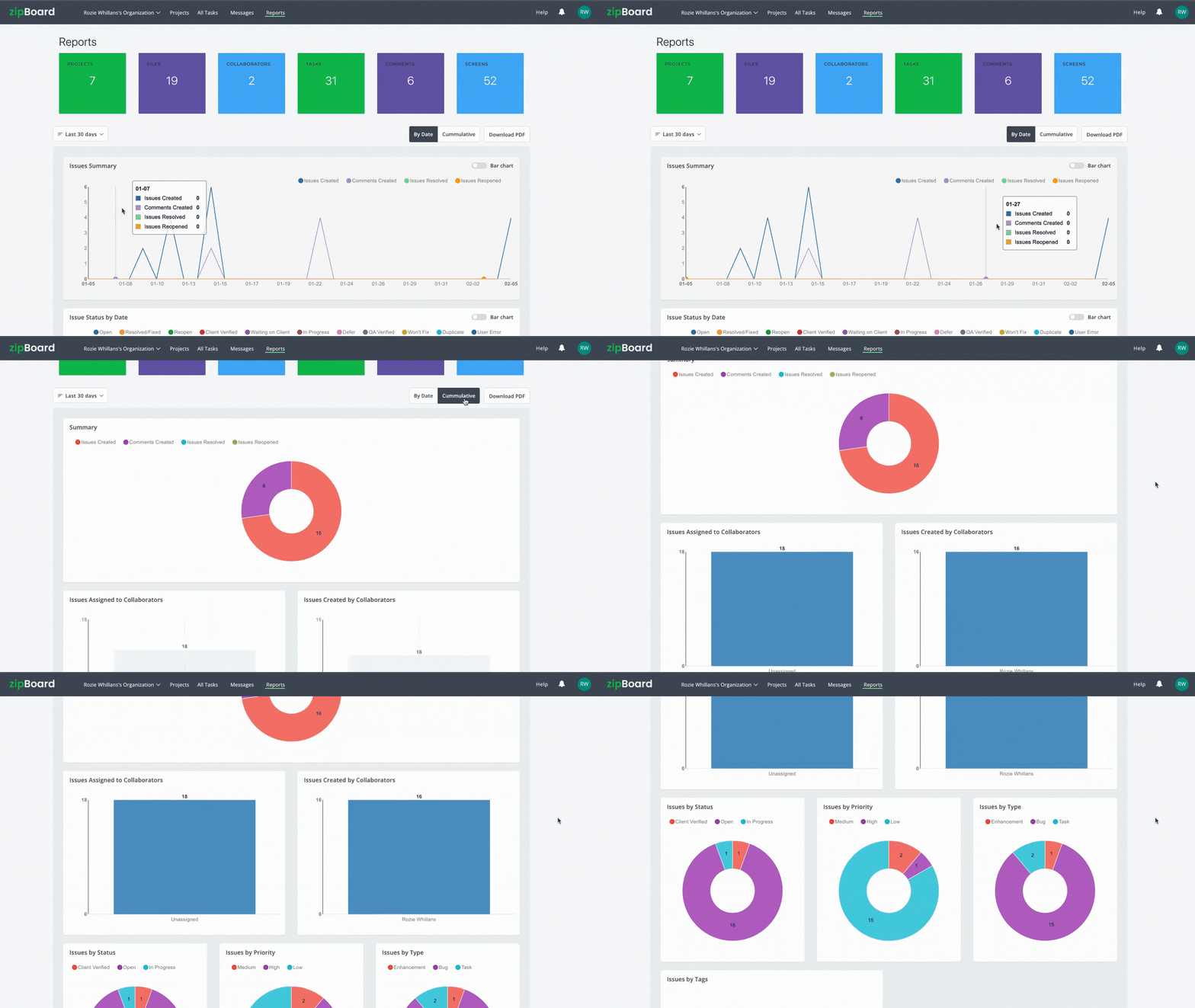
Reporting & Analytics
Use built-in dashboards to analyze feedback trends, identify bottlenecks, and improve processes over time with data-driven insights.
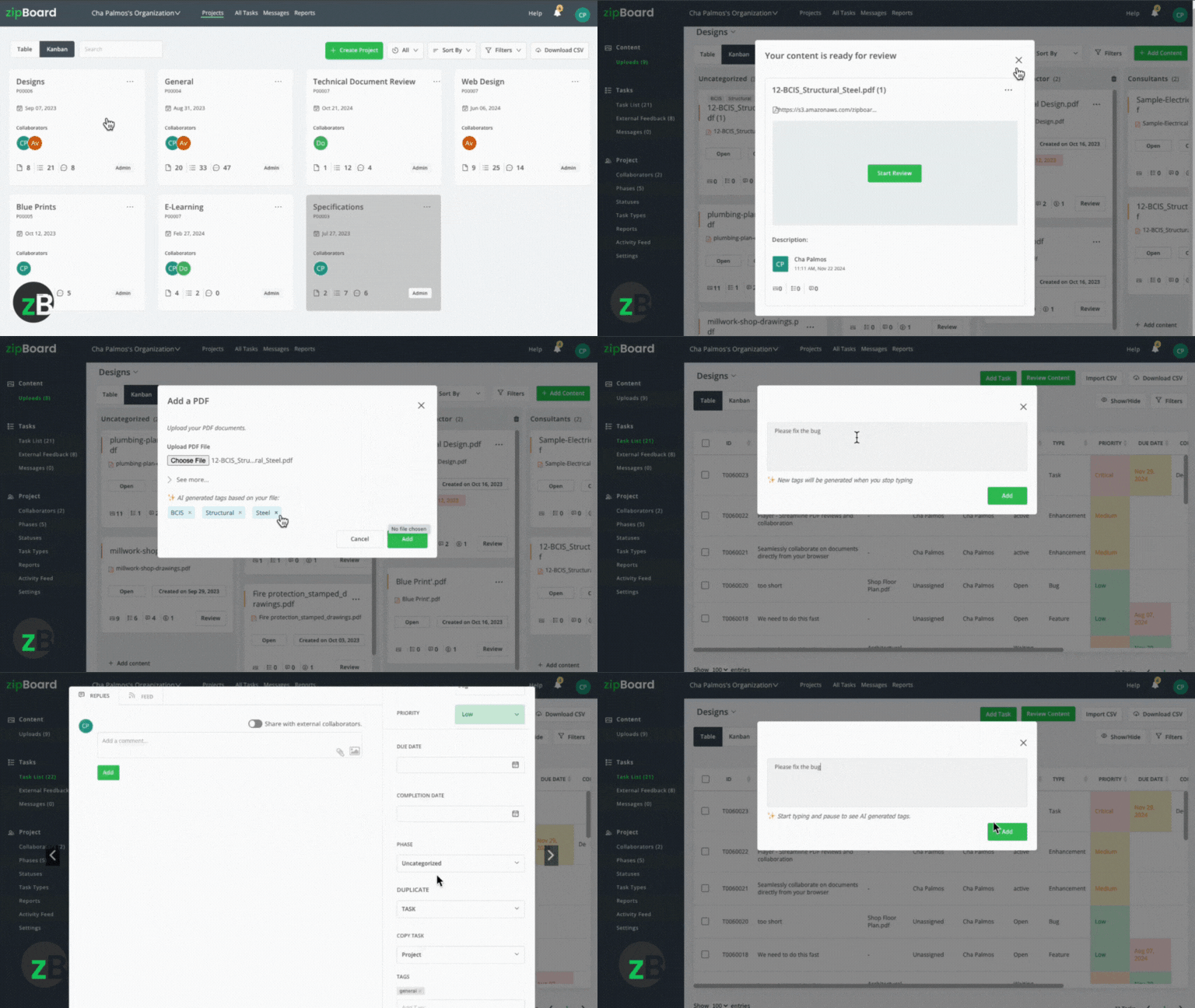
AI-Enhanced Feedback
Leverage AI features to automatically categorize feedback, highlight potential issues, and streamline review cycles through smart suggestions.
Want to see how zipBoard fits into your stack?
Check out all available integrations to keep your team in sync and your reviews efficient.
Explore all integrations now.API & SSO Support
Need custom integrations? zipBoard’s API and single sign-on (SSO) features make it easy to connect securely with your existing systems.
Ready to Streamline Your Content Feedback Process?
Start your free trial with zipBoard and experience organized, actionable feedback across all your digital content—no setup hassles, just better collaboration.
Start Free TrialBook DemoFrequently Asked Questions
Yes. Dedicated SCORM review tools like zipBoard, Articulate Review 360, and Review My eLearning all include a built-in SCORM player that simulates an LMS environment. This means you can share and review a SCORM package without uploading it to a full LMS. Standard cloud storage tools like Google Drive or Dropbox cannot do this.
Most professional SCORM review tools are subscription-based. However, zipBoard offers trial periods.
The most efficient method in 2026 is to upload your SCORM package to a tool like zipBoard, which generates a no-login shareable link. Your client clicks the link, views the course exactly as a learner would, and pins visual comments directly on the slide. No accounts or downloads are required on the client’s side.
zipBoard supports multiple formats beyond SCORM, including xAPI packages, video files, PDFs, and live web URLs. This makes it a single review hub for entire eLearning campaigns rather than just the course module.
Conclusion
In 2026, the distance between a finished course and a successful launch is measured entirely by the efficiency of your feedback loop. As the eLearning market scales toward its $400 billion potential, the technical barriers of legacy review systems—clunky logins, siloed communication, and environment-specific bugs—are risks your production timeline can no longer afford. By transitioning to a friction-free, “no-login” collaboration model like zipBoard, you empower every stakeholder from legal to marketing to provide instant, visual feedback that keeps your projects moving. Ultimately, the best SCORM review tool is the one that gets out of the way of your experts, allowing your team to focus on what truly matters: delivering high-impact learning content without the administrative drag.
Transform Your E-learning Feedback Process Today
Try zipBoard free for 14 days or book a personalized demo to see how structured feedback can revolutionize your E-learning review workflow.
Book DemoStart Free Trial


Recent Posts
- 7 Best Fieldwire Alternatives for Construction Teams September 29, 2026
- Never Miss a Content Approval Made Easy with Centralized Tools September 25, 2026
- How to Compare Two PDF Versions Without Losing Track of Changes September 1, 2026
- Why IT Teams Are Getting Out of the PDF Review Server Business August 20, 2026
- The Real Cost of Adobe Acrobat for Documentation Teams August 19, 2026
©️ Copyright 2026 zipBoard Tech. All rights reserved.