Your Digital Asset Review Workflow Is Broken (And How to Fix It)
03 Feb
Table of Contents
ToggleDigital content is growing fast—and most teams aren’t struggling to create it. They’re struggling to review it. PDFs, design files, technical manuals, training modules, and engineering drawings move through a messy mix of email threads, chat messages, and “final_v2_REAL.pdf” attachments.
That workflow creates predictable failure modes: feedback without context, version confusion, missed approvals, and rework. The result is slower cycles, higher risk, and frustrated teams—especially when external stakeholders (clients, SMEs, compliance, contractors) are involved.
The fix isn’t “more meetings.” It’s a modern review workflow built around three things: visual feedback in context, clear versioning, and automated routing/approvals. This guide breaks down what’s changed, what’s broken, and how to rebuild a review process that scales.
TL;DR
- The Problem: Fragmented communication (emails, Slack, and spreadsheets) leads to version confusion and workflow fatigue.
- The Impact: Manual workflows cause missed deadlines, expensive rework, and brand inconsistency.
- The Fix: Centralizing assets in a single source of truth and using automated proofing tools can reduce review cycles by up to 50%.
The Changing Landscape of Digital Asset Review
Gone are the days when assets were just JPEGs or MP4s. Today, a digital content review platform must handle a complex mix of media:
- Engineering: CAD drawings, Bills of Materials (BOMs), 3D models, drawings, specs, and submittals.
- Technical Writing: User manuals, API documentation, compliance guides, and SOPs.
- Marketing: Interactive brochures, PDFs, and SCORM courses.
- Creative: Figma/Adobe XD files, video scripts, web design, motion graphics, and brand assets.
Why does this matter? Each type has unique review needs. Engineering needs precise, pixel-perfect annotations; creatives need visual feedback; and legal teams need audit trails. A generic document collaboration platform often fails to address these specific nuances.
In-Person vs. Distributed Review
Before the pandemic, most of reviews happened in person. Today, most of teams rely on remote content review platform tools. While this shift offers flexibility and collaboration, it introduces new pain points:
Lack of Context: The "Blind Feedback" Loop
- The Problem: Comments exist in a vacuum. A stakeholder emails, “Change the header image,” or leaves a sticky note in a PDF saying, “This wording is off.”
- Why It Hurts: Without a visual anchor (like a screenshot or a pin on the exact coordinate), the designer or engineer has to play detective. They waste time decoding which header image or which paragraph.
- The Cost: This back-and-forth clarification cycle often accounts for 30–40% of the total review time. It’s not work; it’s administrative friction.
Time Zone Lags: The 24-Hour "Ping-Pong" Delay
- The Problem: In distributed teams, a reviewer in London submits feedback just as the developer in San Francisco logs off.
- Why It Hurts: Approvals are delayed by 3–5 days simply due to asynchronous communication (McKinsey). A simple question like “Is this the right shade of blue?” sits unanswered for a full workday.
- The Cost: Momentum dies. Creative energy is lost as teams switch contexts to other tasks while waiting, making it harder to pick the thread back up when the answer finally arrives.
No Single Source of Truth: The "Phantom Edit"
- The Problem: Stakeholders end up editing different versions of the same file. Marketing marks up a PDF, Engineering updates the CAD file, and Legal edits a Word doc.
- Why It Hurts: There is no centralized record. Changes requested by Legal might contradict changes requested by Marketing, and the production team has to manually reconcile conflicting feedback.
- The Cost: Critical errors slip through the cracks because no one sees the full picture. This leads to costly post-production fixes.
Version Chaos: The "Final_Final_v3" Nightmare
- The Problem: Multiple stakeholders download a file, make edits locally, and re-upload it with a new name.
- Why It Hurts: You end up with a folder full of files named Project_v1, Project_v1_Edit, Project_v2_FINAL, and Project_v2_FINAL_Real.
- The Cost: Solving version control issues in content review becomes a full-time job. Teams risk working on obsolete files, leading to what Gartner calls “rework fatigue”—fixing things that shouldn’t have been broken in the first place.
Communication Breakdown: The Platform Scatter
- The Problem: Feedback is scattered across email, Slack, Trello cards, and verbal hallway conversations.
- Why It Hurts: To approve an asset, the project manager must aggregate feedback from four different channels.
- The Cost: This external review feedback chaos guarantees that at least one critical piece of feedback will be missed.
To manage a successful distributed content review process, teams need tools that bridge the gap between remote work and real-time collaboration. “These five issues show up in every industry. The difference between high-performing teams and struggling teams is whether feedback is anchored to the asset, versions are controlled, and approvals are automated.”
Core Review Areas: Use Cases and Solutions
Digital Content & Creative Review
The Pain Points:
Creative workflow bottlenecks are killing productivity. 40% of designers wait 5+ days for feedback (Creative Bloq), and 30% of revisions are caused purely by miscommunication—specifically, a lack of clear “why” behind changes. Externally, clients often send 5+ rounds of comments via scattered channels like email or Slack, creating external review feedback chaos.
The Solutions:
While tools like Framer (web/mobile) and Figma (UI/UX) integrate automated workflows, they are often siloed. Creative workflow management tools need to bridge the gap between design and delivery.
How zipBoard solves this:
zipBoard combines the best of all worlds for design review collaboration:
- Universal Support: Handles PDFs
- Automated Workflows: Route reviews to the right team with one click.
- Real-Time Collaboration: Features threaded comments and @mentions to fix creative workflow bottlenecks.
- Integrations: Connects seamlessly with Slack, Jira, Confluence, and DAMs like Bynder.
Engineering & Technical Document Review
The Pain Points:
Precision is non-negotiable here. 25% of CAD files contain errors due to manual review (ASME), and a lack of version control leads to rework costs of $50K+ per project (PTC). Meanwhile, 50% of technical writers spend 2+ hours a day simply chasing approvals (Gartner). An effective engineering document review workflow must eliminate these risks.
The Solutions:
Traditional tools like SolidWorks eDrawings or Autodesk Document Cloud are great for markup but often lack the broader project context.
How zipBoard solves this:
zipBoard acts as a unified drawing markup online and document review hub:
- Unified Reviews: Upload Confluence pages, PDFs, and engineering files into a single workspace.
- Version Control: Immutable snapshots and diff tools ensure everyone is looking at the latest revision.
- Workflow Automation: Route technical docs to Subject Matter Experts (SMEs) and compliance officers automatically.
Training & SCORM Course Review
The process of reviewing eLearning content is uniquely complex because it isn’t just a static image or video; it is an interactive experience. When the review process is manual, the bridge between instructional design and the final Learning Management System (LMS) deployment often collapses.
What Teams Need:
Instructional designers, Subject Matter Experts (SMEs), and QA testers need a way to review live, interactive content (SCORM, xAPI, or HTML5) in its native environment. They need to be able to track bugs across different devices and ensure that branching logic, quizzes, and multimedia elements function exactly as intended before the course goes live to learners.
What Breaks in the Old Workflows:
LMS review is notoriously chaotic. Most eLearning teams still use email or Slack for feedback, resulting in zero audit trail. Furthermore, according to Articulate, 30% of SCORM packages fail QA simply due to mismatched versions. Without a dedicated tool, SMEs often resort to taking manual screenshots and pasting them into Word docs or spreadsheets, leading to “feedback lag” where developers can’t replicate the specific interactive bug the reviewer encountered.
How zipBoard Solves This:
zipBoard bridges the gap between the course developer and the stakeholder by turning the browser into a collaborative canvas.
- Review in Context: Stakeholders can click directly on SCORM frames to leave comments, eliminating the need for “Slide 4, third paragraph” descriptions.
- Version Control for SCORM: Upload new annotations and comments to the same task thread so reviewers are always looking at the latest iteration, not an outdated file from last week.
- Simplified SME Access: Reviewers don’t need an LMS login or specialized software; they can access the course via a simple URL to provide feedback instantly.
Ready to Elevate Your Content Feedback Process?
Try zipBoard today and experience streamlined reviews, clear collaboration, and faster approvals—all in one platform.
Start Free TrialBook DemoPain Points Across All Teams: A Deep Dive
Pain Point
Content Sprawl
Version Control Issues
External Feedback Chaos
PDF Review Chaos
Engineering Errors
Impact
Fragmentation of data across disconnected team environments
Chronic project delays stemming from poor visibility and tracking
Excessive iteration cycles that stall final delivery and approval
Over-reliance on stagnant communication channels like email
Technical inaccuracies and flaws within core production files
Solution
Centralized DAM + automated tagging
Immutable versions + audit logs
Structured comment threads + routing
Real-time PDF review and approval tool
AI-assisted markup + automated checks
Tool Examples
Bynder, Adobe Experience Manager
Markup.io, zipBoard
Miro, zipBoard
Adobe Acrobat Pro, zipBoard
Autodesk Document Cloud, SolidWorks
If your team is trying to manage content sprawl or solve version control issues in content review, the common thread is the need for a centralized, visual platform.
How Digital Asset Workflow Automation Solves the Chaos
To move from chaos to clarity, you need digital asset workflow automation. Here is how automation transforms the process:
Automated Routing
Instead of manually forwarding emails, the system routes PDFs to the correct reviewer based on department or file type.
Version Control
Automation enforces immutable snapshots. zipBoard, for example, locks versions automatically and provides a full revision history with visual diff tools.
Real-Time Collaboration
Move away from static Word docs. Use threaded comments and @mentions (like Slack, but for reviews) to enable content QA workflow efficiency.
Approval Gates
Implement multi-level sign-offs (e.g., Designer → Manager → Client). zipBoard offers customizable digital asset approval workflow settings with email nudges and reminders.
Audit Logs
For regulated industries, tracking who changed what and when is critical. zipBoard tracks every annotation, comment, and approval with user IDs and timestamps.
Integrations
A content approval workflow software must talk to your existing stack. Look for Jira, Confluence, Slack, and DAM integrations to eliminate context switching.
The Old Way vs. The Modern Tech Stack
The Old Way vs. The Modern Tech Stack
Storage: Dropbox / Google Drive
Comms: Slack / Email
Tracking: Excel / Asana
Result: You are the human middleware, manually moving data between these silos. This is where PDF review chaos thrives.
The "Integrated" Stack (Better)
Design: Figma (for UI) + Adobe Creative Cloud
Docs: Confluence / SharePoint
Project Mgmt: Jira / Monday.com
Result: Better, but stakeholders still struggle. A marketing manager doesn't know how to use Figma; a client can't access your internal Jira.
The Visual Review Layer Stack (Best Practice)
This is where a specialized digital asset review & markup platform sits on top of your existing tools, providing a single visual interface for everyone.
Why zipBoard Is the Perfect Layer for Your Team
zipBoard solves the fragmentation problem by acting as the universal visual layer for your projects. It doesn’t force you to replace your tech stack; it connects it.
Instead of emails saying “Move the button,” zipBoard lets users click directly on a live website, PDF, or image to drop a pin.
- The zipBoard Fix: Every comment is attached to a specific visual coordinate and screen resolution. The developer sees exactly what the reviewer saw. No guessing.
zipBoard provides a centralized hub where the latest version is always the clear source of truth. It eliminates the guesswork of file management while providing a robust trail for every decision made.
- Precision Annotations: Feedback is never vague. Using visual annotations pinned to exact locations, reviewers can point to specific pixels or text strings, ensuring designers know exactly what needs to be fixed without the back-and-forth.
- Organized Collaboration: Communication is moved out of messy email chains and into structured threads. You can manage the entire lifecycle of an asset with clear assignments, approvals, a timestamped audit trail, and targeted @mentions to loop in specific users or reviewers exactly when they are needed.
Since feedback is centralized and contextual, reviewers don’t need to be online simultaneously.
- The zipBoard Fix: Automated notifications alert the right team members instantly. Detailed annotations mean the developer has all the info they need to fix the issue without waiting for a follow-up call.
Every action is logged, meaning you never have to wonder who approved a specific change or when a bug was reported. This level of transparency is essential for teams working in regulated industries or high-volume agencies.
When the project is over (or when a dispute arises), you need a record of what happened. zipBoard provides exportable reports that turn your review history into a professional document.
- Proof of Approval: Generate a PDF or CSV audit trail showing exactly who approved what and when.
Compliance Ready: Perfect for regulated industries that require documentation of the QA and review process for every digital asset.
The zipBoard Fix: Meeting You Where You Work
Creative teams need their feedback to flow directly into their technical environment, while external stakeholders need a “frictionless” way to give feedback that doesn’t require learning a new, complex software platform.
- For Developers: Stop manual data entry. You can push captured issues and bugs directly to Jira that developers need to fix them.
- For Project Managers: Stay updated without leaving your chat apps. Sync comments and status updates with Slack or Microsoft Teams so you can track progress in real-time.
- For Clients & Subject Matter Experts: Eliminate the “login barrier.” Clients get a simple link to review—no complex software installation or account creation required.
Guest/External Reviewers: Streamline external sign-offs with dedicated Guest Review access for PDFs and live assets, ensuring even the least tech-savvy stakeholder can pin a comment successfully.
Ready to Elevate Your Content Feedback Process?
Try zipBoard today and experience streamlined reviews, clear collaboration, and faster approvals—all in one platform.
Start Free TrialBook DemoFeatures That Matter in a Modern Review & Markup Tool
When evaluating a markup and annotation tool online, look for these critical features:
- Online markup: No desktop-only limitations. You should be able to annotate in the browser.
- Real-time commenting: Faster iteration than email. Look for threaded comments.
- Side-by-side diff: The ability to spot changes instantly between versions.
- Approval gates: Prevents “lost in translation” changes by enforcing sign-offs.
Why zipBoard Stands Out
While many tools do one thing well, zipBoard is an all-in-one design feedback tool and project hub.
We handle PDFs, images, SCORM files, and design assets in one place. Review a PDF manual and a video all in the same workspace.
We provide version control for non-tech teams—no need for Git or Perforce. The audit logs and diff tools work for designers, engineers, and writers alike.
zipBoard has helped teams of 10 to 10,000+ to streamline their workflow.
How zipBoard transforms workflows
For Creatives
Review PDFs, images, and Figma files—all in one place.
For Engineers
Annotate construction files and track changes without switching tools.
For Techincal Writers
Version control and audit logs make documentation reviews smoother than Word track changes.
Why zipBoard Excels as a Digital Asset Review Solution
zipBoard stands out by offering a complete, visual-first solution for managing digital reviews across diverse formats and workflows. Here’s how it supports teams end-to-end:
Customizable Workflows
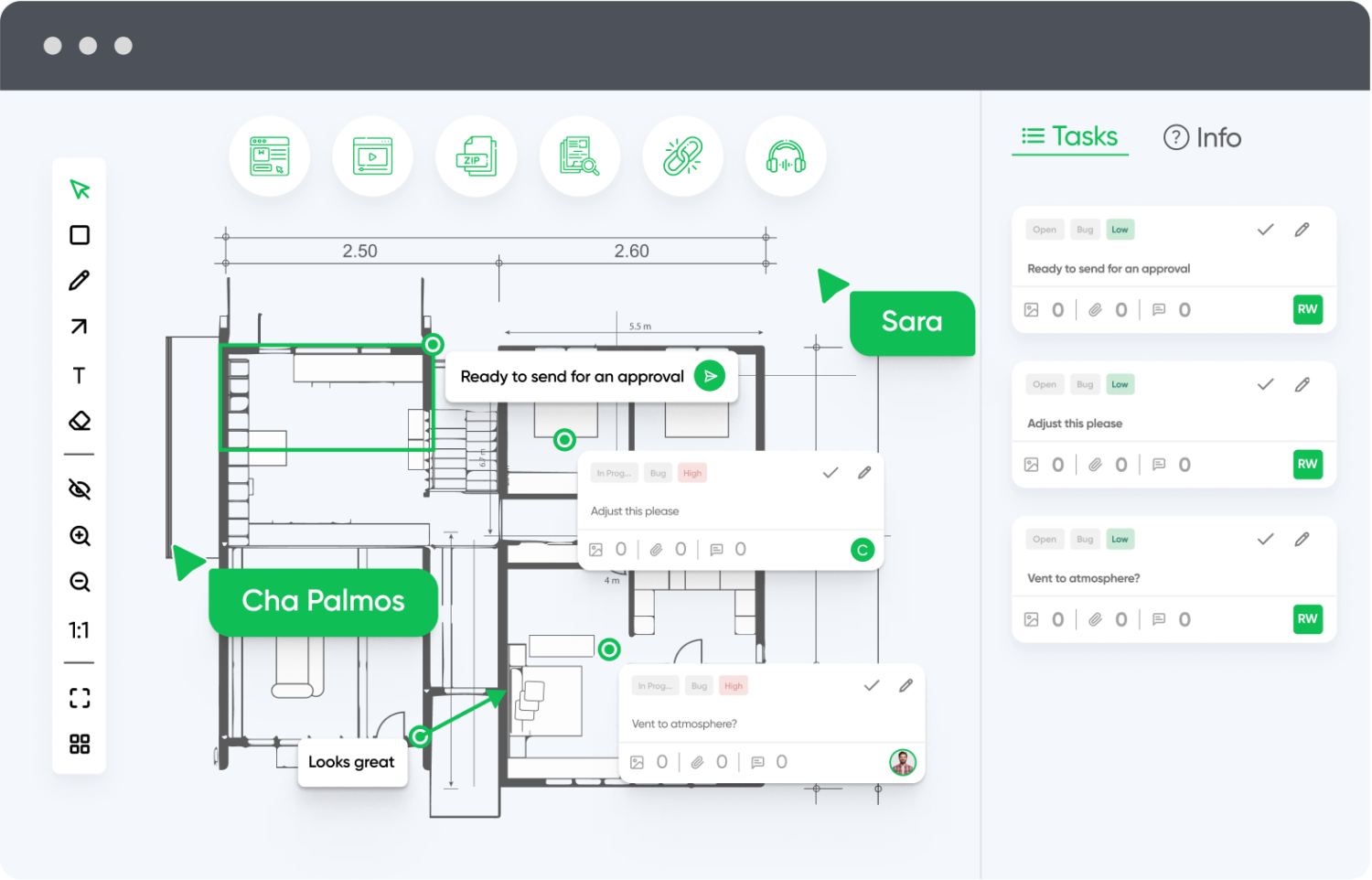
Adapt zipBoard to your team’s review process, not the other way around. From simple two-step approvals to multi-phase stakeholder workflows, zipBoard flexibly supports your content lifecycle.
Don’t want to start from scratch?
Try zipBoard’s ready-to-use templates with pre-built phases, project statuses, and task types—designed to help you launch faster and stay organized from day one.
Explore templates now and streamline your setupEnterprise-Grade Security and Permissions
With granular access controls, audit trails, and compliance features, zipBoard is built to protect sensitive content while ensuring only the right people can view, comment, or approve.
Visual Context Reduces Miscommunication
Markup tools allow teams to leave feedback directly on the content—not in separate threads—making feedback clearer, faster, and far less prone to misinterpretation.
Cross-Browser & Device Testing
Review web content and applications in multiple browsers and devices from one platform. Ideal for teams working on responsive or cross-platform experiences.
Built-In Task Management
Convert comments into actionable tasks, assign them to team members, and track progress without switching platforms. Priorities and deadlines help keep reviews on schedule.
Reporting & Analytics
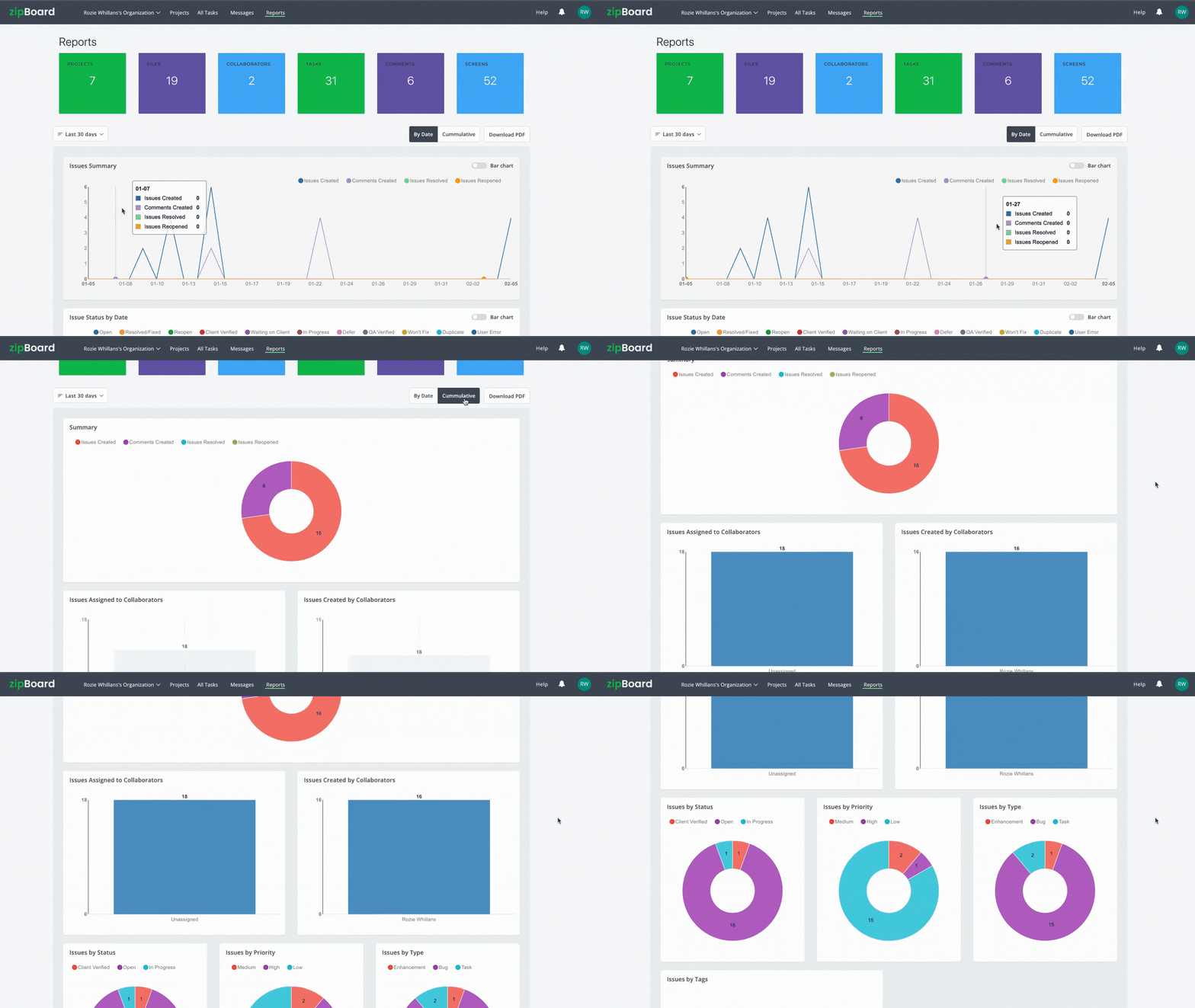
Use built-in dashboards to analyze feedback trends, identify bottlenecks, and improve processes over time with data-driven insights.
AI-Enhanced Feedback
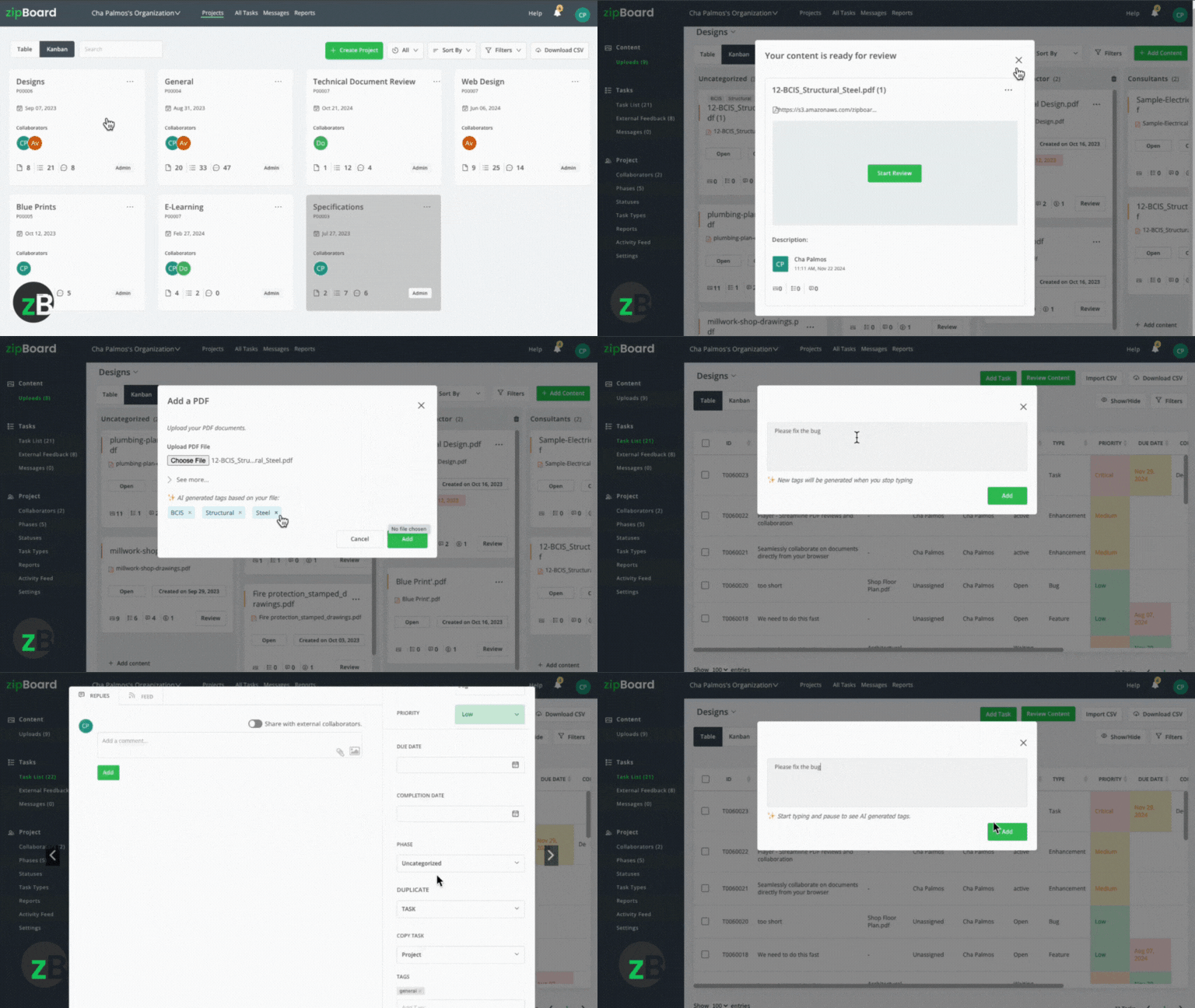
Leverage AI features to automatically categorize feedback, highlight potential issues, and streamline review cycles through smart suggestions.
Want to see how zipBoard fits into your stack?
Check out all available integrations to keep your team in sync and your reviews efficient.
Explore all integrations now.API & SSO Support
Need custom integrations? zipBoard’s API and single sign-on (SSO) features make it easy to connect securely with your existing systems.
Ready to Streamline Your Content Feedback Process?
Start your free trial with zipBoard and experience organized, actionable feedback across all your digital content—no setup hassles, just better collaboration.
Start Free TrialBook DemoFuture Trends in Content Feedback Systems
The future of Digital Asset Review & Markup is intelligent and integrated.
AI-Assisted Markup
By 2027, most of enterprises will use AI + automation for 80% of digital asset reviews. Autodesk’s AI already flags missing dimensions in CAD files; Framer AI suggests design improvements.
Unified Platforms
The market is moving away from point solutions toward platforms that combine DAM with review capabilities (e.g., Adobe Experience Manager + specialized review tools).
Review Telemetry
Advanced analytics will show time-to-approve metrics and bottleneck detection (e.g., alerting managers that “Marketing delays 60% of reviews”).
FAQs About Digital Asset Review
A digital asset review workflow is a structured process for evaluating, annotating, and approving digital media—such as images, videos, SCORM modules, and PDFs. Unlike simple document sharing, this workflow provides a centralized hub that tracks the entire lifecycle of an asset from initial draft to final sign-off, ensuring that every stakeholder has clear visibility into the project’s status.
While document collaboration (like Google Docs) is built for text-based files, a digital asset review platform is designed to handle rich media. It provides specialized tools like frame-by-frame video commenting, interactive SCORM review, and pixel-precise markups for CAD and design files. It prioritizes visual context over simple text threads to prevent misinterpretation.
Email and Slack feedback often exist in a vacuum, leading to the “Blind Feedback Loop.” Visual feedback allows stakeholders to anchor comments to exact coordinates on the asset. This eliminates the “detective work” for designers and engineers, reducing the time spent on clarifying questions by up to 40%.
Teams often cut approval times by up to 60%, reduce coordination overhead, and boost content quality. Most see a return on investment within 3–6 months.
Conclusion
Manual review processes are a liability in today’s fast-paced digital environment. To fix creative workflow bottlenecks, manage content sprawl, and eliminate PDF review chaos, you need a system that automates the mundane and clarifies the complex.
Don’t let version control issues or fragmented feedback slow your team down.
Ready to ditch the PDF chaos? Start small by piloting a high-impact workflow, like engineering document review or creative sign-offs, on a modern platform.
Transform Your Team's Content Feedback Process Today
Try zipBoard free for 14 days or book a personalized demo to see how structured feedback can revolutionize your content creation workflow.
Book DemoStart Free Trial

Recent Posts
- How Construction Teams Manage Drawing Reviews (Without the Chaos) March 24, 2026
- Technical Writers Best Toolkit: Review & Documentation Calculator March 16, 2026
- User-Friendly E-Learning Review Tools: Trends for Teams in 2026 February 20, 2026
- Your Digital Asset Review Workflow Is Broken (And How to Fix It) February 3, 2026
- Best Practices for Efficient Document Reviews and Collaboration December 18, 2025
©️ Copyright 2025 zipBoard Tech. All rights reserved.