27 Jan

The short answer: blueprint markup software lets you put clouds, callouts, measurements and stamps on PDF drawings, then track every comment until it's resolved. For takeoff, estimating and offline work on a tablet, Bluebeam Revu is the deepest tool. If your field crews live in a jobsite app, Procore, Fieldwire or Autodesk Forma give you markups next to RFIs and punch lists. If the hard part is getting owners, consultants and subcontractors to review drawings without buying everyone a licence, a browser tool like zipBoard fits: reviewers mark up from a link, and every markup becomes a tracked task.
Construction drawings get reviewed by many people who don't share the same software. The architect works in Revit, the general contractor in Procore, the MEP consultant in Bluebeam, and the owner's rep just has a browser. Blueprint markup software is where all of them comment on the same sheet, and where someone can see which comments are still open before the next revision goes out.
This guide explains what the software does, how to choose, and how six tools compare, using only what each vendor says on its own pages. It's the construction chapter of our guide to PDF markup software for teams.
What is blueprint markup software?
Blueprint markup software opens drawings, usually as PDFs, and lets reviewers add notes on top without changing the drawing itself. Good tools also keep track of what each markup asks for, who has to fix it, and which revision it belongs to. These are the jobs it has to do:
Clouds and callouts
Circle the change with a revision cloud and point at it with a callout or arrow, so the comment sits on the exact detail.
Measure with calibration
Set the scale from a known dimension, then check lengths, areas, perimeters and counts. Takeoff tools go further, into quantities and cost.
Stamps and signatures
Mark a shop drawing "Reviewed", "Revise and resubmit" or "Approved", and add a signature or date stamp.
Compare revisions
Put the old and new sheet next to each other, or overlay them, to see what moved and check that each comment was addressed.
Markup lists and tracking
Every markup in one list you can filter by author, type or status, so nothing is missed when the next set goes out.
Shared review
Everyone comments on one copy instead of emailing marked-up PDFs back and forth, and sees each other's notes.
How to choose blueprint markup software
Most tools can draw a cloud. The differences show up in who has to pay, where people work, and what happens to a markup after it's drawn. Ask these six questions:
- Who marks up? If it's only your own estimators and project managers, a desktop tool with deep features is fine. If owners, consultants and subcontractors comment too, check what an outside reviewer needs: a paid seat, a free account, or just a link.
- How is it licensed? Per user, per project, by construction volume, or by the team running reviews? Count the people who comment, not only the people who manage.
- Field or office? Superintendents on site need a tablet app that works without signal. Design and submittal review usually happens at a desk, where a browser is enough.
- What happens to a markup? Does it get an owner, a due date and a status? Can you see who still hasn't reviewed, and who approved which revision?
- What does it connect to? Procore, Autodesk, your document management system, Microsoft Teams, or your own platform through an API.
- Where do the drawings live? Some owners and public agencies can't upload drawings to an outside cloud. Check whether the tool can review files that stay on your own servers or in your region.
Blueprint markup software compared
Each column says only what that vendor's own pages say. Plans change, so check each vendor's page before you buy.
| Question | Bluebeam (Revu, web, mobile) | Drawboard Projects | Autodesk Forma (Data Management, Build) | Procore Drawings | Fieldwire | zipBoard |
|---|---|---|---|---|---|---|
| Built for | Markup, measurement and takeoff on drawings, plus PDF editing | Drawing and document review for design and construction teams | Document management and field work across Autodesk's construction platform | Drawing management inside Procore's project platform | Jobsite management: plans, tasks, punch lists | Team review and sign-off of drawings and documents in the browser |
| Where it runs | Revu on Windows; Bluebeam on web, iOS and Android | Web, Windows, iOS | Web; mobile app | Web; mobile, including offline | iPhone, iPad, Android, web | Any modern browser, desktop or tablet |
| Works offline | Revu on desktop; mobile offline with Studio sync | Offline markups in the Windows and iOS apps | See Autodesk's mobile docs | Yes, syncs when back online | Yes, syncs when back online | No, needs a connection |
| Outside reviewers | Without a plan: free Bluebeam ID, read-only, a limited markup set in Studio Sessions | Guests at no extra cost, with time-limited access | Project members with Autodesk accounts | Users are unlimited on Procore's annual contract | Basic plan is free for up to 5 users | Unlimited reviewers on every plan; mark up from a link with no account |
| Measure | Length and area on all plans; perimeter, count, angle, volume on Core and up | Calibrated length, rectangle and polygon area | Measurement markups | See Procore | See Fieldwire | Calibrate; distance, area, perimeter, arc, count |
| Takeoff and estimating | Yes: Quantity Link to Excel, Dynamic Fill (Complete and up) | No | Separate Autodesk products | Separate Procore products | No | No |
| Compare revisions | Overlay and compare on Core and up | Overlay mode, revision switching | File compare | Compare drawing versions | Sheet compare on Pro and up | Side by side with synced scroll and a list of text changes |
| Markups tracked to done | Markups List with statuses | Tasks and issues with assignees, deadlines, statuses | Issues list | Links to RFIs, punch lists, submittals | Tasks and punch lists | Every markup becomes a task with owner, priority and status |
| Reviewer sign-off | Stamps and digital signatures | Assign reviewers; statuses from Needs Review to Approved | File approval workflows | Through Procore's submittals and other tools | Submittals on Business Plus | Required reviewers with due dates; a decision per reviewer per version |
| Integrations and API | Procore, Newforma, Autodesk Forma, SharePoint and more | Procore, Aconex, Teams, Autodesk Forma, Revit, Archicad; public API for tasks | Autodesk platform and API | Marketplace of 500+ apps | App integrations on Business; API on large contracts | Procore, Jira, Slack, Teams, Wrike, Outlook, Zapier; REST API; embeddable links |
| How it's priced | Per user, billed annually | Per user; Team plan $270 per user per year | Per named user | Annual contract, unlimited users | Per user; free Basic plan; Pro $39 per user per month, billed annually | Per team, from $99 a month; reviewers free |
Sources: Bluebeam plans and pricing and working without a subscription; Drawboard plans and pricing (Drawboard Projects, prices in USD); Autodesk Forma Data Management, About Autodesk Docs and PlanGrid; Procore Drawings and pricing; Fieldwire pricing and blueprint app. zipBoard: PDF and drawing review guide, pricing.
Which blueprint markup software is best for construction teams?
It depends on the job the markup has to do:
- Takeoff, estimating and heavy markup at a desk: Bluebeam Revu. Its measurement, Quantity Link and batch tools go much further than browser tools.
- Field crews working from tablets, often offline: Fieldwire, Procore or Autodesk Forma Build. Markups sit next to tasks, RFIs and punch lists, and the apps sync when signal returns.
- Design teams reviewing drawing sets on tablets with a stylus: Drawboard Projects, which also lets guests in at no extra cost.
- Review rounds with many outside parties: zipBoard. Owners, consultants and trades mark up from a link without a licence, every markup becomes a task with an owner, and each required reviewer's decision is recorded on the revision they saw.
Many teams use two: Bluebeam or a field app for their own staff, and a link-based review tool for everyone outside the company.
Six blueprint markup tools, one by one
1. Bluebeam Revu and Bluebeam Cloud
The standard desktop tool for construction PDFs. All plans include Revu for Windows plus Bluebeam on web and mobile. Basics covers markup and length and area measurement; Core adds perimeter, count, angle and volume, overlay and compare, and hosting Studio Sessions; Complete adds Quantity Link with Excel and Dynamic Fill; Max adds AI drawing reviews and comparisons. Someone without a plan can sign in with a free Bluebeam ID and join Studio Sessions read-only, with a limited set of markup tools.
Best for: estimators and project teams who need takeoff and deep markup. Watch for: plans are per user, billed annually, so every regular reviewer adds cost. See our Bluebeam alternative for drawing review for where each tool fits.
2. Drawboard Projects
Drawing review on web, Windows and iOS, known for pressure-sensitive pen markup. It has calibrated measurement, overlay mode, offline markups in the apps, tasks and issues pinned to drawings, and review statuses from Needs Review to Approved. Guests can be invited at no extra cost with time-limited access. Integrations include Procore, Aconex, Autodesk Forma, Revit and Archicad. Team is $270 per user per year.
Best for: architecture and design teams who mark up with a stylus. Watch for: everyone on your own team needs a licence. Compare in detail: zipBoard vs Drawboard.
3. Autodesk Forma: Data Management (formerly Autodesk Docs) and Forma Build
Autodesk's common data environment includes markup tools, file approval workflows, file compare and a central issues list. Autodesk says markups carry forward across file versions. It's licensed per named user and fits best when your project already runs on Autodesk's platform.
Is PlanGrid still available? Not to new customers. Autodesk's PlanGrid page says it "is no longer available for purchase by net-new customers" and points to Forma Build, which Autodesk describes as combining the best of PlanGrid and BIM 360.
4. Procore Drawings
Procore's drawings tool keeps every sheet and revision in one place, lets the team mark up and compare versions, and links drawings to RFIs, punch lists and submittals. Mobile access works offline and syncs later. Procore prices by annual contract with unlimited users, so if your company already runs Procore, its markup is often the default.
Watch for: outside reviewers need to be invited into your Procore project. zipBoard's Procore integration syncs Procore documents into a zipBoard review when you want people outside Procore to mark up.
5. Fieldwire
A jobsite app from Hilti for plans, tasks, punch lists and forms on iPhone, iPad and Android. Fieldwire says you can add markups, annotations and progress photos on drawings in the field, and the app works offline. The Basic plan is free for up to 5 users, 3 projects and 100 sheets; sheet compare starts on Pro at $39 per user per month, billed annually.
Best for: superintendents and foremen working from plans on site. Watch for: it's built for the field, not for formal design or submittal review rounds.
6. zipBoard
A browser-based review tool for drawings and documents. Reviewers open a link and mark up with clouds, callouts, stamps and calibrated measurements, with no account or install. Each markup becomes a task with an owner and status, required reviewers record a decision on each revision, and you can compare revisions side by side. Reviewers and collaborators are unlimited on every plan; Team starts at $99 a month.
Best for: review rounds with owners, consultants and subcontractors. Watch for: no takeoff or estimating, no native mobile app, and it needs a connection.
Can contractors review and mark up drawings without buying AutoCAD?
Yes. Contractors almost never need AutoCAD to review drawings. Architects and engineers issue drawings as PDFs, and any blueprint markup tool can add clouds, callouts, measurements and stamps on a PDF. You only need AutoCAD or Revit to change the model or the source drawing.
Your options, from cheapest for the contractor:
- A review link: with zipBoard, the design team shares a link and the contractor marks up in the browser with no licence or install. Measurements work once the sheet is calibrated.
- A free account in someone else's tool: Bluebeam lets people without a plan join Studio Sessions read-only with a limited markup set; Drawboard Projects invites guests at no cost; Fieldwire's Basic plan is free for small teams.
- Your own markup licence: Bluebeam Revu or Drawboard, if you mark up drawings every day or need takeoff.
If you only get DWG files, ask the design team to publish PDFs. Most review processes expect PDFs anyway, so each revision has a fixed record.
What apps do AEC professionals use for on-site notes and markups?
On site, people use tablet apps that work offline: Fieldwire, Procore's mobile app, Bluebeam on iOS and Android, Drawboard on iPad and Windows tablets, and Autodesk's mobile apps for Forma Build. They're built for photos, punch items and quick markups where the signal drops.
In the office, the same drawings go through formal review: design reviews, shop drawings and submittals with many outside reviewers. That's where a browser tool like zipBoard fits. It runs in a tablet browser too, but it needs a connection and has no separate app, so it isn't a replacement for an offline field app.
How does zipBoard stand out from other blueprint markup software and PDF annotation tools?
zipBoard isn't trying to be Bluebeam. It's built for the review round: getting many people, most of them outside your company, to mark up the same drawing set and close every comment.
Unlimited outside reviewers from a link
Owners, consultants and trades open a link in any browser and mark up with no account, install or licence. You can require sign-in, add a password or an expiry date, and revoke the link. Guests don't see your internal comments.
Markups become tracked tasks
Clouds, shapes, lines and highlights create a task when saved. Set the owner and priority, filter by status, and see what's still open before the next issue.
Required reviewers per revision
Name who must review, with a due date. Each records Approved, Changes Requested, Feedback Given or Review Complete on the version they saw, and approvals reset when a new revision is uploaded.
Compare revisions and measure in the browser
Open two revisions side by side with synced scrolling and a list of text changes. Calibrate a sheet and measure distance, area, perimeter, arcs and counts.
Procore and your own systems
Sync documents from Procore projects into a zipBoard review. Connect Jira, Slack, Microsoft Teams, Wrike, Outlook or Zapier, or use the REST API.
Drawings that stay where they are
Add a drawing by URL and zipBoard never stores the file; only comments and markups are kept. Enterprise can host on your own servers, in a specific region or a private cloud, with SSO. How it works
AI drawing review
An AI first pass on a drawing set against your own rules, such as title blocks, revision clouds, sheet references and spec section numbers. A person accepts or dismisses every finding, and accepted findings become tasks. We turn it on for your team on request, and your drawings aren't used to train models. AI drawing review for construction
What other tools do better
- Takeoff and estimating: Bluebeam Revu goes much deeper, with Quantity Link to Excel and Dynamic Fill.
- Offline work on site: Fieldwire, Procore, Bluebeam and Drawboard have apps that work without signal. zipBoard runs in the browser and needs a connection.
- Pen markup on a tablet: Drawboard's pressure-sensitive ink is built for stylus users.
- Editing the PDF itself: Bluebeam can edit, combine and split PDFs. zipBoard reviews; it doesn't edit.
- Existing PDF comments: markups already inside a PDF stay visible but don't become zipBoard comments (why).
Mark up drawings in the browser with zipBoard
Here's how a drawing review runs, from upload to the next revision. The steps match the PDF and drawing review guide.
1. Add the drawing set and share one link
Upload the PDF to a project, sync it from Procore, or add it by URL so it stays on your own server. Share one link with reviewers and name the required reviewers with a due date.
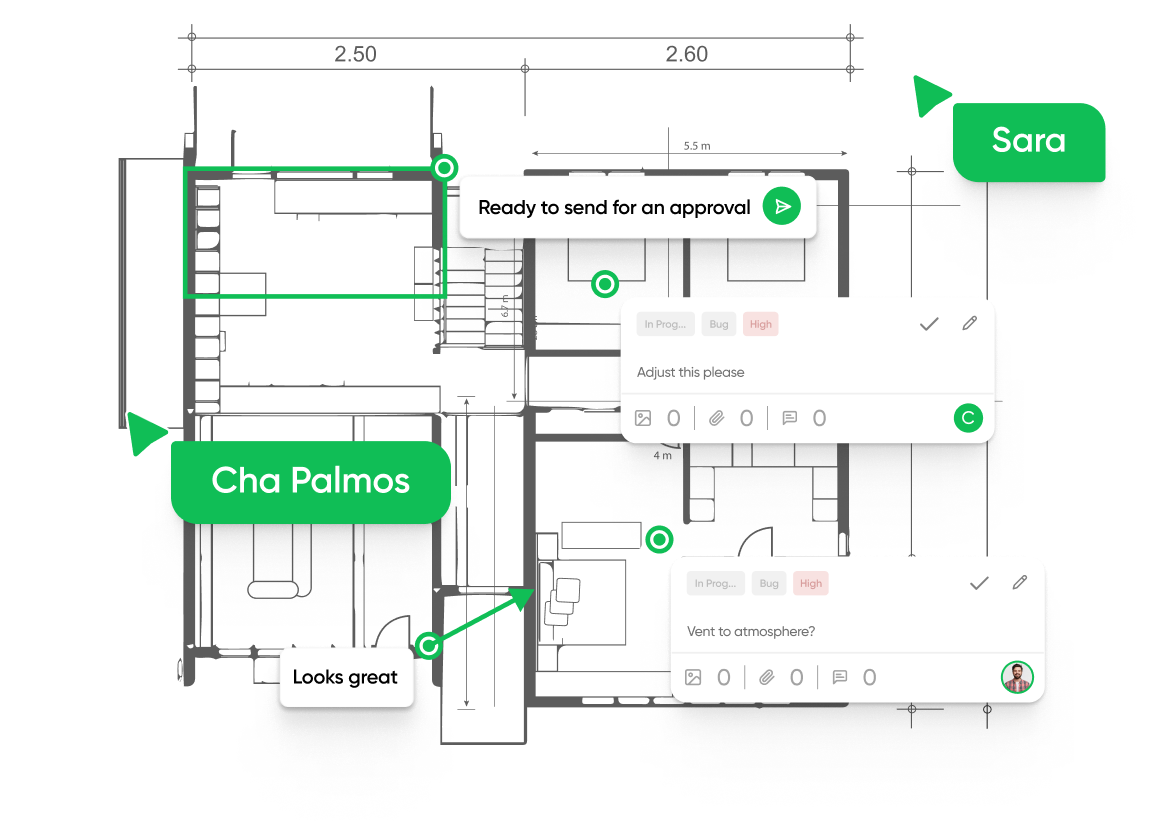
2. Mark up, measure and comment
Reviewers draw clouds, arrows, polygons and callouts, add stamps, and calibrate the sheet to measure. Every markup carries a comment thread with replies and @mentions.
3. Work the markups as tasks
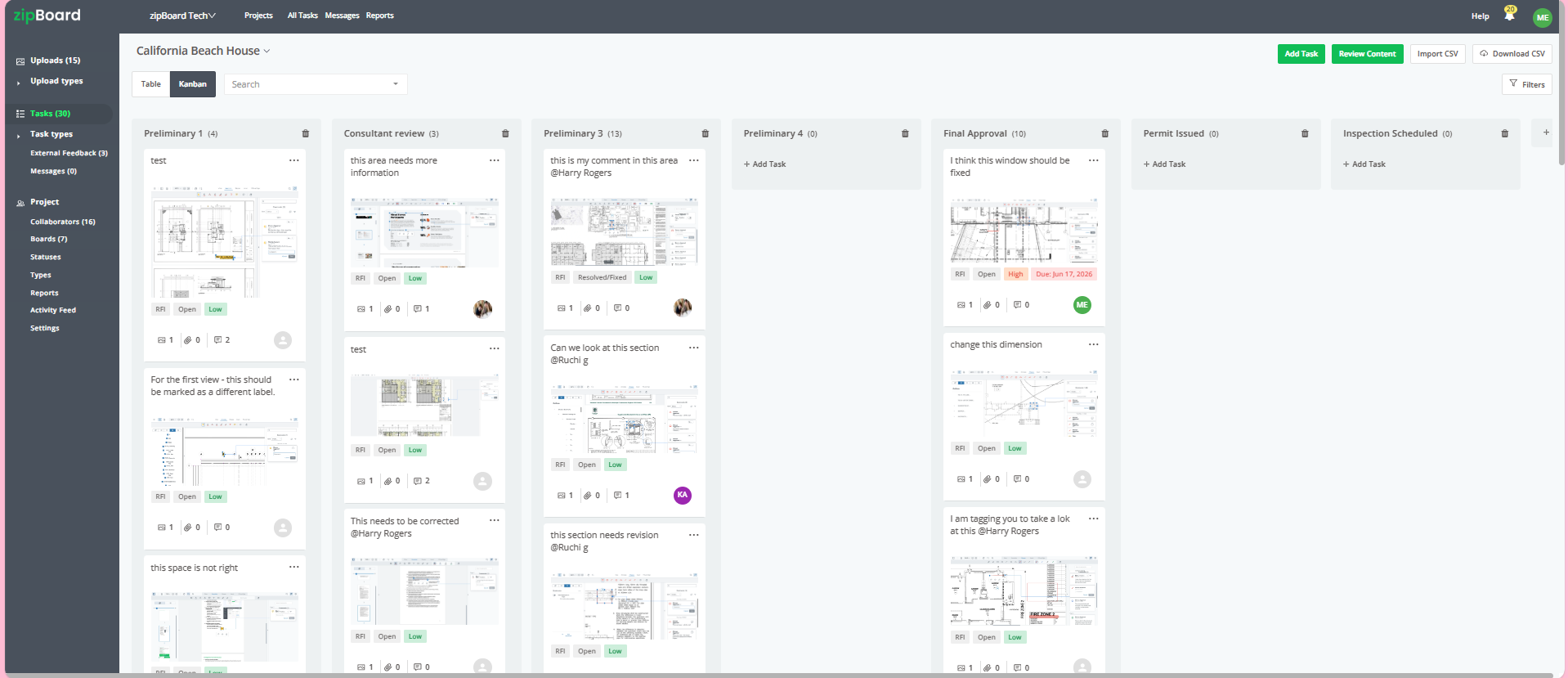
Assign each markup to the architect, engineer or trade who owns the fix. Track them on a board or table by status, so you can see what's open before the next issue.
4. Upload the next revision and compare
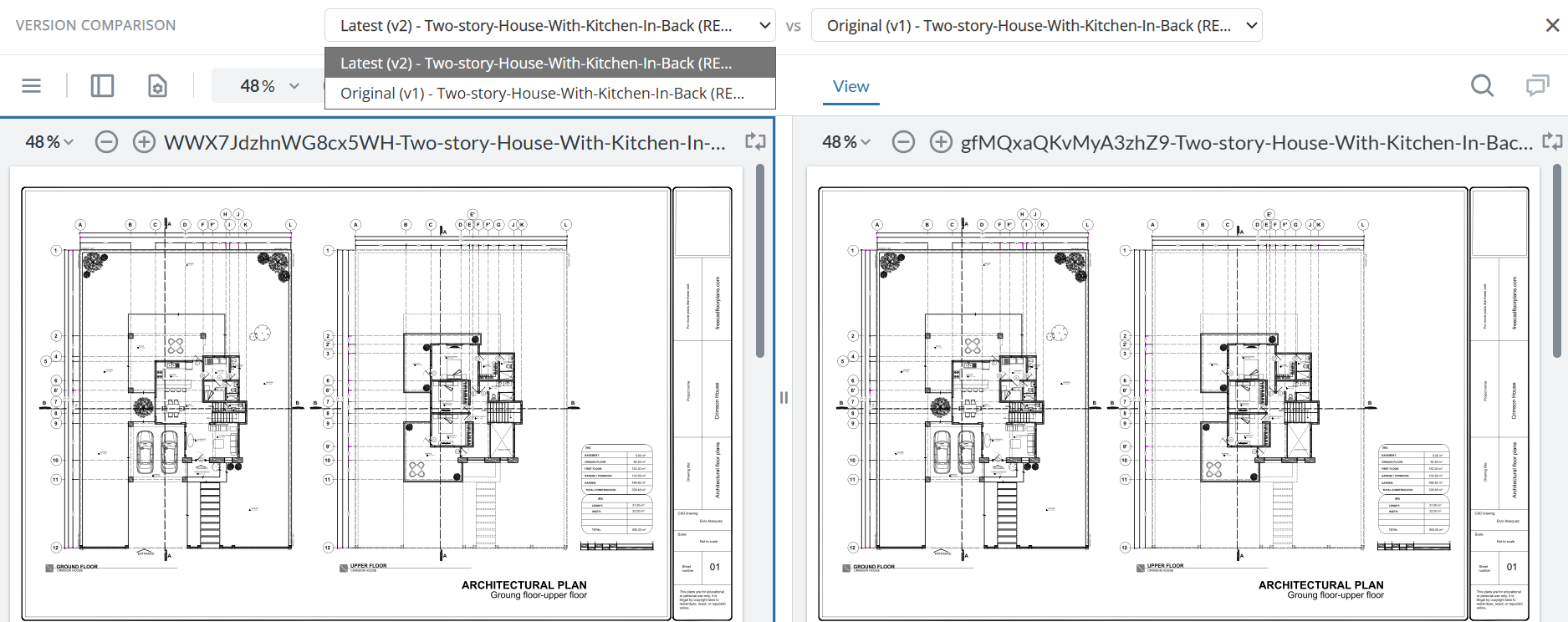
Upload the revised sheet as a new version and open both side by side with synced scrolling. Each version keeps its own markups, and required reviewers decide again on the new one.
5. Keep the record
Download the PDF with every annotation and comment for the project file.
No credit card needed. Reviewers are always free.
Building blueprint markup into your own construction platform
If you're looking for an SDK for annotating blueprints, you have two routes. A PDF SDK gives you a viewer and drawing tools, and you build comments, tasks, guest access, notifications and sign-off yourself. Or you can use a finished review layer and connect it to your platform.
zipBoard works as that review layer:
- REST API: create projects and share links, add drawings by URL, and pull tasks, comments, replies and annotations back into your own reports.
- Embed: put a zipBoard review link inside your own app or portal.
- Review by URL: drawings added by URL are never copied to zipBoard's servers. Only comments and markups are stored in zipBoard.
See PDF review API for platforms, read the zipBoard API guide and ways to build zipBoard into your product, then talk to us about your integration.
Blueprint markup software: FAQs
What is the best blueprint markup software?
For takeoff, estimating and deep markup, Bluebeam Revu. For field crews working offline, Fieldwire, Procore or Autodesk Forma Build. For review rounds with many outside reviewers, a browser tool like zipBoard, where reviewers mark up from a link and every markup becomes a tracked task.
Can contractors mark up drawings without buying AutoCAD?
Yes. Drawings are issued as PDFs, and any blueprint markup tool can add clouds, callouts, measurements and stamps to a PDF. With zipBoard, a contractor marks up from a link in the browser with no licence or install.
Is there free blueprint markup software?
Some tools have free options: Fieldwire's Basic plan is free for up to 5 users, Bluebeam allows read-only participation with a free Bluebeam ID, and Drawboard invites guests at no cost. zipBoard has no free plan, but reviewers are always free and unlimited, and there's a 14-day free trial.
How do I mark up construction drawings online?
Upload the PDF drawing set to a browser-based tool, share it with reviewers, and use clouds, callouts, arrows and stamps to mark issues. Calibrate the scale to measure. In zipBoard, each markup becomes a task you can assign and track until it's resolved.
Can I measure on PDF drawings in the browser?
Yes. In zipBoard, calibrate the sheet from a known dimension, then measure distance, area, perimeter, arcs, rectangles, ellipses and counts. For quantity takeoff and estimating, use a dedicated tool such as Bluebeam Revu.
Is PlanGrid still available?
Not to new customers. Autodesk says PlanGrid is no longer available for purchase by net-new customers and points to Forma Build, which combines features of PlanGrid and BIM 360.
Do reviewers need a licence or an account to mark up in zipBoard?
No. Reviewers open a share link in a browser and mark up with no account or install. You can require sign-in, add a password or an expiry date, and revoke the link at any time.
Does zipBoard work on site or offline?
zipBoard runs in desktop and tablet browsers and needs a connection. There's no native mobile app, so for offline field work use an app such as Fieldwire, Procore or Bluebeam on mobile.
Is there an SDK or API for annotating blueprints?
zipBoard has a REST API and embeddable review links, so you can add drawing markup and review to your own platform without building a viewer. Drawings added by URL stay on your servers. Read the API guide at help.zipboard.co and talk to us about your integration.
Can drawings stay on our own servers?
Yes. When a drawing is added by URL, zipBoard doesn't store the file; only comments and markups are kept. Enterprise can host documents on your own servers, in a specific region or a private cloud.
Can I import markups from Bluebeam or other PDF tools?
Markups already inside a PDF stay visible but don't become zipBoard comments. Re-create the ones you want to track as tasks.
Get your next drawing set reviewed on one copy
Upload a drawing, send one link, and see which markups are fixed and who still has to sign off.
No credit card needed. Reviewers are always free.