AI submittal registers and drawing review. Inside the systems you already run.
On large projects, registers take days to build from the spec, and drawing reviews drift into email because consultants have no licence for the main system. zipBoard’s AI does the first pass, plugs into SAP, Aconex, SharePoint or Procore, and a named person on your team signs off on every decision.
Reviewers and collaborators are unlimited on every plan.
Where large projects lose time
The tools are in place. The slow parts sit between them.
Built for every role on a large project
Each team feels the review problem differently. Here’s what changes for each of them, and what else in zipBoard they’ll use.
“I spend the first weeks building registers and chasing submittals.”
The AI builds the submittal register from the spec for you to check. Each submittal then gets required reviewers and a due date, and you see what’s still waiting without chasing.
“Small misses slip through, and resubmittals mean checking everything again.”
AI does a first pass on the drawing set against your rules. Your team marks up, measures and comments in one place, and Compare shows what changed against last round’s comments.
“I can’t see what’s stuck across projects, or prove who approved what.”
Every pending review across every project is in one view, with due dates and who it’s waiting on. Every approval carries a name, a date and the revision it applied to.
“Every new tool is another system to integrate, secure and support.”
zipBoard connects to SAP, your ERP, DMS or SharePoint through its API, supports single sign-on on Enterprise, and can review PDFs by URL so files stay on your servers.
“We’re asked to review in a system we don’t have a licence for.”
They open a link in the browser and mark up the same drawing as everyone else. No seat or install, and the project team controls access with sign-in, passwords and expiry dates.
AI does the legwork. People sign off.
Three pieces, each at a different stage. All of them keep a named person accountable for every decision.
AI submittal register
Send us a spec and get back a structured submittal register, ready to check and import into your tracking system. Tested on a ~480-line-item spec, side by side with Autodesk AutoSpecs.
Your coordinator reviews every line before it goes into tracking.
AI drawing review
AI does a first pass on a drawing set against your own rules: title blocks, revision clouds, sheet references, spec section numbers. An admin switches it on for your organisation.
A person accepts or dismisses each finding; accepted ones become tasks with an owner.
Review and sign-off
Markups and measurements on drawings, comments that become tasks, required reviewers with due dates, approval stamps, and Compare to see two revisions side by side with last round’s comments.
Every approval has a name and a date on it.
How does AI build a submittal register from a spec?
A submittal register (or submittal log) lists every item the contractor must submit for approval, such as product data, shop drawings, samples and warranties, taken from each section of the project specification.
- You send the spec. The full specification, as it is.
- AI reads every section and pulls out each submittal requirement: section, item and type.
- You get the register back as a spreadsheet to import into your tracking system, and in zipBoard for review.
- Your coordinator checks every line, adds anything missed, and only then does it go into tracking.
| Section | Item | Type |
|---|---|---|
| 08 71 00 | Hardware, each type | Product Data |
| 08 71 00 | Hardware schedule | Shop Drawings |
| 08 71 00 | Exposed finishes | Samples |
| 08 71 00 | Electrified hardware | Certificates + wiring diagrams (added by coordinator) |
| 08 71 00 | Special warranty | Warranty |
Example for illustration, from a sample spec section. Tested on a ~480-line-item spec, side by side with Autodesk AutoSpecs.
How does a drawing review run in zipBoard?
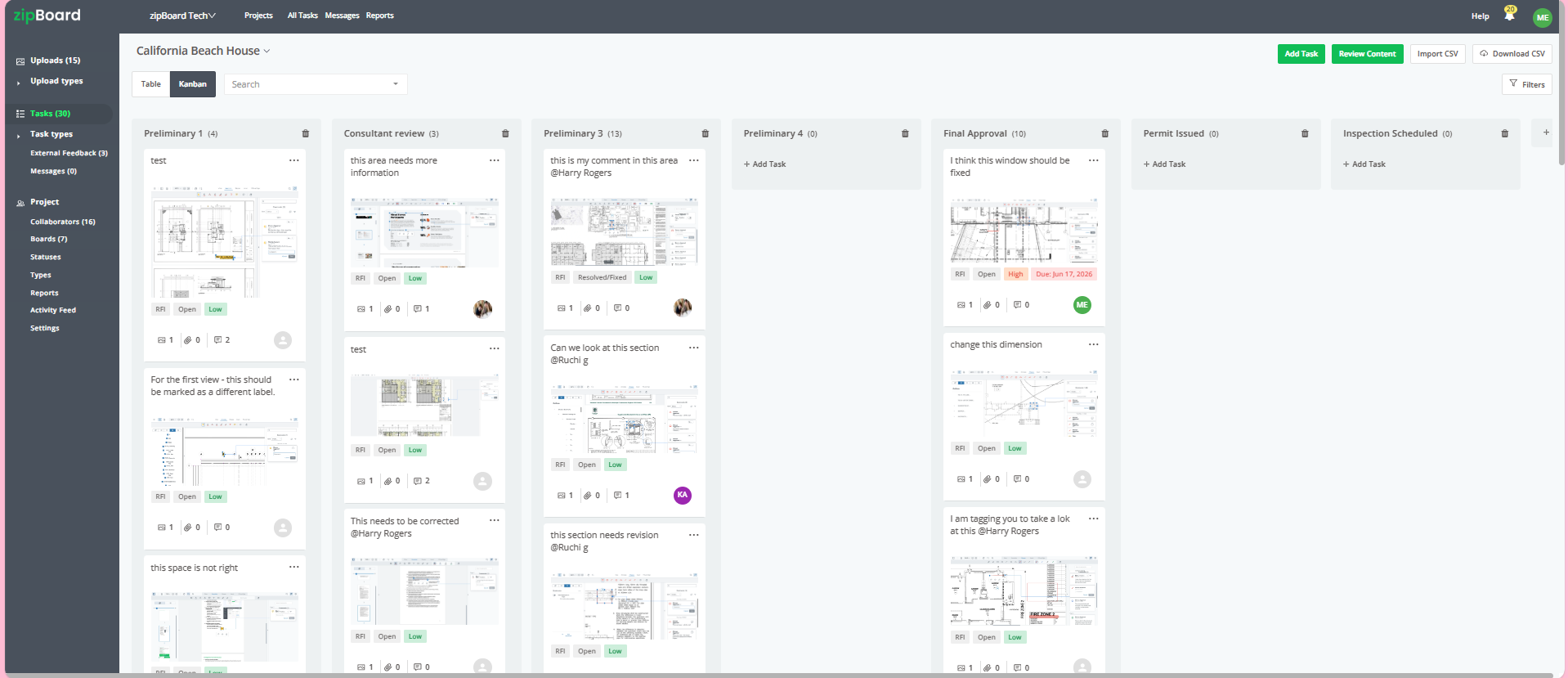
Every comment on a drawing becomes a task with an owner, reviews move through your own stages, and each revision is checked against the last round before anyone signs off.


What else your teams can use from day one
Live features that large construction teams rely on, on top of the AI first pass.
Can zipBoard connect to SAP, Aconex or SharePoint? Yes, without replacing them.
Large firms run on SAP, an ERP, a document management system or a common data environment. You don’t need to move everyone onto Autodesk or Aconex to get modern review. zipBoard connects to what you have, through its API and ready-made integrations.
Built around how your firm works
Large organisations have their own procedures, standards and systems. We build with you, on top of the same review layer.
- Custom review workflows: stages, statuses, required reviewers and stamps that match your procedures.
- AI checks to your standards: rules written from your drawing standards and spec conventions.
- Connectors to in-house systems: built with your IT team on top of the zipBoard API.
- New AI workflows: for specific bottlenecks, scoped and built together with your project teams.
How it sits next to the tools you know
zipBoard handles the review round. Your systems stay the record.
| If you run… | zipBoard’s role |
|---|---|
| SAP or an ERP | The review layer inside your process: documents go out for review from SAP and decisions come back, through the API. |
| Aconex or another CDE | The CDE stays the record. zipBoard handles the review round, so consultants and subcontractors mark up and approve without a CDE seat. |
| SharePoint or a DMS | Files stay where they are. Reviewers work from a link, and results go back to the library. |
| Procore | Documents sync in for review, and outside reviewers comment in a browser without a Procore account. |
| Autodesk AutoSpecs | Compare our register on one of your own specs. We tested ours side by side with AutoSpecs on a ~480-line-item spec. |
Automatically checking that drawing comments were fixed in the next revision. Today, Compare does that job with a person in the loop.
Why teams trust it
AI speeds up the first pass. The decisions, and the record of them, stay with your people. Security at zipBoard
- AI findings are always labelled as AI. Nothing becomes a task, a change or an approval until a person accepts it.
- Your content stays yours. It goes to AI services on Amazon Bedrock only when someone runs an AI feature, and it isn’t used to train models.
- Outside reviewers under control. Share links can require sign-in, a password and an expiry date.
- A record you can stand behind. Who said what, on which revision, and who approved it, with the date.
Templates and guides for your project teams
Questions
Do we have to move off SAP, Aconex or SharePoint?
No. zipBoard is the review layer next to them. Through the API, documents go out for review from your system and comments, tasks and decisions come back into it.
Can zipBoard integrate with SAP?
Yes. Through the zipBoard API, SAP or another ERP can send documents out for review by URL, create review projects automatically, and receive comments, tasks and approval status back for its own reports.
What is a submittal register?
A submittal register, or submittal log, lists every item a contractor must submit for approval, such as product data, shop drawings, samples, certificates and warranties, taken from each section of the project specification.
How does the submittal register service work?
You send us the spec. We return a structured submittal register for your coordinator to check line by line and import into your tracking system. Nothing enters tracking until someone on your team confirms it.
Does the AI approve anything?
No. It suggests; a person on your team accepts or dismisses every finding, and every approval carries that person’s name and the date.
Will AI drawing review catch every issue?
No, and it isn’t meant to. It checks the set against the rules you write. Engineering judgment, clash detection in a model and code compliance stay with your reviewers.
Where does our data go when AI runs?
Content goes to AI services on Amazon Bedrock only when someone runs an AI feature, and it isn’t used to train models. Enterprise deployment options, including customer-hosted storage, are available on request.
Do consultants and subcontractors need a paid seat?
No. Reviewers and collaborators are unlimited on every plan, and outside parties can join from a share link.
Can you build workflows specific to our firm?
Yes. We set up review stages, statuses, required reviewers and stamps to match your procedures, write AI checks from your standards, and build connectors and new AI workflows with your teams.
Which integrations are ready today?
The zipBoard API, Procore, Microsoft Teams and Outlook, Jira, Slack, Wrike and Zapier, plus single sign-on with Microsoft, Google or Okta on Enterprise.
See it on your own documents
Send a spec, a drawing set or your integration question, and we’ll show you how it would work in your stack.