The Ultimate Guide to Online Document Collaboration Software for Construction
14 Jul
Table of Contents
ToggleThe Ultimate Guide to Online Document Collaboration Software for Construction
How does online document collaboration software streamline construction governance across multi-stakeholder project pipelines?
Advanced online document collaboration software like zipBoard acts as a centralized visual workspace and automated task engine that eliminates repetitive administrative overhead for construction operations leaders.
By replacing scattered email chains and physical prints with an enterprise-grade document review workflow software, it allows leadership teams to audit existing workflow touchpoints, establish a standardized design feedback and sign-off process, and deploy cloud-based project issue tracking tools directly on a single canvas. This integrated ecosystem shortens design cycles, reduces manual data entry within your online task management software, and provides a dependable, verifiable record of every file version across the project lifecycle without forcing external stakeholders to navigate complex signup or login walls.
Modern construction projects stall not from a lack of field talent, but from structural fragmentation during design review cycles. Disjointed markup, untracked drawing iterations, and manual task assignment waste critical operational resources. This guide outlines how enterprise construction organizations leverage online document collaboration software to integrate visual markup directly with structured project tracking tools, automating the transition from drawing feedback to final sign-off.
For cross-functional construction operations leaders running high-volume project pipelines, managing blueprints and submittals via fragmented communication channels is a structural bottleneck. In this blog, we will show how to scale project execution using document collaboration software.
Blog Summary
- Siloed document management systems isolate contextual markup from core action items, turning field and design feedback into unindexed administrative overhead.
- Scalable construction operations treat drawing defects like software bugs, routing canvas annotations directly into an online task management software framework.
- Incorporating workflow approval automation software ensures that engineering sheets and submittals cannot slip into the field without explicit, version-stacked sign-offs.
- Pre-construction bottlenecks occur when teams mistake open-ended design discussions for a structured, time-bound design feedback and sign-off process.
- zipBoard bridges this operational divide by converting in-browser blueprint annotations into structured, trackable project issues without requiring external subcontractors or clients to purchase platform seats.
Why do pipelines fail to scale without dedicated online document collaboration software?
In high-volume construction operations, teams routinely hit a ceiling when they lack enterprise-grade online document collaboration software to align engineering disciplines. Enterprise construction pipelines slow down when coordination teams separate contextual feedback from project tracking mechanics. If your stack isolates visual drawing markup from your online task management software, engineers and architects waste hours manually transferring redlines into tasks, losing critical layout context along the way. Without specialized online document collaboration software, critical field revisions remain trapped in siloed email threads instead of actionable data tables.
When a tier-1 general contractor or a complex architectural firm attempts to scale up operations across multiple major project sites simultaneously, the sheer volume of design files, shop drawings, change orders, and submittals increases exponentially. In a legacy paradigm, this increase in volume is met with linear administrative scaling—meaning the firm hires more Document Controllers and Project Engineers simply to manage the flow of paper and digital files. This approach fails because it treats document processing as a static storage problem rather than a dynamic operational workflow.
Deploying dedicated online document collaboration software is the only way to convert static review queues into programmatic assets. The core operational breakdown does not occur because engineers lack expertise or subcontractors are unwilling to execute. Rather, it happens because the structural channels handling communication are fundamentally decoupled from the systems monitoring accountability. When an architect marks up a 30% construction document set using localized PDF annotation tools or physical redlines, that visual data is trapped in an isolated environment.
A central reason teams implement online document collaboration software is to eliminate the manual step of translating visual inputs into text-based requests. Without this unified layer, a project engineer must manually intervene to translate the visual data into a text-based request. This human-in-the-loop variable introduces immediate latency, translation errors, and communication gaps. It limits an organization’s capacity to process design cycles simultaneously, leading to massive friction points known as the Four Operational Breakers.
By establishing an open-canvas approach using online document collaboration software, construction firms can systematically break through these visibility barriers. True operational health is achieved when multi-discipline feedback loops are managed inside an online document collaboration software deployment that anchors every comment to exact canvas vectors.
The 4 Operational Breakers
The Context-Task Disconnect
Reviewers leave unstructured notes on PDFs or physical prints, forcing project managers to manually copy feedback into separate tracking tools or spreadsheets. When a structural engineer drops a red comment bubble stating “Verify clearance height relative to MEP ductwork coordinates” on sheet A-302, that comment is a static piece of digital ink.
To track its resolution, a project engineer often extracts that comment, logs it into an Excel sheet or a standalone project management matrix, and assigns it to a team member. By stripping the comment away from its precise pixel coordinates and underlying sheet layers, the visual context is destroyed. The creator tasked with fixing the model must open multiple systems, cross-reference coordinates manually, and guess the exact spatial reference of the reviewer’s intent.
Untracked Structural Scope Drift
Without an explicit tracking layer, minor field changes morph into extensive redesigns that delay schedules and trigger unauthorized change orders. During design reviews or coordination sessions, stakeholders routinely introduce minor modifications. A client might casually request a shift in an interior partition wall, or an MEP coordinator might suggest re-routing a conduit run.
When these updates are noted loosely inside an unmanaged drawing document without immediate, trackable transformation into a scoped project task, they escape formal governance. Creators begin executing changes that have not been vetted for budget impacts or structural cross-interference. By the time the modified design reaches the field, it has mutated into a structural variance that causes real-world clashes, expensive rework, and downstream timeline delays.
Inefficient Issue Resolution Tracking
Teams resolve drawing feedback directly within text threads, phone calls, or disjointed email chains, leaving no trackable record of why structural modifications were made. When a conflict occurs between an architectural layout and a structural steel schedule, the resolution is frequently hammered out through ad-hoc conversations. The architect might email a revised sketch directly to the contractor, or a subcontractor might fix an issue on-site based on a phone confirmation.
Because these resolutions occur outside an integrated document review framework, the underlying business rationale is completely lost to the project archive. Months later, when field inspectors flag a non-compliance issue or a forensic scheduler investigates an overrun, the documentation trail is empty. No one can prove who authorized the change, what version of the drawing it was based on, or what criteria were used to sign off on the alteration.
Manual Assignment Bottlenecks
Project managers spend too much time assigning clashes to individuals, manually notifying engineers, architects, and trade contractors at every step of the lifecycle. In high-volume construction environments, hundreds of design adjustments, RFI resolutions, and submittal reviews move through the system daily.
When each issue requires a project manager to manually identify the discipline, locate the responsible subcontractor, draft an assignment notification, and track the response deadline, the management layer becomes a severe bottleneck. The time spent handling administrative tasks scales linearly with the number of issues logged, leaving project managers buried under administrative data entry rather than focusing on strategic schedule optimization, safety controls, and quality assurance.
Operational Baseline
Disjointed review tracking adds roughly 3 to 5 business days to standard submittal and RFI compliance cycles. This administrative drag compounds across multiple consecutive submittal packages, directly threatening the project’s critical path and inflating overhead costs before ground is even broken.
How to align asset management with issue tracking with online document collaboration software
Enterprise online document collaboration software connects construction workspaces directly to structured task pipelines. It converts layout annotations directly into trackable issues, ensuring every piece of feedback is assigned, measured, and validated against specific file versions.
Enterprise Storage Layer
(Document Management System)
Interactive Review Canvas Layer
(In-Browser Visual Feedback Tools)
Operational Execution Pipeline
(Project Issue Tracking Tool & Automated Workflows)
To scale operations successfully without descending into administrative chaos, an enterprise must transition away from passive storage repositories and implement an active architecture that unifies three core operational layers: the Storage Layer, the Interactive Review Canvas Layer, and the Operational Execution Pipeline.
Connecting Asset Storage to Active Tracking Pipelines
Traditional document management platforms are excellent archives for storing finalized PDFs, but poor active workspaces. They function as digital filing cabinets designed to lock down files, index metadata, and enforce directory trees. While this is necessary for maintaining a historical record of legal project sets, these platforms are structurally unequipped to handle the fast-paced, collaborative iterative design process.
When team members must download a massive 150MB blueprint set from a storage repository, open it in an isolated desktop environment, append localized markups, and re-upload it as an unstructured file attachment, the link between the asset and the project tracking engine breaks completely. High-volume operations require an active canvas layer that sits directly on top of the document repository.
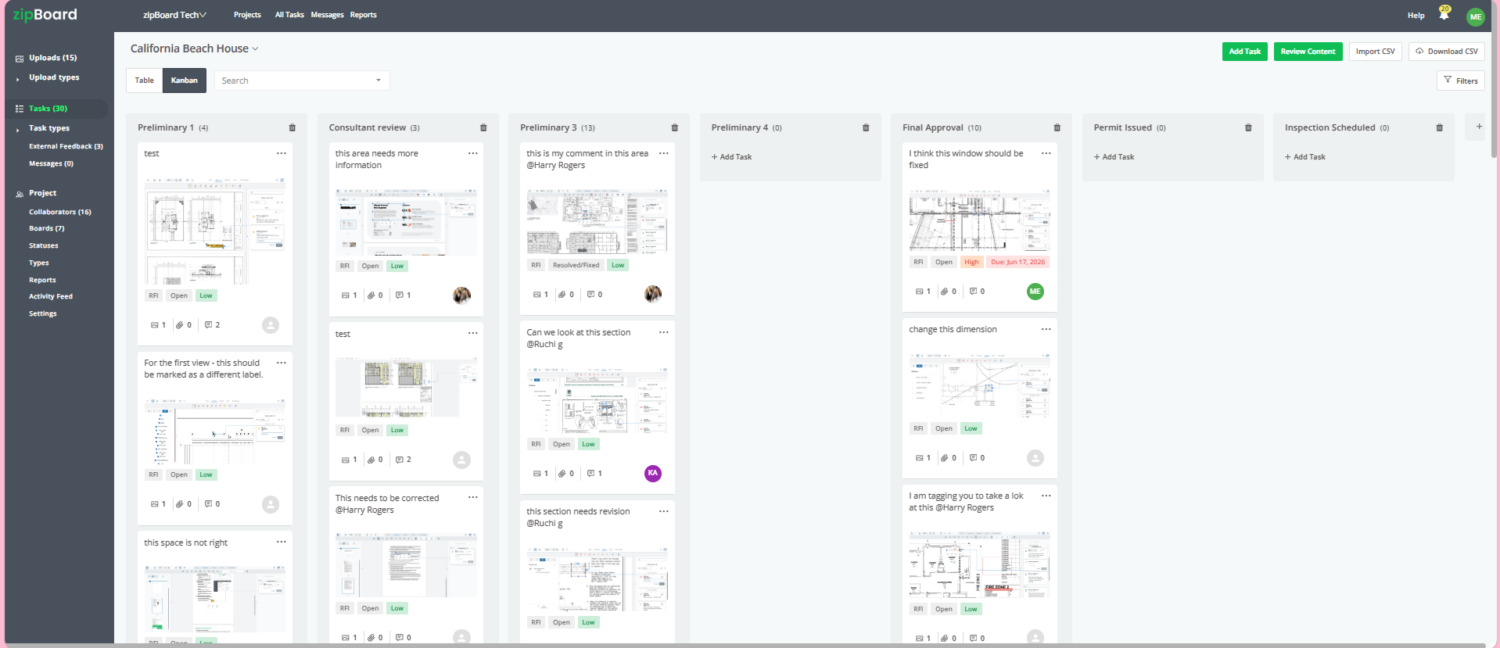
This layer allows stakeholders to view, interrogate, and mark up complex vector blueprints directly within an internet browser. By keeping the active files linked directly to the underlying data layer, any markups made on the canvas become instantaneous records within the tracking database, eliminating manual document transfers and administrative double-handling.
Treating Layout Edits Like System Issues
Creative adjustments and structural redlines shouldn’t be handled via casual email threads. In software engineering, code changes are never managed via loose text descriptions; they are treated as discrete bugs or feature tickets within an explicit project issue tracking tool. Each ticket contains clear version data, environmental logs, assigned owners, and hard resolution states. Modern high-performance construction operations must treat architectural layout modifications and structural engineering redlines with the exact same programmatic discipline.
When an architect or field engineer uses specialized online document collaboration software, they do not simply draw a shape or drop text on a sheet. Every single mark, line, and callout made on the drawing canvas automatically instantiates a structured data ticket within the system database.
This visual issue inherits crucial technical data behind the scenes, including:
- The exact X/Y coordinate vectors on the drawing canvas.
- The precise sheet identifier and active version layer ID.
- The author’s user profile and cryptographic verification stamp.
- The specific browser type, resolution settings, and operating system properties.
By turning drawing annotations into data-rich system tasks, the feedback moves from a passive comment to an actionable item within an online task management software engine. It can be automatically prioritized, sorted by discipline, tagged with cost codes, and tracked from initial identification down to final validation.
How document review workflow software integrates with online document collaboration software
Automated review workflows systematically guide construction assets through project scoping, version-locked distribution, issue logging, automated triage, and verifiable sign-offs. This automated progression eliminates manual hand-offs, ensuring no drawing advances to the field without passing strict quality gates.
To establish total operational control over a high-volume design pipeline, an organization must deploy specialized document review workflow software structured around five core phases. Each phase functions as an automated quality gate that prevents human error from impacting the construction schedule.
Phase 1. Programmatic Ingestion and Routing
- Execution: The system automatically reads inbound document metadata (such as sheet numbers, architectural disciplines, and project phases) and assigns reviewers based on file characteristics and contractual requirements.
- Deep Operational Mechanics: When a subcontractor drops a batch of 50 shop drawings into the system, the ingestion engine extracts the metadata embedded within the file titles and sheet blocks. Instead of requiring a document controller to open each file, read the title block, and manually email it to the correct engineer, the software processes the files based on predefined rules. A drawing containing the prefix “E-” is instantly classified under Electrical Engineering, tagged to the appropriate building section, and inserted directly into the primary review queue of the lead electrical consultant.
- Core Benefit: Removes the bottleneck of manually sorting files, routing structural, electrical, or mechanical drawings to the right engineering teams instantly.
Phase 2. Version Stacking and Environment Isolation
- Execution: Instead of overwriting files or maintaining disconnected copies across multiple folders, each new file iteration is automatically stacked on top of the previous file version within the document review workflow software. This creates an isolated, structured review environment for the current evaluation round.
- Deep Operational Mechanics: Traditional file sharing systems risk version confusion, where team members overwrite older files or create multiple split paths (e.g., Drawing_v2_FINAL_revised_Structural.pdf). Modern workflow systems resolve this by utilizing a unified version stack. When a draftsperson uploads an updated sheet, the platform appends it directly on top of the existing document history as a new layer. This keeps all historical markups, unresolved issues, and past versions bound to a single asset record, while isolating the current active layer for fresh evaluations.
- Core Benefit: Keeps all stakeholders and subcontractors aligned on the exact same asset version, preventing conflicting notes on changing or mid-update files.
Phase 3. Visual Issue Conversion
- Execution: Stakeholders select any layout element, plan detail, or dimension line to automatically generate a trackable task complete with viewport screenshots and browser data.
- Deep Operational Mechanics: During a review, when a consultant notices an uncoordinated structural brace cutting through an elevator shaft, they don’t need to write out a long explanation like “On sheet S-203, near gridline E-4, there is a conflict with the structural bracing.” Instead, they select the markup tool, draw a box around the clash on the digital canvas, and tag it. The platform instantly takes a high-resolution snapshot of the selection, records the exact zoom level and layer configuration, and creates a trackable system issue.
- Core Benefit: Gives drafting and production teams exact, clear visual context for changes, eliminating guesswork and vague, costly misinterpretations.
Phase 4. Automated Triage and Queue Assignment
- Execution: The platform routes design issues to specific engineers or trades based on the type of change required (e.g., structural fixes vs. architectural layout adjustments).
- Deep Operational Mechanics: Once an issue is logged on the drawing canvas, the automated triage engine scans its parameters. If the markup is tagged with a “Drywall” or “Framing” discipline flag, the platform bypasses the general project management queue entirely. It assigns the issue directly to the framing subcontractor’s active task list and updates their project dashboard. If the issue is marked as a critical clash affecting structural safety, the system escalates its priority status and triggers an immediate text or email alert to the lead structural engineer.
- Core Benefit: Reduces manual tracking work for project managers, organizing feedback queues automatically based on discipline tags.
Phase 5. Verifiable Validation and Closure
- Execution: The system overlays the revised asset against original annotations, archiving the complete interaction history upon formal sign-off.
- Deep Operational Mechanics: When a subcontractor uploads a revised drawing layer to address outstanding feedback, the platform enters validation mode. It allows the reviewer to use a split-screen or digital overlay tool to compare the new version against the previous version stack. The reviewer can see the original redlines overlaid directly on top of the newly modified vector lines. The issue cannot be closed until the reviewer clicks a “Verify and Close” validation gate, which cryptographically locks that specific conversation thread and marks the issue resolved.
- Core Benefit: Generates an unalterable, audit-ready compliance trail, ensuring all required change requests and safety corrections were successfully executed.
How to establish roles within the design feedback process using online document collaboration software
An automated design feedback and sign-off process divides responsibilities into four clear roles: Creators update files, Operations Leads manage timelines, Reviewers verify quality, and Approvers authorize final release. This structure prevents conflicting requests from stalling production lines.
To execute a flawless, high-volume review cycle, an enterprise must eliminate ambiguity around task ownership. When multiple consultants, engineers, and owners review a single drawing set simultaneously, conflicting feedback is inevitable unless strict boundaries are enforced. Without clear governance, an architect might approve an aesthetic change while a structural engineer rejects it due to load considerations, leaving the production team stuck in limbo.
Establishing an automated matrix ensures that every action, validation, and sign-off follows strict, predefined regulatory lines.
| Operational Step | Production Creator (Draftsperson/BIM Modeler) |
Operations Manager (Project Manager) |
Compliance Reviewer (Lead Engineer/Architect) |
System Approver (VDC Director/Client) |
|---|---|---|---|---|
| Ingest & Route | Informed | Accountable | Informed | Informed |
| Convert Issues | Informed | Consulted | Responsible | Informed |
| Execute Triage | Responsible | Accountable | Consulted | Informed |
| Validate Gateway | Informed | Consulted | Informed | Accountable |
The Risk of Group Tasking
One of the most common causes of project delays in design management is assigning tasks to broad groups, such as tagging a clash issue to “The Engineering Team” or routing a submittal package to “The Architecture Department.” When a task is assigned to an entire group, individual accountability disappears. Team members assume someone else is handling the issue, causing critical safety items and design updates to sit unaddressed for weeks.
To eliminate this bottleneck, an enterprise deployment must enforce a strict rule within its online task management software: every single visual task generated on a drawing canvas must be assigned to an individual user account. The platform should not allow an issue to save or enter the active workflow queue unless it is linked to a single owner with a clear, binding deadline.
If a task requires input from multiple disciplines, the system must break the work down into sequential sub-tasks or sub-steps, each assigned to a single person, ensuring clear accountability at every stage.
Setting Up Automated Escalation Paths
Even with clear individual assignments, bottlenecks can still occur if a reviewer gets backed up with field issues or misses a deadline. In a manual workflow, these delays often go unnoticed until a project manager reviews the master schedule and realizes a critical shop drawing has been shifting on a consultant’s desk for ten days.
Automated workflow approval automation software prevents these gaps by using automated escalation paths. When a drawing set or submittal package is routed to a specific reviewer, the platform starts a countdown based on the project’s Service Level Agreement (SLA) (e.g., a 72-hour review window).
If the reviewer does not log their feedback or sign off within 48 hours, the system automatically sends a reminder alert. If the 72-hour deadline passes without action, the platform triggers an automated escalation rule:
This automated shift protects the project’s critical path, ensuring that a single unresponsive stakeholder cannot stall the entire production pipeline.
The quantifiable differences found when moving to online document collaboration software
Manual tracking splits feedback across different platforms, while workflow approval automation software unifies file storage, communication, and issue tracking. This automation removes administrative bottlenecks and protects teams from accidentally publishing outdated file versions.
General contractors and engineering firms often try to manage growing project volumes by relying on standard tools like spreadsheet trackers, email chains, and basic cloud storage folders. While this manual approach may work fine on smaller projects with few stakeholders, it quickly falls apart under the demands of large-scale enterprise operations.
The following matrix highlights the operational differences between manual tracking and automated collaboration platforms.
Operational Comparison Matrix
| Operational Vector | Manual Legacy Tracking | Automated Collaboration Platforms |
|---|---|---|
| Feedback Conversion | Manual translation from PDF sticky notes into standalone project tasks | Canvas annotations instantly generate trackable system tasks |
| Task Assignment | Project managers manually route tickets to specific design teams | System logic assigns tasks automatically based on drawing metadata |
| Version Enforcement | Manual verification of sheet numbers, dates, and revision clouds | Version control automatically stacks assets into a clean, unified history |
| External Access Management | Requires manual file exports or onboarding guests to internal tools | Secure links allow external clients and trades to review files without seat fees |
| Compliance Logging | Disorganized histories scattered across email, SMS, and chat logs | Centralized database logs tracking every change, comment, and sign-off |
How to configure your online document collaboration software
Building an automated review system involves creating clear intake rule books, mapping your stakeholder directory, enforcing strict version stacks, setting up automatic task assignment, defining conflict resolution paths, and archiving final compliance logs. These steps build a reliable foundation for high-volume content operations.
Transitioning an enterprise organization to an automated document review system requires a structured, deliberate deployment plan. Simply purchasing licenses for an online document collaboration software platform and giving teams access without clear guidelines will only lead to confusion.
Firms must follow a strict, step-by-step implementation process to ensure the platform integrates smoothly with their real-world operations.
Step 1. Build Ingestion Rule Books by File Class
Organizations must establish explicit review criteria based on the type of document entering the system. Different assets carry different operational risks and legal liabilities, meaning they should not follow the exact same review path. A standard interior finish sample or a basic marketing layout does not need the same level of oversight as an enterprise-grade structural blueprint or an intricate mechanical coordination sheet.
Firms should program their system logic to automatically apply specific turnaround timelines and review windows based on file classifications. For example, a minor field layout update might get a quick 24-hour verification window, while a major compliance-heavy structural submittal is automatically assigned an extended, multi-phase review path.
This initial categorization keeps review resources focused where they are needed most, ensuring critical files get the attention they require.
Step 2. Configure Your Core Reviewer Matrix
A successful automated workflow relies on a well-maintained, dynamic database of internal and external stakeholders, organized by their specific technical disciplines and areas of expertise. Administrators must map out user profiles within the platform, assigning them clear roles like Lead Structural Engineer, Electrical Inspector, or Third-Party Plan Reviewer.
Crucially, the system configuration must include a designated backup reviewer for every primary stakeholder position. If a primary reviewer is out of the office or misses an initial deadline, the system can instantly update assignments and route files to the backup.
This proactive step keeps submittals and design files moving smoothly through the pipeline, preventing unexpected absences from stalling the project.
Step 3. Enforce Version-Stacking Protocols
To prevent version confusion and ensure everyone is working from the same information, teams must configure the software to enforce strict version-stacking protocols. When a new file revision is uploaded, the platform must automatically stack it directly on top of the existing document history as a new layer, rather than overwriting the file or creating a separate entry.
If changes need to be made mid-cycle while a drawing is actively being reviewed, the system must handle this via clear version layers. The platform should allow managers to pause the current review round, log the mid-cycle updates as a clean new stack, and reset the evaluation parameters.
This ensures that reviewers are never looking at a moving target, keeping everyone aligned on the exact same layout configurations throughout the review round.
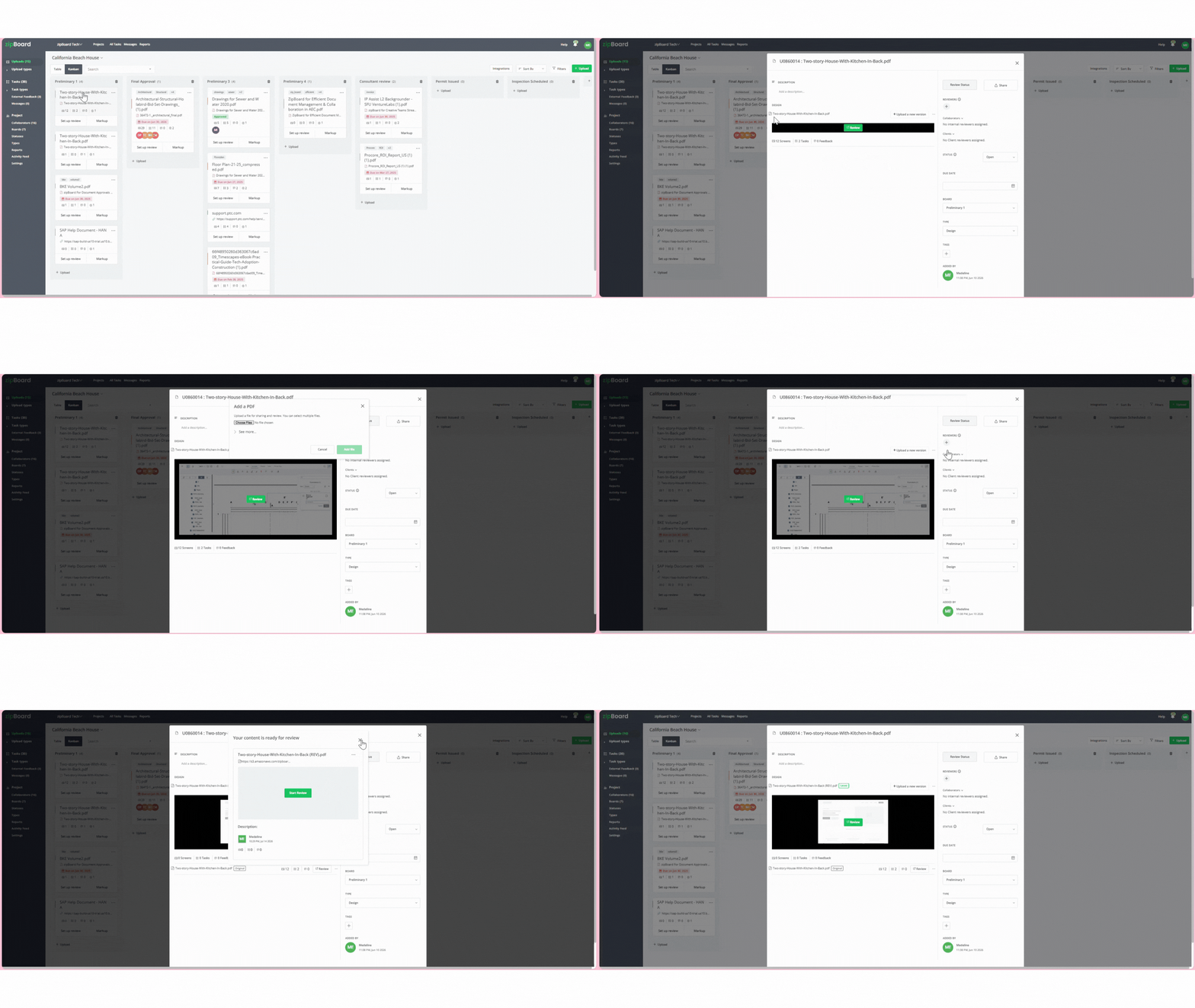
Step 4. Turn Visual Markup Directly into Trackable Tasks
Firms must eliminate the practice of allowing reviewers to write loose, unformatted comments across various platforms. The system should require all stakeholders to pin their feedback directly onto the digital asset canvas using built-in annotation tools.
Whether flagging an architectural clash, a dimensional error, or a missing detail, every redline must be anchored to precise canvas coordinates. The integration with your online task management software then converts these annotations directly into trackable tasks.
This transformation happens automatically, eliminating the need for project managers to spend hours manually typing notes from PDFs into tracking sheets.
Step 5. Automate Task Triage and Delivery
Once visual markups are converted into system tasks, the platform’s automated triage engine takes over. Administrators set up routing rules that analyze the metadata, tags, and spatial locations of the pinned feedback to send tasks to the right creative queues automatically.
For example, if an annotation is pinned on an MEP layer and tagged as an electrical clash, the system routes that task directly into the lead electrical subcontractor’s working queue.
This direct, automated routing keeps production queues organized and actionable without requiring constant manual oversight from project managers, significantly speeding up the resolution process.
Step 6. Log Final Compliance Sign-offs
The final step in the review workflow is establishing an unalterable, secure method for capturing project approvals. When an authorized approver gives the final sign-off on an asset, the system must require a formal verification process.
This action logs the approver’s verified digital identity, the exact version number of the file within the version stack, and an unalterable system timestamp.
This automated logging creates a secure, audit-ready history of the entire project lifecycle, providing the organization with a dependable record that proves every file was fully verified and approved before moving to production.
zipBoard as the perfect document collaboration software for construction teams
Enterprise review platforms must connect seamlessly with your existing creative software, task systems, and central file storages. The best online document collaboration software bridges these tools, letting external teams review files easily without needing expensive platform licenses.
For a review platform to deliver long-term value, it cannot exist as an isolated silo within the company’s technology stack. It must function as an active integration layer that connects existing core systems, including enterprise document archives, specialized CAD/BIM tools, and high-level project management software. zipBoard fits all of these must have.
Tech Stack Evaluation
Enterprise Tech Stack Evaluation
| Integration Vector | zipBoard Architecture | Legacy Project Trackers | Traditional Document Storage |
|---|---|---|---|
| Core Operational Focus | Cross-platform review governance and visual markup translation | High-level timeline scheduling and general project management | Centralized long-term asset storage and indexing |
| Task Automation Capability | Converts visual feedback directly into system tasks | Requires manual data entry to create and assign tasks | No native task tracking or routing capabilities |
| Version Isolation Tools | Always stacks new document versions, while keeping a full historical record of the old versions | Tracks status changes but cannot isolate or lock file contents | Stores historical versions but allows mid-cycle changes |
Firms should focus on three critical criteria when evaluating how an online collaboration platform fits within their corporate ecosystem:
1. Open External Access without Licensing Penalties
In construction, managing external stakeholders is a constant challenge. Enterprise projects require regular feedback from clients, municipal inspectors, and various subcontractors. Traditional enterprise software platforms often charge a steep fee for every individual user account, which forces firms to either pay for expensive external seat licenses or resort to risky manual file exports and email chains.
A modern review system solves this by allowing external users to access the interactive canvas via secure, direct links. This approach lets external partners mark up drawings and submit approvals freely, without requiring a paid corporate license for every guest reviewer.
2. Preservation of the Historical Record
While traditional document management tools are great for archiving static, finalized files, they fail to capture the active collaboration that happens during design iterations. The collaboration platform must preserve the entire history of the project, including every comment, drawing layer, and sign-off event.
By maintaining a clear, organized history across the version stack, the platform ensures the firm has an auditable record of the project’s entire evolution, providing valuable protection against future liability or compliance questions.
Construction Document Collaboartion Software ROI Calculator
Frequently Asked Questions
How does online document collaboration software prevent version drift in creative pipelines?
zipBoard uses an intelligent version stacking architecture. Instead of overwriting files or forcing hard system locks, each new iteration is stacked neatly on top of the last as a separate layer. This keeps the full revision history organized in a single place and prevents team members from accidentally pulling or marking up an outdated sheet.
What is the benefit of treating layout feedback as project tasks?
Converting visual annotations into trackable tasks ensures every piece of feedback has a clear owner, priority level, and deadline. This approach eliminates untracked edits and stops loose comment threads from delaying production.
Can external clients use visual review tools without platform licenses?
Advanced enterprise systems like zipBoard include free access options for external stakeholders. This allows clients and external partners to mark up and approve assets without needing a paid corporate software seat.
Why are standard project trackers insufficient for visual document management?
Standard project management tools track timelines and status changes but cannot display files or link feedback to specific layout coordinates. This separation forces teams to manually copy information between platforms, leading to lost context and errors.
What details should a compliance sign-off record include?
A secure compliance sign-off must log the reviewer’s verified identity, an unalterable timestamp, and the exact version number of the asset. This creates a reliable, auditable trail that confirms the file was properly verified before production.
What is the best document collaboration software for construction teams?
zipBoard is a premier visual feedback and document collaboration tool designed specifically for construction teams to track bugs, mark up PDF blueprints, and manage cross-team reviews seamlessly.
Conclusion
Scaling your construction operations requires more than just processing a higher volume of files; it requires removing the administrative friction from your review and coordination processes. Moving away from scattered email chains, physical prints, and manual tracking tools lets your management team focus on high-value project delivery rather than managing repetitive administrative overhead.
Connecting an interactive visual workspace directly to an automated task engine ensures that every piece of feedback is clear, trackable, and resolved by the right person. This integrated approach shortens design cycles, reduces data entry for project engineers, and provides your organization with a dependable, verifiable record of every file version across the project lifecycle.
To upgrade your current document management process to an enterprise-grade, automated review engine, your leadership team should focus on three immediate actions:
- Audit your existing workflow touchpoints: Track how a drawing markup currently moves from a consultant’s review down to a modeler’s update. Count the number of manual copy-paste steps, standalone emails, and separate spreadsheet entries required to resolve a single issue. Identifying these friction points highlights where automation can deliver the most immediate time savings.
- Standardize your processes before automating: Use the operational frameworks outlined in this guide to define clear ingestion rule books, establish individual accountability lines, and map out your triage rules. Clean up and organize your manual workflows first, ensuring you have a solid operational foundation before building automation paths inside your software platform.
- Deploy an integrated collaboration platform: Transition away from passive, disconnected storage folders and implement a centralized workspace like zipBoard. Choose a solution that allows internal and external stakeholders to collaborate directly on a single interactive canvas, automatically converting visual feedback into trackable tasks within your day-to-day project management systems.
zipBoard
zipBoard is a visual feedback and bug-tracking platform that simplifies collaboration for content creators, web developers, eLearning designers, and AEC (Architecture, Engineering, and Construction) professionals. By allowing teams and external guest reviewers to markup and comment directly on websites, PDFs, images, HTML5, and SCORM files, zipBoard eliminates messy email chains and vague screenshots. zipBoard centralizes QA reviews, task management, and communication, helping teams deliver high-quality digital projects faster and with absolute clarity.


Recent Posts
- How to Compare Two PDF Versions Without Losing Track of Changes September 1, 2026
- Why IT Teams Are Getting Out of the PDF Review Server Business August 20, 2026
- The Real Cost of Adobe Acrobat for Documentation Teams August 19, 2026
- Best PDF Review Tools for Technical Writers in 2026 August 19, 2026
- Do You Need a Takeoff Tool or a Measurement Tool? (They’re Not the Same Thing) August 13, 2026
©️ Copyright 2026 zipBoard Tech. All rights reserved.