How to Compare Two PDF Versions Without Losing Track of Changes
01 Sep

Table of Contents
ToggleHow to Compare Two PDF Versions Without Losing Track of Changes
How to Compare Two PDF Versions Without Losing Track of Changes?
To compare two PDF versions efficiently without losing track of changes, use an integrated review tool with a side-by-side feature. zipBoard allows you to compare 2 documents side by side without switching applications.
Managing multiple document versions across email threads often leads to missed edits and version drift. While manual checking is prone to error and standalone diff tools isolate feedback, running visual side-by-side comparisons within your primary review platform lets you spot changes instantly, assign tasks directly on the document, and eliminate disconnected email chains.
If your desktop looks like a graveyard of files named Proposal_v2_final, Proposal_v2_FINAL_edits, and Proposal_v3_ACTUAL_FINAL.pdf, you already know the operational friction of document version control.
Comparing manual or datasheet revisions with SMEs? See our technical document review software.
When multiple internal stakeholders, clients, and external subject matter experts redline a document across disparate communication channels, tracking what changed, and what got accidentally dropped, becomes a major project bottleneck. Missing a single line item, an altered legal clause, or a shifted layout element can lead to costly revisions late in production.
Here is a breakdown of how teams compare PDF versions today, the limitations of standard methods, and how to structure a seamless comparison workflow.
TL;DR
Context-Switching Drain: Jumping between standalone comparison tools, email threads, and task managers causes constant overhead and missing edits during tight release deadlines.
Security & Access Friction: Sharing marked-up PDF versions back and forth externally forces teams to grant broad network access to guest reviewers or rely on insecure email attachments with zero audit trails.
The Solution: Moving to an integrated document review workspace lets teams compare PDF versions side-by-side, assign actionable feedback in place, and eliminate disconnected email attachments permanently.
5 Common Bottlenecks in PDF Version Tracking
Why do even organized teams routinely run into version control nightmares? The breakdown usually happens at specific structural bottlenecks during the review lifecycle:
1. The “Final_v3_ACTUAL_FINAL” File Sprawl
When file naming relies on manual user discipline, version collision is inevitable. Multiple reviewers download Proposal_v1.pdf, make separate offline annotations, and email back Proposal_v1_JM_comments.pdf and Proposal_v1_KT_edits.pdf. The author is left manually stitching together contradictory annotations from multiple file variants.
2. Micro-Edits and Unintended Layout Shifts
Text reflow is a major hidden culprit. Adding a single sentence on page two can push a critical diagram or table onto page three, altering page numbers across an entire table of contents. Without visual diffing tools, human reviewers focused solely on reading text miss these downstream layout breakages entirely.
3. Asynchronous Feedback Conflicts
When Reviewer A requests a change via Slack on Monday, and Reviewer B approves the original text via email on Tuesday, the document author gets caught in the middle. Without a single, live review canvas where all stakeholders see each other’s feedback in real time, conflicting directions go unresolved until final production.
4. Loss of Context in Disconnected Task Managers
Finding a discrepancy between two PDF versions is only half the battle. When a reviewer spots an error in a standalone diff tool, they typically capture a screenshot, open Jira, Asana, or Trello, create a ticket, write out the context, and assign it to a team member. This handoff breaks context—the assigned team member often can’t pinpoint the exact coordinate or rationale behind the requested fix.
5. External Stakeholder Friction
Getting external clients, vendors, or guest reviewers to participate in complex review setups is notoriously difficult. If verifying a revised PDF requires downloading specialized software, creating user accounts, or navigating VPN access, external reviewers will default to emailing back generic, hard-to-parse bullet points—restarting the manual tracking headache.
The Problem: Why Version Tracking Breaks Down
Document review rarely happens in a straight line. A typical review cycle involves multiple rounds of feedback:
A designer or author exports an initial PDF draft (
v1.0).Reviewers send back feedback via marked-up PDFs, annotated screenshots, and loose bullet points in email bodies.
The author updates the file and exports a new PDF version (
v2.0).Stakeholders need to verify that all requested edits were made—and that no unintended changes were introduced.
The friction point occurs between Step 3 and Step 4. Without a structured way to run a differential check, team members waste hours re-reading content they already approved or, worse, miss unapproved modifications that sneak into final publication.
The Hidden Costs of Document Version Drift
Document version drift occurs when unapproved changes, omitted edits, or outdated file versions creep into production outputs. While it might seem like a minor administrative annoyance, the ripple effects across an organization are costly:
Scope Creep & Financial Loss: In legal, construction, or enterprise sales, a single unverified modification in a contract line item or spec sheet can bind an organization to unexpected costs.
Rework Cascades: When an editor updates a section without notifying downstream teams, graphic designers waste hours re-aligning layouts that were previously signed off.
Reviewer Fatigue: Asking stakeholders to review an entire 40-page document for the third time, just to verify three specific edits, causes reviewers to skim, drastically increasing the risk of missing critical errors.
Compliance & Audit Failures: In regulated industries, lacking a clear, timestamped record of who approved which specific text change leaves organizations vulnerable during legal or quality compliance audits.
3 Ways Teams Compare PDFs Today (And Their Pitfalls)
| Method | How It Works | Strengths | Limitations |
|---|---|---|---|
|
01
Manual Eyeball Redlining
|
Opening two PDF windows side-by-side and manually reading line-by-line. |
|
|
|
02
Native App Comparison
|
Using built-in diff utilities (e.g., Word's compare feature or Adobe Acrobat Pro). |
|
|
|
03
Standalone Diff Tools
|
Uploading files to single-purpose web checkers or dedicated file utilities. |
|
|
1. Manual Switching
Opening two PDFs in separate windows and cross-referencing them visually remains a default approach for many teams. However, human visual processing is poorly suited for spotting subtle variances across multi-page documents. Font size tweaks, altered margins, or minor numerical adjustments in financial tables are easily overlooked during manual sweeps.
2. Built-in Tools: Word & Adobe Acrobat Compare
Many organizations rely on Microsoft Word’s native compare two word documents engine or Adobe Acrobat’s built-in PDF comparison feature.
While these tools accurately flag text additions and deletions, they introduce structural issues. Converting a complex PDF back into Word frequently scrambles tables, headers, and vector graphics. On the other hand, Adobe Acrobat generates a static comparison summary, but it lives outside your team’s project management environment. You still have to copy those flagged items into your tracking system manually.
3. Standalone File Comparison Tools
Dedicated file comparison tool applications allow you to upload two document revisions to display line-by-line or pixel-by-pixel variances instantly.
The primary drawback is fragmentation. Identifying a change is only half the battle. Once a diff tool highlights a discrepancy, you must switch contexts—exporting the diff report, opening your project management platform, drafting an issue, and tagging an owner. Every manual transfer step introduces room for miscommunication.
The Solution: Integrated Side-by-Side Comparison
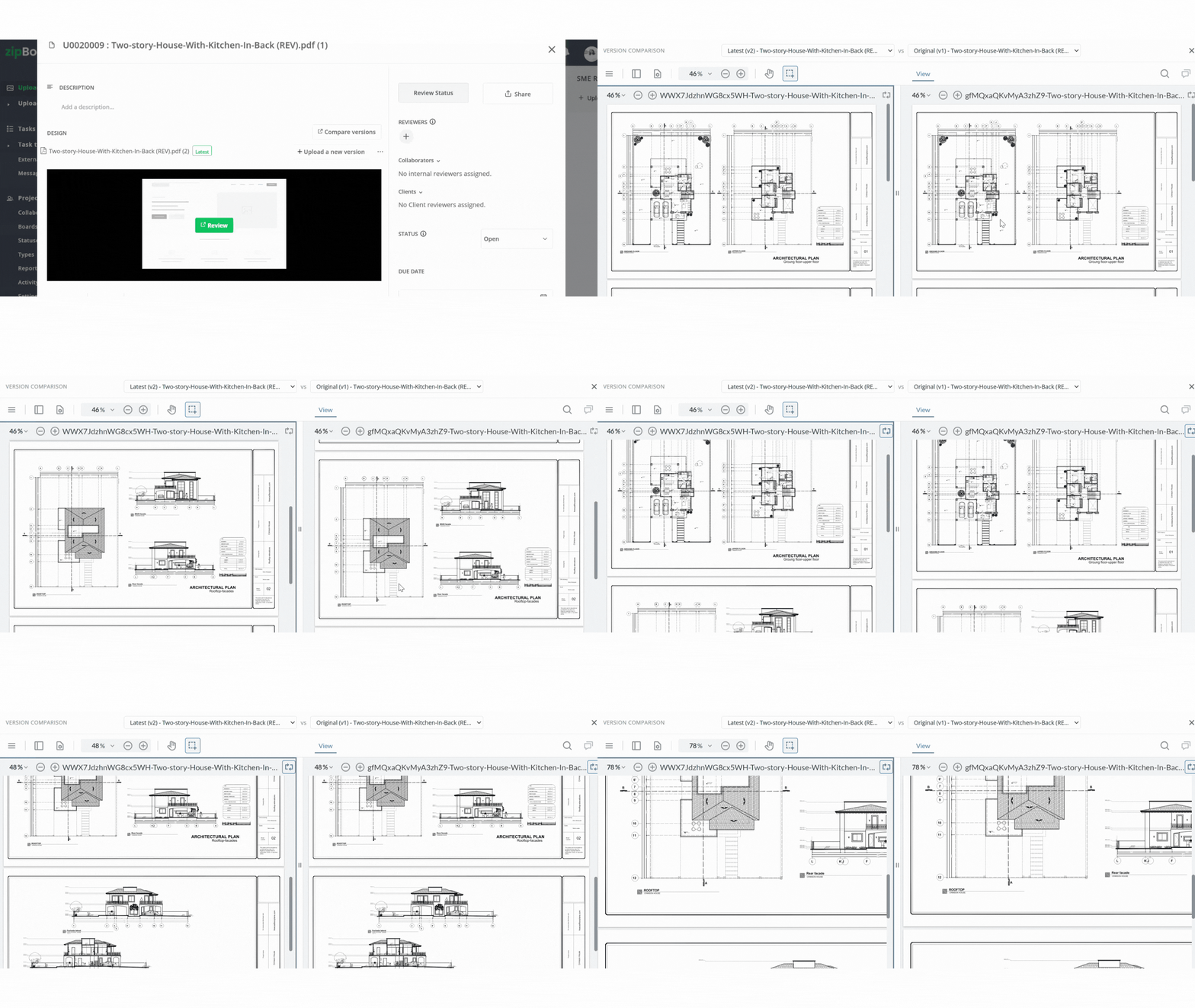
The root cause of version drift isn’t a lack of comparison algorithms, it is workflow fragmentation. When document comparison happens in one app, communication occurs over email, and issue tracking lives in a third tool, edits inevitably slip through the cracks.
Using zipBoard’s document comparison features, teams can review, compare, and verify PDF versions directly within their existing feedback environment:
Visual Side-by-Side: Position two versions side-by-side to catch layout shifts, text edits, and missing pages immediately.
- Centralized Version Control & Audit Trails: Retain a complete historical log of every draft iteration, marked-up layer, and approval sign-off inside a single centralized project hub.
Side-by-Side Views
Toggle visual sliders to spot layout shifts, text updates, and missing pages immediately.
No-Account Guest Access
Share a secure link. External clients review right in browser without logging in.
Contextual Task Creation
Pin feedback directly to exact coordinates and assign instantly as actionable tasks.
Version Control & Trail
Maintain a complete historical log of iterations, annotations, and approvals in one hub.
See The Side-by-Side Version In Action
Get to know the zipBoard side by side version in under 1 minute!
Best Practices for Document Version Control Across Teams
Standardize Naming Conventions: Replace vague names like
Draft_Final_v2.pdfwith systematic naming structures using ISO dates and version tags (e.g.,2026-08-29_ProjectName_v02.pdf).Consolidate Review Channels: Discontinue collecting separate marked-up PDFs from individual reviewers. Require all stakeholders to annotate on a shared web canvas so conflicting feedback is resolved before version comparisons are executed.
Establish Clear Approval Gates: Define explicit sign-off criteria for each version milestone (e.g., Legal Sign-off vs. Design Approval) so team members know when a version is outdated against further feedbacks or comments.
Frequently Asked Questions (FAQ)
You can use free web-based diff checkers or native tools like Microsoft Word (by converting PDFs to .docx format). However, free tools often lack formatting preservation and security protections. For professional teams, using a browser-based collaborative review tool like zipBoard allows users to compare documents without requiring paid software licenses.
Yes, zipBoard supports version comparison feature for PDF, Images, Videos, and SCORM Files.
You must have at least two versions of the asset uploaded to your zipBoard project to activate the comparison option.
Conclusion
Relying on manual redlining or disconnected comparison software creates unnecessary risk during document review. Manual checks leave room for human error, while standalone tools split your diff results from your task tracking.
By centralizing version comparison inside your primary review workspace, you can highlight document variances instantly, turn discrepancies into assigned tasks, and maintain complete visibility over every revision cycle.
Recent Posts
- How to Get SMEs to Review Technical Docs on Time: Deadlines, Reminders and Sign-off October 29, 2026
- Adobe Shared Review Not Working in Edge or After an Update? What Breaks and How to Fix It October 26, 2026
- How to Review AI-Generated eLearning Courses (and Get Them Approved Faster) October 22, 2026
- 7 Best Fieldwire Alternatives for Construction Teams September 29, 2026
- How to Track Content Approvals Across Multiple Projects (Without Missing One) September 25, 2026
Features
Compare
©️ Copyright 2026 zipBoard Tech. All rights reserved.