19 Aug
Six engineers commented on the manual: two in Acrobat, one on a printout, three in email. Now someone has to merge it all and work out who actually signed off on Rev C.
No credit card needed. Reviewers are always free.
The short answer: the best tool for reviewing PDFs with a team is the one your reviewers will actually open, that keeps every comment on one copy, and that shows who still hasn't signed off on which revision. For documentation teams that send long manuals and datasheets to many engineers, that usually means a browser-based review tool such as zipBoard or Filestage. Adobe Acrobat's "Share for review" is fine for a few reviewers who already use Acrobat. Bluebeam and Drawboard are built for drawings. If every SME already works in your CCMS, its own review module (Heretto, AEM Guides, Paligo) may be enough.
What makes PDF review hard for documentation teams?
Marking up a PDF is easy; every PDF tool does it. The hard part is the team around the PDF:
- Comments arrive in five places. Annotated copies, email threads, chat and printouts, and the writer merges them by hand.
- Reviewers can't or won't open the file. SMEs don't have a FrameMaker or CCMS seat, Acrobat asks them to sign in, or the shared review server is down again.
- Nobody knows who is outstanding. "Who still hasn't signed off?" is answered from a spreadsheet next to the PDF.
- "What changed between versions?" Reviewers reread 200 pages to check whether their three comments were fixed.
- The record is missing at release. An approval given on Rev B quietly gets treated as approval of Rev C.
So judge each tool on the review, not the editor. If your Acrobat shared review is already breaking, start with what breaks in Adobe shared review and how to fix it.
For how this works across several review groups (engineering, safety, regulatory, marketing), see collaborative review for documentation teams.
What should you check before choosing a PDF review tool?
- Who has to pay or install something? Count your reviewers, not your writers. A manual can need ten engineers, a safety lead and a regulatory reviewer.
- Can outside reviewers comment from a link? Contract engineers, partners and customers can't always get onto your SharePoint or VPN.
- Can you see each reviewer's decision? Comments are not sign-off. Look for required reviewers, due dates and a decision per person.
- How does it handle the next revision? Does it keep versions together, compare them, and reset approvals?
- What do you hand over at release? A marked-up PDF, a comment resolution sheet, a record of who approved what.
- Where do the files live? Some teams can't upload controlled documents to an outside service.
Which PDF review tools work best for teams? (comparison)
| Tool | Built for | Reviewers comment from | Who needs a paid seat | Compare revisions | Decisions and sign-off |
|---|---|---|---|---|---|
| zipBoard | Review and approval of PDFs and other content with many reviewers | Browser; share-link reviewers comment on PDFs without signing up | Reviewers and collaborators are unlimited on every plan | Side by side, with text changes highlighted on PDFs | Required reviewers, due dates, a decision per reviewer per version |
| Adobe Acrobat ("Share for review") | Creating, editing and signing PDFs | Browser link; Adobe says recipients can comment without an Acrobat account | Each person who edits or shares in Acrobat; Compare Files needs Acrobat Pro | Compare Files (Acrobat Pro) | Comments in the PDF; you track sign-off yourself |
| Acrobat server-based shared review (network folder or SharePoint) | Reviews that must stay on your own servers | Acrobat or Reader on the desktop | The initiator needs Acrobat (not available in Reader) | Separate (Compare Files) | Comments in the PDF |
| Bluebeam Revu / Studio | Construction drawings and engineering markup | Revu, or Bluebeam on web and mobile with a free Bluebeam ID | Per user, billed annually; full Studio participation needs a plan | Compare Documents and Overlay (Core plan and up) | Markup lists and statuses |
| Drawboard Projects | Drawing review for design and construction teams | Web, iOS or Windows; guests use the web app | Per user; guests invited with time-limited access | Not checked | Markups and comments |
| Filestage | Approval of marketing, creative and regulated content | Browser; reviewers don't need an account | Seats sold in bundles; reviewers are free | Side by side (overlay and text compare on Business) | "In review", "Needs changes", "Approved", due dates |
| CCMS review (Heretto, AEM Guides, Paligo) | Reviewing DITA/XML source inside the content platform | Browser, inside the CCMS | A reviewer licence or role in the CCMS | Inside the CCMS | Review assignments and tasks |
Sources, checked 2 Nov 2026: Adobe Share a PDF for review, Acrobat for teams pricing, Compare two versions of a PDF, shared review on network servers; Bluebeam pricing, Studio FAQs, Compare Documents vs Overlay; Drawboard pricing, inviting guests; Filestage pricing; Heretto user roles; Adobe AEM Guides review; Paligo user types. zipBoard details from our help articles on PDF review, text changes and required reviewers.
Try it: review a sample manual with no sign-up
This is a live zipBoard review of a fictional product manual. Click a pinned comment, or add your own on a spec table.
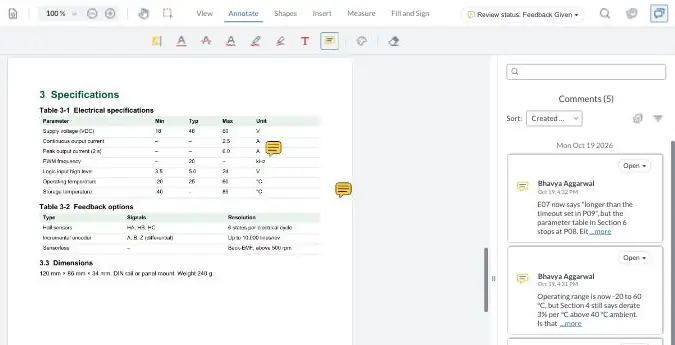
Your demo comments are private to this visit.
The tools, one by one
zipBoard
Best for: documentation teams sending long PDFs to many SMEs, inside and outside the company
zipBoard is a review and approval tool. It sits on top of the PDF you already publish, from FrameMaker, a DITA pipeline, InDesign or Word, and runs the review around it.
- One copy, one link. Reviewers open the PDF in the browser. Share-link reviewers comment without signing up; links can have a password and an expiry date.
- Who still hasn't signed off? Add required reviewers with a due date. Each records Approved, Changes Requested, Feedback Given or Review Complete, and overdue files turn red.
- What changed between versions? Upload the next revision as a new version, compare the two side by side, and see text changes highlighted on PDFs. Approvals reset for the new version.
- Comments become work. Markups create tasks with an owner and a status; filter comments by status or by the PDF's own sections.
- A record to file. Download the PDF with every annotation, and export comments as a comment resolution sheet (CSV export on Enterprise and custom plans).
- Files can stay on your servers. Add PDFs by URL through the API, with enterprise hosting options on the security page.
What it doesn't do: it isn't a PDF editor (you can't rewrite text in the PDF), it doesn't write comments back into DITA or XML source, and comments already embedded in a PDF don't convert into zipBoard comments.

Adobe Acrobat ("Share for review")
Best for: a few reviewers, one or two rounds, and a team that already lives in Acrobat
Acrobat is the best tool here for creating, editing and signing PDFs, and most companies already own it. Its current review method shares a link: Adobe says reviewers can comment in a browser "with no sign-in or software needed", and their comments show up in the sender's Acrobat.
- Cost: Acrobat Standard for teams is US$16.99 and Pro US$23.99 per licence per month on an annual plan (Adobe, 2 Nov 2026). Compare Files is a Pro feature.
- Sign-off: comments live in the PDF; tracking who approved which revision is up to you.
- The older server-based shared review (network folder or SharePoint) is still documented and still used by teams whose files can't leave their network. It is also where most breakage happens: see Adobe shared review not working.
Our Acrobat vs zipBoard comparison goes row by row, and the real cost of Adobe Acrobat for documentation teams has a calculator for your own numbers.
Bluebeam Revu and Studio
Best for: engineering drawings, measurements and construction document sets
Bluebeam is the standard for drawing markup in construction and heavy engineering, with measurement, Compare Documents and Overlay on its Core plan and up. Studio Sessions let a team mark up the same file at once.
- Cost: sold per user and billed annually (Bluebeam pricing). Non-subscribers can join with a free Bluebeam ID, but Bluebeam's Studio FAQ says attendees without a plan get read-only access.
- Fit for doc teams: strong if your manuals are mostly drawings; most of its tools go unused on a user manual or datasheet.
More: Bluebeam vs zipBoard.
Drawboard Projects
Best for: design and construction teams reviewing drawings on tablets and Windows
Drawboard Projects is a PDF markup and review tool with web, iOS and Windows apps, and offline markup on Windows and iOS. It's sold per user per month, and you can invite clients and partners as guests with time-limited access; guests use the web app (Drawboard pricing).
More: Drawboard vs zipBoard.
Filestage
Best for: marketing, creative and regulated content approval with many outside reviewers
Filestage is a browser-based approval tool. Reviewers don't need an account, files move through "In review", "Needs changes" and "Approved" with due dates and reminders, and you can compare two versions side by side. It also turns sticky notes and highlights already in an uploaded PDF into review comments. Seats are sold in bundles and reviewers are free (Filestage pricing).
Versus zipBoard for doc teams: both cover reviewer access, due dates and approvals. Filestage converts comments already in an uploaded PDF; zipBoard doesn't. zipBoard adds comments filtered by the PDF's own sections, comments as tasks with owners, and PDFs added by URL so they stay on your own servers.
Review inside your CCMS (Heretto, AEM Guides, Paligo)
Best for: teams whose SMEs already have access to the CCMS and review the source
Most component content management systems now include review. Heretto has a Reviewer role with commenting and suggesting modes; AEM Guides sends review links for DITA topics and maps that open in the browser; Paligo has Reviewer and Contributor licence types, with up to 10 on its Business plan (Paligo pricing).
The trade-off: reviewers comment on topics and maps, not on the formatted PDF customers read, and each one needs a role or licence in the CCMS. Many teams keep CCMS review for writers and editors, and send the rendered PDF to engineers and outside reviewers.
Proofing tools (Ziflow, Markup.io)
Best for: agencies and marketing teams proofing creative work
Ziflow and Markup.io both review PDFs and both list unlimited reviewers on their pricing pages (Ziflow, Markup.io). Their workflows are built around creative proofing (video, images, brand assets) rather than SME sign-off on technical revisions.
More: Ziflow vs zipBoard · Markup.io vs zipBoard.
How do you see what changed between two PDF revisions?
Most reviewers don't want to reread the manual. They want to know whether their comments were fixed and what else moved. Acrobat Pro (Compare Files) and Bluebeam (Compare Documents, Core plan and up) can both compare two PDFs. In zipBoard, the comparison sits inside the review: open Compare versions, read the list of text changes, and check each version's comments side by side.
Step by step: compare two PDF versions and detect text changes in a PDF. The longer guide: how to compare two PDF versions without losing track of changes.
What does a slow PDF review actually cost?
The licence is the small number. The big ones are time and risk:
- The writer's merge time: copying comments from email and annotated copies into one list, every round.
- Extra rounds: when reviewers comment on an old revision, or two SMEs fix the same line differently.
- Chasing: working out who is outstanding, then reminding them.
- IT upkeep: a review server, SharePoint permissions, VPN access for outside reviewers, and the tickets after every update.
- Release risk: shipping with an approval that was really given on the previous revision.
Paid seats matter too, mostly when every reviewer needs one. In zipBoard, reviewers and collaborators are unlimited on every plan. See plans
How does a team PDF review work in zipBoard?
- Upload the PDF to a project, or add it by URL so it stays on your server.
- Add required reviewers and a due date, and send a share link to anyone else.
- Reviewers mark up in the browser: highlight, strikeout, notes, shapes, callouts and stamps, with replies and @mentions.
- Work through the comments: assign them as tasks, filter by status or section, resolve them.
- Upload the next revision, compare it with the last one, and collect fresh decisions.
- File the record: the marked-up PDF, the comment export and each reviewer's decision.
Full walkthrough in the help centre: PDF and drawing review in zipBoard. For the bigger picture, see technical document review software for SME sign-off.
AI review for technical documents is in private beta: a first pass that flags inconsistencies before the draft reaches your SMEs. Ask us about joining.
Ask about early access"Was my comment fixed?" AI Compare will check whether last round's comments were addressed in the new revision.
Get a previewWhen should you not switch from what you have?
- Your Acrobat review works. A few internal reviewers, one round, nobody chasing: keep it.
- You mostly edit PDFs. zipBoard reviews PDFs; it doesn't rewrite them. Keep Acrobat for editing and move only the review if that's where the pain is.
- Every SME already reviews in your CCMS and is happy there. A second tool adds a step.
- Your documents are mostly drawings that need measurement and takeoff. Bluebeam is built for that.
- You need your existing PDF comments to come with you. Comments embedded in a PDF don't become zipBoard comments; see moving existing PDF comments.
Frequently asked questions
What is the best tool for reviewing PDFs with a team?
For documentation teams with many reviewers, a browser-based review tool such as zipBoard or Filestage, because reviewers comment on one copy from a link and you can see each person's decision. Adobe Acrobat's "Share for review" suits a few reviewers who already use Acrobat. Bluebeam and Drawboard suit drawing-heavy reviews.
What is the best PDF review tool for technical writers?
One that your SMEs can open without a CCMS or FrameMaker seat, that tracks who still hasn't signed off on each revision, and that compares revisions. zipBoard is built for that review step; CCMS review modules work when every reviewer already has access to the CCMS.
Do reviewers need Adobe Acrobat to comment on a PDF?
Not with Acrobat's link-based "Share for review": Adobe says recipients can comment in a browser without an Acrobat account. The older server-based shared review needs Acrobat or Reader on the desktop. In zipBoard, share-link reviewers comment in the browser without signing up.
Can I compare two versions of a PDF and see what changed?
Yes. Acrobat Pro has Compare Files, Bluebeam has Compare Documents on its Core plan and up, and zipBoard compares versions side by side with text changes highlighted, next to each version's comments.
How do I track who has approved a PDF?
Use a tool that records a decision per reviewer per revision. In zipBoard, required reviewers record Approved or Changes Requested on the file, the file stays in their review list until they decide, and a new version resets the decisions.
Can our PDFs stay on our own servers?
In zipBoard, yes: your system can add PDFs by URL through the API, and there are enterprise hosting options. See reviewing documents that stay on your own servers.
Will the comments already in our PDFs carry over?
Not automatically. Comments embedded by Acrobat or other tools stay in the PDF's own comment list and don't become zipBoard comments.
How much does a PDF review tool cost?
Compare the cost of the review, not just the licence: who needs a paid seat, which features need a higher plan, server and IT upkeep, and the writer's time merging comments. zipBoard includes unlimited reviewers and collaborators on every plan.
Why does Adobe shared review keep breaking?
Usually because of the server, sign-in or comment sync after a Windows, Edge or Acrobat update. Our guide covers what breaks and how to fix it.
Run your next manual review from one link
One copy, every comment, and a clear answer to "who still hasn't signed off?"
No credit card needed. Reviewers are always free.
Related: Get SMEs to review technical docs on time · Document approval software for engineering teams · Technical document review checklist · Compare documents side by side · Help: technical documentation reviews with many SMEs