The Project Manager’s Guide to Drawing Approvals and Submittal Tracking
10 Apr
Table of Contents
ToggleDirect Answer:
Project managers track drawing approvals by:
- Recording the reviewer name and decision (Approve / Revise / Reject).
- Linking every approval to a specific drawing version (never to a generic filename).
- Maintaining a centralized log or platform (single source of truth).
- Capturing automatic timestamps for audit, dispute, and compliance purposes.
According to a landmark study by the Plangrid and FMI Corporation, project stakeholders lose an average of 5.5 hours per week simply searching for project data or resolving conflicts stemming from outdated information. This “data waste” is a primary driver of the industry’s rework crisis; FMI suggests that approximately 52% of global rework is caused by poor project data and miscommunication. On a standard $10M project, failing to track approvals accurately can lead to over $250,000 in unnecessary expenditures due to errors that could have been caught with a synchronized review process.
To tackle that, Project managers track drawing approvals using a combination of approval stamps, submittal logs, and centralized review platforms. The most reliable approach is a system that records who approved what, when, and on which version, with a complete, tamper‑proof audit trail. This structured approach eliminates “he said/she said,” reduces rework, and ensures approvals are defensible in audits, claims, or safety inspections.
Why Tracking Drawing Approvals Is Critical in AEC
In construction and design workflows, an unmarked “approved” drawing sent to the field can trigger costly rework, schedule delays, or safety incidents. Tracking isn’t administrative busywork, it is risk management. A solid approval tracking process delivers:
- Accountability across architects, engineers, contractors, and clients.
- Clear revision history that proves which version was live at any moment.
- Faster decision‑making (no hunting through email threads).
- Reduced rework and disputes because everyone works from the approved set.
Below is the complete framework covering methods, common failure points, best practices, tools, and a deep dive on avoiding version confusion.
Methods Project Managers Use to Track Drawing Approvals
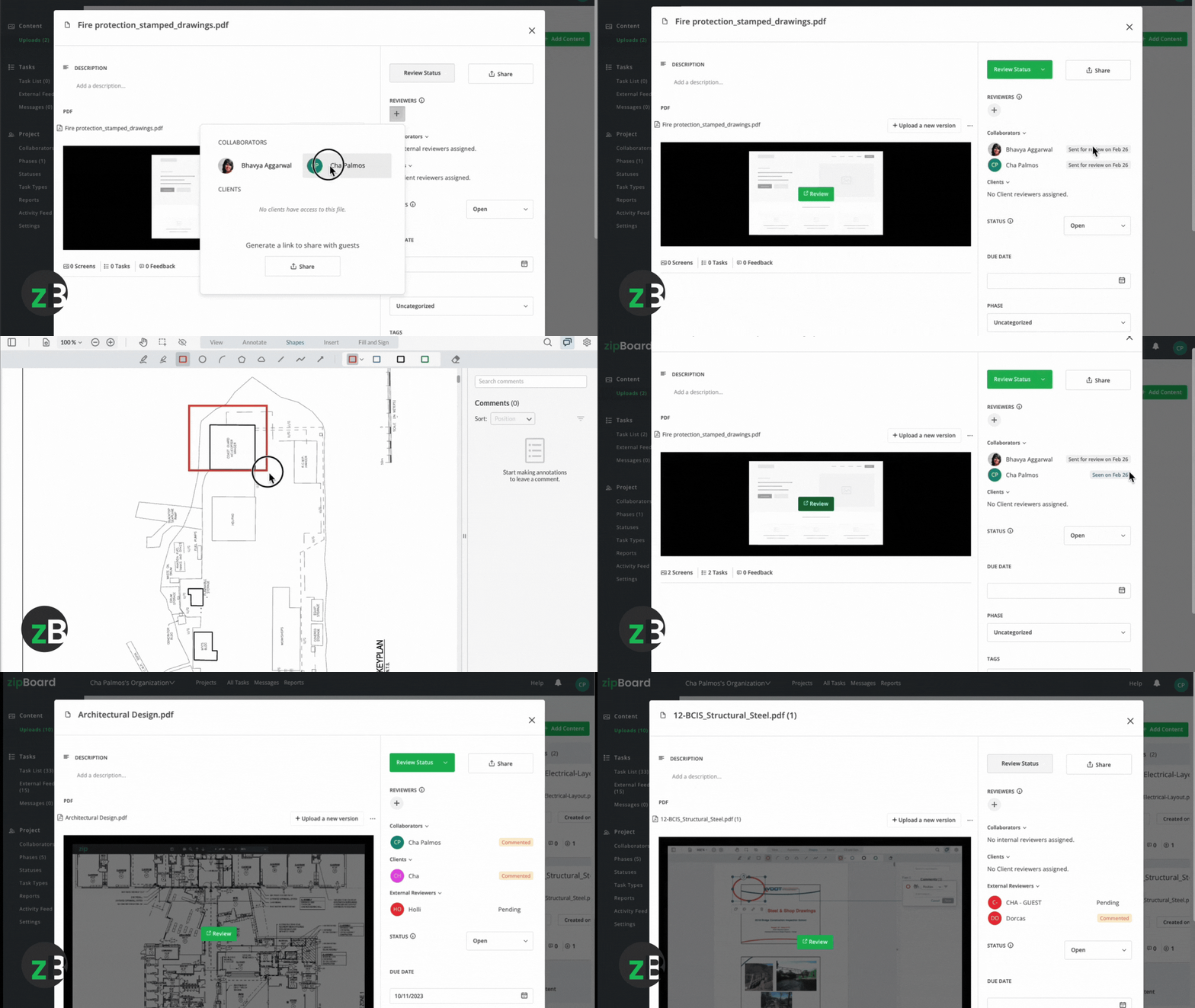
Approval Stamps (Physical & Digital)
Traditional stamps, “Approved,” “Revise & Resubmit,” or “Approved as Noted”, still define decision points. Modern teams use digital equivalents inside PDF markups or platform‑specific “Approve” buttons that auto‑log the action.
Key to success: Standardize where the stamp appears (e.g., bottom‑right corner) and, for digital stamps, require the reviewer’s name and date to be embedded in the metadata.
Submittal Logs (Spreadsheets & Databases)
A submittal log is the master register of every drawing under review. It typically captures:
- Drawing number, title, and discipline
- Submission date & revision number
- Reviewer name, role, and decision
- Approval date and version link
Excel is universal, but it breaks when files live in email threads, attachments get renamed, and the log becomes disconnected from the actual file. For robust tracking, the log must live inside the project’s document management system or a dedicated review platform.
Centralized Review Platforms (The Modern Standard)
Cloud‑based platforms keep drawings, comments, decisions, and versions in one place. They auto‑link approvals to exact file versions, generate audit trails, and notify stakeholders instantly, eliminating the email confusion. Leading options include Procore, Autodesk Construction Cloud (ACC), and zipBoard.
Tools That Make Approval Tracking Effortless
Tool
Why It Helps Tracking
Key Feature for PMs
Procore
Submittal module auto‑logs reviewer decisions, dates, and versions; exports clean audit trails. |
Structured workflows for large teams; compliance‑ready reporting. |
Autodesk Construction Cloud (ACC)
Links BIM models, drawings, and markups to specific versions; approvals sync across the project ecosystem. |
Version History with locked approval records; deep integration with Revit/AutoCAD. |
zipBoard
A streamlined review and approval platform built for visual collaboration. Teams comment directly on drawings, track versions, and maintain a clear approval history without complexity. |
Unlimited collaborators at no extra cost (unlike per‑seat pricing models). No‑login guest access—share a link; stakeholders markup PDFs instantly without accounts, downloads, or friction. |
Problems That Break Approval Tracking (And Cost You Money)
Email Chaos
Attachments fork into “shadow versions.” A drawing marked “Approved” in an email loses context when forwarded, renamed, or detached from the thread. Searching dozens of emails for “final approval” is inefficient and legally risky.
When “Sheet_A101_v2_Final.pdf” and “Sheet_A101_v2_Approved.pdf” both circulate, crews cannot tell which is live. Teams may approve one revision while building from another—one of the most expensive mistakes in AEC.
Missing Audit Trail
If you cannot prove who approved which version when, you face liability during RFIs, claims, or safety inspections. Without timestamps and version linkage, disputes become “your word against theirs”.
Disconnected Tools
If you cannot prove who approved which version when, you face liability during RFIs, claims, or safety inspections. Without timestamps and version linkage, disputes become “your word against theirs”.
Best Practices for Bulletproof Drawing Approval Tracking
Capture the Who, What, When, Version
Every approval record must include the reviewer’s name, decision, timestamp, and the exact drawing version ID (e.g., Rev 2, Sheet A101).
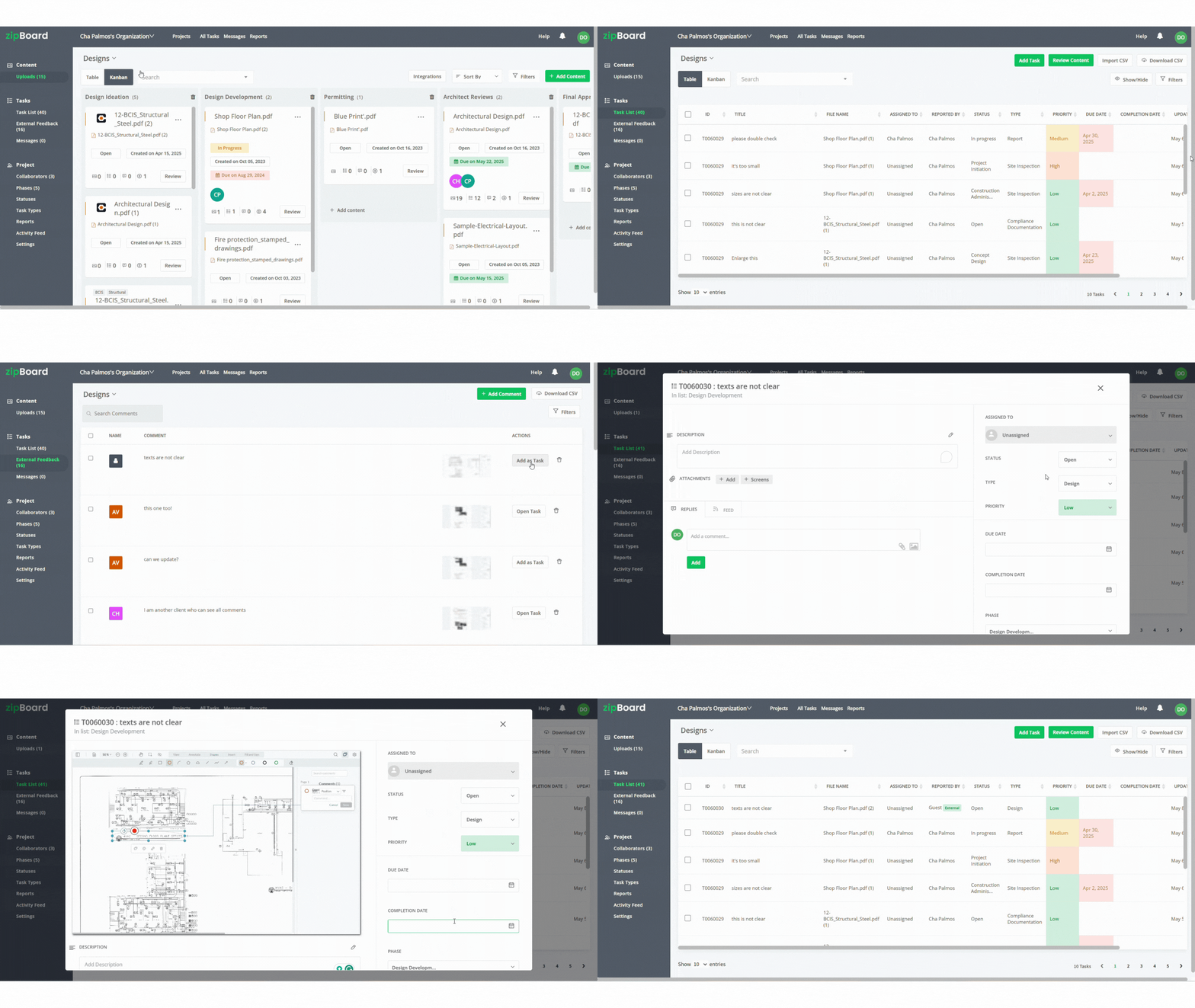
Centralize Everything in a Single Source of Truth
Whether a submittal log or a cloud platform, everyone checks one place. No exceptions.
Automate Timestamps
Manual date entries cause errors. Use platforms that auto‑stamp the moment an approval is clicked or feedback is added.
Enforce Strict Version Control
Standardize naming (e.g., A101_Rev2_2026-03-27) and lock or archive superseded drawings the instant a new revision publishes.
Tie Comments to Specific Versions
Feedback must reference the exact revision and document reviewed (e.g., “Rev 2, Sheet A101”). Never use generic labels like “the latest drawing.”
Control Publishing Rights
Only the PM, Design Manager, or designated coordinator can upload new revisions to prevent unauthorized “final” versions from external collaborators or guest reviewers.
Tool Comparison: Procore vs. Autodesk Construction Cloud (ACC) vs. zipBoard
Feature
Procore
Autodesk
zipBoard
Core Strength / Best For |
Enterprise‑grade construction management—ideal for large teams, complex RFIs, submittals, and compliance reporting.
BIM‑centric document & model management—best for design teams that need tight integration between drawings, models, and project data.
Fast, visual‑first review & approval—perfect for teams that want zero‑friction collaboration, instant stakeholder feedback, and simple version control without heavy setup.
Drawing Approval Tracking |
Robust Submittal module auto‑logs reviewer, decision, date, and version; exports clean audit trails for owners and contracts.
Document Management + Review links approvals to specific drawing versions; approvals sync across BIM models and sheets.
Visual approval workflow ties every “Approve/Revise/Reject” to an exact PDF version; approvals are immutable and locked to that revision.
Role‑based access; guests need accounts and invites, this can slow external reviewers (clients, subs).
Guests require Autodesk IDs or project invites; collaboration is powerful but adds friction for external stakeholders.
Unlimited collaborators at no extra cost + no‑login, no‑signup guest access via a simple share link, stakeholders markup PDFs instantly without accounts, downloads, or delays.
Pricing Model |
Typically per‑user seat licensing, costs scale with team size; can get expensive for many collaborators.
Per‑user subscription (often bundled with Autodesk products); additional seats add to the bill.
Unlimited collaborator access with no extra fee, ideal for projects with many external reviewers.
Ease of Use & Setup |
Steep learning curve; powerful but requires administration and workflow configuration.
Moderate to steep, best leveraged when teams already use Autodesk BIM tools; setup takes time.
Extremely fast onboarding, upload a PDF, share a link, and start marking up in minutes; no training needed.
Feedback & Task Tracking |
Submittal logs track status, but comments are scattered across markups, RFIs, or emails; no unified Kanban/board view for visual feedback.
Issue tracking exists, but drawing feedback is list‑based and often buried in model data; lacks a dedicated Kanban view for all comments in one glance.
Kanban and Table task tracking lets you view every feedback item, comment, and action item in one single page view, no switching between logs, emails, or spreadsheets; perfect for managing review cycles at a glance.
Why It Stands Out |
The industry standard for compliance‑heavy, large‑scale construction projects—unbeatable for structured submittal reporting and owner‑level audits.
Deep BIM integration—the only choice when drawings, models, and design coordination must live in one ecosystem.
Speed + Simplicity + Cost‑Effective Scale: removes every barrier to fast approvals—unlimited guests, no logins, instant version locking, Kanban task tracking, and crystal‑clear audit trails—without the overhead of enterprise platforms.
Key Takeaway for Project Managers
- Choose Procore if you need enterprise‑level submittal control, compliance reporting, and structured workflows for large, complex job sites.
- Choose ACC if your team lives in Revit/BIM and you must sync drawing approvals with 3D models and design coordination.
- Choose zipBoard if you want drawing approvals done fast, visually, and at scale—especially when external stakeholders, clients, or subs need to review instantly without logins or IT overhead, and you want all feedback tracked in one clean Kanban or table view rather than chasing comments across email threads and spreadsheets.
Why zipBoard Stands Out for Fast, Frictionless Tracking
While Procore and ACC excel at enterprise‑scale control and BIM integration, zipBoard is purpose‑built for speed and simplicity in review‑heavy workflows:
- Cost‑effective scalability: Unlimited collaborator seats are free, ideal for projects with many subs, clients, and consultants.
- Zero‑friction access: No‑login, no‑signup guest review via share links gets stakeholders marking up drawings in seconds, not days.
- Traceability: Consolidated feedback management, every comment is tracked as an actionable task in a single page Kanban/table view.
How to Avoid Version Confusion in Construction Drawings
Direct Answer:
To prevent version mix‑ups, always:
- Use one shared drawing source (cloud folder or review platform).
- Standardize revision naming (e.g., A101_Rev2_2026-03-27).
- Track versions in a register (central log or platform).
- Mark old drawings as “Superseded” immediately when a new one publishes.
- Tie every comment and approval to a specific version (never generic).
- Control who can publish updates (only PM or designated coordinator).
Version Control Setup Checklist
✅ Single Source: All drawings live in one directory/platform.
✅ Naming Convention: Project_Sheet_Rev_Date
✅ Access Control: Only PM/Design Manager can publish new revisions.
✅ Comment Linking: Every markup includes the drawing version ID.
Before vs. After Following The Checklist
Step
Before
After
Storage
Email + local drives |
Single review platform |
Naming
Random (“Final_John_Apr2.pdf”) |
Standardized (A101_Rev2_2026-03-27) |
Supersession
Manual memo (often missed) |
Notified you automatically when new document and updates are added |
Field Access
Crew grabs latest email attachment |
Crew checks live portal for current, approved set |
Conclusion
Effective drawing approval tracking is not about fancy software—it is about discipline: record who approved what, on which version, and when, and store that data in a single source of truth. Combine that discipline with reliable version control and centralized review tools, and you eliminate the email chaos, version confusion, and costly rework that plague too many projects.
Frequently Asked Questions
Version control is the systematic management of drawing revisions—using unique IDs, naming standards, and a central register—to ensure every stakeholder always uses the latest, approved set and can prove which version was live at any time.
PMs log each version number, date, and approver in a centralized register or review platform that links directly to the file, while automatically marking older versions as superseded to prevent field errors.
Using unapproved or outdated drawings can cause costly rework, schedule delays, safety incidents, and contract disputes. A robust approval and version tracking system prevents this by locking access to the correct, approved version only.


Recent Posts
- 7 Best Fieldwire Alternatives for Construction Teams September 29, 2026
- How to Track Content Approvals Across Multiple Projects (Without Missing One) September 25, 2026
- How to Compare Two PDF Versions Without Losing Track of Changes September 1, 2026
- Why IT Teams Are Getting Out of the PDF Review Server Business August 20, 2026
- The Real Cost of Adobe Acrobat for Documentation Teams August 19, 2026
©️ Copyright 2026 zipBoard Tech. All rights reserved.