How Construction Teams Manage Drawing Reviews (Without the Chaos)
24 Mar
Table of Contents
ToggleDirect Answer: The best way to manage drawing revisions is to use a centralized drawing review platform that provides version control, comment tracking, structured workflows, and a complete revision history. This ensures all stakeholders work on the latest drawings, reduces errors, and prevents costly rework.
In the architecture, engineering, and construction (AEC) world, construction drawing review isn’t just a step in the workflow, it’s the make‑or‑break moment for schedule, budget, and quality. A single missed comment, an undetected clash, or an outdated revision can trigger costly change orders, project delays, or even safety incidents.
Yet, for decades, most teams relied on a broken process: PDFs emailed back‑and‑forth, filenames like FloorPlan_FINAL_v7_REALLY_FINAL.pdf, comments scattered across Slack, Word docs, and PDF markups, and no reliable way to track drawing revisions. According to the 2026 AEC Collaboration Benchmark Report, 68 % of projects suffer schedule slippage directly tied to drawing‑review inefficiencies, costing the industry over $14 billion annually in rework and disputes.
The result? Poor project data and miscommunication on projects is responsible for 48% of all rework in construction. Modern drawing review software has changed this entirely. Purpose-built collaboration platforms now allow stakeholders to review architectural drawings online and track drawing revisions automatically, turning one of construction’s most painful bottlenecks into a streamlined, auditable process.
In this guide you’ll discover:
- The biggest pain points in traditional drawing reviews, and their real-world cost
- How leading AEC firms review architectural drawings online with zero email dependency
- Proven, step-by-step methods to track drawing revisions without spreadsheets
- Why purpose-built drawing review software like zipBoard has become the industry standard
What Drawing Review Actually Looks Like Today
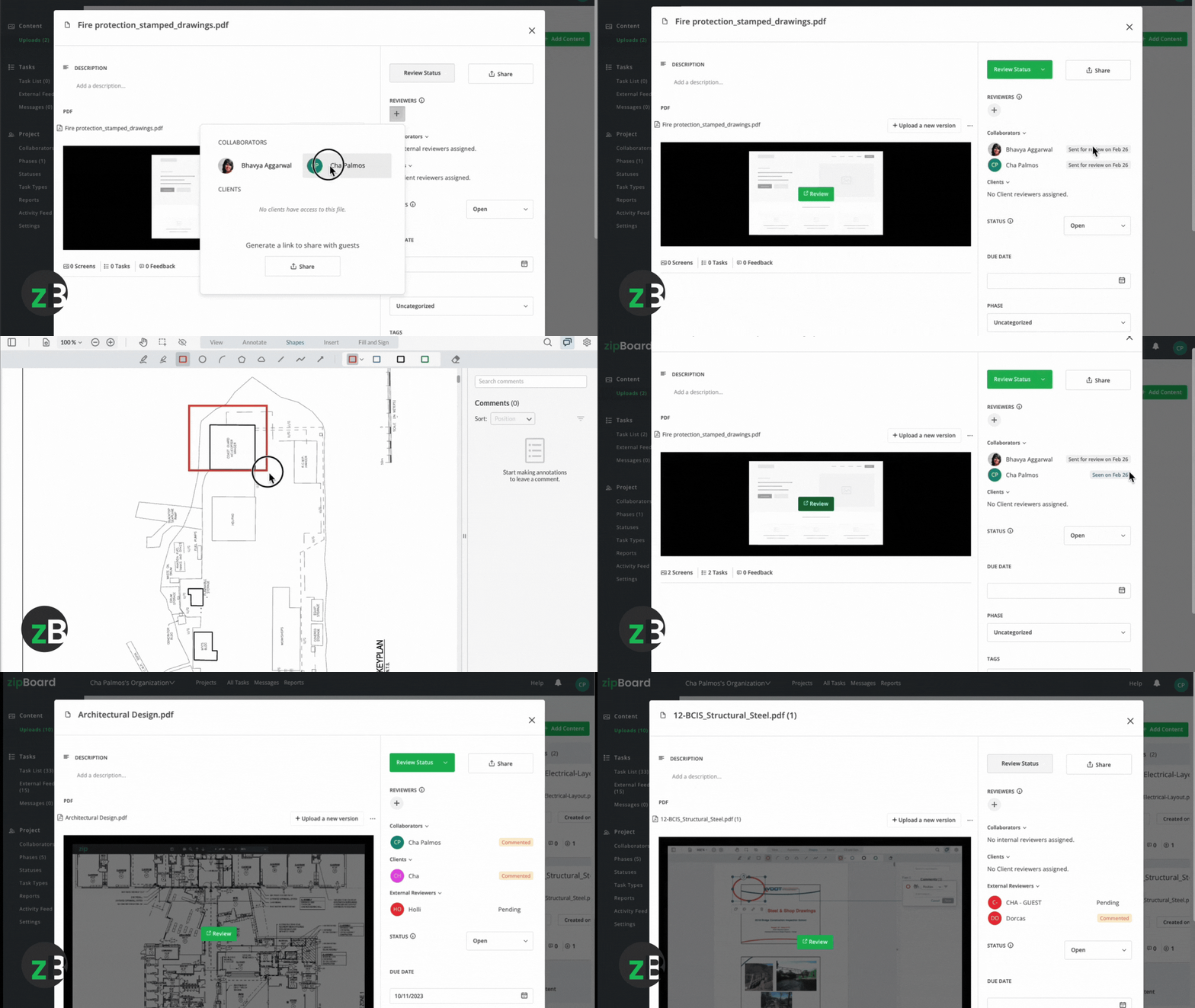
A typical workflow looks like this:
A PM uploads a drawing → emails it to the architect → receives markups → forwards to consultants → collects feedback → sends a revised version.
Within 2–3 rounds:
- multiple PDFs exist
- comments are scattered
- no one is sure which version is final
This is where most teams lose control.
Challenge 1: Email Chaos Is Killing Your Drawing Reviews
If your team still manages construction drawing review via email, you’re fighting a losing battle. Email-based review is the single biggest productivity bottleneck on AEC projects, not because it’s inherently broken, but because it was never designed for the complexity of multi-discipline, multi-revision drawing workflows.
The 5 Fatal Flaws of Email-Based Reviews
- Version Proliferation
When an architect emails RoofPlan_v3.pdf, the structural engineer saves it as RoofPlan_v3_SE_REVIEWED.pdf and sends it back. By Review Round 2, there are seven “final” versions in circulation, and no one knows which one governs. According to Dodge Data & Analytics, 73% of AEC professionals have worked from outdated drawings at least once per project because of exactly this. - Comment Fragmentation
Feedback lives in PDF markups, email reply chains, Slack threads, and Word tables simultaneously. There is no single source of truth. Teams typically waste 9–11 hours per drawing set just consolidating feedback before any actual review work begins. - File-Size Blockades
CAD and BIM files, .DWG, .RVT, .NWC, routinely exceed 100 MB. Email servers block them outright, forcing teams onto unsecured consumer platforms like Google Drive or Dropbox. Nearly 1 in 5 AEC firms reported a data breach in 2025 linked to unprotected drawing sharing through these channels. - No Revision Audit Trail
Email gives you no way to track drawing revisions systematically. When a dispute arises, you have no defensible record of who changed what, when, or why. That ambiguity is precisely what fuels change-order battles. - No Accountability
No one formally “owns” a comment. Without status tracking, resolved items resurface in later rounds because no one officially closed them out. The same feedback gets addressed (and missed) repeatedly across review cycles.
The cost is quantifiable. Projects stuck in email-based construction drawing review suffer average delays of 12–18 days per review cycle, resulting in $87,000 or more in rework costs per project, according to the Lean Construction Institute.
Challenge 2: Sharing Drawings With Consultants & Stakeholders
Today’s projects involve architects, structural engineers, MEP engineers, sustainability consultants, contractors, subcontractors, owners, and facility managers — often across continents. Getting everyone aligned on the latest drawings is a logistical nightmare when using email or generic file‑sharing tools.
❌ Why Generic Tools Fail
Tool
Can You?
Problem for AEC Teams
Attach large CAD files? |
Email caps file attachments at 25 MB |
Google Drive/Dropbox
Review architectural drawings online with markups? |
❌ Only PDF viewing. No layer‑specific comments.
Basic BIM 360
Assign comments & set due dates? |
❌ Limited to BIM; PDF markups are clunky.
✅ The Modern Solution: Review Architectural Drawings Online
Instead of sending PDFs back and forth, some teams now use a simple review workflow:
The PM uploads a drawing → shares a link → stakeholders comment directly on the plan → all feedback stays in one place.
This removes the need to:
- consolidate comments
- track versions manually
- follow up over email
Everyone is looking at the same drawing, with full context.
Security is built into this model rather than bolted on afterward. Enterprise-grade platforms offer SOC 2 Type II compliant encryption both in transit and at rest, granular role-based permissions (view-only, comment, or approve), watermarking and download restrictions, and automatic expiry for external links.
When choosing a platform to review architectural drawings online, verify it supports:
Challenge 3: Tracking Comments Across Teams
During a typical construction drawing review on a mid-size project, 200–500 comments can move between disciplines. Without a structured system, tracking this volume manually becomes a significant source of errors that compound across review rounds.
What Comment Chaos Actually Looks Like
Consider a real hospital project scenario. The architect emails a marked-up PDF to the MEP engineer. The MEP engineer replies with their own markup. The contractor consolidates both into a Word table, which the owner then edits independently. By Review Round 3, 23% of comments have been duplicated across documents, 17% of “resolved” items have resurfaced because no one formally closed them, and the project has lost six days simply reconciling feedback, before a single drawing change has been made.
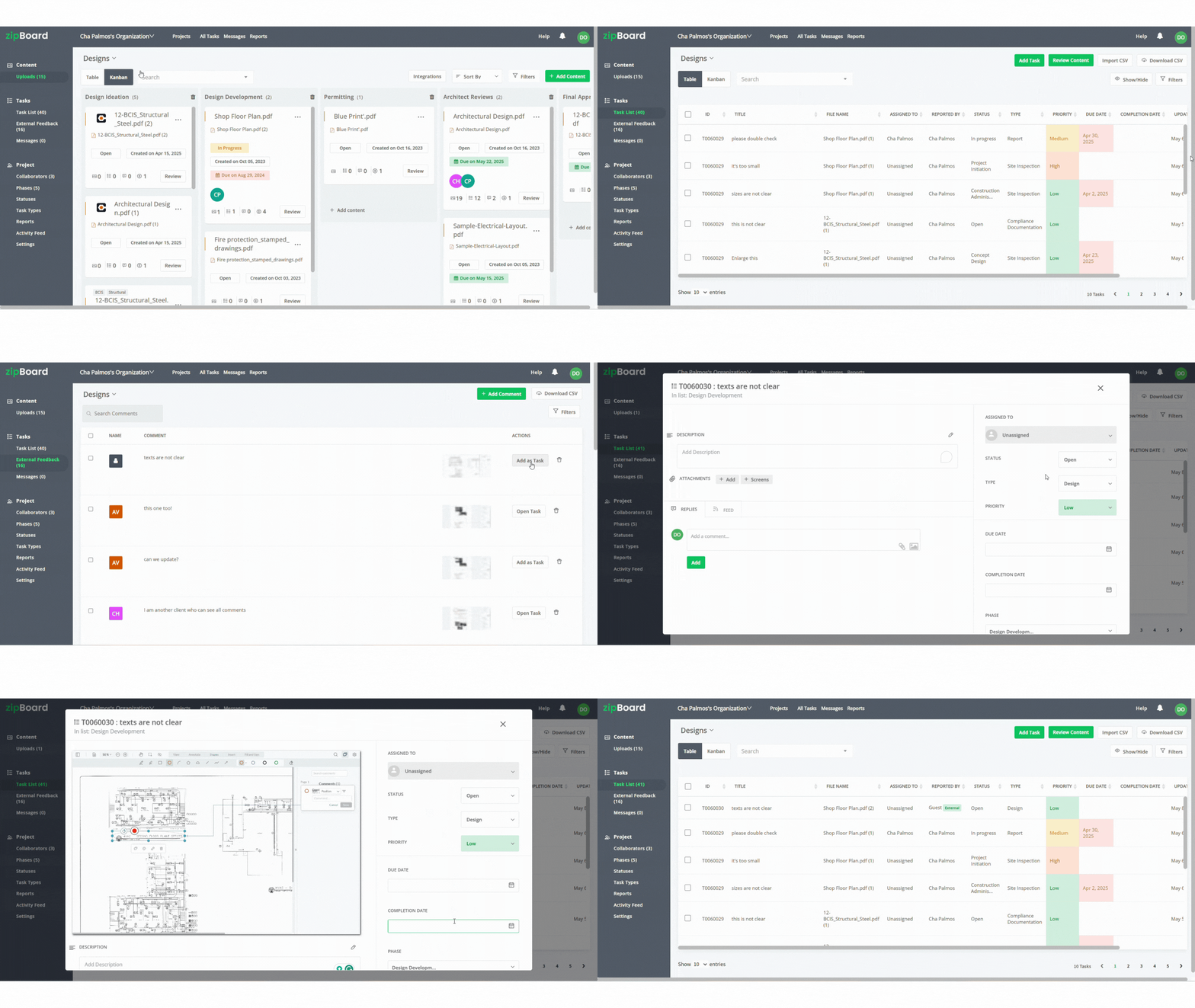
✅ How Dedicated Software Fixes This
Professional construction drawing review platforms treat comments as structured data, not free text. Here’s what they enable:
- Pin‑Point Accuracy
Click anywhere on the drawing to attach a comment — even to a specific layer or line number. No more “See top‑right of grid C‑3!” - Automated Tagging & Ownership
Every comment auto‑logs:- Reviewer’s name & role
- Timestamp
- Assigned Owner (e.g., @James_Struct)
- Due date
- Status Workflow
Comments move through a clear lifecycle:
Open → In Review → Resolved → Verified → Closed
Only closed comments advance to the next revision. - Threaded Discussions
Replies stay nested under the original comment — no more “Reply‑All” clutter.
📌 Result: 100 % visibility into every comment during the construction drawing review. Zero fallen‑through‑the‑cracks comments.
Challenge 4: Version Control Chaos
FoundationPlan_V12_FINAL_APPROVED_v2_DO_NOT_USE_OLD.pdf — if that filename looks familiar, you’ve experienced version-control failure firsthand. Manual version control is the leading cause of change-order disputes in construction, and the reasons are structural, not behavioral.
Why Manual Versioning Fails
- Filename Chaos: Teams invent their own naming conventions. Two “v7” files exist.
- No Audit Trail: You cannot prove who created Revision 5 or why.
- Rollback Impossible: If Rev 9 introduces an error, finding Rev 8 means digging through email archives for hours.
How to Automatically Track Drawing Revisions
Dedicated drawing review software replaces error-prone filenames with an intelligent revision engine. When a drawing is uploaded or updated, the system auto-generates a sequential revision number — Rev 1.0, Rev 1.1, Rev 2.0 — and records the uploading user, an exact timestamp, the change reason (e.g., “Updated duct sizing per MEP comment #42”), and the linked comments that triggered the revision.
The full revision history can be displayed in Kanban or table, so any team member can see at a glance which version is current, what changed in each prior revision, and when each version was approved
Critically, revisions are stored as an immutable audit trail. This creates a bulletproof record to track drawing revisions across the project’s lifetime, and it’s exactly the kind of documentation that protects you during inspections, closeout, or litigation.
The Modern Solution: Dedicated Drawing Review Software
Generic tools were never built for AEC workflows. Drawing review software is purpose‑engineered for the complexities of construction drawing review, delivering capabilities that email, Dropbox, or even basic BIM platforms can’t match.
Feature
Generic Tools (Email/Drive)
Dedicated Drawing Review Software
Review architectural drawings online
View‑only PDFs |
Annotate in‑browser (layers, redlines, clouds, dims) |
Track drawing revisions
Manual filenames |
Auto‑revisioning + immutable audit trail |
Comment Assignment & Due Dates
❌ None |
✅ @mention + deadlines + status tracking |
Mobile Review
Limited |
✅ Full markup capability |
Must‑Have Features in Any Drawing Review Software
When evaluating tools to review architectural drawings online, insist on:
- Annotation Toolbox – comment directly on drawings, assign feedback , track status
- Automated Revision Logging – Core function to track drawing revisions.
- Integrations – Syncs with Procore, Microsoft Teams, Slack & more.
Sharing One Drawing vs the Entire Project
One common mistake teams make is giving external stakeholders access to the entire project.
In reality, most reviews involve just one drawing at a time.
Modern workflows allow PMs to:
- share a single drawing via a link
- control what comments are visible
- track feedback without exposing all files
This small change significantly reduces confusion.

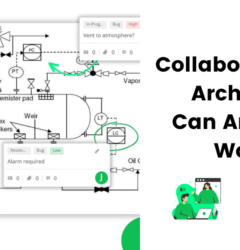
see how comments are pinned directly on a drawing – see it in action here
Why Cost Kills Collaboration
Many AEC firms still rely on Bluebeam, a desktop PDF‑markup tool. While powerful for individual redlining, Bluebeam creates collaboration bottlenecks — especially when cross‑disciplinary teams need to review architectural drawings online and track drawing revisions together. Many teams use Bluebeam for markup — and it works well for individual reviews. The challenge arises when drawings need to be shared across multiple stakeholders and tracked across revisions.
Here’s why Bluebeam falls short for team‑based reviews:
Desktop‑First (Paid Cloud Add‑On)
Bluebeam Revu is a Windows‑only desktop app. To review architectural drawings online, teams must subscribe to Bluebeam Cloud — an additional paid service.
EVERY COLLABORATOR PAYS
In Bluebeam Cloud, every single user who needs to comment, approve, or track drawing revisions requires a paid seat (≈ $150–$250 /user/month).
→ If you have 12 consultants, subcontractors, or owners reviewing drawings, you pay for 12 extra licenses.
Result: Firms restrict access, revert to emailing PDFs, and lose centralized control — defeating the entire purpose of the tool!
No Native Auto‑Revision Tracking
Bluebeam still forces teams to use manual filenames (v9_FINAL_2026.pdf). You cannot natively track drawing revisions; revision logs must be exported and compiled manually, a huge time‑sink prone to error.
zipBoard Eliminates These Barriers — For Everyone
zipBoard is built exclusively for construction drawing review collaboration. Most importantly:
✅ 100 % Cloud‑Native – Review PDF files directly in your browser. Zero downloads.
✅ UNLIMITED COLLABORATORS — ABSOLUTELY FREE
Invite architects, engineers, subcontractors, owners… they can all review architectural drawings online, comment, assign tasks, and track drawing revisions — for $0.
👉 Only the project owner (you) pays.
No per‑seat fees or extra charges.
✅ Auto‑Revision Tracking – Every upload auto‑generates a revision number + immutable audit trail. No manual filenames. Ever.
Bottom Line: Bluebeam charges every collaborator. zipBoard sets collaborators free.
Transform Your Construction Document Review
Try a 14-day free trial or book a quick 15-minute walkthrough call with us.
Sign UpBook a DemoStreamline Your Construction Drawing Review Process
Follow this workflow to master construction drawing review with modern software:
- Onboard the Team
Admin creates a project space and invites all stakeholders. Assign roles: Viewer, Commenter, Approver. - Bulk‑Upload Drawings
Drag‑and‑drop entire project folders. - Review Architectural Drawings Online
- Stakeholders open drawings in the web viewer.
- Use redline tools to mark issues directly on the drawing.
- @mention the responsible party (e.g., @Maria_MEP) and set a due date.
- Track Drawing Revisions in Real Time
The live dashboard shows:- Pending comments
- Overdue items
- Current revision status per drawing
Execute the Approval Workflow
Define a sequence (e.g., MEP → Structural → Architect → Contractor). With drawing review tools like zipBoard, you get to see who has seen and reviewed the document and who hasn’t, making it easier to track and notify people.
Why zipBoard Is the Smart Choice for Drawing Reviews
zipBoard isn’t just another file‑share tool — it’s built exclusively for construction drawing review. Here’s why AEC leaders choose zipBoard to review architectural drawings online and track drawing revisions:
✅ True Online Review – Annotate construction drawing directly in your browser. No plugins. No downloads.
✅ Automated Revision Tracking – Every change creates a timestamped, immutable record. Export the full audit trail for compliance.
✅ Intelligent Comment Workflow – Assign, set deadlines, and watch the progress of your project from the task bar.
✅ Visual Version Tree – See the entire revision history at a glance, with Kanban or table view.
✅ Enterprise‑Grade Security – SOC 2 Type II, GDPR & CCPA compliant. Data residency options (US/EU).
✅ Deep Integrations – Syncs bi‑directionally with Procore, Microsoft Teams, Slack, and more.
The Bottleneck: Industry research shows:
Construction teams spend so much time reconciling documentation gaps stemming from inefficient review cycles.
zipBoard’s Role:
“We don’t replace your ERP, scheduler, or CA tool. We fix the review bottleneck to make them work better.”
Here’s how we do it:
- 60% reduction in RFI turnaround time (2.8 days → 1.1 days)
- 38% fewer submittal rejection cycles
- 25% faster change-order approvals
Start Smarter Construction Document Review Workflow Now
Teams using zipBoard report 40 % faster reviews and save 7–12 days per project!
Sign UpBook a DemoWhy This Matters for Your Team
Receive real-time, review-ready documentation via dashboards—no more chasing vendors for “final” versions.
No more managing email chains or version control spreadsheets. Focus on design, not admin.
Faster decisions from the field → schedule compression → reduced overhead costs.
Frequently Asked Questions
Drawing revision control is the systematic process of tracking, labeling, and updating architectural and engineering plans throughout a project’s lifecycle.
Because designs constantly change due to site conditions, client requests, or budget constraints, drawings go through multiple versions. Revision control ensures that everyone knows exactly which version of a drawing is the most current and approved.
Drawing reviews have evolved from traditional red pens to digital tools. They generally fall into three categories:
Traditional: Paper prints and physical red pens (hard to share, no audit trail).
Standard PDF Markups: Adobe Acrobat or Bluebeam (great precision, but files get trapped in email threads).
Cloud Collaboration Platforms (like zipBoard): Real-time web markups where teams comment on the same file simultaneously without downloading software.
The best way to prevent building off old plans is to establish zipBoard as your Single Source of Truth using these automated practices:
Centralized Web Workspace: Stop emailing PDFs. When all internal teams, clients, and contractors review drawings in one browser-based link, no one gets stuck working off an old file buried in an inbox.
Automated Version Stacking: zipBoard automatically stacks new uploads on top of old ones.
Real-Time Digital Tasking: Convert markups directly into trackable tasks. Site superintendents see resolution status live, rather than relying on manual, outdated paper checklists.
Technically you could use shared Excel sheets or manual folder naming, but these methods are error‑prone and don’t scale. Drawing review software auto‑logs every change, tags it to the user, and stores a full audit trail, the only reliable way to track drawing revisions.
Most platforms keep all revisions forever. In zipBoard, for example, you can archive past projects, so past projects won’t take up too any of your storage space.

Recent Posts
- 7 Best Fieldwire Alternatives for Construction Teams September 29, 2026
- How to Track Content Approvals Across Multiple Projects (Without Missing One) September 25, 2026
- How to Compare Two PDF Versions Without Losing Track of Changes September 1, 2026
- Why IT Teams Are Getting Out of the PDF Review Server Business August 20, 2026
- The Real Cost of Adobe Acrobat for Documentation Teams August 19, 2026
©️ Copyright 2026 zipBoard Tech. All rights reserved.