Frame.io is built for video. Your reviews are mostly documents.
Your Workfront reviews now open in the Frame.io viewer: two roles, Approve or Needs Work, no measurement tools, and version compare that overlays pixels, not words. If most of what your team signs off is PDFs, manuals, brochures and web pages, zipBoard gives every document a review with owners, required reviewers, text-change compare and admin controls your IT team will accept.
No credit card needed. Reviewers are always free.
Moving off Adobe Workfront Proof? See where to move your review.
What Frame.io does with PDFs and documents today
Frame.io has added a lot for documents this year, so it's worth knowing exactly what it does before you decide.
PDF and Office files open in the viewer
Frame.io lists PDF, Word, PowerPoint and Excel as supported for "viewers and reviewing features". Source
Page-level comments
Comment on a page, anchor a comment to a spot, or post one across the whole PDF. Frame.io recommends staying under 1,000 pages or 1 GB per file. Source
Text markups and suggested edits
Highlight text, suggest an Insert, Delete or Replace, and search with Cmd/Ctrl+F. Only on files uploaded after September 2024, and off when watermarking is on. Source
Visual compare
Compare any two assets. For static files, overlay and pixel difference need the same dimensions. Frame.io's help describes no word-level text compare. Source
Web pages
Zipped HTML and live URLs, if the site allows iframe embedding. Some private URLs need a Chrome extension. Source
Inside Workfront
Per Adobe's transition article: "Simplified: Reviewer or Approver role", Approve / Needs Work, "mark review complete coming soon", measurement tools "unsupported at this time". Source
Where document teams hit limits
- "Did they fix what we asked?" Overlay and pixel difference show that something moved. They don't list which words changed, or put last round's comments next to the new text.
- Two roles for a whole review. Proof teams that used authors, reviewers, approvers and admins now have Reviewer or Approver.
- Comments stay comments. Turning a comment into a task with an owner and a due date happens somewhere else.
- Measuring drawings and dielines isn't supported in the Workfront viewer.
- Where the files live. Frame.io stores files in Adobe's cloud. If documents must stay on your own servers, check with IT first.
Try it: comment on a sample manual
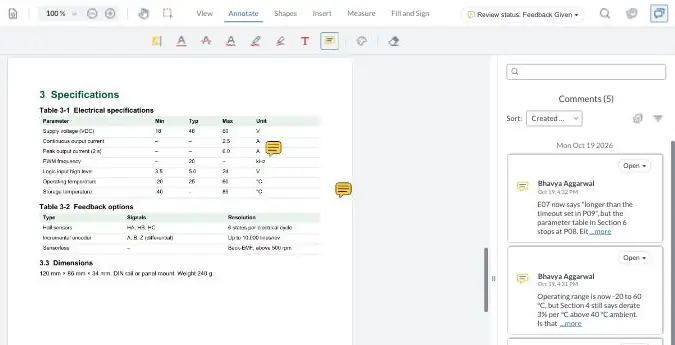
Comment the way your reviewers would, turn a comment into a task, then compare two versions. Your demo comments are private to this visit.
Frame.io vs zipBoard for PDF and document review
Frame.io's column says only what Frame.io and Adobe's own pages say, opened 5 Nov 2026; Adobe's Workfront transition article re-checked 13 Nov 2026.
| What document teams decide on | zipBoard | Frame.io (incl. the Workfront viewer) |
|---|---|---|
| Reviewing the document | ||
| Built for | Review and approval of documents, web pages, images, video and eLearning | Video-first creative review; documents added in 2026 |
| PDF commenting | Pinned comments, shapes, highlights, free hand, stamps; each comment can become a task | Page-level and anchored comments; highlight and suggested edits (Insert / Delete / Replace) |
| Office files | Export to PDF, then upload | Word, PowerPoint and Excel open in the viewer |
| Search inside the document | Yes, search text inside the PDF | Cmd/Ctrl+F in-document search (uploads after Sept 2024) |
| Comparing versions | Side by side, with text changes highlighted and listed, and each version's comments in its own pane | Any two assets side by side; overlay and pixel difference for static files of the same dimensions |
| Measuring | Distance, area, perimeter and count on a calibrated PDF | Not supported in the Workfront viewer |
| Web pages | Live websites and apps, plus SCORM/HTML courses | Zipped HTML and live URLs that allow iframe embedding |
| Sign-off and follow-up | ||
| Roles | Super Admin, Admin, Manager, Collaborator; Client (Enterprise), Guest Collaborator, Guest Reviewer on a link | Reviewer or Approver in Workfront approvals |
| Sign-off | Required reviewers with due dates and a decision per version; staged approval on every plan | Approve / Needs Work; multi-stage approvals; "mark review complete" coming soon |
| After the comment | Comments become tasks with owner, priority and due date; Kanban or table; Jira, Wrike, Teams | Comments; Print Comments and comment export |
| Outside reviewers | Comment from a link, no account; each link has its own permissions, password and expiry | Share links, no sign-up needed; passphrase and expiry on Pro and up |
| IT and cost | ||
| Single sign-on | Enterprise: Microsoft, Google, Okta | Enterprise plan; through Adobe for Workfront |
| Where files live | AWS by default; on Enterprise, Azure, region-specific or private cloud, or documents kept on your servers and reviewed by URL | Adobe cloud |
| Cost model | Reviewers and collaborators unlimited on every plan (see plans) | Priced per member; free share-link reviewers; included with Workfront V2 licences (Frame.io pricing) |
Sources, opened 5 Nov 2026: Supported file types · Multipage PDF viewer · Text markups · Comparison viewer · HTML review · Frame.io pricing · Transitioning from Workfront Proof (re-checked 13 Nov). zipBoard: compare PDF versions, text changes, measure, tasks from annotations, roles, share links, SSO, documents on your servers.
The cost is the review rounds, not the seats
Frame.io is included with Workfront V2 licences, and its share-link reviewers are free. The cost that grows is the time spent on each round.
In zipBoard, reviewers and collaborators are unlimited on every plan.
The merge
Someone reads every reviewer's comments and works out which ones conflict.
The check
Someone opens v2 and checks each v1 comment by eye, because the compare shows pixels, not words.
The chase
Someone works out who hasn't signed off yet.
See every review still waiting, across every project
My Work shows each reviewer what needs their review, what has a new version since they last looked, and what's due soon or overdue. Required reviewers and a decision per version show you who hasn't signed off.
What zipBoard adds, and what Frame.io does better
What zipBoard adds for document review
- Text-change compare: see which words changed between two PDF versions in a Change List, with each version's comments in its own pane. PDFs with different page counts work.
- Feedback becomes owned work: every comment can become a task with an owner, priority and due date; Global Asset View and My Work show what's still waiting across projects.
- Required reviewers and decisions per version, with staged approval on every plan, @mentions with email and status-change notifications.
- Measure distance, area, perimeter and count on calibrated drawings and dielines.
- Admin control: four internal roles plus client and guest roles; Super Admins manage members and billing.
- Files on your terms: SSO on Enterprise and, as Enterprise options, documents submitted by URL from your own servers, customer-hosted storage, region-specific or private cloud, or Azure. Security at zipBoard
- One review tool for the whole team: PDFs, images, video, audio, live websites and SCORM courses.
What Frame.io does better
- Video. It's Frame.io's core, with Premiere and Creative Cloud alongside.
- Inside Workfront and Adobe. Included with Workfront V2 licences, with approvals in the same place as your projects.
- Office files open natively, without exporting to PDF, and suggested edits read like tracked changes for copy edits.
- Pixel and overlay compare for creative files of the same size. zipBoard's image compare is on the way.
- Certifications. Adobe holds security certifications zipBoard doesn't have yet.
When not to switch
Keep Frame.io (or the Workfront viewer) if:
- Most of your reviews are video or motion.
- Your documents are short, single-reviewer copy edits where suggested edits and Approve / Needs Work are enough.
- Your reviewers work mostly in Word or PowerPoint files and you don't want to export to PDF for each round.
- Everything must stay inside Workfront, with no second tool.
- You need SOC 2 or ISO 27001 from the review vendor. zipBoard doesn't hold its own yet. It completes security questionnaires and can run you on a private instance, but if a certificate is a hard requirement, check with your security team first.
- You need 21 CFR Part 11 e-signatures for regulated labelling. zipBoard isn't built for that.
- You want existing comments moved over. Comments already inside a PDF don't convert into zipBoard comments (why), and Frame.io comments don't import today.
How the move works
Start with one document workflow. Keep Workfront and Frame.io for everything else.
Taking this to IT? See how review tools compare on roles, SSO and data.
Coming soon
AI Review
AI-assisted first-pass checks on PDFs, in beta on paid plans. A person accepts or rejects every finding.
AI compare
Check which comments from the last round were fixed in the new version.
Workfront connector
Sync a zipBoard review's status and decision back to the Workfront task.
Frame.io PDF review: common questions
Can Frame.io review PDFs?
Yes. Frame.io opens PDFs and Office files, supports page-level and anchored comments, and lets reviewers highlight text and suggest edits. It recommends files under 1,000 pages or 1 GB.
Can Frame.io compare two PDF versions?
It can show two assets side by side and, for static files of the same dimensions, overlay them or show a pixel difference. Its help doesn't describe a word-level text compare. zipBoard lists every text change between two PDF versions.
Is Frame.io free with Workfront?
Adobe says review and approval with Frame.io is included at no extra cost on Workfront V2 licences. The bigger cost is usually review rounds and the time spent chasing sign-off.
Do reviewers need an account?
Not in either tool. Frame.io share-link reviewers don't need to sign up. zipBoard reviewers comment from a link, and each link can have its own permissions, password and expiry date.
Can we measure drawings or dielines in the Frame.io viewer?
Adobe lists measurement tools as unsupported in the Workfront viewer today. zipBoard measures distance, area, perimeter and count on calibrated PDFs.
Can documents stay on our own servers?
In zipBoard, yes, as an Enterprise option: submit PDFs for review by URL through the API, or use customer-hosted storage or a private instance. How it works
Does zipBoard have SOC 2 or ISO 27001?
Not at present. zipBoard completes security questionnaires, provides security documentation and can run you on a private instance. See Security at zipBoard.
Can we keep using Workfront and Frame.io?
Yes. Many teams keep Frame.io for video and move document review to zipBoard. Task sync to your project tool is scoped in the pilot.
How do I check that every comment was fixed in the new version?
Open both versions side by side, read the list of text changes, and check last round's comments against the new text. Step by step: how to compare two PDF versions without losing track of changes.
Move your longest document review first
Pick the PDF workflow with the most rounds. We'll set it up with your admin and run it for 30 days, then you decide.
No credit card needed. Reviewers are always free.