
Leaving Adobe shared review
Leaving Adobe shared review? Here’s where your PDF review can go
Adobe now calls the server-based shared review “legacy”, and it breaks when Acrobat, Edge or a SharePoint sign-in changes on any reviewer’s machine. Keep Acrobat for editing and move the review to a link: every reviewer comments in the browser, files can stay on your servers, and you can see who still hasn’t signed off.
Unlimited reviewers on every planNo credit cardNothing to install
Required reviewers
Illustration. Names and file are examples.
The short answer
You have three ways forward
If your team runs PDF reviews with Acrobat’s “Send for shared commenting” on a network folder, SharePoint or WebDAV server, you can keep it running (Adobe still documents it, as legacy), switch to Acrobat’s cloud Share link (files go to Adobe’s cloud and reviewers sign in unless the link is public), or move the review to a review tool and keep Acrobat for editing. Most documentation teams with outside reviewers or files that must stay in-house pick the third.
The server-based review is “legacy”
Adobe still documents shared reviews on network folders, SharePoint and WebDAV servers, but calls it its legacy sharing experience and “not the recommended review method”.
Cloud is the default
In current Acrobat, sharing for review goes to Adobe’s cloud. To start a server-based review you first switch off “Share for review using Adobe’s cloud storage” in Preferences › Reviewing.
The cloud link asks reviewers to sign in
Adobe’s help says recipients must sign in to review and comment, unless you make the link public, and Adobe says public links are not for sensitive information.
Sources: Adobe Help, Send PDFs for review via internal servers; Share PDFs for review. Review broke this week? Start with the fixes: Adobe shared review not working in Edge or after an update.
Side by side
What are your options?
| Keep legacy shared review | Acrobat cloud Share link | Move the review to zipBoard | |
|---|---|---|---|
| Where reviewers comment | Acrobat or Reader on the desktop | Browser, from a link | Browser, from a link |
| Do reviewers need an account? | Acrobat/Reader installed, plus access to your server | Adobe ID sign-in, unless the link is public | No: guests comment from a share link; you can require sign-in, a password and an expiry |
| What reviewers cost you | Reader is free; whoever starts the review needs Acrobat | Reviewers sign in with an Adobe ID, unless the link is public | Nothing: reviewers and collaborators are unlimited on every plan |
| Where files and comments live | Your network folder, SharePoint or WebDAV server | Adobe’s cloud storage | zipBoard (AWS), or add PDFs by URL so files stay on your servers; region-specific or private hosting on Enterprise |
| Who still hasn’t signed off? | Tracker | Activity in Acrobat | Required reviewers with due dates record a decision (Approved, Changes Requested) |
| Notifications | Email invitation when the review starts | Email invitation; activity in Acrobat | Email when you’re added as a reviewer or @mentioned; the owner gets an email on every reviewer decision |
| Next revision | Start a new review | Share the new file | Upload as a new version of the same file and compare side by side |
| What becomes of a comment | A note in the PDF | A note in the PDF | A task with an owner and a status, or a note |
| Admin controls | Your server’s permissions | Your Adobe admin console | Roles (Super Admin, Admin, Manager, Collaborator, Reviewer); SSO on Enterprise |
| Editing the PDF | Yes, in Acrobat | Yes, in Acrobat | No. Keep Acrobat for that |
| What tends to break | Edge, Windows and Acrobat updates; SharePoint sign-in; comment sync | Sign-in for outside reviewers; link settings | Needs a browser and an internet connection |
Sources for the Adobe columns: the Adobe help pages above. zipBoard: moving from Acrobat shared review, reviewing documents on your own servers, security.
More than shared review ever gave you
Shared review collects comments. zipBoard runs the whole round.
Who must sign off, by when, what changed between versions, what’s still open, and who gets told when something moves.
Workflow
Required sign-off on every version
- Required reviewers and a due date on each file. Everyone else can still comment.
- A recorded decision per version: Approved or Changes Requested.
- Sign-offs reset on a new version, so a yes on version 1 never counts for version 2.
- Comments become tasks with an owner and a status, not notes in a PDF.
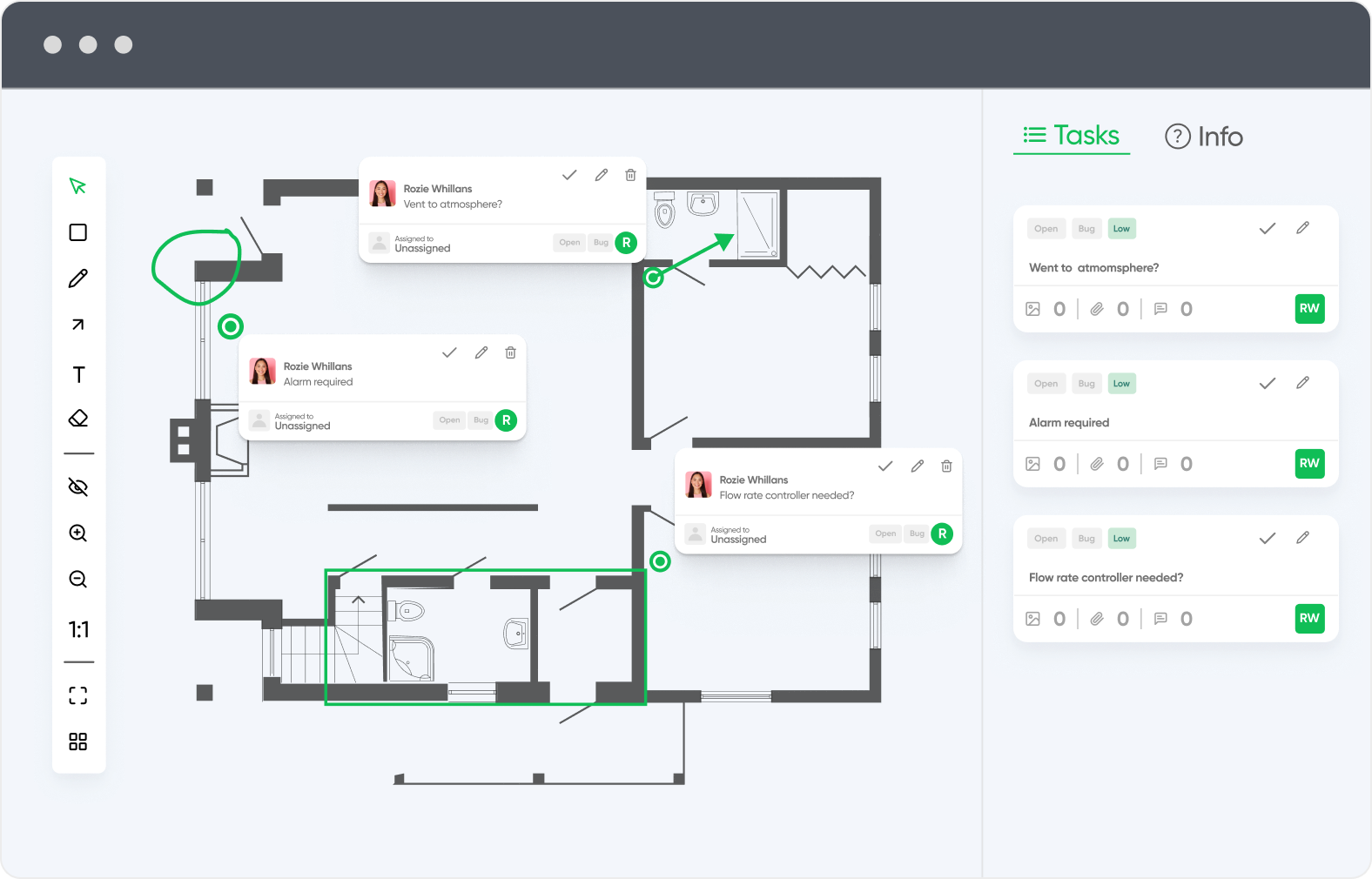
Real product screenshot (top); illustration (bottom).
Tracking
Know where every review stands
- Needs my review and My Work list every file and comment waiting on you, across projects.
- Each reviewer’s status sits on the file, so you see who has approved without opening a tracker.
- Due-date flags: red when a file is past due and not approved, amber when it’s due within 7 days.
- A record for every revision of who reviewed and decided what. Export comments to CSV or download the annotated PDF.
Illustration of My Work. Red = past due and not approved; amber = due within 7 days.
Notifications
The right person hears about it
- Reviewers get an email when you add them to a file.
- The owner gets an email every time a reviewer approves, requests changes or finishes reviewing.
- @mention someone and they get an email that links straight to the comment: the quickest way to unblock one late SME.
1 of 3 required reviewers has approved.
“Torque values in 4.2 don’t match the spec sheet.”
@Mei can you confirm the CE marking text?
Illustration. Email wording is an example.
Versions
See exactly what changed
- Compare versions side by side, with removed and added text highlighted.
- Each version’s comments sit next to it, so you can check last round’s feedback against the new text.
- Connect the rest of your stack: send tasks to Jira or Wrike, or pull comments and statuses into your own system through the API.

Real product screenshot.
Try it
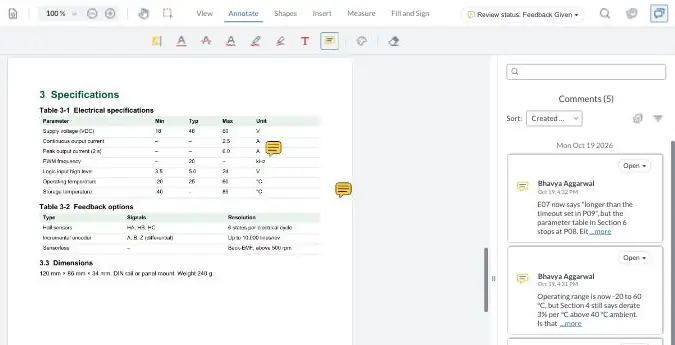
Comment on a sample manual, no Acrobat needed
No sign-up. Click Annotate to leave a comment. This is exactly what your reviewers see when you send them a zipBoard link.
This is a shared demo file, so you may see markups from other visitors.
Choose
Which option fits your team?
Stay on legacy shared review
If it works, every reviewer is inside your network, and IT is happy to keep supporting it.
Use Acrobat’s cloud Share link
If your files can sit in Adobe’s cloud, reviewers are fine signing in, and you mostly need comments, not a sign-off record.
Move the review to zipBoard
If reviewers sit outside the company, files have to stay on your servers, a PDF goes through several revisions, or sign-off lives in a spreadsheet next to the PDF today.
Acrobat → zipBoard
What moves where?
The move
How do you move without losing a review round?
Five steps. The full migration guide has the checklist.
List your live reviews
And who reviews what: internal, SMEs, outside partners.
Finish open rounds in Acrobat
Start the next round in zipBoard; nothing has to move mid-round.
Set up roles and projects
Who runs reviews, who must sign off, and the stages your documents move through (save it as a template on Enterprise).
Decide where files live
Upload, or add PDFs by URL so they stay on your server.
Pilot one document
Then retire the review folder or SharePoint library when the team is happy.
Migration help: we set up your roles, SSO (Enterprise) and first projects with your admin, and run a 30-day pilot on one live workflow with you.
Book a migration callWhat’s next
AI that does the first pass. People still decide.
Acrobat’s shared review has barely changed in years. zipBoard is adding Orbit, an AI layer on top of the review round. A person on your team decides on every finding.
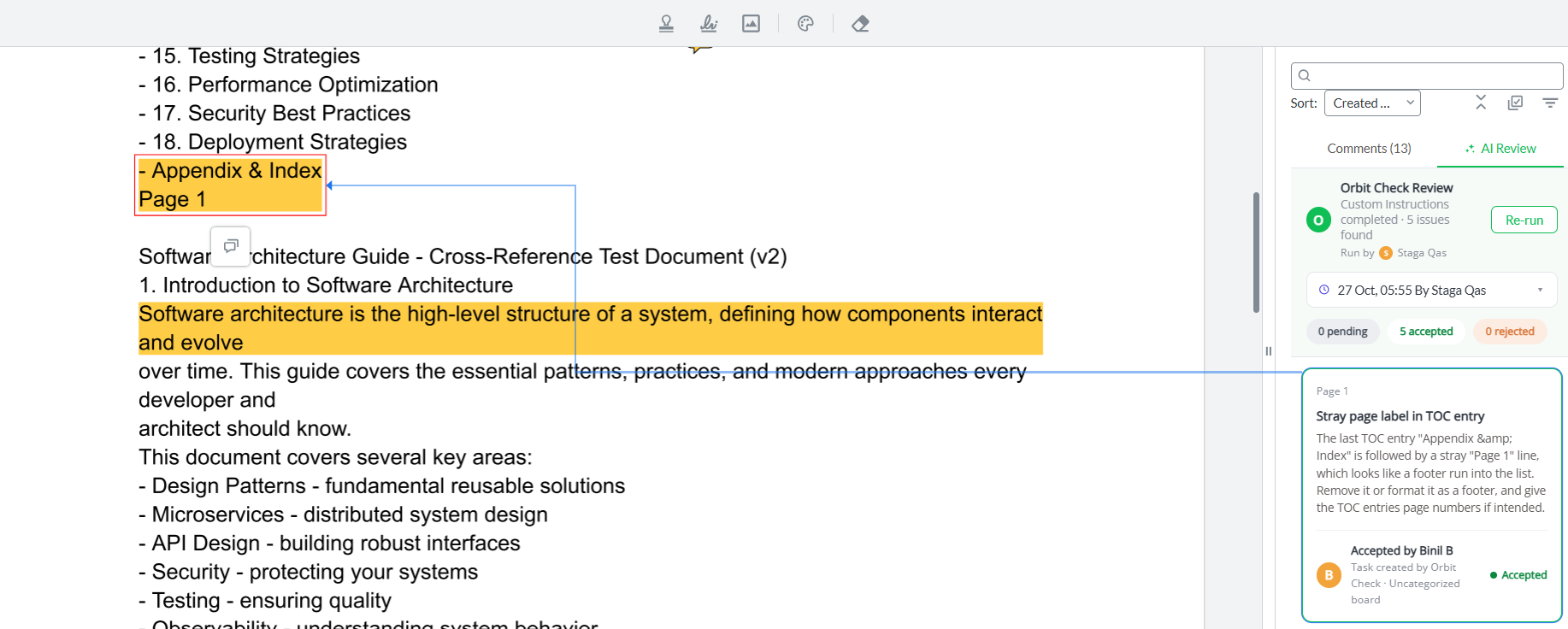
Real product screenshot: Orbit Check findings.
Orbit Check
Runs your own checklist on a document before your reviewers see it and lists what it finds. Your team accepts or rejects each finding, and accepted ones become tasks. We turn it on for your team on request, free until 15 January 2027.
Illustration. Example findings.
Orbit Verify
Answers “did they fix it?” on the next version. It checks each comment from the last round against the new version and gives it a verdict, so the back-check no longer means re-reading the whole document.
Preview. Example comments.
Pricing
Reviewers cost nothing
Every plan includes unlimited reviewers and collaborators, and guests can comment from a share link without an account. Bring in every SME, partner or customer a document needs without buying another seat.
Add 30 SMEs or an outside partner to a review. Your bill doesn’t change.
14-day free trial on every plan, no credit card needed.
- Unlimited reviewers and collaborators
- Guests comment from a share link
- 14-day free trial
- Unlimited reviewers and collaborators
- Guests comment from a share link
- 14-day free trial
- Unlimited reviewers and collaborators
- SSO
- Region-specific or private hosting
Plan prices are for zipBoard review and approval. Orbit AI features (Orbit Check, Orbit Verify) are not included in these prices.
Who switches
Built for the people a PDF or drawing review depends on
Doc owners and tech writers
One link per round, one place to see who’s late, no comment merging.
SMEs and engineers
Open a link, comment on the page, decide. No Acrobat, no training.
QA, safety and regulatory
A recorded decision per version, and only the changed parts to re-check.
IT and admins
Roles, SSO on Enterprise, and files that can stay on your own servers.
Construction and design teams
Architects, engineers and contractors who still run drawing, spec and submittal reviews in Acrobat. Consultants and owners mark up from a link, each required reviewer records a decision per revision, and documents can sync in from Procore. Drawing review for construction
Outside partners and customers
Open a link in any browser and comment as a guest. No Adobe ID, no Acrobat, no seat to buy.
Honest fit
When not to switch
- Your shared review works, reviewers are all on your network, and nobody chases comments.
- You mostly edit, create or sign PDFs, and review is one or two people, one round.
- Reviewers need Acrobat’s editing tools in the same session.
- You need an electronic signature that meets 21 CFR Part 11. zipBoard keeps a record of who reviewed and decided what, but it is not a Part 11 e-signature.
- Your CCMS already runs review and every SME has a seat in it.
- Comments already in your PDFs: plan to close those rounds in Acrobat; zipBoard starts from the next round.
FAQ
Frequently asked questions
Is Adobe shared review being discontinued?
Not yet. Adobe still documents shared reviews on network folders, SharePoint and WebDAV servers, but calls it its legacy sharing experience and not the recommended review method. Its recommended path is the cloud Share link.
How do I turn on the legacy shared review in current Acrobat?
In Preferences > Reviewing, uncheck “Share for review using Adobe’s cloud storage”, then use Send for comments > Send for shared commenting.
Do reviewers need an Adobe account for Acrobat’s Share link?
Yes, unless you make the link public. Adobe says recipients must sign in to review and comment, and that public links are not for sensitive information.
Do reviewers need Acrobat or an account to comment in zipBoard?
No. Reviewers open a share link in any browser and comment as guests. You can require sign-in, add a password and set an expiry date.
Can our PDFs stay on our own servers?
Yes. Your system can add a PDF to zipBoard by its URL, so the file stays on your server. Enterprise customers can also choose region-specific or private hosting and single sign-on.
Do we have to stop using Acrobat?
No. Most teams keep Acrobat for editing and move only the review: upload the PDF, share the link, make the changes in Acrobat, upload the next version.
What happens to comments already in our PDFs?
Finish open rounds in Acrobat and start the next round in zipBoard. You can export each finished round’s comments from Acrobat for your records.
Is zipBoard SOC 2 or ISO 27001 certified?
Not at present. zipBoard runs on AWS, supports SSO on Enterprise and can keep documents on your servers; the security page has the detail, and zipBoard completes vendor security questionnaires.
Does zipBoard notify reviewers and track who has signed off?
Yes. Reviewers get an email when they are added to a file or @mentioned, and the owner gets an email each time a reviewer approves or requests changes. Each reviewer’s status shows on the file, and files past their due date and not approved are flagged red.
Is zipBoard adding AI to review?
Yes. Orbit Check (on paid plans; an admin turns it on) runs your own checklist on a document before review, and Orbit Verify (beta, coming in early December) checks whether last round’s comments were fixed in the new version. A person decides on every finding.
Do construction teams use this for drawings and submittals?
Yes. Architects, engineers and contractors review drawings, specs and submittals the same way: consultants and owners mark up from a link, required reviewers record a decision on each revision, and new revisions can be compared side by side. Documents can also sync in from Procore. For an AI first pass on drawings, see AI drawing review.
How much does zipBoard cost?
Team plans start at $99 a month and Agency at $199 a month, with unlimited reviewers and collaborators on every plan, so you never pay per reviewer. Enterprise is priced on request, and every plan starts with a 14-day free trial. Orbit AI features are not included in plan prices. See pricing.
Related: Fix guide: Adobe shared review not working · Adobe PDF alternative for team review · Migration guide · Technical document review software · Compare documents side by side · Security
Keep Acrobat for editing. Move the review.
Start free with unlimited reviewers, or let us set up your first project and run a 30-day pilot with you.