25 May

Updated 18 November 2026
The short answer: the best PDF annotation tool depends on who marks up the file and what happens next.
- Just you, for free: Adobe Acrobat Reader, Xodo or the free version of PDF-XChange Editor.
- Editing, signing and annotating in one app: Adobe Acrobat or Foxit PDF Editor.
- Construction drawings: for measuring, takeoff and estimating, Bluebeam Revu or Drawboard Projects. To review and sign off drawings with consultants, clients and subcontractors who won't buy a licence, zipBoard: it measures, and every markup becomes a tracked issue.
- A team plus outside reviewers who must comment, track fixes and sign off: zipBoard. Reviewers mark up one copy from a link with no account, every markup becomes a task with an owner, and approvals are recorded on each version. Filestage and PageProof also fit marketing proofing.
- Classrooms: Kami.
Below we compare ten PDF annotation tools for document collaboration, using what each vendor's own website and help pages say. This list is about teams, so tools are ordered by how well they handle shared review: one copy, outside reviewers, tracked fixes and sign-off. That puts zipBoard first. We make zipBoard, so we've also been careful to say where other tools do the job better, and when a free reader is all you need.
How to choose a PDF annotation tool
Most PDF annotation tools have the same basics: highlight, underline, strikeout, sticky notes, shapes and free text. The differences show up once more than one person is involved. Ask these five questions.
Who marks up the file?
If it's only you, a free PDF reader with annotation tools is enough. If several people comment, you want one shared copy, not a pile of annotated attachments to merge.
Do reviewers need an account or a seat?
Clients, consultants and subject experts often won't install software or buy a licence. Check whether they can comment from a link, and who has to pay.
Does a markup get an owner and a status?
A comment is easy to add and easy to lose. For team work, check whether each markup can be assigned, given a status and filtered until it's done.
Who can see, comment and approve?
Look for link controls (sign-in, password, expiry), internal comments hidden from guests, a record of who approved which version, and where files are stored.
Do you need to measure?
Architects, engineers and contractors need scale calibration, measurements and revision compare. Takeoff and estimating need a specialist tool such as Bluebeam.
Will there be a version 2?
If the PDF will be revised, check whether you can compare versions side by side and see which comments were addressed. See how to compare PDF versions side by side.
PDF annotation tools compared
Scroll the table sideways on a phone; the tool name stays pinned. Every cell is based on the vendor's own pages, linked in each tool's section below. Plans change, so check the vendor's page before you buy.
| Tool ↕ | Best for ↕ | Platforms ↕ | How reviewers collaborate ↕ | Status / assignee ↕ | Compare versions ↕ | Measure ↕ | Free plan ↕ | Pricing model ↕ |
|---|---|---|---|---|---|---|---|---|
| zipBoard | Team review and sign-off with outside reviewers | Any modern browser | One copy from a link; reviewers need no account or install | Every markup becomes a task with owner, priority, status | Side by side with text changes listed | Distance, area, perimeter, arc, count | No (14-day trial) | Per team, reviewers unlimited on every plan |
| Adobe Acrobat | Editing, signing and annotating PDFs | Windows, Mac, web, mobile | Share a link to one copy; recipients comment in the browser with no login | Not described | Pro and Studio | Yes in Acrobat; in Reader only if the creator enables it | Free Reader with comment tools | Per user; individual and team plans, monthly or annual |
| Bluebeam Revu | Construction drawings, measurement, takeoff | Revu on Windows; web and mobile included | Studio Sessions on a shared file; attendees need a free Studio account and Revu | Markups list in Revu | Core and higher | Yes; depth grows by plan | No (free trial) | Per user, billed annually |
| Drawboard PDF + Projects | Tablet and pen markup; drawing review (Projects) | PDF: Windows, iOS, Mac, Android, web. Projects: iOS, Windows, web | Real-time sync; guests free and time-limited in Projects | Projects: issues, assignees, review statuses | Projects: overlay mode | Projects: yes | Drawboard PDF free tier | Projects per user, monthly or yearly |
| Xodo | Free, quick annotation on any device | Web, Windows, Mac, Linux, Android, iOS | Save to Xodo Drive or Google Drive; shared review not described on pricing page | Not described | Not described | Not described | Yes, with limits | Subscription or perpetual desktop licence; Teams by quote |
| PDF-XChange Editor | Low-cost Windows editor and annotator | Windows | Each person annotates their own copy; SharePoint check-in and check-out | Not described | Editor Plus | Distance, area, perimeter | Free version (about 70% of features) | One-time licence per user |
| Foxit PDF Editor | Acrobat-style editing at a lower price | Windows, Mac, web; mobile on Editor+ | Shared Review by email or link; reviewers comment in Foxit Editor or Reader | Review Tracker: who responded, deadlines | Yes | Listed | No (14-day trial) | Per user per year, or one-time licence |
| Filestage | Marketing and content approval | Web | One copy from a link; reviewers need no account | Approve or request changes; due dates from Starter | From Starter | Not described | Yes (1 active project) | Monthly or yearly, team seats in bundles |
| PageProof | Agency and brand proofing workflows | Web | Unlimited reviewers on one proof | Automated workflows and checklists | Smart and side-by-side | Not described | No (trial on request) | Monthly or yearly plans |
| Kami | Teachers and students | Browser, Chrome extension; Google Drive, OneDrive, LMS | "Anyone with link can annotate", or an individual copy per student | Not described | Not described | Not described | Yes (Basic) | Teacher, school and workplace plans |
"Not described" means we couldn't find it on the vendor's own pages, not that the feature definitely doesn't exist.
The 10 best PDF annotation and markup tools
1. zipBoard
Best for: teams that review PDFs and drawings with outside reviewers, track every fix and need sign-offzipBoard is PDF markup software for teams. You share one link; reviewers open the PDF in any browser and mark it up with no account or install. Each highlight, note, shape or free hand drawing becomes a task with an owner, priority and status, so nothing gets lost between rounds. Required reviewers record a decision on each version, and the next revision is compared side by side with the last.
A pinned comment and reply on a sample manual in zipBoard. Open the same sample yourself with the button below.
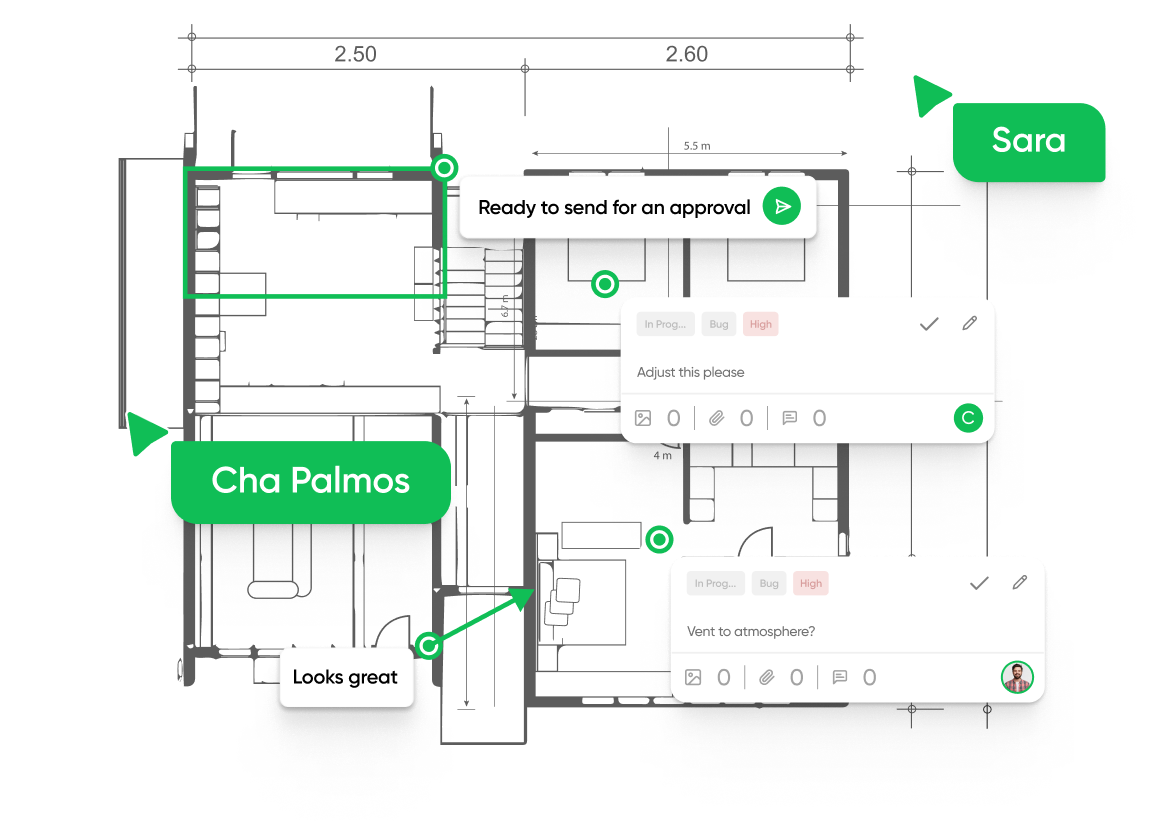
Markups from several reviewers on one floor plan, each one a tracked issue.
Strengths
- One shared copy; reviewers need no account, seat or install
- Every markup is a tracked task, not a loose comment
- Approvals recorded per reviewer and per version
- Compare versions side by side with a list of text changes
- Measure on drawings after calibrating scale
- Internal comments hidden from guests
- Images, video, websites and SCORM courses in the same review
- AI first pass on PDFs (Orbit Check) in early access: we turn it on for your team on request
Limits
- Not needed for solo annotation: a free reader is enough
- Doesn't edit PDF content or run e-signature workflows
- No quantity takeoff or estimating; Bluebeam goes much deeper
- Browser-based, so it needs a connection
- Comments already inside a PDF don't convert into zipBoard comments
Pricing: Team starts at $99 a month and Agency at $199 a month; Enterprise is by quote. No free plan; 14-day free trial, no credit card. zipBoard pricing
2. Adobe Acrobat (Reader, Standard, Pro)
Best for: editing, signing and annotating PDFs in one appAcrobat Reader is the free PDF reader most people already have. Adobe says Reader includes sticky notes, text, highlight, underline, strikethrough and freehand drawing, on desktop and mobile. Paid Acrobat adds editing, and Standard and higher let you share a PDF link to collect comments. Adobe says recipients "won't need an account" and comment in the browser with the same tools as desktop.
Strengths
- Free Reader with solid comment tools
- Share for review without making reviewers sign in
- Full PDF editing, forms and e-signing
- Compare Files in Pro and Studio
Limits
- Adobe's share page doesn't describe deadlines, assignees or comment status
- Compare isn't in Standard
- Measuring in Reader works only if the PDF's creator enables it
Pricing model: per-user subscriptions (Standard, Pro, Studio) for individuals and teams, billed monthly or annually; prices vary by country. Acrobat pricing · Share a PDF for review · Acrobat Reader
3. Bluebeam Revu
Best for: construction drawings, measurement and takeoffBluebeam is the standard markup tool in many architecture, engineering and construction firms. Revu runs on Windows, and Bluebeam on web and mobile is included with every plan. Teams mark up the same drawing set in Studio Sessions. Bluebeam's help says attendees need a free Studio account and an installation of Revu.
Strengths
- Deep measurement: length and area on Basics, then perimeter, count, angle and volume on Core
- Quantity takeoff with Excel links on Complete
- Overlay and compare drawings on Core and higher
Limits
- Hosting a Studio Session needs Core or higher
- Studio attendees need Revu installed
- Every user pays per seat, billed annually
Pricing: per user, billed annually. Bluebeam's pricing page lists Basics at USD $260, Core at $330, Complete at $440 and Max at $590 (introductory). Bluebeam pricing · Attend a Studio Session · Bluebeam alternative for review
4. Drawboard PDF and Drawboard Projects
Best for: pen and tablet markup; drawing review for AEC teamsDrawboard PDF is a pen-friendly annotator for Windows, iOS, Mac, Android and the web, with a free tier (10 documents, 40 MB each, unlimited contributors, real-time sync). Drawboard Projects is the team product for drawings, on iOS, Windows and the web. Drawboard says guests are free and time-limited, and only your own team needs a paid seat.
Strengths
- Excellent with a stylus on a tablet
- Projects: issues, assignees, review statuses and pinned discussions on every tier
- Overlay compare, measurement and offline markups
Limits
- Projects is built around drawings, not general documents
- Procore and Aconex integrations from the Growth plan
- Guest access is time-limited
Pricing: Drawboard PDF has a free tier and Pro plans. Drawboard Projects is per user: Team is USD $29 a month, or $22.50 a month billed yearly; Growth is $39, or $30.83 billed yearly; Enterprise is custom. Drawboard pricing · zipBoard vs Drawboard
5. Xodo
Best for: free, quick annotation on any deviceXodo offers a free online PDF annotator plus apps for Windows, Mac, Linux, Android and iOS. Its guide lists highlight, underline, squiggly, strikethrough, notes, free text, rectangles and comments. You can download the annotated PDF or save it to Xodo Drive or Google Drive.
Strengths
- Runs on almost every platform
- Free plan for occasional use
- Also has an online PDF editor
Limits
- The free plan allows one action a day
- Xodo's pricing page doesn't describe shared review, assignees or approvals
Pricing model: subscriptions for Xodo Web, Desktop and the full suite (billed annually), a perpetual desktop licence, and Teams by quote. Xodo pricing · How to annotate a PDF in Xodo
6. PDF-XChange Editor
Best for: a low-cost Windows editor with measuring toolsPDF-XChange Editor is a Windows PDF editor with a large free version: the vendor says about 70% of features are unrestricted. Annotation tools include callouts, stamps, sticky notes, highlights, freehand, and distance, area and perimeter measurements you can export to CSV.
Strengths
- One-time licence, no subscription required
- Measurements included
- Document compare in Editor Plus
Limits
- Windows only
- Built for one person's copy; its docs describe SharePoint check-in and check-out, not a shared review
Pricing: perpetual licence with a year of maintenance. Single-user Editor starts at USD $62 and Editor Plus at USD $79. PDF-XChange Editor
7. Foxit PDF Editor
Best for: Acrobat-style editing with built-in shared reviewFoxit PDF Editor runs on Windows, Mac and the web, with iOS and Android apps on PDF Editor+. Shared Review lets you invite reviewers by email or link, and the Review Tracker shows who has responded and the deadline. Foxit's help says reviewers comment in Foxit PDF Editor or Foxit Reader, not in other PDF viewers.
Strengths
- PDF editing, plus compare two PDF versions
- Review deadlines and a tracker of who responded
- Subscription or one-time licence
Limits
- Reviewers need a Foxit viewer to comment in a shared review
- No per-comment owner or status described
Pricing model: per user per year (PDF Editor, PDF Editor+) or a one-time licence; 14-day free trial; volume licensing by quote. Foxit pricing · Foxit Shared Review
8. Filestage
Best for: marketing and content approvalFilestage is an online review and approval tool for files, including PDFs. Reviewers are unlimited and, in Filestage's words, "don't need to make an account to give feedback." Reviewers draw, highlight and strike text, then approve or request changes.
Strengths
- Free plan for one active project
- Due dates and password-protected links from Starter
- Automatic text compare and PDF comment import on Business
Limits
- Team seats come in bundles of five
- Extra decision types and review reports need Business
- No measuring tools described
Pricing model: Free, Starter, Business and Enterprise, billed monthly or yearly. Filestage pricing
9. PageProof
Best for: agency and brand proofing workflowsPageProof is an online proofing tool with automated, multi-step workflows. Every plan has unlimited reviewers, markup tools, smart and side-by-side compare, and import of comments from Acrobat PDFs.
Strengths
- Workflow templates and checklists
- Smart compare between versions
- Imports existing Acrobat comments
Limits
- No free plan; trial on request
- Higher entry price than general PDF tools
Pricing: Team is USD $299 a month or $2,999 a year; Team Plus is $499 a month or $4,999 a year; Enterprise by quote. PageProof pricing
10. Kami
Best for: teachers and studentsKami is a PDF annotation tool for classrooms. It works with Google Drive, OneDrive, Google Classroom, Canvas, Schoology and Microsoft Teams, and has a Chrome extension. Teachers can share a file so "anyone with link can annotate", or give each student their own copy. Comments can be text, voice, video or screen capture.
Strengths
- Free Basic plan for teachers
- Fits learning platforms schools already use
- Pro and Work plans for non-teachers
Limits
- Built for teaching, not business sign-off
- No task status or version compare described
Pricing model: free Basic, Teacher, School or District (quote), and Pro and Work plans for workplace users. Kami pricing · Sharing files from Kami
For teams that need sign-off, not just comments
A PDF annotator gets comments onto a page. A team review also needs to know who must approve, what's still open, and what changed in the next version. That is where a single-user annotator stops and a review tool starts.
- One copy for everyone, opened from a link with no account or seat
- Every markup tracked with an owner and a status until it's done
- Named approvers with due dates and a decision on each version
- Compare revisions side by side and check each comment was addressed
See how it works in zipBoard's PDF annotator for teams, or try a sample manual without signing up.
No credit card needed. Reviewers are always free.
What is the best PDF reader with annotation features?
For one person, Adobe Acrobat Reader is the safest free choice: it's on most computers and includes highlights, sticky notes, strikethrough and drawing. Xodo is a good free option across many devices, and the free version of PDF-XChange Editor suits Windows users who also want measurements. Drawboard PDF is best with a pen on a tablet.
If other people need to see and respond to your annotations, pick by collaboration instead. Acrobat and Foxit can share a PDF for comments. zipBoard is built for team review with tracked fixes and sign-off; Filestage and PageProof suit marketing proofing.
Which apps let multiple people annotate the same document?
These tools put several people on one shared copy of a PDF:
- Adobe Acrobat: share a link; recipients comment in the browser.
- Bluebeam: Studio Sessions, with Revu installed.
- Drawboard: real-time sync in Drawboard PDF; guests in Projects.
- Foxit PDF Editor: Shared Review, commenting in a Foxit viewer.
- Kami: "anyone with link can annotate".
- zipBoard, Filestage and PageProof: one copy from a link, with approvals.
The real difference is what happens after. In zipBoard every markup becomes a task with an owner and status, so the team can see what's left. Read more on collaborative PDF annotation.
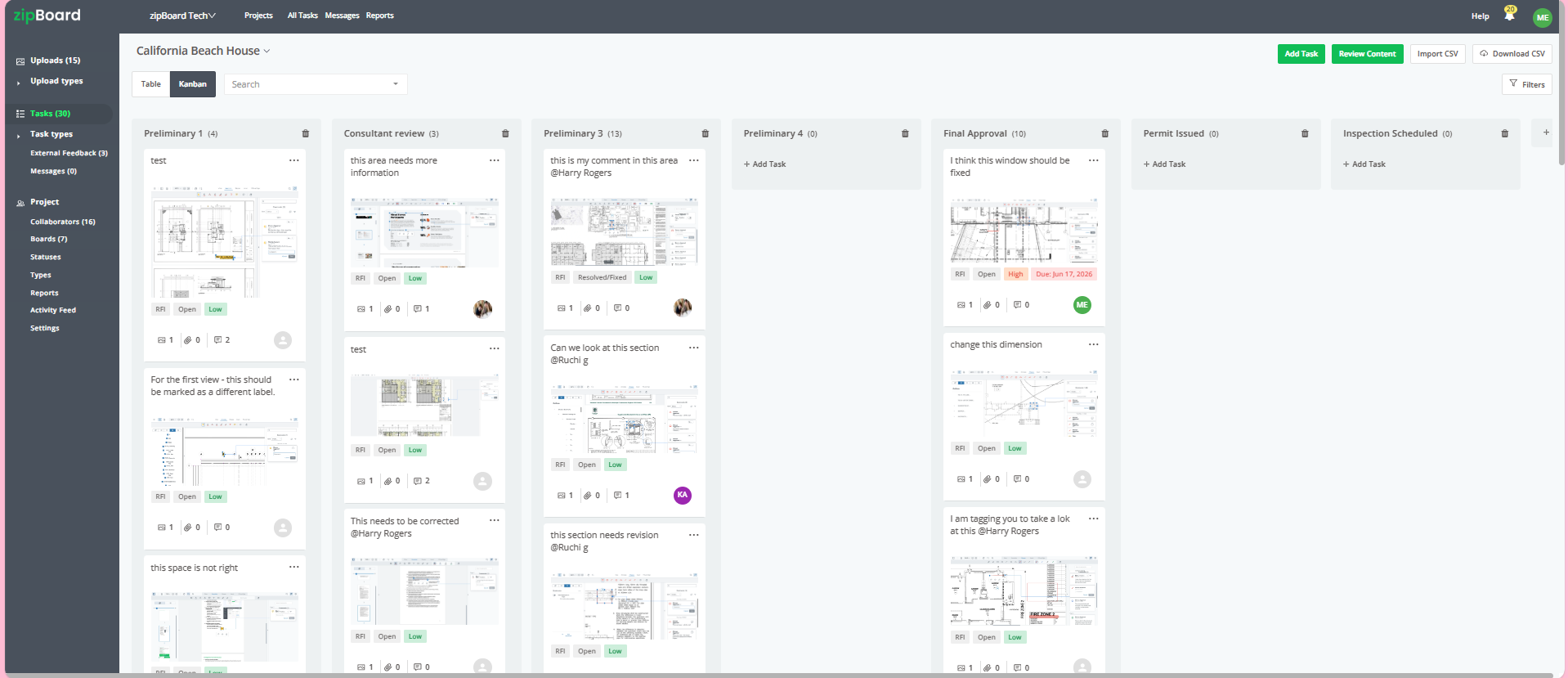
Every markup lands on a task board with an owner and a status.
What is a compliant PDF annotation solution? (permissions and control)
No annotation tool makes you compliant by itself. Regulated teams usually need these controls, and should check each one with the vendor:
- Access: who can open the link. Look for required sign-in, passwords, expiry dates and revoking a link.
- Permissions: who can comment and who can only view; internal comments hidden from outside reviewers.
- Approval record: who approved which version, and when. Approvals should reset on a new version.
- Data location: where files and comments are stored, SSO, and security questionnaires.
In zipBoard, share links can require sign-in, carry a password and expiry, and be revoked. Guests don't see internal comments, and each required reviewer records a decision per version. PDFs added by URL stay on your own system, and Enterprise adds SSO and hosting on your servers or in your region. zipBoard doesn't hold a SOC 2 report or ISO 27001 certificate; we complete security questionnaires. Details: security at zipBoard. Among the others, Filestage lists SSO, audit logs and password-verified approval on its Enterprise plan.
How do you annotate PDFs for client review?
- Upload the PDF to a review tool and turn on commenting.
- Send one link. Choose a tool where clients don't need an account or licence.
- Keep internal notes private so clients only see what's meant for them.
- Ask for a decision (approved or changes requested) and set a due date.
- Upload the revision and compare it with the last version before you send it back.
zipBoard, Acrobat, Filestage and PageProof all let clients comment from a link. zipBoard also turns each client comment into a task for your team. For creative proofs, see online proofing.
What is PDF annotation?
PDF annotation means adding highlights, underlines, notes, comments, shapes, stamps or drawings on top of a PDF without changing its content. Annotations sit in a layer over the page, so they can be shown, hidden, replied to or exported. Common annotation tools are:
- Text markup: highlight, underline, strikethrough and squiggly lines
- Comments: sticky notes, free text and callouts
- Shapes: rectangles, clouds, arrows, lines and free hand
- Stamps and signatures, such as "Approved"
- Measurements on scaled drawings
PDF markup usually means the same thing, often for drawings. "PDF editing" is different: it changes the text and images in the file itself.
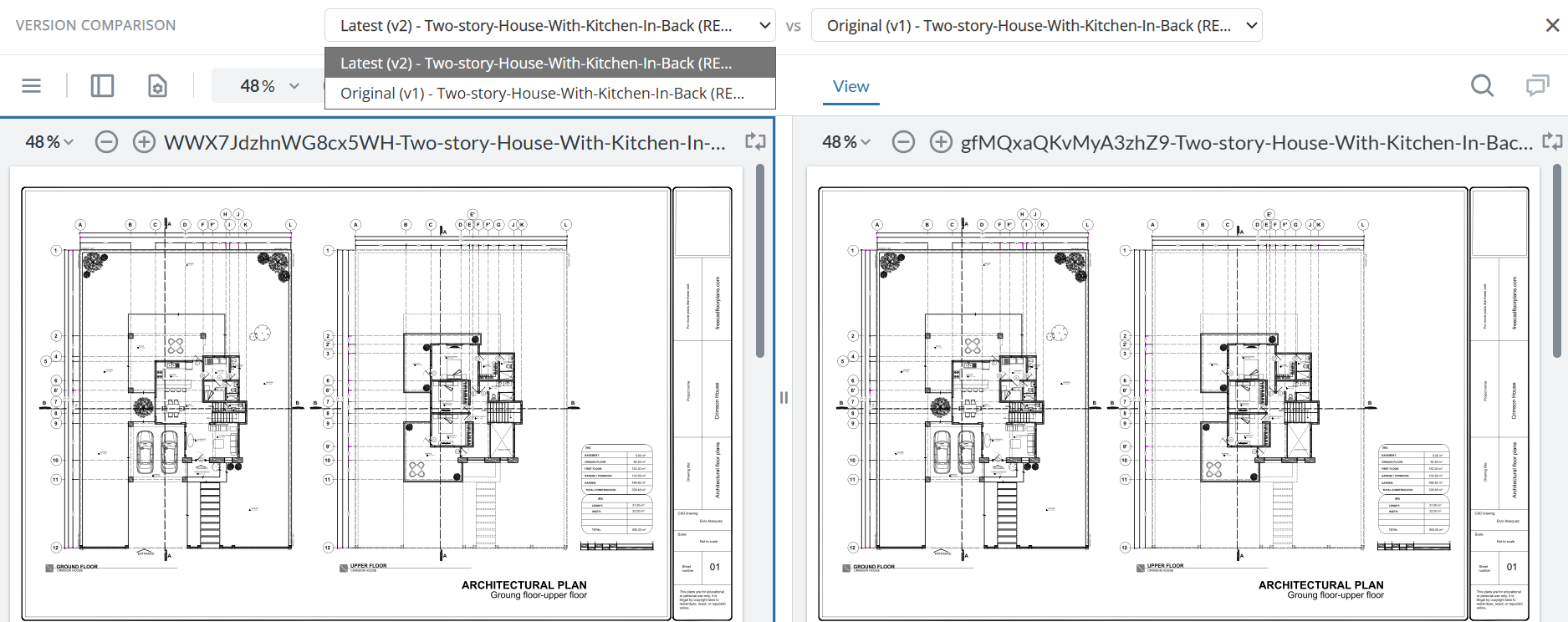
Comparing two revisions of an annotated drawing side by side.
PDF annotation tools: FAQ
What is the best free PDF annotation tool?
For one person, Adobe Acrobat Reader, Xodo and the free version of PDF-XChange Editor all highlight, comment and draw at no cost. Drawboard PDF has a free tier, Filestage a free plan for one project, and Kami a free plan for teachers.
Do reviewers need Adobe Acrobat to comment on a PDF?
Not always. Adobe says people you share a PDF with can comment in the browser without logging in. In zipBoard, Filestage and similar review tools, reviewers comment from a link with no account. Bluebeam Studio attendees need Revu, and Foxit shared reviews need a Foxit viewer.
How do I annotate a PDF on a Mac?
Open it in Preview and use the Markup toolbar for text, shapes and highlights. For shared review, upload it to a browser-based tool and send a link.
Can I annotate a PDF on an iPad?
Yes. Drawboard, Xodo, Foxit PDF Editor+, Acrobat and Bluebeam have mobile apps. zipBoard reviewers can open a link in a tablet browser, with no separate app.
Can several people annotate a PDF at the same time?
Yes, in tools built for shared review, such as Acrobat's share for review, Bluebeam Studio Sessions, Drawboard, Foxit Shared Review, zipBoard, Filestage and PageProof. Everyone works on one copy, so nobody merges files by hand.
Can I keep comments that are already in a PDF?
PageProof and Filestage (Business plan) import existing PDF comments. In zipBoard, comments already inside a PDF stay visible on the page but don't become zipBoard comments, so re-create the ones you need to track.
Which PDF annotation tool is best for construction drawings?
For measurement, takeoff and estimating, Bluebeam Revu or Drawboard Projects. For drawing review and sign-off with consultants, clients and subcontractors who won't buy a licence, zipBoard: reviewers mark up from a link, it measures, and every markup becomes a tracked issue.
How much do PDF annotation tools cost?
Free readers cost nothing. Desktop editors are sold per user, by subscription or a one-time licence. Review tools usually charge for the team that runs reviews; zipBoard keeps reviewers and collaborators unlimited on every plan, with Team from $99 a month.