Construction Administration (CA) consistently presents significant challenges for project stakeholders, such as operational inefficiencies, scheduling delays, and escalating costs. These challenges aren’t isolated incidents, as they stem from inherently complex project dynamics. The core issue resides in the fragmentation of responsibilities across numerous participants; owners, architects, general contractors, and various subcontractors. As noted by Ofori (1990) in his book, this fragmented structure is a fundamental root cause of project chaos.
The consequences of this fragmentation are substantial. Analysis by McKinsey (2020) reveals an average of 80% in time overruns and 30–50% in cost overruns for global construction projects. Similarly, Chan and Kumaraswamy (1997) in their journal identified poor administration and coordination as key contributors to project delays. These findings highlight a systemic vulnerability and suggest an urgent need for improved CA practices.
Furthermore, inadequacies in handover and documentation processes, as outlined by the National Institute of Building Sciences (NIBS), caused the damage even further. These failings result in disputes, rework, and substantial financial losses. According to Autodesk, annual rework costs in the U.S. alone are $177 billion. Moreover, the construction industry’s contribution to environmental impact is also affected. In 2022, a UNEP report highlighted how inefficient administration undermines green building efforts, accounting for 39% of global CO2 emissions.
This guide offers a structured approach to addressing and mitigating CA-related challenges. It begins by outlining the foundational causes of chaos. The subsequent sections detail actionable strategies designed to improve performance and reduce risk.
Specifically, this guide will:
Analyze Root Causes: Examine key contributors to CA inefficiencies, including fragmented responsibilities, coordination and collaboration deficits, and documentation limitations.
Optimize Documentation Practices: Provide strategies to streamline document review, minimize errors, and ensure comprehensive record-keeping.
Evaluate Technology Solutions: Assess the role of digital tools in bridging communication gaps and enhancing operational efficiency.
This guide aims to furnish practitioners with implementable solutions, checklists, case studies, and best practices, to facilitate enhanced CA and achieve project objectives.
The New Challenges in Construction Administration
The evolving digital landscape, the lingering consequences of COVID-19, and the increasing prevalence of remote team structures have collectively amplified previous vulnerabilities while introducing new challenges:
The construction industry is undergoing a digital transformation, yet challenges with technology integration remain. Successful adoption requires a structured CA approach to manage data flow and ensure all stakeholders are operating from a single space.
Supply chain vulnerabilities and persistent labor shortages, direct consequences of the COVID-19 pandemic, have underscored the importance of robust risk management and adaptive planning within CA.
The expanding adoption of remote and distributed teams necessitates enhanced communication protocols and digital collaboration tools. Effective CA provides the organizational structure and oversight necessary to maintain coordination and mitigate the risks associated with geographically dispersed teams.
Ultimately, prioritizing CA is no longer a good idea; it is a must for navigating the complexities of the modern construction environment and achieving sustainable project outcomes.
Get to Know Construction Administration
CA is where plans meet reality. It’s the phase where everyone—architects, contractors, PMs—ensures the project gets built right. Think of it as the guardrails that keep budgets, timelines, and quality intact.
✅ RFIs & submittals: Answering questions and reviewing materials.
✅ Change orders: Approving adjustments to scope, cost, or schedule.
✅ Progress updates: Keeping owners informed of milestones and issues.
Construction Administration vs. Construction Management
While often used in conjunction and sometimes even interchangeably, Construction Administration (CA) and Construction Management (CM) represent distinct roles and responsibilities within a construction project. Construction Management is a broader, more holistic discipline encompassing the entire project lifecycle from inception to completion. Construction Administration, on the other hand, focuses on the critical period during construction, ensuring the project adheres to the contract, specifications, and budget.
Feature
Construction Management
Construction Administration
Scope & Lifecycle
Encompasses the entire project lifecycle: planning, design, procurement, construction, and closeout.
Primarily focuses on the construction phase of a project.
CM is the overarching discipline. CA is a critical function performed within the CM framework.
CA provides essential support for CM, enabling effective oversight during the construction phase.
A Construction Manager directs the project, while a Construction Administrator ensures the execution adheres to the agreed-upon plans and contract. They are collaborative roles, working together to achieve project success.
Construction Administration Key Phases & Core Activities
Project Phase
Primary CA Objectives
Typical CA Activities
Pre‑Construction
Establish a solid contractual and documentation foundation before any ground is broken.
Review and negotiate contract documents.
Set up the project’s document‑control system (submittal logs, RFI registers, meeting‑minute templates).
Conduct pre‑bid and pre‑award meetings to clarify scope, schedule, and deliverable expectations.
Construction
Maintain contract compliance, control changes, and ensure accurate, real‑time project records while the work is in progress.
Issue, track, and close out RFIs.
Manage submittal review cycles (shop drawings, product data, mock‑ups) and record approvals/rejections.
Conduct regular site‑meeting minutes, daily logs, and progress‑report distribution.
Oversee field documentation for safety inspections, quality control tests, and non‑conformance reports.
Post‑Construction / Close‑Out
Deliver a complete, auditable record set and ensure a smooth hand‑over to the owner/operator.
Assemble and certify as‑built drawings, operation & maintenance (O&M) manuals, warranties, and equipment certifications.
Conduct final project audit (contractual, financial, regulatory) and close out all open RFIs, change orders, and claims.
Process final payment, release retainage, and archive all project documentation in accordance with the owner’s record‑keeping policy.
Facility‑Management Support
Preserve the value of the documentation for long‑term asset management.
Offer a “record‑keeping hand‑over” workshop to familiarize FM personnel with the as‑built package.
Construction Administration is present throughout the entire project lifecycle. In the pre‑construction stage it establishes the contractual and regulatory framework; during construction it safeguards compliance, controls changes, and maintains an accurate project record; and in the post‑construction phase it finalizes documentation, resolves outstanding items, and enables a seamless transition to operations. By systematically executing these CA activities at each stage, owners can dramatically reduce disputes, rework, and hidden costs.
Where zipBoard Fits Into Construction Administration (Without Overclaiming)
Modern Construction Administration (CA) operates as an ecosystem of specialized tools—ERPs (SAP/Oracle), field platforms (Procore/ACC), scheduling engines (Primavera/MS Project), and dedicated document control systems. Each solves a distinct part of the workflow.
zipBoard strategically owns the high-friction middle layer: the review cycle.
What zipBoard Does?
zipBoard acts as a centralized review engine that unifies:
~60% of miscommunication between design and site teams (FMI, 2024)
Result: By streamlining the review layer, downstream systems (ERP, scheduling, reporting) receive clean, approved data, enabling faster, more accurate decisions.
What zipBoard Does Not Replace
zipBoard is purpose-built to integrate with, not compete against:
Tool Category
zipBoard’s Role
Why Not a Replacement
ERP Systems
(e.g., SAP, Oracle)
Feeds submittal statuses, CO costs, and approved docs for financial reporting
ERPs manage budgets, invoicing, and procurement—not review workflows
Scheduling
(e.g., Primavera P6, MS Project)
Provides reviewed scope changes for schedule impact updates
Schedulers manage timelines—not document reviews
Full CA Platforms
(e.g., Procore, ACC, Newforma)
Handles the messy review process before data flows into CA systems
These platforms focus on execution, close-out, or BIM—not document markups
Example: When an Architect approves a submittal in zipBoard, the approval status automatically syncs to Procore’s submittal log or SAP for cost coding.
Why This Focused Approach Matters
The Problem: Many vendors claim to be “end-to-end CA solutions,” but construction teams already have established systems for budgeting, scheduling, and safety. Overlapping tools create confusion, redundant work, and adoption resistance.
The Bottleneck: Industry research shows:
Construction teams spend so much time reconciling documentation gaps stemming from inefficient review cycles.
zipBoard’s Role:
“We don’t replace your ERP, scheduler, or CA tool. We fix the review bottleneck to make them work better.”
Here’s how we do it:
60% reduction in RFI turnaround time (2.8 days → 1.1 days)
38% fewer submittal rejection cycles
25% faster change-order approvals
Key Differentiators in Action
Scenario
Traditional Workflow
With zipBoard
RFI Clarification
Email threads lost → 5–7 day delays
Tag issue → architect annotates drawing → automated routing → approval in 24 hours
Submittal Rejection
Revisions emailed → multiple versions → confusion
Revision tracking in platform → single source of truth → rejection rate drops 38%
Change Order Scope
Unclear markup → disputes → 14-day approvals
Annotated drawings → linked to CO → 7-day approval cycle
Why Construction Administration Fails: Deep‑Dive into the Core Pain Points
When Construction Administration “fails,” the symptoms are not isolated—they cascade. Poor version control fuels RFI backlogs; RFI delays amplify change‑order frequency; fragmented tools cripple stakeholder engagement. The table makes it clear that each of these mistakes is a measurable source of schedule slip, cost overrun, and dispute risk. Tackling them systematically—through integrated document control, digital RFI/submittal workflow automation, disciplined change‑order processes, and a unified collaboration suite—turns CA from a liability into a project‑success engine.
Pain Point
Typical Symptoms on the Jobsite
Direct Consequences
Representative Industry Metrics
Version‑Control & Drawing Revisions
Multiple PDFs of the same sheet floating in email folders.
Field crews pulling “old” shop drawings
Re‑work (material waste, labor idle).
Schedule slips (average 0.8 day per revision per trade).
Safety incidents when crews follow superseded details
ENR 2023 – 38 % of schedule delays on large projects trace to drawing‑revision errors.
Dodge 2022 – Avg. 4.2 revision cycles per major trade on a 200k sf commercial build → ≈ $1.3 M extra cost.
RFI Backlogs & Submittal Delays
RFI register stuck in a spreadsheet; >10 days to answer.
Submittal log not updated; approvals pending for weeks.
Field crews “on hold” awaiting clarification.
Critical‑path activities stall → idle labor.
Erosion of trust between owner, architect, and contractor.
AGC 2023 Survey– 31 % of respondents cite RFI turnaround > 10 days as a primary cause of schedule overruns.
Change Orders & Scope Creep
Owner requests “minor” additions after the walls are up.
Design changes introduced without formal CO documentation.
Budget inflation (average +12 % to contract value on commercial projects). Re‑sequencing of trades → further delays.
ENR 2022 – 45 % of cost overruns on major infrastructure stem from unmanaged change orders.
AGC 2022 – Avg. change‑order frequency = 1.8 /mo; average impact = +12 % to original contract.
Architects slow to respond to shop‑drawing queries.
Owners delay material selections.
Subcontractors feel “out of the loop” and guess specifications.
Misaligned expectations → re‑work & claims.
Missed value engineering opportunities.
Dodge 2023 – 27 % of projects suffered “critical‑path delays” due to delayed owner/architect decisions.
AGC 2021 Stakeholder Engagement Index – average score 62/100 (below “effective”).
Fragmented Tools & Email Sprawl
RFI in Outlook, submittals in Dropbox, drawings on a shared drive.
No single source of truth; data duplicated, outdated, or lost.
Teams spend hours searching for the latest version.
Administrative overhead (≈ 22 % of project‑team time per ENR 2023).
Amplifies version‑control errors.
Inhibits real‑time reporting & KPI tracking.
ENR 2023 – 22 % of project‑team time spent reconciling information across disparate tools.
AGC 2022– 35 % of contractors cite tool fragmentation as a top barrier to on‑time delivery.
The Pain Points of Traditional CA and The Solutions
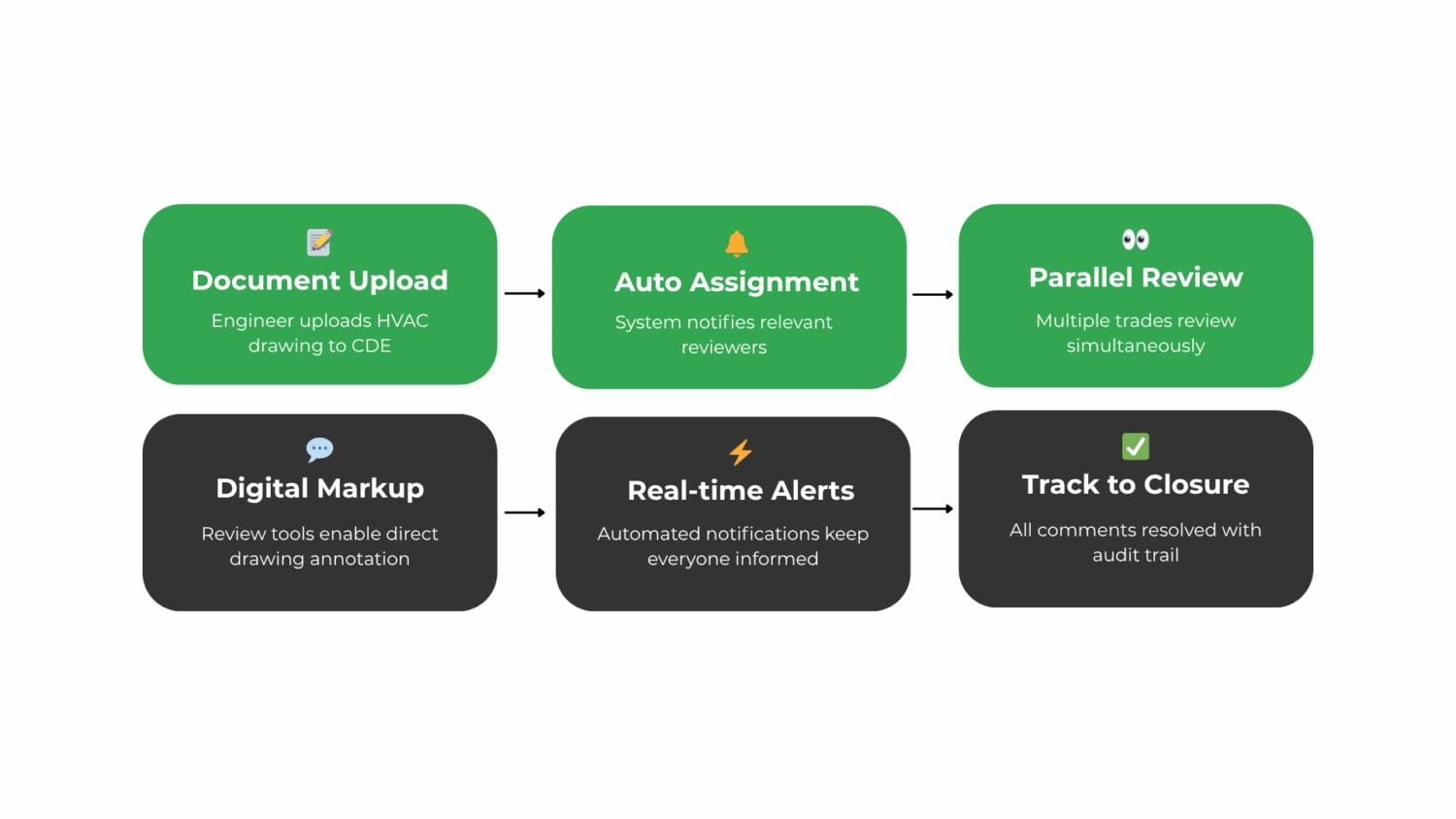
The traditional Construction Administration (CA) workflow is fraught with inefficiencies, leading to project delays, cost overruns, and stakeholder dissatisfaction. However, by embracing modern technologies and streamlining processes, it’s possible to transform CA from a chaotic to a clear and efficient workflow. This modern approach focuses on centralizing documents, facilitating real-time collaboration, automating approvals, and providing transparency through live dashboards and mobile access.
Scattered Documents & Reviews
Disparate documents and lack of version control lead to confusion and errors.
Solution: Implement a centralized construction document management system that stores all project documents in one place, ensuring that all stakeholders access the latest versions. This reduces mistakes and miscommunications, promoting a more efficient workflow.
Manual Markups + Issue Tagging + Versioning
Manual routing and approval processes are slow and can bottleneck the project.
Solution: Automate the routing and approval process using workflow automation tools. This ensures timely distribution of documents to the right stakeholders, reducing delays and increasing project efficiency.
Delayed Dashboards for Stakeholders
Stakeholders often lack real-time visibility into project progress and status.
Solution: Provide live dashboards that offer real-time insights into key project metrics, such as progress, issues, and approvals. This keeps stakeholders informed and engaged, facilitating better decision-making and project outcomes.
Mismatch in Field-to-Office Sync & Mobile Access
Disconnect between field operations and office administration hinders project efficiency.
Solution: Implement a system that enables seamless sync between field and office, allowing for real-time updates and access to project information from anywhere. Mobile access ensures that field crews can view, update, and interact with project data on-site, reducing errors and improving productivity.
Implementing the Modern CA Workflow
To transition to a modern CA workflow, follow these steps:
Assess Current Processes: Identify areas for improvement and bottlenecks in your current CA workflow.
Select Appropriate Tools: Choose tools that can centralize documents, facilitate real-time collaboration, automate approvals, provide live dashboards, and enable field-to-office sync and mobile access.
Train Stakeholders: Ensure that all stakeholders are trained on the new tools and processes to ensure a smooth transition.
Monitor and Adjust: Continuously monitor the new workflow and make adjustments as necessary to optimize efficiency and effectiveness.
Benefits of the Modern CA WorkflowThe modern CA workflow offers numerous benefits, including:
Improved Efficiency: Streamlined processes and automated workflows reduce manual errors and delays.
Enhanced Collaboration: Real-time collaboration tools facilitate better communication among stakeholders.
Increased Transparency: Live dashboards provide stakeholders with real-time project insights, promoting informed decision-making.
Better Project Outcomes: By reducing delays, errors, and miscommunications, the modern CA workflow leads to more successful project outcomes.
Tangible Benefits (Backed by Industry Data)
Benefits
Metric (2022‑2023)
RFI turnaround time
↓ 45 % (average 4 days vs. 7 days pre‑digital) – AGC Survey 2023
Change‑order processing
↓ 30 % in cycle time (from 12 days to 8 days) – Dodge Data 2022
Document‑related re‑work
↓ 22 % of schedule delays – ENR 2023
Admin overhead
↓ 20 % of team time spent searching for files – ENR 2023
Stakeholder satisfaction
↑ 15 pts on Net Promoter Score (NPS) after implementing live dashboards – AGC 2022
By centralising every file, enabling real‑time markups with issue tagging, exposing live KPI dashboards, and giving the field mobile sync, the modern CA workflow transforms chaotic email chains and version wars into a transparent, auditable, and fast‑moving process. The result: fewer delays, lower costs, and happier stakeholders.
Successful CA hinges on clear roles. Here’s a comprehensive breakdown of who drives the process:
Role
Primary Responsibilities
Key Deliverables
Architect
• Reviews submittals, shop drawings, and product data sheets.
• Approves work for compliance with contract documents.
• Conducts design‑phase issue tracking and coordination.
• Builds according to approved plans and specifications.
• Performs field QA/QC and maintains daily construction logs.
• Controls cost and schedule impacts of changes.
• Compiled submittal packages • RFI logs with status tracking.
• Change‑order proposals (scope, cost, schedule impact).
• Progress photos & field reports.
Owner / PMO
• Approves project budgets and change‑order funding.
• Monitors KPIs and dashboard metrics.
• Conducts final project handover and acceptance.
• Ensures compliance with contract terms and regulatory requirements.
• Budget approvals and funding releases.
• Executive KPI dashboards (real‑time metrics).
• Decision logs (approvals, scope changes).
• Owner walkthrough reports and final acceptance.
Owner / PMO
• Approves project budgets and change‑order funding.
• Monitors KPIs and dashboard metrics.
• Conducts final project handover and acceptance.
• Ensures compliance with contract terms and regulatory requirements.
• Budget approvals and funding releases.
• Executive KPI dashboards (real‑time metrics).
• Decision logs (approvals, scope changes).
• Owner walkthrough reports and final acceptance.
When each role understands their deliverables, the CA process runs smoother, reducing the documented 40% owner dissatisfaction rate and the 50% of delays attributed to coordination failures. Clear responsibilities paired with modern digital workflows transform CA from a bottleneck into a project success driver.
Metrics, KPIs & Success Measures
1️⃣ RFI Turnaround Time
What It Measures
Average days from RFI submission to formal response from architect/engineer.
What "Good" Looks Like
Project Type
Target Range
Industry Benchmark
Commercial
≤ 2 days
2.3 days
Infrastructure
≤ 3 days
≤ 3 days
Healthcare & Education
≤ 2.5 days
2.7 days
Industrial
≤ 1.5 days
1.8 days
🚩 > 5 days (indicates systemic bottlenecks).
2️⃣ Submittal Rejection Rate
What It Measures
% of submittals sent back for revision before approval.
What "Good" Looks Like
Metric
Target Range
Industry Benchmark
First Pass Approval Rate
≥ 85 %
79 %
Average Re‑submittal Cycle
≤ 1.5 cycles
≤ 1.8 cycles
🚩 > 20 % rejection rate (quality/process issue).
3️⃣ Change‑Order Percentage
What It Measures
% increase in original contract value due to change orders.
What "Good" Looks Like
Project Phase
Target
Acceptable Range
Red Flag
Pre Construction
≤ 5 %
5‑8 %
> 10 %
Construction
≤ 12 %
12‑15 %
> 20 %
Overall Project
≤ 15 %
15‑20 %
> 25 %
🚩 Each 1 % increase in CO cost typically adds 150K‑300K on a $20M project (FMI 2024).
4️⃣ Rework Cost
What It Measures
Direct cost of correcting errors, omissions, or non‑conforming work.
What "Good" Looks Like
Metric
Target
Industry Benchmark
% of Total Project Cost
≤ 2 %
3.2 %
% of Direct Labor
≤ 5 %
6.8 %
Frequency of Major Rework Events
≤ 1 per $10M
1.2 per $10M
🚩 > 5 % rework cost (quality system breakdown).
5️⃣ Cycle Time
What It Measures
Average time from document issue to approval/close‑out.
What "Good" Looks Like
Process
Target
Industry Benchmark
RFI Processing
2‑3 days
2.8 days
Submittal Review
3‑5 days
4.2 days
Change Order Approval
7‑10 days
9.5 days
Document Close Out
14‑21 days
18 days
🚩 > 5 % rework cost (quality system breakdown).
Key Documents & Deliverables in Construction Administration (CA)
1️⃣ Core CA Documents
Document
Purpose
Key Data Fields
Best Practice Frequency
Submittals
Demonstrates contractor's compliance with specs
• Submittal • Description
• Manufacturer & model
• Revision status
• Review status/date
• Approver signature
• Submit within 2 weeks of contract award
• Review within 5 business days
• First‑pass approval ≥ 85 %
Spreadsheets/email create “paper hurricanes.” Modern CA platforms like Zipboard replace chaos with traceability, speed, and transparency.
What "good" looks like:
✅ RFI turnaround: < 48 hours (vs. 5–7 days with email)
✅ Re‑work cost: < 2% of project (vs. 5–7% with version control issues)
✅ Owner satisfaction: > 80% (vs. 40% with fragmented tools)