AI Drawing Review: Your QA/QC Checklist, Run on Every Sheet
Orbit Check reads your drawing PDFs against the checks your team already uses and marks each miss on the sheet. A person accepts or rejects every finding. Accepted ones become tasks in the same review as your team’s markups.
Free until 15 January 2027. We turn it on for your team on request.
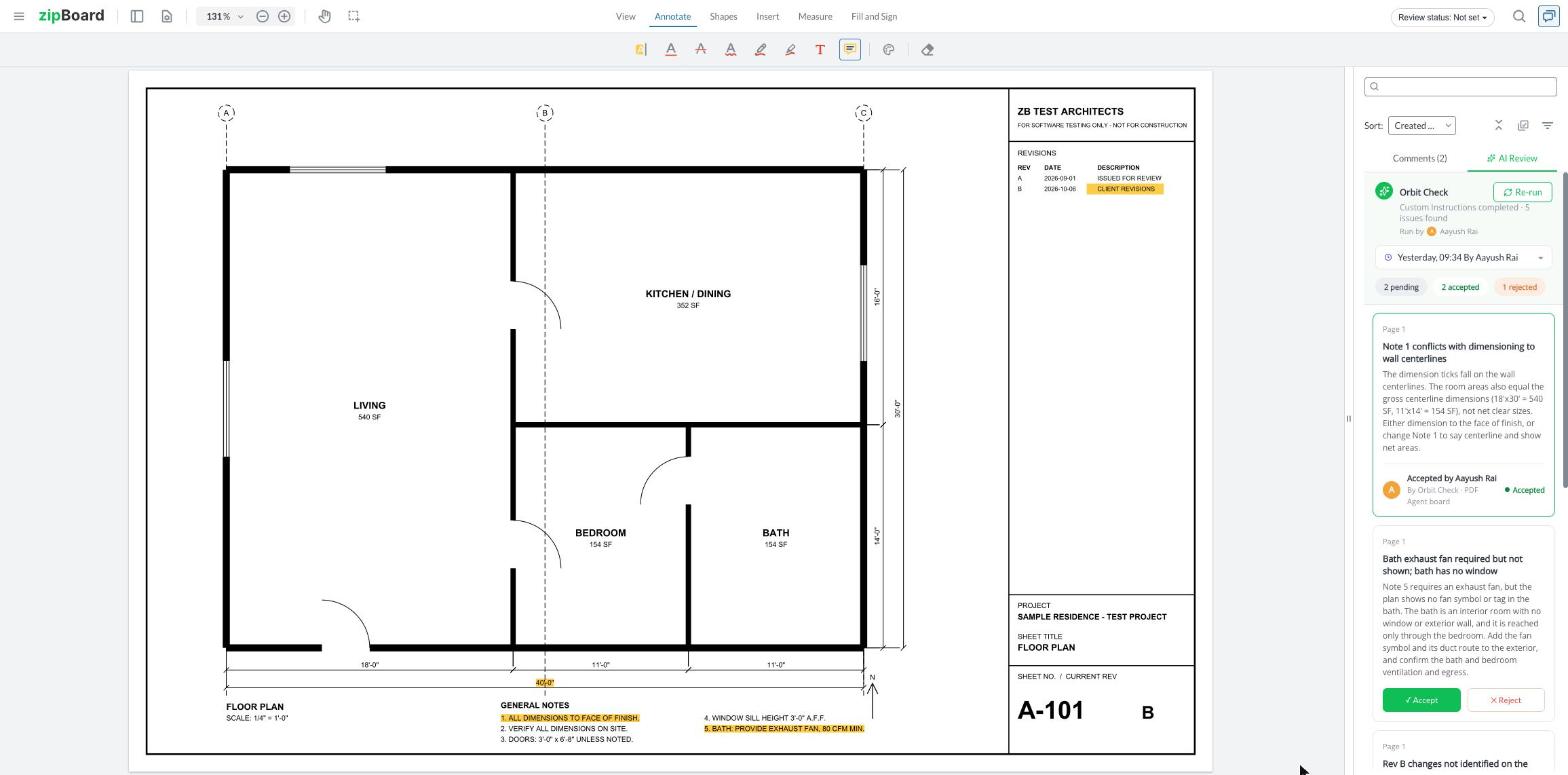
A real Orbit Check run on our own test sheet, A-101. Highlights on the sheet are the AI’s findings; the panel shows each one and what our reviewer decided.
Five findings on one floor plan, and what our reviewer did with each
We ran Orbit Check with a custom QA/QC checklist on A-101, a test sheet our team drew for software testing. Here is everything it found.
- Note 1 conflicts with dimensioning to wall centerlinesNote 1 says dimensions are to face of finish, but the dimension ticks fall on wall centerlines and the room areas are gross centerline areas. Fix the dimensions, or change the note.
Accepted · became a task - Overall dimension text collides with grid B lineThe 40′-0″ overall dimension sits right on the dashed grid line. Move the text or break the line so it’s legible.
Accepted · became a task - Bath exhaust fan required but not shown; bath has no windowNote 5 calls for an exhaust fan, but the plan shows no fan symbol or tag in an interior bath with no window.
Pending: waiting for a reviewer - Rev B changes not identified on the planThe revision table says only “Client revisions”, and the sheet has no revision cloud or delta tag showing what changed.
Pending: waiting for a reviewer - Grid B does not match wall or dimension stringsGrid B sits about 2′-0″ off the interior partition, and the grid spacing doesn’t add up to the dimension strings.
Rejected · no task created, reason kept
Finding text shortened for this page. Run on 17 November 2026 in zipBoard’s own workspace. We hid our team’s unrelated test comments in the screenshots; the AI findings and decisions are as they appear in the product.
The run summary, and a finding waiting for Accept or Reject.
Accepted findings show who accepted them. Rejected ones keep their reason.
On the sheet: the notes and dimension the findings point to, highlighted by Orbit Check.
Share a drawing set in the early access form and tell us your checks. We’ll run them and walk you through the findings.
Write the checks your team already does by hand
Most firms already have a QA/QC checklist. It lives in a binder or a spreadsheet, and it gets run at the end, under deadline. Orbit Check runs it on every set. Write each check the way you’d brief a junior reviewer.
Run the same checks on the next set and the next revision, so every sheet gets the same first pass whoever is on the project.
Examples of checks you can write. Your own wording works.
How AI drawing review works in zipBoard
The AI does the legwork. Your people make every call, in the same review as the rest of the team.
Finding the miss is step one. Closing it is the job.
Most AI drawing tools hand you a report. In zipBoard, findings sit in the review your team already runs, next to the people who fix and approve them.
Findings become tasks
An accepted finding is a task with an owner and a status, alongside your reviewers’ clouds and comments. Filter by owner and see what’s still open before the set goes out.
Everyone reviews from a link
Owners, consultants and subcontractors mark up and measure in the browser, with no install and no seat. Reviewers are unlimited on every plan. PDF markup tools
Sign-off you can prove
Name the required reviewers with a due date and stamp submittals with your own action codes. Every run shows who ran it and who decided each finding. Shop drawing approval
Check the next revision
Upload Rev C as a new version and compare it side by side with Rev B, with last round’s comments beside it. Compare revisions
Works with Procore
Send review tasks to Procore, or keep zipBoard next to SharePoint, Aconex or your document control system. Procore integration
Specs too
Starting a project? Send us the spec and get the submittal register back, every line checked by your coordinator. AI submittal register
Who uses AI drawing review
The same checklist idea, at different points in a project.
Before a set is issued
Run your QA/QC checks on every sheet, so senior reviewers start on design questions instead of title blocks.
Before pricing and on incoming shop drawings
A first pass on bid sets and shop drawings before your project engineers review them.
At each design milestone
Check the set against your own standards, and keep a record of who accepted each finding.
Before you submit
Catch missing stamps, tags and references in your own submittals before the GC or architect does.
What Orbit Check is good at
- Consistency checks: notes against dimensions, revision tables against clouds, tags against notes
- Completeness checks against the rules you write, on every sheet
- Small misses that turn into RFIs when nobody has time to look
- Keeping a record: who ran it, what it found, who accepted or rejected each finding
What it isn’t
- Not code compliance sign-off. It doesn’t check against your local building code; a licensed professional still does.
- Not clash detection. It reads drawing PDFs, not BIM models.
- Not always right. One of the five findings above was rejected. That’s why a person decides.
- Not for huge single files yet. Very large or complex sets may need splitting into smaller PDFs.
Which kind of AI drawing review tool do you need?
“AI drawing review” covers several kinds of tool. Pick by the job you need done. Descriptions of other tools come from their own pages, read in November 2026.
| If you need | Kind of tool | Examples | How it works |
|---|---|---|---|
| A check against local building codes before permit | AI plan check service | UpCodes Plan Review, InspectMind | Upload drawings and specs, get an issue report. InspectMind charges per check. |
| Deep cross-sheet coordination on large sets, inside a wider AI platform | AI QA/QC platform | Nomic, Structured AI, MeltPlan | Cited findings with drawing locations, exported as markups or issues to tools like Bluebeam, Autodesk or Procore. |
| AI inside the markup tool your whole team already pays for | AI in a desktop markup tool | Bluebeam Max (Smart Review) | Premium per-user plan on top of Revu. Smart Review is in preview. |
| Your own checklist, run where the whole review happens | AI first pass in a review and approval platform | zipBoard Orbit Check | Your plain-language rules on drawing PDFs. Findings become tasks next to the markups of reviewers who join from a link, with sign-off and revision compare. |
Sources: UpCodes Plan Review · InspectMind for architects · Nomic automated drawing review · MeltPlan drawing QA/QC · Bluebeam Max. Already on Bluebeam for markup? See zipBoard as a Bluebeam alternative for review.
Where your drawings go
Drawings are sent to AI services on Amazon Bedrock only when someone on your team runs a check, and they aren’t used to train models.
Orbit Check is off until we turn it on for your team. Guests and clients can’t run it or decide on findings, and the AI never edits your file.
Early access, free until 15 January 2027
Orbit Check for drawings is in early access. We turn it on for your team on request, and it’s free to use until 15 January 2027. We’ll publish pricing before then, and you won’t be charged unless you choose to.
zipBoard plans start at $99 a month for Team, with unlimited reviewers on every plan. See plans
AI drawing review: common questions
What is AI drawing review?
AI drawing review uses AI to take a first QA/QC pass on construction drawings against written rules, such as complete title blocks, matching revision clouds, valid references and notes that agree with the dimensions. A person then checks each finding. In zipBoard, the findings land in the same review where your team marks up, assigns and approves the drawings.
What should general contractors look for in software that checks drawing sets for mistakes?
Look for checks you can write in your own words, findings marked on the exact spot on the sheet, a way to accept or reject each finding, and a record of who decided what. Then look at what happens next: can findings become tasks with owners, can subcontractors and consultants review without a licence, and can you compare the next revision? Also ask where your drawings are processed and whether they’re used to train models.
How can teams improve drawing review without adding more manual checking?
Move the mechanical checks to an AI first pass and keep people on the judgment calls. Write your QA/QC checklist once, run it on every set, and let reviewers spend their time accepting or rejecting findings instead of hunting for them. Tracking each accepted finding as a task, and comparing the next revision side by side, removes the second round of manual checking too.
Does the AI approve anything or change my drawings?
No. Orbit Check suggests; a person accepts or rejects every finding. Accepted findings become tasks, rejected ones stay in the history with their reason, and your PDF is never edited.
Does it check building codes or do clash detection?
No. It checks drawing PDFs against the rules you write. Code compliance stays with your licensed professionals and code-check tools, and clash detection stays in your BIM tools.
What kind of checks can I write?
Anything you’d ask a junior reviewer to check by eye: title block fields, revision clouds against the revision table, callouts pointing to sheets in the set, notes against dimensions, fixture tags, stamps. Write them in plain language. The AI is not always right, so every finding goes to a person.
Which files does it work on?
PDF drawings and drawing sets in zipBoard’s viewer. Very large or complex sets may need splitting into smaller PDFs. You get a notification when a check finishes.
Can outside reviewers use it?
Guests and clients reviewing from a share link can’t run Orbit Check or decide on findings. They see and mark up the drawing as usual, and they never need a zipBoard licence.
Where do my drawings go when I run a check?
To AI services on Amazon Bedrock, only when someone runs a check. Your drawings aren’t used to train models. Enterprise teams can also keep files on their own servers or in a specific region.
How is this different from Bluebeam Max Smart Review?
Smart Review is part of Bluebeam Max, a premium per-user plan on top of Revu, and Bluebeam lists it as a preview. Orbit Check runs your own checklist inside zipBoard, where reviewers join from a link with no seat and findings become tracked tasks with sign-off. If your whole team works in Revu, Max keeps everything in one tool.
How much does it cost, and how do I get it?
Orbit Check for drawings is in early access and free to use until 15 January 2027. Request access and we’ll turn it on for your team; we’ll publish pricing before then.
Run your checklist on your next set
Send us a drawing set and the checks you care about. We’ll turn Orbit Check on for your team and walk you through the findings.
Free until 15 January 2027. Reviewers are always free.