Send us a spec. Get the submittal register back.
Building the register means days of copying line items out of the spec book, right when the project is busiest. zipBoard’s AI reads the whole spec and builds the register for you, and your coordinator checks every line before anything goes into tracking.
Tested on a ~480-line-item spec, side by side with Autodesk AutoSpecs. We confirm scope and price before we run anything.
| No. | Submittal | Type |
|---|---|---|
| 01 11 00-03 | Shop drawings: roof safety barricade system¶ 1.9.7.2 · p. 8 | Shop Drawings |
| 01 11 00-05 | Samples, checked by the Contractor¶ 1.13.2 · p. 10 | Samples |
| 01 11 00-12 | Written notice to the Owner: start of warranty¶ 1.19.4 · p. 11 | Warranty |
From our in-app prototype, on a sample spec book (fictional project). Today we deliver the register as a structured file.
Your coordinator gets days back, and nothing important slips
The register is the first thing every submittal depends on. Getting it right, early, is what keeps long-lead items on schedule.
Days back on every project
The AI reads the whole spec book in one pass. Your coordinator reviews a finished draft instead of copying line items section by section.
Organised by spec section
Every submittal is numbered and grouped by spec section and typed (product data, shop drawings, samples and so on), ready to review section by section.
Every line traced to the spec
Each item carries its section, paragraph and page, so anyone can check it against the source in seconds.
Tested against AutoSpecs
We ran it on a ~480-line-item spec, side by side with Autodesk AutoSpecs on the same document, and we’re happy to run one of yours so you can judge for yourself.
Works with the log you use
The register comes back structured, ready to import into Procore, Autodesk Build or your spreadsheet. No tool swap.
A person signs off
AI does the legwork; your coordinator confirms every line. Your spec goes to AI services on Amazon Bedrock only when we run it, and it isn’t used to train models.
What a register looks like
One line per submittal, numbered by spec section, with the type and the paragraph and page it came from. In our prototype, each line also gets a confidence score and important items are flagged, so your coordinator knows where to look first.
- Section, item, type and spec reference on every line
- Delivered today as a structured file for your log
- Prototype: confidence scores, important and generic items flagged
| No. | Submittal | Type |
|---|---|---|
| 21 13 13-01 | Product data: sprinkler systems Important¶ 1.3.1 · p. 22 | Product Data |
| 21 13 13-02 | Shop drawings: sprinkler systems Important¶ 1.3.2 · p. 22 | Shop Drawings |
| 21 13 13-03 | Delegated design: sprinkler systems Important¶ 1.3.3 · p. 22 | Delegated Design |
| 21 13 13-05 | Test reports: sprinkler systems¶ 1.4.2 · p. 23 | Test Reports |
| 21 13 13-07 | Operation and maintenance data¶ 1.6.1 · p. 24 | O&M Data |
| 01 11 00-01 | Construction schedule must designate submittals Generic¶ 1.6.6.1 · p. 7 | Schedules |
Every item points back to the paragraph it came from
In the prototype, you open any line and see the exact spec text it was built from, highlighted in context, so reviewers check the source instead of trusting a summary. The “submit by” date is worked back from when the material is needed on site.
From our in-app prototype, on a sample spec (fictional project).
Help us build the register inside zipBoard
Today we build the register for you as a service. We also have a working prototype that runs it inside zipBoard, from the spec to the approval stamp. We’re looking for a few construction teams to pilot it on a live project and shape it with us; if it fits how you work, we’ll prioritise building it with you.
| No. | Submittal | Conf. |
|---|---|---|
| 01 11 00-03 | Shop drawings: roof safety barricade system¶ 1.9.7.2 · p. 8 | 90% |
| 01 11 00-05 | Samples, checked by the Contractor¶ 1.13.2 · p. 10 | 94% |
| 01 11 00-10 | Field drawings: relative position of services¶ 1.16.5 · p. 10 | 98% |
- What the prototype does
- Upload your spec books and get one register per book, or all of them in one log.
- Verify with confidence scores: accept the high-confidence items in one click, set generic ones aside, and spend your time on the few that need a closer look.
- Schedule from the site date: enter when it’s needed on site, the lead time and review time, and the submit-by date is worked back for you.
- Ball in court, assignee and approver on every submittal, with overdue and due-in-14-days views.
- What we’re designing next
- Check the package against the spec: compare what the sub submitted with the spec requirement before it goes to the architect.
- Mark up and stamp the package in zipBoard, with every revision kept.
An AI first pass on your drawing sets
Write the checks your team already uses, in plain language. The AI runs them across the set and lists what it finds, labelled as AI. Accept a finding and it becomes a task with an owner; dismiss it and it’s gone. Your reviewers spend their time on judgment, not hunting.
On paid plans, switched on by an admin. It’s a first pass, not a replacement for engineering review.
AI Sheet S-201 references detail 5/S-504; no sheet S-504 in this set.
Rule: sheet references resolve
AI Revision cloud on S-301 has no matching entry in the revision table.
Rule: revision clouds match the table
AI Title block on S-102 is missing the issue date.
Rule: title block complete
Illustration of the workflow with example findings, not results from a customer project.
Everything your team needs to get submittals approved
The register is where it starts. zipBoard is where the shop drawings, product data and samples get reviewed, marked up and signed off, with unlimited reviewers on every plan.
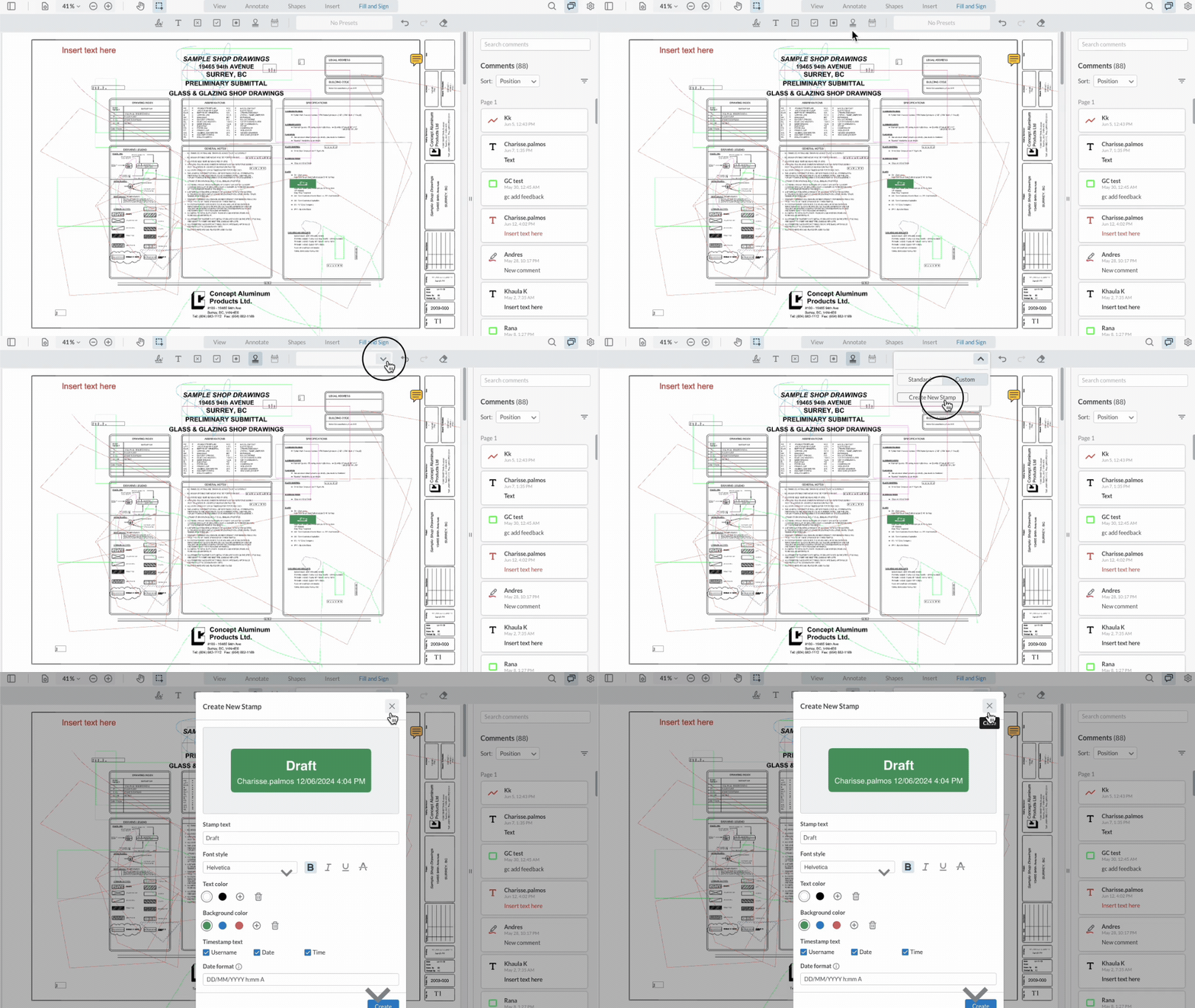
Mark up, measure and stamp shop drawings
Comment, draw, measure and apply approval stamps right on the PDF, in the browser. Consultants and subs review from a link, with no licence to buy.
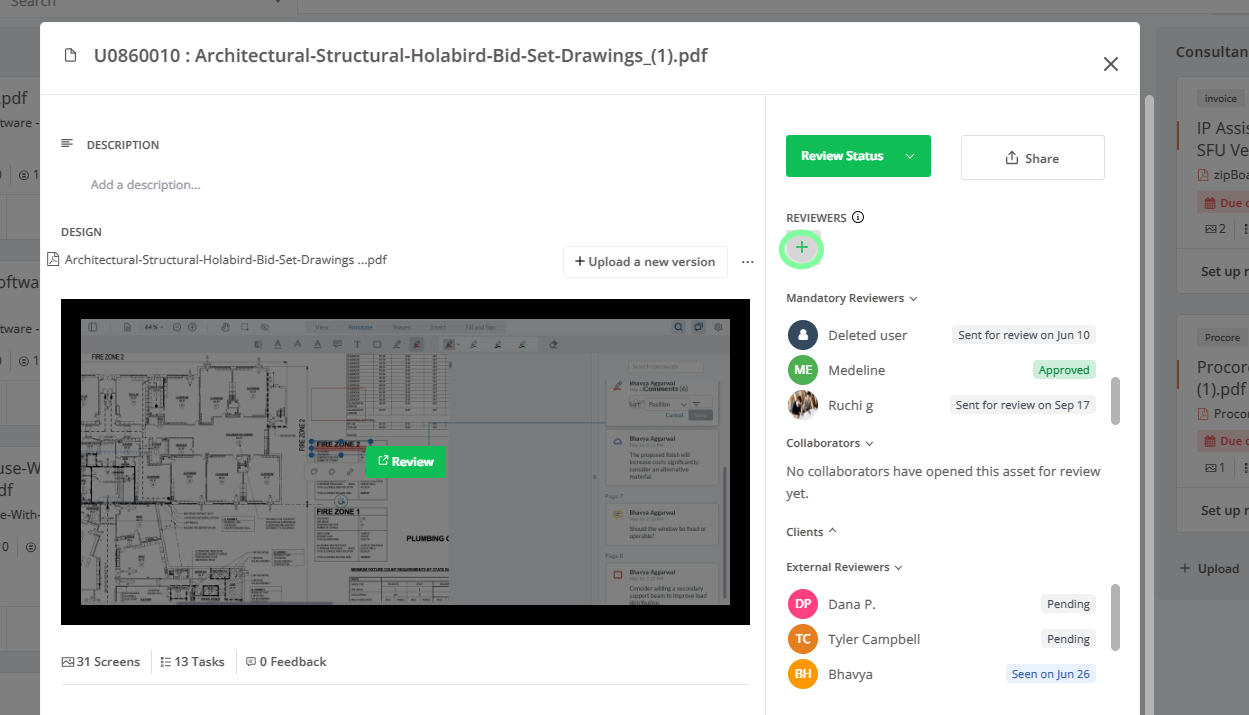
Required reviewers and approvals
Set who must review and who approves. See who’s done, who’s late and who signed off, with a name and date on every approval.

Compare revisions
When Rev B arrives, put it next to Rev A, with changes highlighted and last round’s comments alongside, and see what changed without the scavenger hunt.
Works with Procore
Pull documents from Procore into zipBoard for review and send the results back, so the record stays where your team already works. How the Procore integration works

Send us a spec
Tell us about your project and share a link to the spec (or a drawing set for AI drawing review). Bhavya, zipBoard’s founder, replies personally within one working day with next steps.
- We confirm scope and price before we run anything
- You keep the register
- Early-access teams shape what we build next
Your files go to AI services on Amazon Bedrock only when we run them, and they aren’t used to train models.
Questions
How accurate is an AI-built submittal register?
We tested it on a ~480-line-item spec, side by side with Autodesk AutoSpecs. Specs vary, so every line carries its spec reference and a confidence score, your coordinator reviews every line before it goes into tracking, and we’re happy to run one of your specs so you can judge for yourself.
How much does it cost?
It’s priced per spec, with no annual contract to start. We confirm the price before we run anything.
How long does it take?
We’ll confirm a turnaround when you send the spec.
Do we need to change our submittal tool?
No. The register comes back in a structured format you can import into the tool you already use, such as Procore, Autodesk Build or a spreadsheet log.
Does the AI approve anything?
No. It builds a draft register. A person on your team confirms each line.
Where does our spec go?
It’s sent to AI services on Amazon Bedrock only when we run it, and it isn’t used to train models.
Can we run the register ourselves in zipBoard?
There’s a working prototype, and we’re building it with a few construction teams first. If you’d like to pilot it on a live project, say so on the form and we’ll prioritise it with you.
Can I try AI on drawings too?
AI drawing review is in early access on paid plans: it does a first pass on a drawing set against your own rules, and you accept or dismiss each finding. Choose it on the same form.
Got a spec on your desk?
Send it over and we’ll send back the register.
Related: Construction submittal management · Shop drawing approval · Construction drawing review software · zipBoard for large construction firms · Free submittal schedule template