Give experts their time back
A standard editorial check covers grammar, spelling, clarity, terminology and formatting. No prompt needed.
Orbit Check catches typos, inconsistent terms and style-guide slips across your PDFs, then hands every finding to a person to accept or reject. Accepted findings become tasks, pinned to the page.

Before anyone reads a manual, course or spec for meaning, someone has to catch the mechanical misses. It isn't judgment, and it's done by the people whose judgment you need most.
The mechanical pass is done before your reviewers open the file, so their time goes on the questions only they can answer.
A standard editorial check covers grammar, spelling, clarity, terminology and formatting. No prompt needed.
Write your style guide in plain language, like “Our standard is ‘sign in’, not ‘login’.” Orbit Check applies it to every page.
Each finding is marked on the page. Accept it and it becomes a task; reject it and it never touches your task board.
AI findings carry a badge, every run shows who ran it, and rejected findings keep their reason.
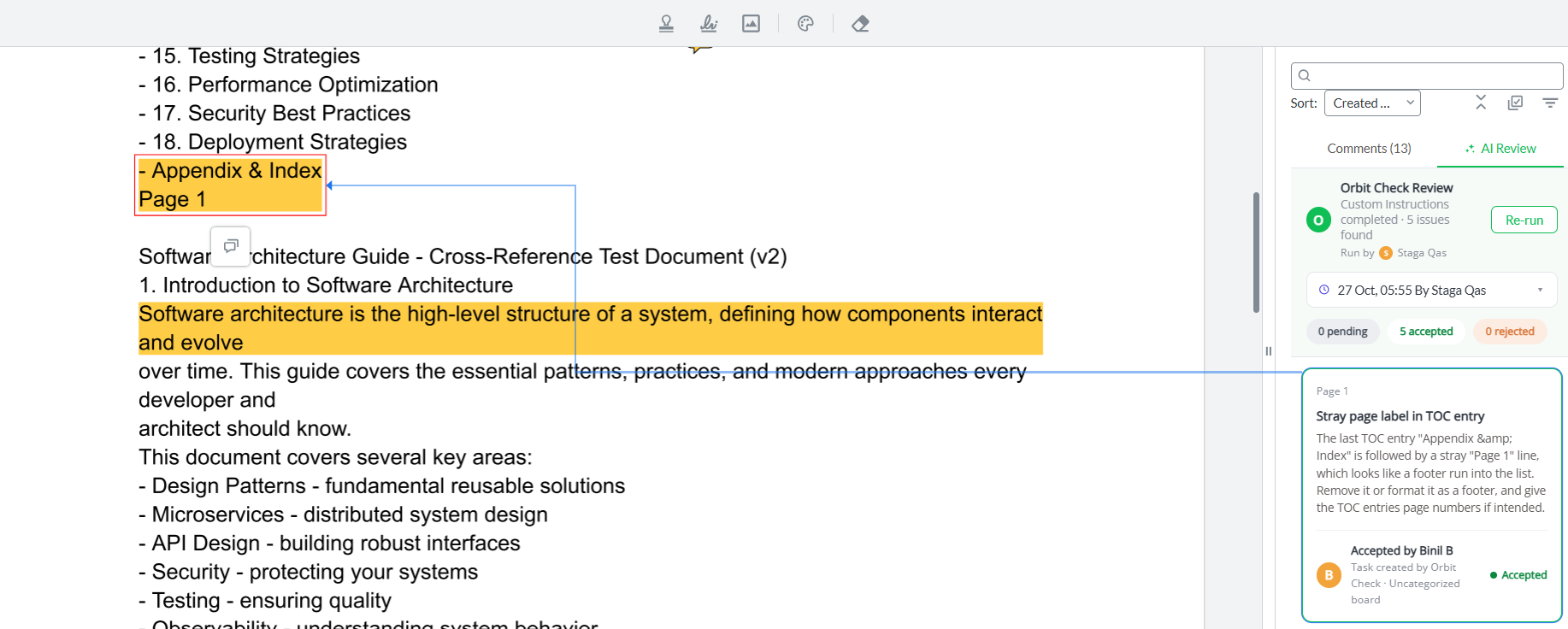
Nothing the AI suggests becomes work until a person agrees, and there's a record of every suggestion and every decision.
Open a PDF and pick zipBoard Editorial Review or your own plain-language rules.
Orbit Check marks what it finds on the page. You're notified when it's done.
Accepted findings become tasks with an owner. Rejected ones keep their reason.
They add their own comments on the same file, from the same link.
Required reviewers approve, and every approval has a name and a date.
Run it again on the revision and use Compare to see what changed.
The AI does the mechanical pass. The people who create, check and approve the work stay in charge of it.

The mechanical pass is done before reviewers open the file, and accepted findings and human comments end up in one task list.

Time goes on the questions only they can answer, not on typos and wrong terms.

Clear, specific fixes arrive early, before the formal review starts.

They sign off knowing the checks ran and every finding was decided by a person.
Shorter rounds, and a record of what was checked and who decided.
They review a cleaner document from a link. They can't run checks or decide on findings.
Off until an admin turns it on, and content isn't used to train models.
Security questions? Email [email protected].
Off until an Owner, Super Admin or Admin turns it on for your organization.
Content goes to AI services on Amazon Bedrock only when someone runs a check, and it isn't used to train models.
Guests and clients can review from a link, but can't run checks or decide on findings.
Every run shows who ran it, and every finding shows who accepted or rejected it.
No. It suggests; a person accepts or rejects each finding, and accepted ones become tasks. Your file is never edited.
PDFs, including scanned PDFs and drawing sets. English works best. Password-protected PDFs aren't supported.
About five minutes for a ten-page PDF; longer documents take longer. You can close the file and zipBoard notifies you when it's done.
Admins, project managers and collaborators on paid plans, once an admin turns it on. Guests and clients can't.
No. Content goes to AI services on Amazon Bedrock only when someone runs a check, and it isn't used to train models.
Orbit Check is in beta on paid plans and free to use until 15 January 2027. We'll announce pricing in advance.
In beta on paid plans and free to use until 15 January 2027. Your admin turns it on in your organization settings.
Related: Document approval software · Online proofing tool · Content approval software