The manual passed engineering review, then safety changed one warning, and nobody can say whether regulatory saw the new wording before release. The fix isn’t more reviewers; it’s giving each review group its own job, a decision on the exact revision, and a record you can hand to an auditor.
Reviewers comment from a link. No Acrobat or CCMS seat needed.
The short answer: a product manual usually needs four separate review groups: a peer or editorial review, a technical (SME) review, a safety review of every hazard message, and a regulatory or literature review of required statements, markings and claims. Run them as rounds on the same revision, give each group only its own checks, and record one decision per group per revision. When anything changes after a group has signed off, that group re-reviews only what changed, and the record shows it.
Who reviews a product manual, and for what?
Most review delays come from groups checking each other’s work, or assuming someone else checked theirs. Write the split down.
| Review group | What they own | What they should not spend time on |
|---|---|---|
| Peer / editorial (another writer, an editor) | Structure, style guide, terminology, cross-references, numbering, consistent formatting of notes and warnings | Technical values; whether a hazard exists |
| Technical / SME (design, test, firmware, service engineers) | Procedures work on the current product and software version; values, limits and part callouts are right | Comma placement; legal wording |
| Safety (product safety, risk owner) | Every hazard from the risk assessment has a message; each message names the hazard, the consequence and how to avoid it; it sits before the step it applies to; signal words and symbols follow your standard | Rewriting procedures that aren’t safety-related |
| Regulatory / literature review (regulatory affairs, compliance, legal, sometimes marketing) | Required statements and markings, intended use, claims, translations of safety text, the document revision matching the product it ships with | Re-checking engineering values the SMEs own |
| Release approver (doc manager or product owner) | Every required group has decided on this revision; every comment is resolved or deferred with a reason | A fresh line-by-line read |
Names vary: medical-device teams often call the last two “labeling review”; industrial teams may have a single compliance group. The split matters more than the names.
What should the safety review check in a manual?
- Coverage. Every hazard in the risk assessment that the user can act on has a safety message, and nothing in the manual contradicts the product label.
- Structure of each message. The hazard, what happens if it’s ignored, and how to avoid it. Many teams follow ANSI Z535.6 for manuals, with signal words such as DANGER, WARNING, CAUTION and NOTICE used consistently.
- Placement. Grouped safety information up front for the product as a whole; embedded messages directly before the step where the hazard occurs, not after it.
- Translations. Each language version of the safety text is approved, not just the source.
- What changed. On a revised manual, every changed or moved safety message is re-checked, even when the rest of the manual is only editorial.
IEC/IEEE 82079-1:2019 is the general standard for “information for use”: it sets principles and requirements for instructions of all kinds of products, and it builds the process of preparing that information into the standard itself (IEC webstore summary). It’s a useful shared reference when safety and documentation disagree on what a manual must contain.
What does the regulatory or literature review check?
- The required statements, notices and markings for each market the product ships to are present and current.
- Intended use, warnings and specifications match the declaration, the label and the datasheet, word for word where they must.
- Claims are supported, and marketing language hasn’t crept into reference content.
- The manual’s revision and product model match what will ship. If the manual is delivered digitally, the access route and the paper-copy process are in place.
That last point is about to matter more for machinery makers selling into the EU. Regulation (EU) 2023/1230 applies from January 2027 and allows instructions for use in a digital format, as long as they clearly identify the product model, stay accessible online for the product’s expected lifetime and at least 10 years after it’s placed on the market, and a paper copy is provided free of charge within one month if the user asks at purchase. For machinery that non-professional users may use, the essential safety information must still be on paper (Regulation (EU) 2023/1230, Article 10). Your regulatory reviewers will want to see those decisions recorded per product and revision.
This is general information, not legal advice. Check the requirements for your products and markets with your regulatory team.
Why does a “small change” restart the review?
Because a sign-off belongs to the revision it was given on. If safety approves Rev C and engineering then corrects a torque value inside a warning, Rev D contains a safety message that safety never approved. Teams handle this one of two ways:
- Send the whole manual back to every group. Safe, slow, and the reason reviewers start skimming.
- Send each group only what changed in its area, and record that they saw it. Faster, but only if you can show exactly what changed between revisions.
The second way is where most of the review cost hides: someone opens two PDFs side by side, finds every change by eye, and writes a summary for each group. That’s hours of a senior writer’s time per revision, and it’s the step most likely to miss a moved sentence.

How do you prove the review happened?
An auditor, a notified body or your own quality team will ask three things: who reviewed which revision, what they said, and what you did about it. Keep three records:
| Record | What it shows | Typical form |
|---|---|---|
| Sign-off log | One decision per required group per revision, with the date | A table in your QMS, a spreadsheet tab, or reviewer decisions recorded on the file |
| Comment resolution sheet | Every comment, who raised it, and its disposition: accepted, rejected with a reason, or deferred | A spreadsheet or CSV export |
| Marked-up revision | The comments in place on the exact document that was reviewed | An annotated PDF filed with the release |
The free technical document review checklist (Excel) has a sign-off log and a comment log built in, with a safety and regulatory round already split out.
How zipBoard fits a safety and regulatory review
zipBoard is a review layer on the PDF you already publish from FrameMaker, a DITA pipeline or Word. It doesn’t replace your authoring tool, your CCMS or your quality system.
- Required reviewers per group. Add the safety and regulatory reviewers as required reviewers with a due date. The manual sits in their “Needs my review” list until they record a decision (Approved, Changes Requested, Feedback Given or Review Complete), and the owner sees who still hasn’t.
- Reviewers without seats. Regulatory, legal or an outside consultant can comment from a share link in the browser; reviewers and collaborators are unlimited on every plan.
- Comments sorted by group. Tag comments (Safety, Regulatory, Technical accuracy, Editorial) so each writer and each group filters to its own, and turn any comment into a task with an owner.
- “What changed?” without rereading. Upload Rev D as a new version: each reviewer’s status resets, the file goes back to their list, and they compare Rev C and Rev D side by side, with changed text highlighted and each version’s comments kept with it.
- The record. Download the marked-up PDF, export comments to CSV as your comment resolution sheet (CSV export is on Enterprise and custom plans), and keep reviewer decisions on the file. See exporting review comments for records or an audit.
- Files that must stay inside. Review documents that stay on your own servers: how it works.
Try it on a sample manual
A live review of a fictional product manual, the same view your reviewers get from a link. Click a pinned comment or add one to the specifications table.
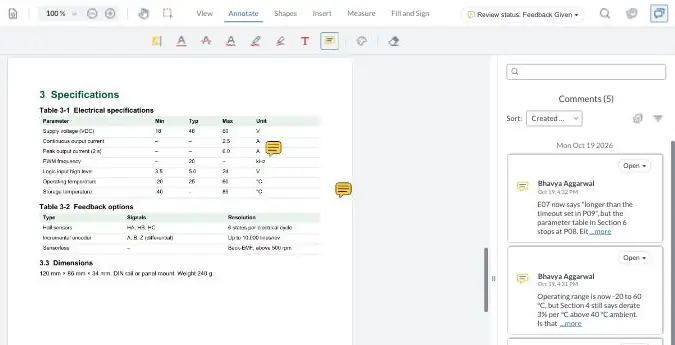
Your demo comments are private to this visit.
When is zipBoard not the right tool for this?
- You need a validated electronic signature on the approval (for example under 21 CFR Part 11). zipBoard records reviewer decisions but isn’t a validated e-signature system; keep the formal approval in your eQMS and use zipBoard for the review before it.
- Labeling change control lives in your QMS and every reviewer already works there happily. Adding a second place to comment would cost more than it saves.
- Comments must write back into DITA or XML source. zipBoard comments stay on the PDF; writers apply them in the source.
- One reviewer, a short document, rare revisions. The Excel checklist and your current tools are enough.
AI review for manuals is in private beta: a first pass that checks a PDF against your style guide or terminology rules before it reaches safety and regulatory. A person accepts or rejects every finding.
Ask about early accessStill running reviews in Acrobat?
If shared review is the step that breaks, start with what fails and the fixes people try.
Adobe shared review not workingSafety and regulatory review of manuals: common questions
What is the difference between a technical review and a safety review of a manual?
The technical (SME) review confirms the content is correct for the product: values, procedures, part callouts. The safety review confirms every hazard the user can act on has a clear message, in the right place, using the signal words and symbols your standard requires. One person can do both, but they are different checks.
Who should sign off a product manual before release?
Every group whose content is in it: usually engineering SMEs, product safety, regulatory or compliance, and a release approver who confirms all of them decided on the same revision. Peer and editorial review comes first but doesn’t usually carry formal sign-off.
Does a small change mean the whole manual goes back for review?
Not necessarily. Each group needs to see the changes in its area. Send them only what changed, record that they reviewed it, and keep the comparison with the record. A change inside a safety message always goes back to safety.
What standards apply to safety information in manuals?
Commonly IEC/IEEE 82079-1 for information for use in general, ANSI Z535.6 for safety messages in manuals in the US, and the product-specific standards and regulations for your sector and markets. Your regulatory team decides which apply.
Can product instructions be delivered digitally in the EU?
Under Regulation (EU) 2023/1230, which applies to machinery from January 2027, instructions for use may be digital if they identify the product model and stay accessible online, with a free paper copy on request at purchase. Essential safety information for machinery that non-professionals may use must still be on paper. Check the details with your regulatory team.
What is a comment resolution sheet?
A log of every review comment with the reviewer, its location, the disposition (accepted, rejected with a reason, or deferred), the response, and the revision where it was fixed. It’s often part of the record for a regulated document.
Can regulatory or outside reviewers comment without a licence?
In zipBoard, yes: share-link reviewers comment on the PDF in the browser without signing up, and reviewers and collaborators are unlimited on every plan.
Know who signed off which revision
Every review group on one copy of the manual, a decision per group per revision, and a clear answer to “what changed since safety approved it?”
No credit card needed. Reviewers are always free.
Related: Technical document review software for SME sign-off · Document approval for engineering and documentation teams · Technical document review checklist · Compare documents side by side · Get SMEs to review technical docs on time · Running technical documentation reviews with many SMEs