Add PDF markup and review to your platform
Your users need to mark up PDFs and drawings, and building that on a PDF SDK takes months. zipBoard is a finished review layer: your system sends the PDF by URL, people mark it up, and tasks and comments come back through the API.
REST API reference at docs.zipboard.co. Reviewers never need an account.
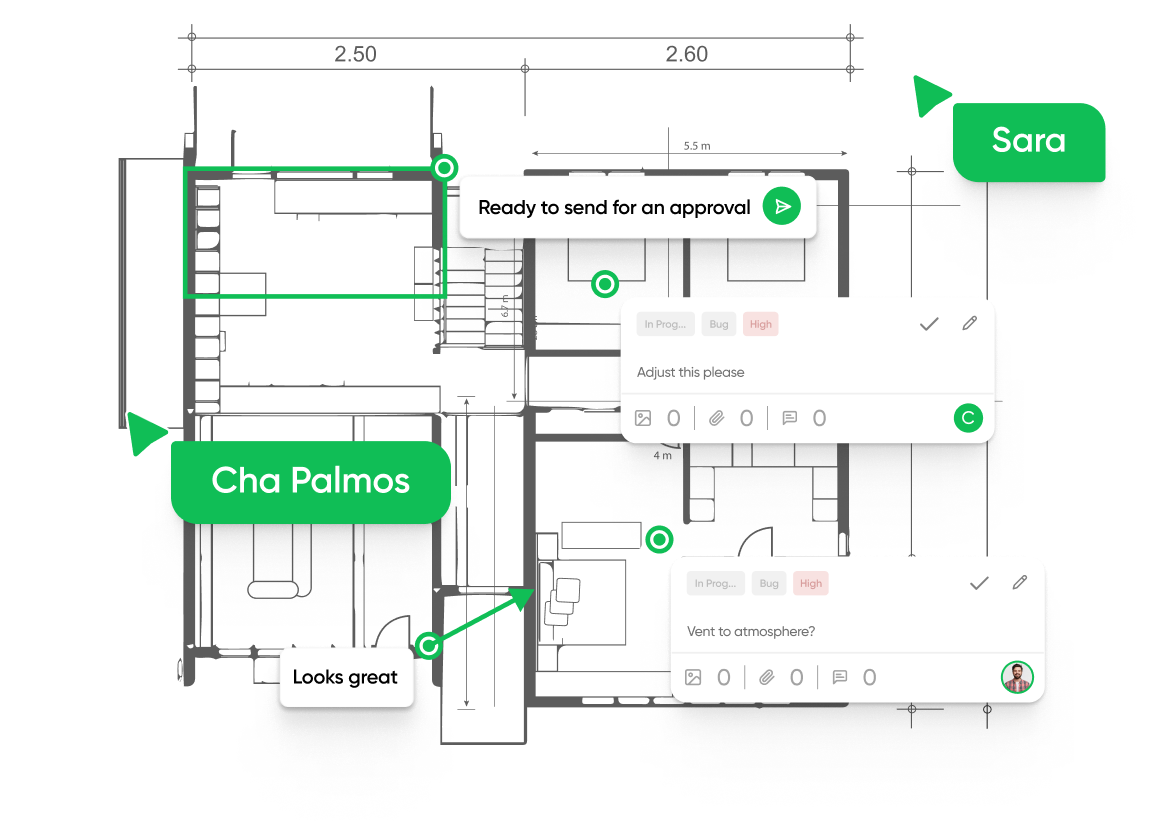 zipBoard review, embedded
Illustration: a zipBoard share link embedded in your own portal. The PDF stays in your system.
From your system to marked-up PDF and back, in four steps
Your code calls the API from your server. zipBoard does the viewer, markup tools, tasks and sign-off.
Your system sends the PDFAdd a hosted PDF to a project by its URL. The file stays where it is.
The API sets up the reviewCreate (or pick) the project and create a share link for the reviewers.
Reviewers mark it upFrom the link in any browser, or inside your own app through an embedded link. Highlights, clouds and notes become tasks.
Results come backPull tasks, comments, replies and markups into your system, reports and dashboards.
A first request
Generate an API key in your zipBoard profile, keep it on your server, and send a bearer token with each request to app.zipboard.co. This lists your organization’s projects:
curl "https://app.zipboard.co/api/v1/project?orgid=YOUR_ORG_ID" \
  -H "Authorization: Bearer YOUR_TOKEN" \
  -H "Content-Type: application/json"
Call the API from your server, never from code that runs in a user’s browser. Full parameters and responses: API reference.
What reviewers get, ready on day one
- Highlight, underline, strikeout, notes, free text and free hand
- Clouds, arrows, polygons and callouts on drawings and blueprints
- Calibrate and measure distance, area, perimeter and counts
- Stamps, signatures, ticks and date stamps
- Markups that become tasks with an owner, priority and status
- Required reviewers and a decision per reviewer, per version
- Side-by-side compare of two PDF versions
Three ways teams use the API
Most integrations are one of these, or a mix.
A review step inside your DMS or ERP
Drawings, submittals and specs stay organised in your system of record, such as SAP. When a document needs review, your system sends it by URL, picks or creates the project and creates the share link. Review status and delays show up in your own reports.
Uses: Projects, Files, Share URLs, Tasks, Comments, Responses
Review projects created automatically
A new job, project or course in your platform creates the matching zipBoard project and its share links. Every review starts with the same setup, and nobody has to do it by hand.
Uses: Projects, Share URLs
Review data in your dashboards
Pull tasks, comments and replies on a schedule into BI dashboards, an issue tracker or an LMS. Report on open items, owners and recurring issues across every project in one place.
Uses: Tasks, Comments, Responses
Embed review in your own app or portal
A zipBoard share link can sit in an iframe inside your product, client portal or intranet. Your users open a drawing or document in your app and mark it up right there, without switching tools.
- Guests need no account. People you share with comment from the link, with no sign-up or install.
- You control access. A link can require sign-in, carry a password and an expiry date, and be revoked.
- Internal stays internal. Guests don’t see your team’s internal comments.
- Same data either way. Markups made in the embedded view come back through the API like any others.
Share link options: Different share link options. Building zipBoard into your product? Ways to partner with us.
This is an embedded zipBoard review
The PDF below isn’t a screenshot. It’s a zipBoard share link in an iframe on this page, the same way it would sit in your app or portal. Highlight a line, draw a box or reply to a comment. Your demo comments are private to this visit.
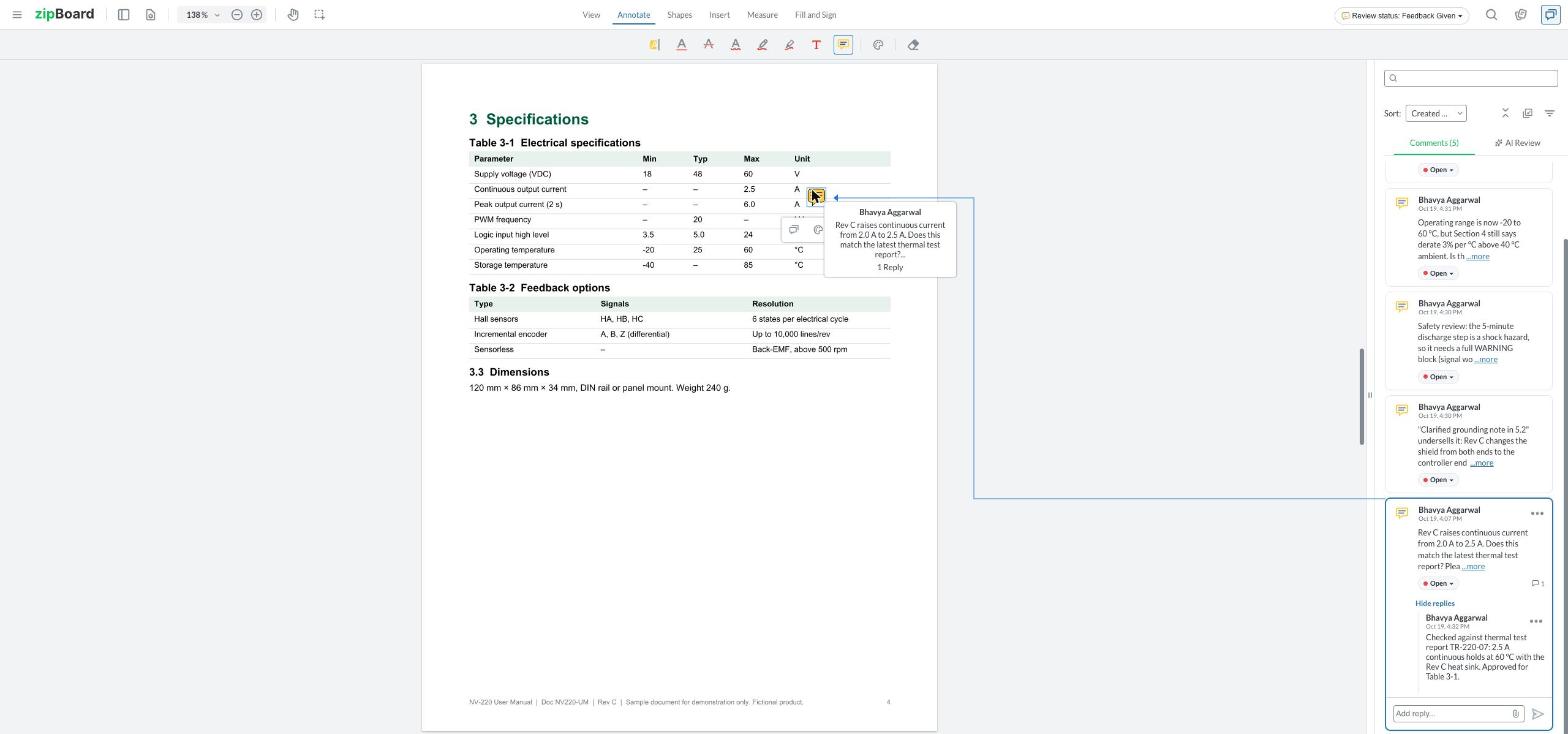
<iframe src="https://app.zipboard.co/s/<your-share-link>"
        width="100%" height="700" title="Review in zipBoard"></iframe>
That one tag is the whole embed. Add sign-in, a password or an expiry date in the share link settings.
Your PDFs never leave your system
When your system adds a PDF by its URL, zipBoard doesn’t store a copy of the file. Only the comments and markups people add are kept, in zipBoard’s database.
The PDF stays in your system of record. Comments and markups are stored in zipBoard’s database and come back to you through the API.
For controlled documents and data-residency rules, Enterprise offers hosting options and sign-in through your identity provider. We work out the setup with your IT team.
What IT usually asks
Where are files stored? With review by URL, in your system. Files uploaded in the zipBoard app are stored in zipBoard’s cloud, or on your servers with Enterprise.
Where are comments stored? In zipBoard’s database.
How do people sign in? Email, Google or Microsoft, or SSO on Enterprise. Guests use a share link.
Straight answers
zipBoard is hosted on AWS, with data encrypted in transit and at rest and role-based access. zipBoard doesn’t hold a SOC 2 report or ISO 27001 certificate; we complete security questionnaires, and a security white paper is available on request.
Security at zipBoard · Review documents that stay on your servers
A ready review layer or a PDF SDK: which fits?
PDF SDKs such as Apryse and Nutrient, and open-source PDF.js, are code libraries: you build the viewer and the workflow around them. zipBoard is a finished product you connect to. Both are good choices for different jobs.
| zipBoard review layer + API | Commercial PDF SDK (e.g. Apryse, Nutrient) | Open-source PDF.js | |
|---|---|---|---|
| What it is | A hosted review product with a REST API and embeddable links | Libraries for viewing, editing, annotating and more across web, mobile, server and desktop | A web-standards platform for parsing and rendering PDFs |
| What you build | The connection: send PDFs by URL, read tasks and comments back | The viewer UI, comment threads, tasks, notifications, permissions and sign-off | Markup tools, storage, collaboration and workflow on top of the renderer |
| Team review workflow | Included: tasks with owners, required reviewers, decisions per version, compare | Yours to design and build | Yours to design and build |
| Outside reviewers | Comment from a link with no account | You build guest access | You build guest access |
| Where it runs | zipBoard’s cloud; Enterprise hosting on your servers, region, private cloud or Azure | Apryse says it can be deployed on your own infrastructure | Wherever you host it |
| Control of the viewer | zipBoard’s interface; custom URL and logo on Enterprise | Full control | Full control |
| Editing, redaction, PDF generation | No: zipBoard reviews, it doesn’t edit PDFs | Yes, per each vendor’s product pages | Rendering only |
| Best when | You want review working in weeks, not a product to build | Markup or document processing is your core product | You need a free viewer and have engineers to build the rest |
Choose zipBoard when
- Review is a step in your product, not the product itself
- Outside reviewers must mark up without an account
- You need tasks, owners and sign-off, not just annotations
- Files must stay in your system (review by URL)
- You’d rather not maintain a viewer, permissions and notifications
Choose an SDK when
- Markup is your core product and you need full UI control
- You need native mobile apps or offline markup in the field
- You need to edit, redact, fill, sign or generate PDFs
- Nothing may run on a third party’s service at all
- You have engineers to build and maintain review workflow
Sources: Apryse PDF SDK · Nutrient SDK · PDF.js · zipBoard API guide.
What the zipBoard API covers
Eleven areas, each documented in the API reference.
| Area | What it covers |
|---|---|
| Projects | List, create, update and delete projects in your organization |
| Collaborators | See and remove the people on a project |
| Files | Add hosted PDFs and website URLs for review, list uploads, update or delete files |
| Tasks | Create, update, assign and delete tasks (issues) |
| Comments | Read and add comments that aren’t tasks |
| Responses | Replies on tasks and comments |
| Annotations | Drawings and markup on screenshots and PDFs |
| Screenshots and videos | Screenshot and video uploads, plus account limits |
| Share URLs | Create and manage review (share) links |
| Users | User details and authentication |
| Organizations | Organization details |
The API takes hosted PDF URLs and website URLs. Images, video, audio and SCORM courses are added in the zipBoard app.
Ready-made integrations
For common workflows you may not need the API at all. Send tasks to an issue tracker, notify a channel, or push markups into your construction platform.
Show review under your own name
Enterprise plans include a custom URL and your logo, so reviewers see your brand when they open a link or the embedded view.
Enterprise also adds SSO and the hosting options above. Pricing is by quote; reviewers and collaborators are unlimited on every plan.
Who builds on zipBoard
Software companies, system integrators and in-house IT teams that need document review inside a system they already run.
Construction platforms
Add drawing and submittal markup, with clouds and measurement, to a project platform. Owners, consultants and subcontractors review from a link. Construction drawing review
Document management systems
Keep controlled documents in your DMS and add a review step with tasks and sign-off, without moving the files.
SAP and ERP rollouts
Send drawings, specs and submittals from the ERP for review by URL, and bring review status back into ERP reports.
LMS and course platforms
Create a review project when a course is created, and feed reviewer comments back into the course workflow.
Agencies and client portals
Put client review inside your portal with an embedded link, under your own URL and logo on Enterprise.
Reporting and BI teams
Pull open items, owners and recurring issues from every project into one dashboard.
Systems you can connect to zipBoard
If a system can hand zipBoard a PDF link and call a REST API, it can add a review step. These are the platforms teams most often ask about.
Document management
SharePoint and OneDrive, Google Drive, Box, Dropbox, M-Files, OpenText and other DMS tools. Send a PDF by URL, get tasks and comments back.
ERP, PLM and quality
SAP, Oracle, Siemens Teamcenter, PTC Windchill and QMS tools. Add review to a change or release process while the file stays in the system of record.
Project and drawing platforms
Procore (ready-made integration), Autodesk Construction Cloud, Aconex and in-house project portals, for drawing and submittal review with clouds and measurement.
Trackers and chat
Jira, Wrike, Slack, Microsoft Teams and Outlook (ready-made), plus Asana, monday.com, ServiceNow and Salesforce through Zapier or the API.
LMS and course tools
Moodle, Canvas, Cornerstone, Docebo and authoring workflows. Create a review project when a course is created, then feed comments back.
BI and dashboards
Power BI, Tableau, Looker or a data warehouse. Pull open items, owners, decisions and recurring issues across every project.
Jira, Slack, Microsoft Teams, Procore, Wrike, Outlook and Zapier are ready-made integrations. The others connect through the zipBoard API or an embedded share link, built by your team or ours.
What it looks like in practice
Review without moving a single file
An enterprise that keeps its controlled documents in SAP sends PDFs to zipBoard by URL. Reviewers mark them up from a link, every markup becomes a task, and status flows back. The PDFs stay in SAP and are never copied to zipBoard’s servers; only comments and markups are stored with us.
An embedded review on another domain
We run the same embed on zipboard.co, including on this page: a zipBoard share link sits inside our own site, and visitors mark up a sample PDF without leaving it. Your app or portal works the same way. Try the live example
We don’t name customers without their written OK. Ask us for a reference call during your evaluation.
An MCP connector for AI assistants
We’re building a zipBoard MCP (Model Context Protocol) server, so AI assistants and agents can work with your reviews through the same permissions as the API.
Ask about a review
“What’s still open on the pump manual, and who owns it?” An assistant reads tasks, comments and decisions and answers in plain language.
Start a review from a chat
Create a review project, add a PDF by URL and get a share link, from an assistant or an agent workflow.
Use it where you work
Planned for MCP-capable assistants such as Claude, ChatGPT and Microsoft Copilot, and for agents your team builds.
PDF review API: common questions
Is zipBoard a PDF SDK?
No. zipBoard is a hosted review product with a REST API and embeddable share links. You don’t build a viewer; you send PDFs for review and read the results back. If you need a code library to build your own viewer, edit PDFs or work offline, a PDF SDK such as Apryse, Nutrient or PDF.js is the better fit.
Can we embed zipBoard in our app?
Yes. A zipBoard share link can be embedded in an iframe in your own app, portal or intranet, so people mark up PDFs without leaving your product. Markups made there come back through the API like any others.
Do PDFs get copied to zipBoard?
Not when your system adds them by URL through the API. zipBoard opens the PDF from your system and doesn’t store a copy of the file. Files uploaded directly in the zipBoard app are stored in zipBoard’s cloud, or on your servers with Enterprise.
Where are comments and markups stored?
In zipBoard’s database. Your system can pull tasks, comments, replies and markups back through the API at any time. For data-residency needs, Enterprise offers region-specific, private-cloud, Azure and customer-server hosting.
Do our users need zipBoard accounts?
Reviewers don’t. Guests mark up from a share link with no account or install. You can require sign-in, add a password or an expiry date, or revoke a link. The people who run reviews and call the API use zipBoard accounts.
Can we white-label it?
Enterprise plans include a custom URL and your logo. The review interface is zipBoard’s; if you need full control of every part of the viewer, an SDK is the better choice.
Which file types does the API accept?
Hosted PDF URLs and website URLs. Other content types zipBoard reviews, such as images, video, audio and SCORM or HTML courses, are added in the zipBoard app.
How does authentication work?
Generate an API key in your zipBoard profile, keep it on your server, and send a bearer token in the Authorization header of each request. Never call the API from code that runs in a user’s browser. Refreshing the key makes the old one stop working.
Can reviewers mark up blueprints and drawings?
Yes. Reviewers add clouds, arrows, polygons and callouts, and calibrate the scale to measure distance, area, perimeter and counts. Markups become tasks with an owner and status that your system can read back.
Does zipBoard integrate with our project management tools without code?
Yes. zipBoard connects directly with Jira, Wrike, Slack, Microsoft Teams, Procore and Outlook, and with other tools through Zapier. Use the API when you need review inside your own system.
Is there an MCP server for zipBoard?
Not yet. We’re building one so MCP-capable assistants such as Claude, ChatGPT and Microsoft Copilot can read review status and start reviews with the same permissions as the API. Ask us to join early access.
How do we get started?
Tell us what you’re building, who your users are and which systems are involved. We’ll walk through the approach with you, then you can test the API with a key from your zipBoard profile.
Put PDF review inside your platform
Tell us what you’re connecting, and we’ll map the integration with you.
Reviewers are always free and never need an account.