
eLearning review tool

eLearning review tool for course QA and SME sign-off

Built in Storyline, Rise, Captivate, an AI course builder or your own HTML? Upload the SCORM ZIP or add the course URL and send one link. SMEs, leaders and partners comment on the exact screen, with no LMS login and no authoring-tool licence, and you can see who still has to sign off.

No credit card needed. Reviewers are unlimited on every plan.

See a course review in zipBoard

Click through the four steps. In step 1, click the green pins to see what each part of the review screen does.

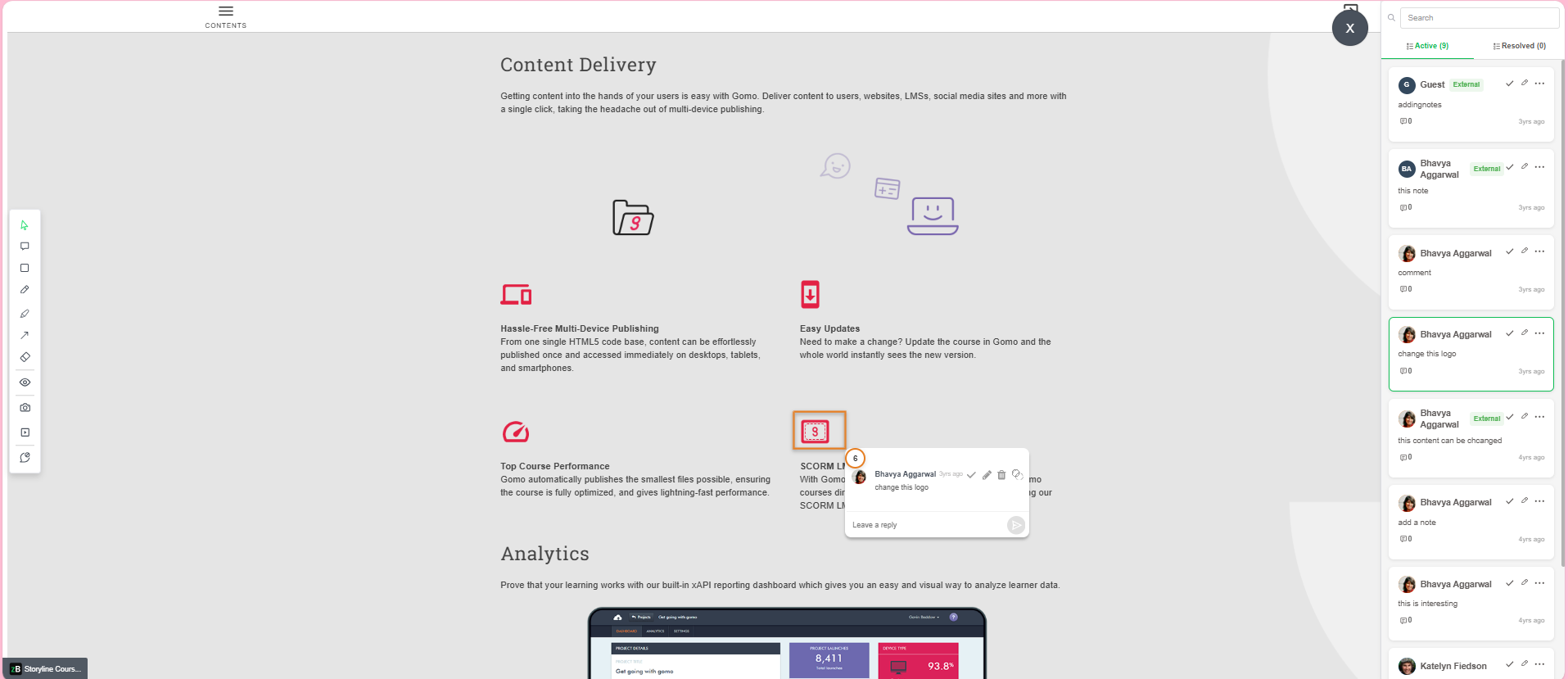
An eLearning course open in zipBoard with a pinned comment and the comment panel

Comment on the exact screen

Reviewers click the button, image or line of text they mean and type. The comment stays pinned to that spot on that screen, so nobody has to describe "the slide with the blue background".

Works on SCORM and HTML ZIPs, hosted courses, videos, PDFs and storyboards.

Example task

Quiz 3: wrong answer marked correct

Assigned toCourse developer
PriorityHigh
TypeAssessment
Due dateFriday
Status
OpenIn ProgressWaiting on SMEResolved/FixedQA VerifiedWon't Fix
Captured with the task: browser, OS and screen resolution, the file or URL, and the exact screen, plus who created it and when.

Every comment becomes a task

Give it an owner, a priority, a due date and a status. Add watchers, log time, and keep the discussion on the task.

Your workflow, your words. Rename and add statuses (for example "Waiting on SME") and task types (Content, Assessment, Media, Navigation, Accessibility).

Made for QA. Browser, OS and screen resolution are captured automatically, so a developer can reproduce "the button doesn't work" without a follow-up email.

Click a status to try it.

Storyboard

Script: policy number out of date
Medium

Alpha

Narration doesn't match on-screen text
High
Next button skips screen 5
High

Beta

Low contrast on the menu text
Medium

Gold

Typo in the closing screen
Low

Run review rounds on a Kanban board

Switch the task list between Table and Kanban. Set up a board for each stage (storyboard, alpha, beta, gold) and drag tasks across as the course moves forward.

Try it: drag a card to another column. Project boards are on Enterprise and custom plans.
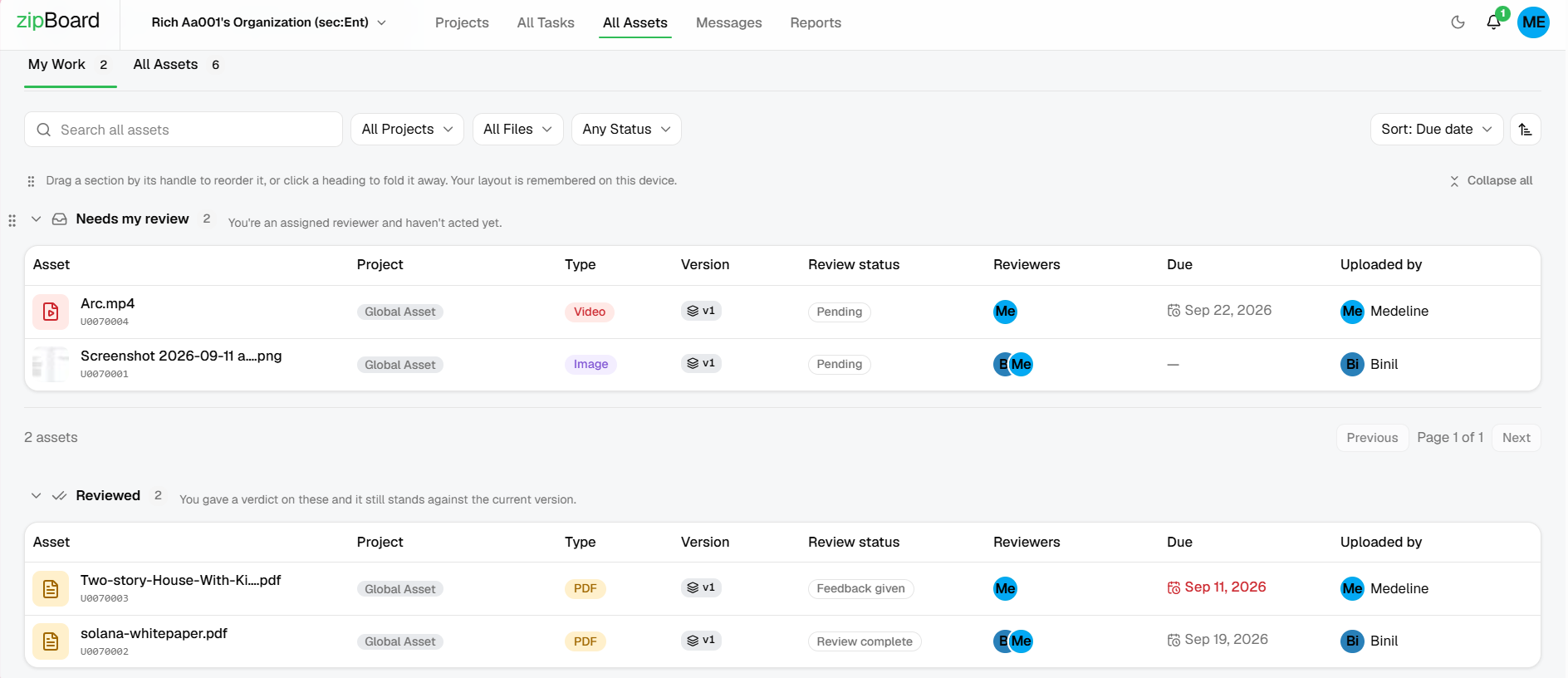
My Work list of courses waiting for review with due dates and review status

See who still has to sign off

Reviewers find every course waiting for them in My Work › Needs my review, with the due date. You see each decision (Approved or Changes Requested) and who is still outstanding.

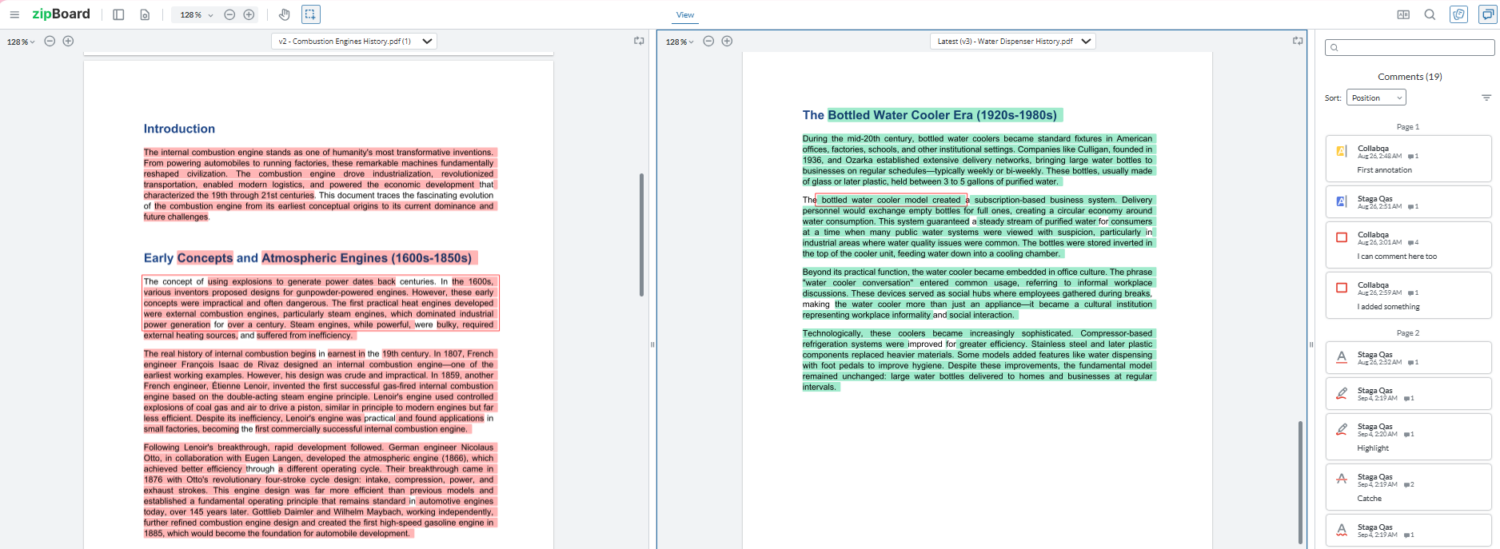
Upload the next build as a new version and compare it side by side. Approvals reset on every new version.

One link for every reviewer

Storyboard to course: scripts, videos and SCORM in one project

Reviewers are free on every plan

The questions L&D teams ask us first

AI-built courses, several authoring tools, busy SMEs and strict IT policies. Here is what training teams tell us gets in the way of a clean review.

We build courses with AI faster than we can review them.

Whatever the AI or agentic workflow produces, publish it as SCORM, HTML or a URL and send it for review the same day. Experts check the facts, the policy and the quiz answers on the screen itself.

Our editors keep changing. Partners need one clean place to review.

Your build tools can change every month. Reviewers always get the same simple link: the course, a comment box and nothing else to learn.

Senior leaders won't create an account just to leave a comment.

Turn sign-in off on the link. Reviewers add a name so their comments are attributed, and that's it. No zipBoard account, no password, no Articulate login.

Every course is built differently.

Legacy courses from an in-house tool, a contractor's Storyline batch, your new standard template: zipBoard reviews the published output, so how each one was built doesn't matter.

SCORM Cloud says it works. Is the content right?

A sandbox tells you the course launches and reports completion. zipBoard is where SMEs catch the wrong figure, the mis-marked quiz answer and the step that isn't in the policy.

How do we know when a review is done?

Reviewers you add get an email and see the course in their own list of reviews to do. You see each decision (Approved or Changes Requested) and who is still outstanding.

We export review comments to Excel just to track fixes.

Every comment is already a task with an owner and a status. Filter by status, type or reviewer, export a CSV when you need a record (Enterprise), or send review data to your own systems through the API.

Our IT is strict about sharing outside the company.

Choose per link who can view and comment, add a password or an expiry date, and use SSO. Enterprise teams can keep courses on their own servers or region.

Did they actually fix what I asked?

Upload the next build as a new version and open both side by side. Each reviewer checks their own comments instead of re-reviewing the whole course.

Reviews are a nightmare: screenshots, email threads, spreadsheets.

Reviewers click on the screen they mean and type. The comment is pinned to that spot, with a screenshot, so nobody has to describe "the slide with the blue background".

Our volunteer and SME reviewers aren't technical.

They open one link in the browser and comment. Nothing to install, no new tool to learn. Copy editors can handle formatting so SMEs can stay on accuracy.

We moved to a new LMS. It still has no review workflow.

Your LMS delivers and tracks the course. Review happens before that: review the SCORM export in zipBoard, fix it, then publish to whichever LMS you use.

Already using Articulate Review 360?

Keep it. Review 360 works well for quick feedback on courses you publish from Articulate 360. Teams add zipBoard when their reviews go beyond that.

Review 360 is built for

  • Courses published from Articulate 360 apps (Storyline, Rise, Studio), plus uploaded videos
  • In-context comments with screenshots, due dates, reminders and threaded replies
  • Reviewers who open a link in the browser and enter an email address to comment

zipBoard adds

  • Every course in one place: SCORM and HTML from Captivate, iSpring, AI course builders, custom HTML and older in-house tools, plus storyboards, scripts, PDFs and videos
  • Feedback that becomes work: every comment is a task with an owner, priority and status, with Jira, Slack, Microsoft Teams and API connections, so nobody rebuilds the list in Excel
  • Proof of what changed: two versions side by side, and approvals that reset on each new build
  • Reviewer access your way: sign-in optional, password, expiry dates, SSO, and courses kept on your own servers or region (Enterprise)

Review 360 details from Articulate's own support articles, Publish Content to Review 360 and Review 360 FAQs, checked 21 Oct 2026.

Is a review tool worth it? Work out what your reviews cost today

Most teams don't pay for review with a licence. They pay with hours: chasing SMEs, copying comments out of email, working out what "the second slide" means, and running one more round because nobody could see what was fixed. Move the sliders to match your team.

Your review process

25
3
5
1.5
6
$75
30%

Hours spent on review overhead each year

0

What those hours cost

$0

Hours you could get back at 30%

0

An estimate from your own numbers. Laerdal Medical reported a 50% cut in review time after moving from Word documents to zipBoard; the default here is set lower on purpose.

Fewer roundsComments on the exact screen are clear the first time, and a side-by-side version check replaces "can you look at the whole course again?"
No late, expensive fixesCatching a wrong fact at storyboard or alpha costs minutes. Catching it after narration is recorded means re-recording.
A record you can showWho reviewed which version, what they asked for and who approved it, without rebuilding the story from email.

Why review time adds up: building one finished hour of basic (level 1) eLearning took 49 to 125 hours, and interactive (level 2) 127 to 267 hours, in the Chapman Alliance study (2010, 249 organizations). Reviews and revisions sit inside every one of those hours. Laerdal figure: Laerdal Medical case study.

Who still has to sign off on this course?

Add the SMEs and leaders whose sign-off you need. They get an email, and the course lands in their own Needs my review list with the due date.

See every decision at a glance: Approved, Changes Requested or still waiting.

Nudge the one holding it up with an @mention on the exact screen.

My Work dashboard filtered by individual sections, showing pending review items and completed reviews categorized with detailed status, file types, and due dates.

What changed in this build, and was my comment fixed?

Upload the next build as a new version of the same course. Old approvals reset, so sign-off on v1 never counts for v2.

Open both versions side by side and check each comment was handled, without downloading two packages.

compare two document versions side by side with zipBoard

Do reviewers need a login, an LMS or a licence?

No. They open one link in the browser and comment on the exact screen. You decide whether the link needs a sign-in, a password or an expiry date.

Pin a comment on a button, a quiz answer or a line of narration, attach a screenshot, and tag it Content, Assessment, Media or Navigation.

Reviewers are free and unlimited on every plan.

zipBoard interface showing collaborative review of a SCORM file with visual annotations and threaded comments in the right-hand panel.

Can you run QA the same way on every course?

Use one checklist and the same issue types on every course, whether it came from Storyline, Rise, Captivate, an AI builder or your own HTML. Every comment becomes a task with an owner, a priority and a status.

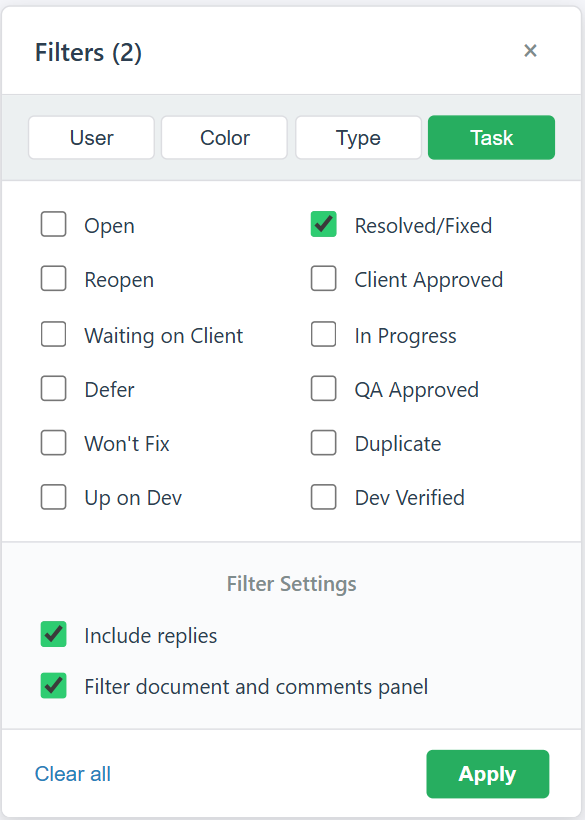
Filter by status, type or reviewer to see what still blocks launch, and export the list as your QA sign-off record (CSV, Enterprise). An AI assistant that flags grammar, consistency and broken links is in private beta with a few teams.

zipBoard Task Status Filter in Review View
Sneak peek · private beta

An AI first pass, before your SMEs spend a minute

We're testing an AI review assistant with a small group of eLearning teams. It reads the course first and flags the editorial issues that eat reviewers' time, so SMEs can focus on whether the content is right.

  • Spelling, grammar and punctuation
  • Inconsistent terms, tone and style
  • Formatting inconsistencies
  • Broken links

People stay in charge: findings go to your reviewers, who decide what gets fixed. Available today: AI-suggested task types and auto-tagging for tasks.

Ask about the beta

AI first pass · Module 2 (illustration)

Spelling"recieve" on screen 4Suggested: receive
Create taskDismiss
Consistency"e-mail" on screen 2, "email" on screens 5 and 7
Create taskDismiss
LinkResource link on screen 9 returns an error
Create taskDismiss

Illustration only. The beta's screens and checks may change.

How does a course review run in zipBoard?

Upload the SCORM or HTML ZIP, or add the course URL (no LMS needed).

Add the SMEs who must sign off and share a link with everyone else (sign-in optional).

Reviewers comment on the exact screen. Each comment becomes a task with an owner.

Upload the next build, compare versions and record who approved it.

How does zipBoard compare with email, spreadsheets or an LMS sandbox?

Most training teams review courses one of these three ways. They solve different problems.

Email, Word and spreadsheetsLMS sandbox (e.g. SCORM Cloud)zipBoard
Best forSmall, one-off reviewsChecking a course launches and reports to the LMSCourse QA and SME sign-off
Where feedback goesInboxes, a Word doc and a shared sheetNot built for reviewer commentsPinned on the course screen, in one list
Reviewer accessAnyone with emailNeeds an accountOne link; sign-in optional
Who owns each issueTracked by hand—Assignee, priority and status on every comment
What changed between buildsAsk the developer—Open two versions side by side
Sign-off recordAn email trail—Reviewer decisions and an exportable issue list

Many teams use both: an LMS sandbox for tracking data, zipBoard for content review and sign-off.

Watch: course reviews in zipBoard

Set up a course review with the Learning Design template

How SMEs and guests review from a link

50%

less review time at Laerdal Medical

Any

SCORM, HTML, URL, video or PDF

Free

for every SME you invite

When is zipBoard the right fit, and when isn't it?

zipBoard is a good fit if:

  • SMEs, leaders or clients who don’t have seats in your authoring tool
  • Courses from several tools, contractors or AI builders
  • Several review rounds before launch, with a sign-off you need to prove
  • Feedback stuck in email, Word documents or spreadsheets

You may not need it if:

  • Your only problem is SCORM tracking data (start with an LMS sandbox)
  • Every reviewer already works happily inside one authoring tool’s own review
  • One reviewer, one short course

Most teams keep their authoring tools and LMS and use zipBoard only for review and sign-off.

Frequently asked questions

An eLearning review tool lets SMEs, clients and QA reviewers comment directly on a course, video or storyboard, and tracks each comment until it’s fixed. It replaces review by email, Word documents, spreadsheets and screenshots.

Yes. Upload the SCORM or HTML ZIP to zipBoard (with the start file, usually index.html, at the top level) or add the course URL. Reviewers open it in the browser; no LMS login is needed.

Yes. Keep the storyboard or script (PDF, Word export or images), narration and training videos, and each SCORM or HTML build in the same project. Reviewers comment on each one the same way, every comment becomes a task, and you can see the whole course move from storyboard to final build without switching tools.

No. You can turn sign-in off on a share link, so reviewers just add their name and comment. They don’t need an Articulate or Captivate licence. For stricter projects, require sign-in, add a password or set an expiry date.

Courses published as SCORM or HTML from Articulate 360 (Rise and Storyline), Articulate Presenter, Adobe Captivate, Adobe Presenter and iSpring, plus any valid SCORM package. Courses from other tools, including Adapt, Elucidat and Lectora, can be reviewed from their hosted URL.

Yes. Export a static SCORM or HTML ZIP (or an MP4 for AI video) from your AI course builder or agentic workflow, upload it, and ask SMEs to check facts, policy, invented details, quiz answers and gaps.

Upload the new build as a new version of the same course and compare the two versions side by side. Approvals from the previous version reset.

Yes. Export comments and tasks as a CSV (Enterprise), connect Slack, Microsoft Teams or Jira, or use the zipBoard API to send review data to your own systems.

Enterprise teams can use SSO and keep files on their own servers or in their own region. You can also review a course hosted on your own CDN or LMS by its URL. See Security at zipBoard for details.

Not always. Review 360 works well for courses published from Articulate 360 apps. Teams add zipBoard when they also review courses from other tools (Captivate, iSpring, AI course builders, custom HTML), storyboards and PDFs, or when they need every comment tracked as a task, versions compared side by side, and enterprise options such as SSO or keeping courses on their own servers.

zipBoard reviews more than courses: storyboards, scripts, PDFs, videos and websites sit in the same project as the SCORM course, with the same tasks, sign-off and version compare. It connects to Jira, Slack, Microsoft Teams and your own systems through the API, and reviewers are free on every plan.

Each reviewer sees the courses waiting for them in one list, with due dates. You see every course’s review status and open issues in one place, and can filter comments by status, type or reviewer across a project.

Publish the course as SCORM or HTML, upload the ZIP to zipBoard (or add the course URL), and send SMEs one link. They comment on the exact screen in the browser, and every comment becomes a task you can assign and track to sign-off.

Yes. Turn sign-in off on the share link and reviewers just add their name so comments are attributed. For stricter projects you can require sign-in, add a password or set an expiry date.

Many teams plan one to three rounds, for example storyboard, alpha and beta, plus a final check. Clear on-screen comments and a side-by-side check of the next version stop the rounds from creeping up.

Yes. Each task records the browser, operating system and screen resolution, the file or URL and the screen it was raised on, so developers can reproduce issues without a follow-up email.

Yes. Add or rename statuses (such as “Waiting on SME”) and task types, and switch the task list between Table and Kanban. Project boards for stages like storyboard, alpha, beta and gold are on Enterprise and custom plans.

Yes. zipBoard reviews SCORM and HTML packages with start-file detection, compares course versions side by side, and has a Learning Design template for course projects. L&D teams at Laerdal Medical, KnowBe4 and Swiss Learning Hub use it for course review.

Usually the cost is already there in hours: reviewers writing up feedback, owners consolidating and chasing it, and extra rounds when nobody can see what was fixed. Use the calculator on this page with your own numbers; Laerdal Medical reported a 50% cut in review time.

AI-suggested task types and auto-tagging are available today. An AI review assistant that does a first pass for spelling, grammar, consistency, formatting and broken links is in private beta with a small group of teams.

No. An LMS sandbox like SCORM Cloud tests whether a course launches and reports completion and scores. zipBoard is for content review and sign-off. Many teams use both.

©️ Copyright 2026 zipBoard Tech. All rights reserved.