
PlanGrid vs zipBoard

A PlanGrid alternative for marking up drawings and getting them signed off

PlanGrid is no longer sold to new customers. If your team used it to mark up sheets, share them with clients and consultants and track revisions, zipBoard does that in the browser: one link, no account for reviewers, every markup tracked to sign-off.

No credit card needed. Reviewers are always free.

Try it: mark up this drawing, no PlanGrid licence needed

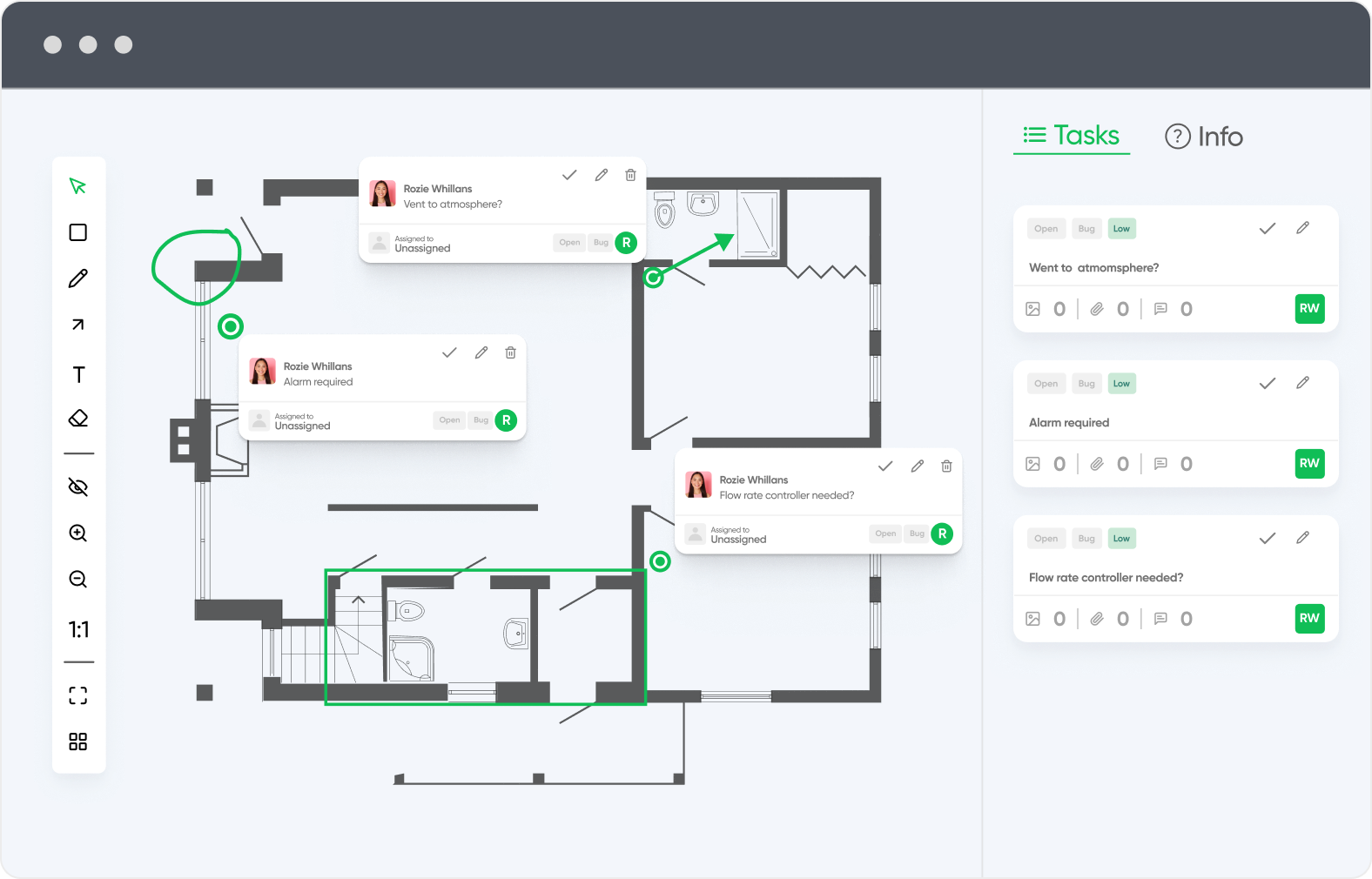
No sign-up. Click Annotate to leave a comment or Measure to check a dimension. This is exactly what your reviewers see when you send them a zipBoard link.
This is a shared demo file, so you may see markups from other visitors.

Stop sharing one licence across the office

On a typical project, the people who need to comment on drawings far outnumber the people who produce them. With zipBoard, everyone outside your team reviews for free.

Clients and trade partners review free

Owners, consultants, subcontractors and trade partners open a link and mark up the drawing. No licence, no app, no install.

No per-user pricing for your team

zipBoard plans are priced by the number of files you review, with unlimited collaborators and reviewers. Adding a new sub or consultant to a project costs nothing.

What it takes in Forma Build

PlanGrid isn't sold to new customers. Its replacement, Forma Build, adds schedules, cost, RFIs, submittals and meetings. Teams that only mark up sheets end up taking on a whole construction suite.

Clients and trade partners review free: no licence, no account

Pay for files, not per-user licences

Find every open comment in one click

zipBoard vs PlanGrid (now Forma Build): how do they compare?

Feature

zipBoard logo
PlanGrid / Forma Build

Built for

Getting drawings and documents reviewed and approved by your team, clients and consultants

Field access to plans, issues, photos and forms for GCs, subs and owners. Forma Build adds RFIs, submittals, meetings, schedules and cost

Where it runs

Any modern browser. Nothing to install

iOS, Android and Windows apps, plus web

Price

Priced by number of files, with monthly or annual billing

No longer sold to new customers. New teams buy Forma Build from Autodesk

Who pays

Priced by number of files. Clients, trade partners and reviewers are free and unlimited

Each person signs in with their own account

Outside reviewers

Open a share link and mark up. No account needed (optional sign-in, password, expiry)

Invited to the project, signing in to PlanGrid or Forma Build

Markup and photos

Clouds, arrows, shapes, highlights, text and stamps. Attach photos and files to any comment, or place an image on the sheet

Markups on sheets, and photos captured in the field from the mobile app

Measurement

Distance, area, perimeter, arcs and count, with calibrated and multiple scales per sheet

Takeoff is a separate Autodesk product (Forma Takeoff)

Comparing revisions

Two PDF versions side by side, with synced scroll and zoom

Sheets and files kept current in the cloud

Tracking comments

Each markup becomes a task with an owner, priority and status (Open / Resolved)

Issues with assignees, tracked in the app

Sign-off

Reviewers with due dates, Approved / Changes Requested decisions, custom stamps and signatures. Approvals reset on each new version

RFI and submittal workflows in Forma Build

Other file types

Images and renderings, video, websites and SCORM courses in the same project

Plans, files, photos and forms

Field and offline use

Browser-based. Not built as an offline field app

Built for the field, with mobile and Windows apps

Integrations

Procore, Jira, Slack, Microsoft Teams, Zapier, REST API

Autodesk Forma partner ecosystem and Autodesk Construction Cloud tools

Free trial

Yes, no credit card

30-day free trial of Forma Build

zipBoard vs PlanGrid (now Forma Build): how do they compare?

Feature

Built for

zipBoard logo

Getting drawings and documents reviewed and approved by your team, clients and consultants

PlanGrid / Forma Build

Field access to plans, issues, photos and forms for GCs, subs and owners. Forma Build adds RFIs, submittals, meetings, schedules and cost

Where it runs

zipBoard logo

Any modern browser. Nothing to install

PlanGrid / Forma Build

iOS, Android and Windows apps, plus web

Price

zipBoard logo

Priced by number of files, with monthly or annual billing

PlanGrid / Forma Build

No longer sold to new customers. New teams buy Forma Build from Autodesk

Who pays

zipBoard logo

Priced by number of files. Clients, trade partners and reviewers are free and unlimited

PlanGrid / Forma Build

Each person signs in with their own account

Outside reviewers

zipBoard logo

Open a share link and mark up. No account needed (optional sign-in, password, expiry)

PlanGrid / Forma Build

Invited to the project, signing in to PlanGrid or Forma Build

Markup and photos

zipBoard logo

Clouds, arrows, shapes, highlights, text and stamps. Attach photos and files to any comment, or place an image on the sheet

PlanGrid / Forma Build

Markups on sheets, and photos captured in the field from the mobile app

Measurement

zipBoard logo

Distance, area, perimeter, arcs and count, with calibrated and multiple scales per sheet

PlanGrid / Forma Build

Takeoff is a separate Autodesk product (Forma Takeoff)

Comparing revisions

zipBoard logo

Two PDF versions side by side, with synced scroll and zoom

PlanGrid / Forma Build

Sheets and files kept current in the cloud

Tracking comments

zipBoard logo

Each markup becomes a task with an owner, priority and status (Open / Resolved)

PlanGrid / Forma Build

Issues with assignees, tracked in the app

Sign-off

zipBoard logo

Reviewers with due dates, Approved / Changes Requested decisions, custom stamps and signatures. Approvals reset on each new version

PlanGrid / Forma Build

RFI and submittal workflows in Forma Build

Other file types

zipBoard logo

Images and renderings, video, websites and SCORM courses in the same project

PlanGrid / Forma Build

Plans, files, photos and forms

Field and offline use

zipBoard logo

Browser-based. Not built as an offline field app

PlanGrid / Forma Build

Built for the field, with mobile and Windows apps

Integrations

zipBoard logo

Procore, Jira, Slack, Microsoft Teams, Zapier, REST API

PlanGrid / Forma Build

Autodesk Forma partner ecosystem and Autodesk Construction Cloud tools

Free trial

zipBoard logo

Yes, no credit card

PlanGrid / Forma Build

30-day free trial of Forma Build

More review features for small teams, without per-user licences

In one zipBoard subscription

  • Unlimited collaborators and reviewers: you pay for files, not people
  • Share links with optional sign-in, password and expiry
  • Every markup becomes a task with an owner, priority and due date
  • Filters to find every open comment on a drawing
  • Phases and custom statuses for your review stages
  • Reviewers with due dates and an Approved / Changes Requested decision
  • Measurement with calibrated scales, and side-by-side version compare
  • Custom stamps and signatures
  • Drawings, renderings, images, video and web pages in one project

What moving to Forma Build adds

  • Schedules and meetings
  • Cost controls: budget, expense, change orders and forecasting
  • More configurable RFIs and submittals
  • Asset and model-based tracking
  • Machine-learning risk analysis

Useful if you run the whole project in one system. A lot to take on if what you need is markup and sign-off (Autodesk: PlanGrid and Forma Build).

If your team mainly marks up sheets and tracks revisions, a review tool covers that job, the whole office can work in it at once, and everyone outside your team reviews free.

Why do teams look for a PlanGrid alternative?

We hear the same things from teams that used PlanGrid:

  • “Autodesk keeps pushing us to upgrade to Build, which would cost a lot more and add things we don’t need.”
  • “We just need markups and photos on the drawings.”
  • “We share one PlanGrid licence across the office.”
  • “I don’t trust the price not to go up again.”
  • “The consultants’ comments come back by email, and we piece them together.”

PlanGrid is no longer sold to new customers. Autodesk points new buyers to Forma Build, which combines the best of PlanGrid and BIM 360, and existing users reach their PlanGrid projects through the Autodesk Forma mobile app (Autodesk: PlanGrid FAQ).

Can clients and consultants mark up drawings without a PlanGrid licence?

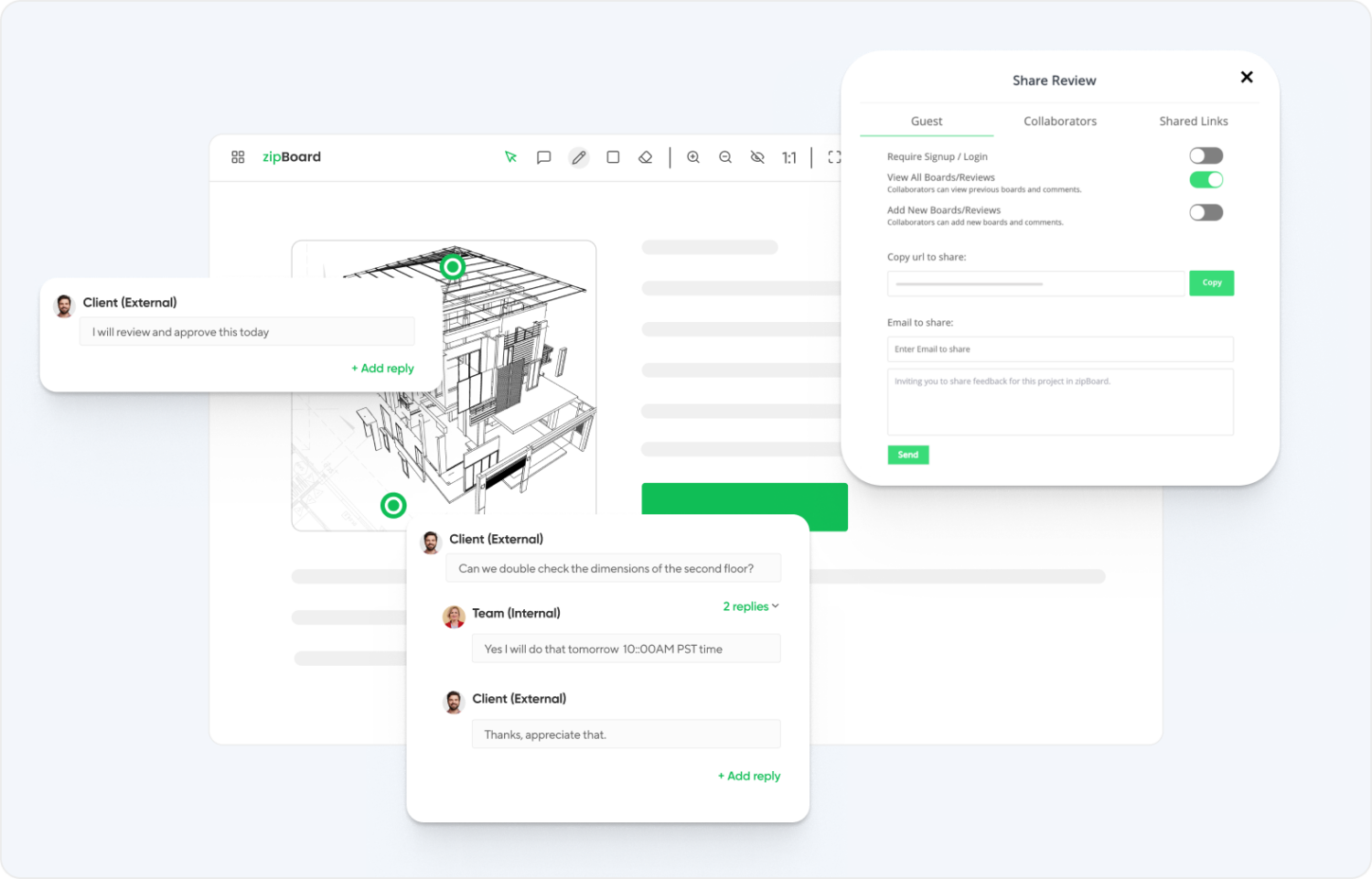
In zipBoard, yes. Click Share on the file, choose what the link allows, and send it. Reviewers open it in any modern browser, type their name if asked, and mark up the PDF. You can still require sign-in, add a password or set an expiry date for confidential sets (share link settings).

In PlanGrid and Forma Build, people work in the project by signing in to their own account. That suits your own team and field crews. For a client or consultant who only needs to comment on one set, a link is usually easier.

Getting comments in is the first half. The second half is knowing which ones are still open, and who has signed off.

document versioning

How do comments turn into assigned work?

Every markup a reviewer places (a cloud, arrow, highlight or note) opens a task panel, so the comment gets an owner, a priority and a due date straight away.

No more retyping comments from a marked-up PDF into a spreadsheet: the task list builds itself as people review (creating tasks from PDF annotations).

Attach site photos, specs or calculations to any comment, and keep renderings, images and videos in the same project (attaching files to comments).

adobe pdf alternative

How do you find every comment again?

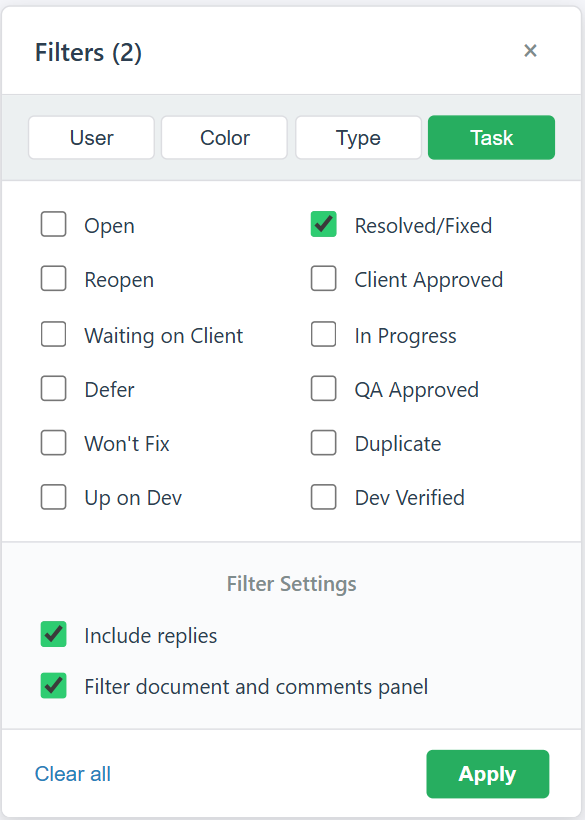
Open the filter in the review view and show only what still needs action: filter by status (Open, In Progress, Resolved/Fixed or your own statuses), by reviewer, colour or markup type, and apply it to both the drawing and the comments panel.

Click any comment to jump to its spot on the drawing, or see every task across the project in one list. Guest reviewers can use the same filters without logging in (working through a large number of comments).

zipBoard Task Status Filter in Review View

Can you set up your own review workflow?

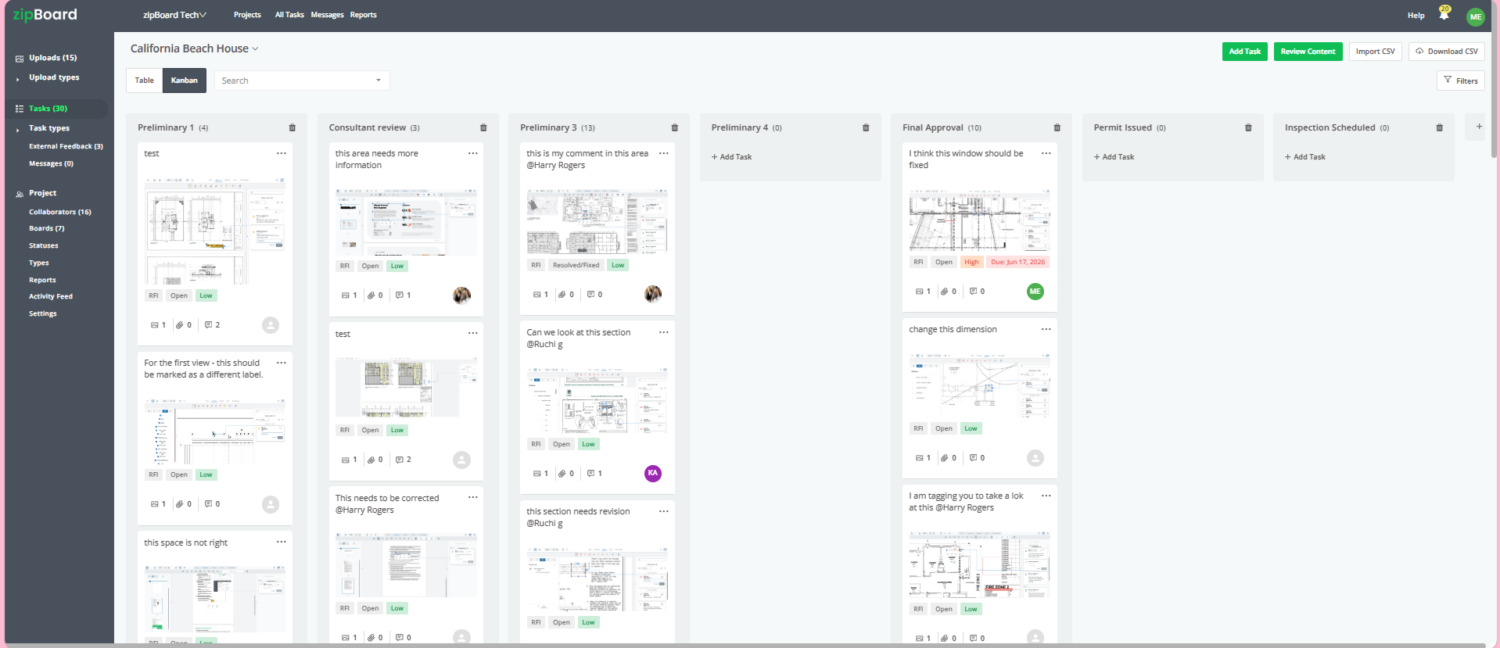
Create a phase for each stage, such as Consultant review, Client approval and Final approval, and move each drawing across as it progresses. Rename statuses to your own action codes, like Approved as Noted or Revise and Resubmit.

Assign reviewers with due dates and save the setup as a project template, so every job starts the same way (running a submittal review cycle).

A screenshot of a project management dashboard named zipBoard displaying a Kanban board for a project titled "California Beach House." The board is organized into columns such as Preliminary 1, Consultant review, Preliminary 3, Preliminary 4, Final Approval, Permit Issued, and Inspection Scheduled. Individual task cards contain text, image attachments of architectural blueprints, priority labels, and user profile icons. A left-hand navigation sidebar and top action buttons like "Add Task" and "Review Content" are also visible.

Already on Procore?

Connect your Procore account and choose which projects to sync. New RFIs, submittals and change orders added in Procore then appear in zipBoard automatically, ready to mark up, so nobody downloads and re-uploads files.

Consultants and clients review those documents in zipBoard without a Procore licence, and their markups become tracked tasks. Included on the Agency and Enterprise plans (Procore integration).

Can you measure and compare revisions in the browser?

Open the Measure tab, calibrate the scale against a known dimension, then measure distance, area, perimeter, arcs or count. It’s built for checking dimensions during review, not for full takeoffs (how to measure).

When a revised sheet or set arrives, upload it as a new version of the same file and compare it with the previous one side by side, with synced scrolling and zoom, to check every comment was addressed (compare two PDF versions).

zipBoard Measurement Tool for Architect with Easy Calibration Feature

How do you record sign-off?

Add reviewers with a due date. Each one records a decision (Approved or Changes Requested), so you can see who still hasn’t signed off, across every project.

Drop your firm’s stamp, such as “Approved as Noted”, and your signature onto the drawing from the review toolbar (stamping submittals and shop drawings).

When the next revision is uploaded, approvals reset for the new round. When the round closes, download the PDF with every markup and comment, for example as an as-built or approval record for your customer (download annotated PDFs).

Streamline review and approval workflows with zipBoard

20,000+​

users

15,000+

projects

Free

for every reviewer you invite

Works with the tools AEC teams already use

Connect zipBoard to Procore and Microsoft Teams out of the box. Need something else, such as SharePoint, your document management system or your ERP? Custom integrations through our API are available on the Enterprise plan. Tell us what you use and we’ll scope it.

procore integration - zipboard
Microsoft Teams logo

How do you review a drawing set in zipBoard?

Step 1 of reviewing a drawing set in zipBoard

Upload the drawing set and share it as a link (reviewers need no account).

Step 2 of reviewing a drawing set in zipBoard

Reviewers mark up the drawings. Every markup becomes a tracked task.

Step 3 of reviewing a drawing set in zipBoard

Measure dimensions and compare revisions side by side.

Step 4 of reviewing a drawing set in zipBoard

Stamp, sign off and close the round.

Watch: track every review and approval in one place

Who should use zipBoard instead of PlanGrid, and who shouldn't?

zipBoard is a good fit if:

  • you used PlanGrid mainly to mark up sheets, track revisions and get sign-off, not to run the field;
  • most of the people commenting on your drawings are clients, owners or consultants outside your team;
  • you share one licence today and want everyone in the office to work at once;
  • you hand marked-up drawings to customers as an as-built or approval record;
  • you’re on Procore and want drawing markups to flow into the review (Procore integration).

Stay with PlanGrid or move to Forma Build if:

  • your crews work from tablets on site, often without a connection;
  • you need punch lists, daily reports, forms or field issue tracking;
  • you want RFIs, submittals, schedules and cost in one system;
  • you coordinate 3D models;
  • the GC or owner mandates Autodesk Construction Cloud on the project.

Some teams keep a field app for the crews and use zipBoard for the review round with clients and consultants. One thing zipBoard doesn’t do today: produce narrative site-visit reports.

What does replacing PlanGrid cost?

PlanGrid itself is no longer sold to new customers; Autodesk sells Forma Build instead (see Autodesk Forma pricing). zipBoard is priced by the number of files you review, not by user, with unlimited collaborators and reviewers (zipBoard pricing).

The bigger cost is usually the review round: time spent piecing comments together from email, comments lost in translation, and extra rounds when nobody can see what’s still open.

Team

For small teams that review a steady stream of drawings and documents.

Agency

Ideal for an agency with multiple managers to manage projects.

Enterprise

Custom

Flexibility of content volume, priority support and dedicated account manager.

Frequently asked questions

PlanGrid is no longer sold to new customers. Existing users can still sign in on the web and in the mobile apps, and Autodesk offers Forma Build, which combines PlanGrid and BIM 360, as the next step.

It depends on what you used PlanGrid for. For field work (punch lists, daily reports, offline markups on tablets), look at Forma Build or a field tool such as Fieldwire. For marking up sheets with clients and consultants, tracking revisions and getting sign-off, zipBoard is built for that round.

Yes. Send a share link; reviewers open the drawing in a browser, type their name if asked, and mark it up. You can still require sign-in, or add a password or an expiry date.

Yes. Attach photos or other files to any comment reply, or place an image directly on the sheet with the Insert tools. zipBoard isn’t a field camera app, so photos are taken on your device first.

No. zipBoard runs in the browser and needs a connection. If your crews mark up offline in the field, keep a field app for that.

Yes. Upload the revision as a new version of the same file and compare the two side by side, with synced scrolling and zoom. Approvals reset on each new version.

Yes. Download the PDF with all annotations and comments included, and send it or file it as your as-built or approval record.

No. zipBoard is priced by the number of files you review, with unlimited collaborators and reviewers, so the whole office can work at once.

zipBoard integrates with Procore (Agency and Enterprise plans) and Microsoft Teams. There is no direct Autodesk integration: publish the set to PDF and upload it, or build a custom integration through the API on Enterprise.